
Using TMX loading in cocos.tiles (SVN Trunk)
84 views
Skip to first unread message

Balajee R.C
Aug 1, 2012, 5:42:58 PM8/1/12
to cocos-...@googlegroups.com
I am loading a TMX file using the new TMX loading facility from trunk. Since I couldn't find any example on how to use the loader, I dug into the code and reckoned I had to do something like this:
class GameManager():
"""Game manager for Longsword. Entry point of all game synchronisation"""
singletonInstance = None #Instance of game manager
def __init__(self):
#Initialise the cocos system
cocos.director.director.init(width=640, height=512)
#Create a scrolling map manager
self.scrollingManager = cocos.tiles.ScrollingManager()
#Load map resource from tmx file
resource = cocos.tiles.load_tmx('radsLevelEdited.tmx')
#Load each layer
layerNames = ["grass","sky","cobbleStone","trees"]
self.bgLayers = []
for layerName in layerNames:
layer = resource.get_resource(layerName)
self.bgLayers.append(layer)
self.scrollingManager.add(layer)
#We have a blank layer in the tmx file called main
#which we will use to add all our game entity sprites into
self.mainLayer = resource.get_resource("main")
self.scrollingManager.add(self.mainLayer)
#Make sure that this layer receives input events
self.mainLayer.is_event_handler = True
#Create the main scene
self.mainScene = cocos.scene.Scene(self.scrollingManager)
#Create a list to store all entities in scene
self.entityList = []
#Create a collision manager to respond to collisions
self.collisionManager = cocos.collision_model.CollisionManagerGrid(0, 1200, 0, 480, 128, 128)
#Schedule updates at 16 fps on this manager
self.mainLayer.schedule(self.update)
(You can find the above code at this code paste url for easier reading.)
However I find some rendering artifacts at the edges of the tiles and messing up of the alpha layer at the edges.
To see the problem, here is a screenshot of the tiled map as previewed in the Tiled map editor:
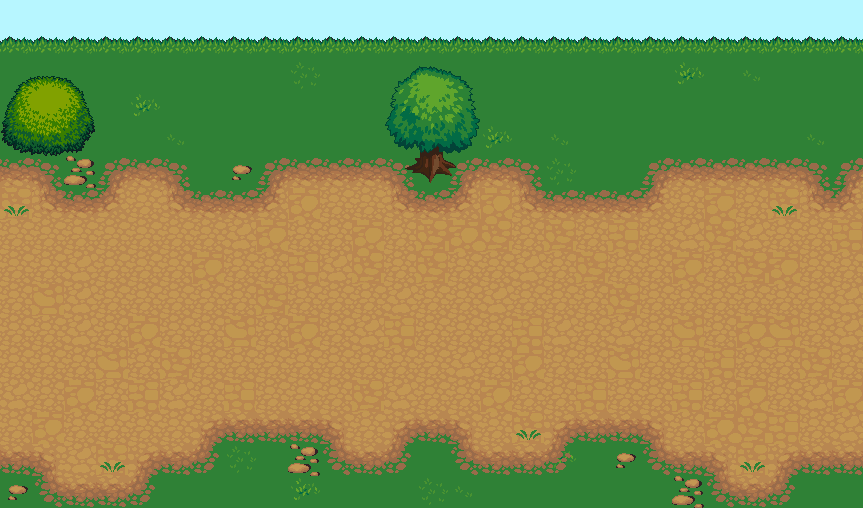
And here is the image as seen in my Cocos2d application:

Could someone please point me as to what may be going wrong? Am I using the TMX loader correctly? I know I must be prepared for bugs when working with trunk but I am quite desperate as to my requirement to load TMX files. Please let me know if I am doing something wrong.

claudio canepa
Aug 1, 2012, 8:42:12 PM8/1/12
to cocos-...@googlegroups.com
On Wed, Aug 1, 2012 at 6:42 PM, Balajee R.C <bala...@gmail.com> wrote:
I am loading a TMX file using the new TMX loading facility from trunk. Since I couldn't find any example on how to use the loader, I dug into the code and reckoned I had to do something like this:
[snip]
Could someone please point me as to what may be going wrong? Am I using the TMX loader correctly? I know I must be prepared for bugs when working with trunk but I am quite desperate as to my requirement to load TMX files. Please let me know if I am doing something wrong.
Try adding
do_not_scale=True
as a key-value parameter in the call to director.init
This instructs cocos to use the orthographic projection, which is better suited for tiling
Other than that, I don't see any significative difference with the code in the cocos example at
Balajee R.C
Aug 7, 2012, 6:34:02 AM8/7/12
to cocos-...@googlegroups.com
Thanks a ton, Claudio! Setting do_not_scale=True in director.init fixed the problem!
Regards,
Balajee
Reply all
Reply to author
Forward
0 new messages