
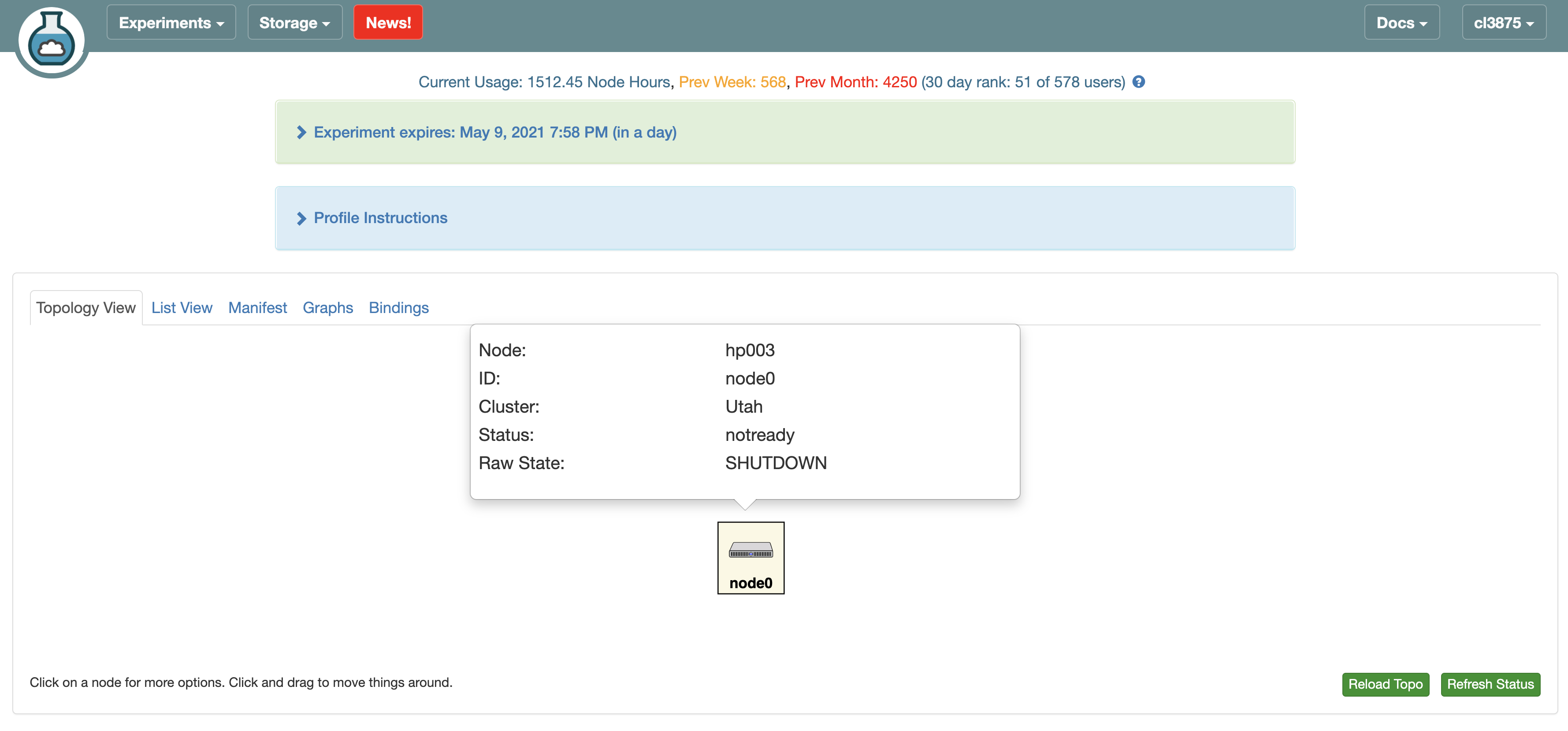
Node is always in the "notready" status and "SHUTDOWN" raw state
204 views
Skip to first unread message

Changxu Luo
May 8, 2021, 5:04:37 PM5/8/21
to cloudlab-users
Hi Cloudlab Team,
A node in my experiment(cl3875-QV94400) keeps showing the status of "notready" and raw state of "SHUTDOWN" from today(it worked yesterday) while the experiment has not expired. I've tried reboot/reload/recovery, but none of these works. From the console logs, it seems like the machine keeps rebooting itself(it falls back to reboot when it comes to the grub menu).
Does anyone have ideas about what's happening here? Does it mean that the experiment has already been terminated? Is there any way that we can recover the data?
Thanks a lot!
Regards,
Changxu

Mike Hibler
May 8, 2021, 5:33:04 PM5/8/21
to cloudla...@googlegroups.com
Looks like it had some TFTP errors when trying to boot into the recovery
MFS. I just tried again now and it booted fine.
I turned off admin mode and now it is booting from disk.
> You received this message because you are subscribed to the Google Groups
> "cloudlab-users" group.
> To unsubscribe from this group and stop receiving emails from it, send an email
> to cloudlab-user...@googlegroups.com.
> To view this discussion on the web visit https://groups.google.com/d/msgid/
> cloudlab-users/39128b52-6381-44f2-9fde-361be712ac5an%40googlegroups.com.
MFS. I just tried again now and it booted fine.
I turned off admin mode and now it is booting from disk.
> Screen Shot 2021-05-08 at 16.56.17.png
>
> --
>
> You received this message because you are subscribed to the Google Groups
> "cloudlab-users" group.
> To unsubscribe from this group and stop receiving emails from it, send an email
> to cloudlab-user...@googlegroups.com.
> To view this discussion on the web visit https://groups.google.com/d/msgid/
> cloudlab-users/39128b52-6381-44f2-9fde-361be712ac5an%40googlegroups.com.
Changxu Luo
May 8, 2021, 6:01:17 PM5/8/21
to cloudlab-users
Hi Mike, thanks for your reply. Should I try to boot into recovery mode? The reboot seems still not working on my side.
Changxu Luo
May 9, 2021, 1:41:11 PM5/9/21
to cloudlab-users
I refreshed the experiment status and now is able to boot out of the recovery mode. Thanks for the help!
Changxu Luo
May 30, 2021, 11:20:16 AM5/30/21
to cloudlab-users
Hi team, the experiment cl3875-QV94400 meets the same problem again, could you please check why the node is stuck at the changing status? Thanks a lot!
Best,
Best,
Changxu
Mike Hibler
May 31, 2021, 10:31:27 AM5/31/21
to cloudla...@googlegroups.com
As you can see from the console log, the kernel is panicing at boot:
---[ end Kernel panic - not syncing: Attempted to kill init! exitcode=0x00007f00
It boots into the recovery OS just fine, so there is no large scale hardware
failure. Have you changed the kernel or kernel modules? Any other system
utilitie or libraries?
On Sun, May 30, 2021 at 08:20:16AM -0700, Changxu Luo wrote:
> Hi team, the experiment cl3875-QV94400 meets the same problem again, could you
> please check why the node is stuck at the changing status? Thanks a lot!
> cloudlab-users/7ba824ef-ea6d-4b68-9d12-9dc836242564n%40googlegroups.com.
---[ end Kernel panic - not syncing: Attempted to kill init! exitcode=0x00007f00
It boots into the recovery OS just fine, so there is no large scale hardware
failure. Have you changed the kernel or kernel modules? Any other system
utilitie or libraries?
On Sun, May 30, 2021 at 08:20:16AM -0700, Changxu Luo wrote:
> Hi team, the experiment cl3875-QV94400 meets the same problem again, could you
> please check why the node is stuck at the changing status? Thanks a lot!
Mike Hibler
May 31, 2021, 10:57:46 AM5/31/21
to cloudla...@googlegroups.com
I schedule the node to take it out of service. I left it in the recovery OS
so you can copy off anything you need, the filesystem is mounted as /mnt.
You seem to have a lot of stuff in directories under /root (/mnt/root).
Terminate the experiment when you have everything you want off of there.
> To view this discussion on the web visit https://groups.google.com/d/msgid/cloudlab-users/20210531143125.GA50818%40flux.utah.edu.
so you can copy off anything you need, the filesystem is mounted as /mnt.
You seem to have a lot of stuff in directories under /root (/mnt/root).
Terminate the experiment when you have everything you want off of there.
Changxu Luo
May 31, 2021, 11:22:15 AM5/31/21
to cloudlab-users
Hi Mike,
Thanks for taking a look at the experiment. We can only see /mnt/tmp under /mnt, could you please check if the contents under /root in the original experiment is still there? Do we need to reboot the experiment to visit that part? Thanks!
Changxu Luo
May 31, 2021, 12:21:10 PM5/31/21
to cloudlab-users
Could you please give us more hours on this experiment? We are still not able to find the data we want(originally under /mnt/sdb), thanks a lot!
Mike Hibler
May 31, 2021, 1:26:00 PM5/31/21
to cloudla...@googlegroups.com
Are we talking about the same experiment here? According to:
https://www.cloudlab.us/status.php?uuid=db5b5c2f-8b2f-11eb-b1eb-e4434b2381fc
hp003 is the only node in the experiment. That is the one I put in the
recovery OS. There is no second drive (/dev/sdb) on that machine.
> msgid/cloudlab-users/20210531143125.GA50818%40flux.utah.edu.
https://www.cloudlab.us/status.php?uuid=db5b5c2f-8b2f-11eb-b1eb-e4434b2381fc
hp003 is the only node in the experiment. That is the one I put in the
recovery OS. There is no second drive (/dev/sdb) on that machine.
>
> --
> You received this message because you are subscribed to the Google Groups
> "cloudlab-users" group.
> To unsubscribe from this group and stop receiving emails from it, send an email
> to cloudlab-user...@googlegroups.com.
> To view this discussion on the web visit https://groups.google.com/d/msgid/
> cloudlab-users/85b1758e-35bb-46ba-931a-81783849bae2n%40googlegroups.com.
> --
> You received this message because you are subscribed to the Google Groups
> "cloudlab-users" group.
> To unsubscribe from this group and stop receiving emails from it, send an email
> to cloudlab-user...@googlegroups.com.
> To view this discussion on the web visit https://groups.google.com/d/msgid/
Changxu Luo
May 31, 2021, 3:16:48 PM5/31/21
to cloudlab-users
Sorry for the confusion here, this is the experiment we are talking about. We mkfs on /dev/sda4 and mounted it at /mnt/sdb in the experiment, but now we are not seeing that large partition in the recovery mode.

Leigh Stoller
Jun 1, 2021, 8:56:07 AM6/1/21
to cloudla...@googlegroups.com
at 12:16 PM, Changxu Luo <cl3...@columbia.edu> wrote:
> Sorry for the confusion here, this is the experiment we are talking about. We mkfs on /dev/sda4 and mounted it at /mnt/sdb in the experiment, but now we are not seeing that large partition in the recovery mode.
Hi, what happens when you try to mount the file system?
> Sorry for the confusion here, this is the experiment we are talking about. We mkfs on /dev/sda4 and mounted it at /mnt/sdb in the experiment, but now we are not seeing that large partition in the recovery mode.
Leigh
Mike Hibler
Jun 1, 2021, 9:46:54 AM6/1/21
to cloudla...@googlegroups.com
I mounted that partition on /mnt/mnt/sdb.
> cloudlab-users/e35900c6-3de9-4568-963d-3a29158fead6n%40googlegroups.com.
Changxu Luo
Jun 2, 2021, 10:09:50 AM6/2/21
to cloudlab-users
Yeah, I can visit that partition now, thank you! Also, can we boot this experiment out of recovery mode now?
Mike Hibler
Jun 2, 2021, 10:19:38 AM6/2/21
to cloudla...@googlegroups.com
As far as I know, it will still panic if booted from disk. I did nothing to
fix it. All you can do is terminate the experiment.
> > cloudlab-users/e35900c6-3de9-4568-963d-3a29158fead6n%40googlegroups.com.
fix it. All you can do is terminate the experiment.
>
>
> --
> You received this message because you are subscribed to the Google Groups
> "cloudlab-users" group.
> To unsubscribe from this group and stop receiving emails from it, send an email
> to cloudlab-user...@googlegroups.com.
> To view this discussion on the web visit https://groups.google.com/d/msgid/
> cloudlab-users/733759b4-77b4-4cdb-9580-4543905d726cn%40googlegroups.com.
>
> --
> You received this message because you are subscribed to the Google Groups
> "cloudlab-users" group.
> To unsubscribe from this group and stop receiving emails from it, send an email
> to cloudlab-user...@googlegroups.com.
> To view this discussion on the web visit https://groups.google.com/d/msgid/
Reply all
Reply to author
Forward
0 new messages