
Distance between cartesian points
2,068 views
Skip to first unread message

Tamy
Nov 26, 2012, 12:32:22 PM11/26/12
to cesiu...@googlegroups.com
I have two cartesian points and I want to know the distance between them. I wrote the follow function:
function distance(p1, p2) {
return Math.sqrt(Math.pow((p1.x - p2.x), 2) + Math.pow((p1.y - p2.y), 2));
}
But it is not right.
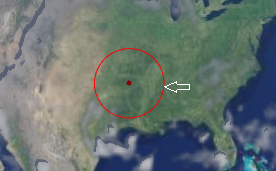
My application draws a circle with mouse. When the mouse moves on horizontal It's ok:
But on vertical the radius is lesser:
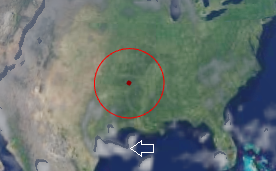
where p1 is center and p2 is the mouse position. It's a cartesian coordinates problem?
Thanks!

Matthew Amato
Nov 26, 2012, 1:29:22 PM11/26/12
to cesiu...@googlegroups.com
Hi Tamy,
The problem is that you are measuring the straight line distance between the two coordinates and not accounting for the curvature of the earth. So while your distance computation is correct, it's not what you want. What you want to compute is surface distance between the two points. I'm not sure we have a method in Cesium to do this yet (someone please correct me if I'm wrong). We know how, and we have code we can port to JavaScript, we just haven't done it yet. I can look into adding it in the next few days if that's okay with you.
Matt
--
Matthew Amato
Nov 26, 2012, 1:34:04 PM11/26/12
to cesiu...@googlegroups.com
Tamy,
@kring just pointed out to me that you are also missing the z value in your computation, it should be:
function distance(p1, p2) {
return Math.sqrt(Math.pow((p1.x - p2.x), 2) + Math.pow((p1.y - p2.y) + Math.pow((p1.z - p2.z), 2));
}
This is still technically incorrect for large distances, but should get you much closer to what you want until we add actual surface distance calculation for you.
Matt
Tamy
Nov 26, 2012, 1:42:03 PM11/26/12
to cesiu...@googlegroups.com
Matt,
Including z value works perfect for me.
Thanks very much!

bobac...@gmail.com
Mar 24, 2013, 5:02:09 PM3/24/13
to cesiu...@googlegroups.com
Le lundi 26 novembre 2012 18:32:22 UTC+1, Tamy a écrit :
> I have two cartesian points and I want to know the distance between them. I wrote the follow function:
>
>
> function distance(p1, p2) {
> return Math.sqrt(Math.pow((p1.x - p2.x), 2) + Math.pow((p1.y - p2.y), 2));
> }
>
>
> But it is not right.
>
>
> My application draws a circle with mouse. When the mouse moves on horizontal It's ok:
>
>
>
> I have two cartesian points and I want to know the distance between them. I wrote the follow function:
>
>
> function distance(p1, p2) {
> return Math.sqrt(Math.pow((p1.x - p2.x), 2) + Math.pow((p1.y - p2.y), 2));
> }
>
>
> But it is not right.
>
>
> My application draws a circle with mouse. When the mouse moves on horizontal It's ok:
>
>
>
> But on vertical the radius is lesser:
>
>
> where p1 is center and p2 is the mouse position. It's a cartesian coordinates problem?
> Thanks!
Hello,
> Thanks!
as Matthew Amato noticed, your formula measures a straight line distance. To take the curvature of the Earth, I suggest you this algorithm (from cartographic points A and B, in radians):
var result;
//arc cos (sinLambdaA sinLambdaB + cos LambdaA cosLambdaB cosDeltaLongitude)*EarthRadius
result=Math.cos(A.getLongitude()-B.getLongitude());
result=result*Math.cos(A.getLatitude())*Math.cos(B.getLatitude());
result=result+Math.sin(A.getLatitude())*Math.sin(B.getLatitude());
result=Math.acos(result);
result=result*EarthRadius;
return result;

Anshika
Apr 7, 2014, 2:39:08 AM4/7/14
to cesiu...@googlegroups.com, bobac...@gmail.com
Hi.
Is there a measure distance/area control now available?
Or we need to use the below algorithm implementation. If so, what is the accuracy of the same. I need area measurement function also.
bobac...@gmail.com
Apr 7, 2014, 3:47:34 PM4/7/14
to cesiu...@googlegroups.com, bobac...@gmail.com
for Area measurement, I give you another snippet to test (good precision):
/**
*
* @param x
* @return the value of Haversine
*/
function Haversine(x) {
return (1.0 - Math.cos(x)) / 2.0;
}
/**
*
* @param arrayCartographic {Array[Cesium.Cartographic]} array of cartographics which defines area
* @return area in km²
*/
function surfaceTerre(arrayCartographic) {
var earthRayInKilometers=6378.137;
var lam1 = 0, lam2 = 0, beta1 = 0, beta2 = 0, cosB1 = 0, cosB2 = 0;
var hav = 0;
var sum = 0;
var k;
for (var j = 0; j < arrayCartographic.length; j++) {
if (j == 0) {
k = j + 1;
lam1 = arrayCartographic[j].longitude;
beta1 = arrayCartographic[j].latitude;
lam2 = arrayCartographic[j+1].longitude;
beta2 = arrayCartographic[j+1].latitude;
cosB1 = Math.cos(beta1);
cosB2 = Math.cos(beta2);
} else {
k = (j + 1) % arrayCartographic.length;
lam1 = lam2;
beta1 = beta2;
lam2 = arrayCartographic[k].longitude;
beta2 = arrayCartographic[k].latitude;
cosB1 = cosB2;
cosB2 = Math.cos(beta2);
}
if (lam1 != lam2) {
hav = Haversine(beta2 - beta1) + cosB1 * cosB2
* Haversine(lam2 - lam1);
var a = 2 * Math.asin(Math.sqrt(hav));
var b = Math.PI / 2 - beta2;
var c = Math.PI / 2 - beta1;
var s = 0.5 * (a + b + c);
var t = Math.tan(s / 2) * Math.tan((s - a) / 2)
* Math.tan((s - b) / 2) * Math.tan((s - c) / 2);
var excess = Math.abs(4 * Math.atan(Math.sqrt(Math.abs(t))));
if (lam2 < lam1) {
excess = -excess;
}
sum += excess;
}
}
return Math.abs(sum) * earthRayInKilometers* earthRayInKilometers;
}
var positions = [new Cesium.Cartesian3(17832.12, 83234.52, 952313.73),
new Cesium.Cartesian3(17832.13, 83234.53, 952313.73),
new Cesium.Cartesian3(17832.14, 83234.54, 952313.73)];
var cartographicPositions = Cesium.Ellipsoid.WGS84.cartesianArrayToCartographicArray(positions);
console.log(surfaceTerre(cartographicPositions));
Message has been deleted

Christopher Baxter
Jul 31, 2017, 5:15:48 PM7/31/17
to cesium-dev
Hi All,
I came across this post while looking for an algorithm to calculate the distance between two Cartesian points in Cesium.
However, the function is currently returning 'NaN' and not the distance between the two points.
Do you have any idea why it would be doing this?
See code below:
function calculateDistance(p1, p2) {
    return Math.sqrt(Math.pow((p1.x - p2.y), 2) + Math.pow((p1.y - p2.y) + Math.pow((p1.z - p2.z), 2)));
}
if (clickPositions.length === 2) {
var distance = calculateDistance(new Cesium.Cartesian3.fromArray(clickPositions[0]), new Cesium.Cartesian3.fromArray(clickPositions[1]));
console.log("Distance: " + distance);
confirm("First point is: " + clickPositions[0] +
"\nSecond Point is: " + clickPositions[1] +
"\nDistance: " + distance);
} else {
confirm("You have clicked on more than two points");
}


Willem van der Gugten
Aug 1, 2017, 3:21:23 AM8/1/17
to cesium-dev
I think your calculateDistance() is incorrect, it should be the sqrt() of the added squares of dX, dY and dZ.
Otherwise, try with Cesium.Cartesian3.distance(left, right) : see https://cesiumjs.org/Cesium/Build/Documentation/Cartesian3.html?classFilter=cart#.distance
Regards, WIllem
Otherwise, try with Cesium.Cartesian3.distance(left, right) : see https://cesiumjs.org/Cesium/Build/Documentation/Cartesian3.html?classFilter=cart#.distance
Regards, WIllem
Christopher Baxter
Aug 1, 2017, 1:08:28 PM8/1/17
to cesium-dev
Hi William,
I agree, the calculateDistance() was not working correctly.
I did however find a solution by adapting a algorithm I found, which uses the cartographic positions instead and takes into account the height value for each point.
I was also going to ask, for the above area algorithm, if the positions array that is passed to Cesium.Ellipsoid.WGS84.cartesianArrayToCartographicArray() is in Radians will the algorithm still work?
I ask because Radians seems to be the default unit for Cartesian3 instances in Cesium.
Cheers,
Chris
Willem van der Gugten
Aug 2, 2017, 3:54:15 AM8/2/17
to cesium-dev
Hi Chris,
The stackoverflow solution calculates the distance over the earth’s curved surface, which is very different from the Cartesian3.distance() (straight line between two points).
Cartesian3 is always meters so that will not work with radians. In the algorithm the cartesianArrayToCartographicArray() is meant to convert X,Y,Z to latitude,longitude,height (in radians and meters).
Cartesian3 is always meters so that will not work with radians. In the algorithm the cartesianArrayToCartographicArray() is meant to convert X,Y,Z to latitude,longitude,height (in radians and meters).
Reply all
Reply to author
Forward
0 new messages