
Precision of 3D terrain
199 views
Skip to first unread message

Peter Antypas
Dec 14, 2012, 1:17:43 PM12/14/12
to cesiu...@googlegroups.com
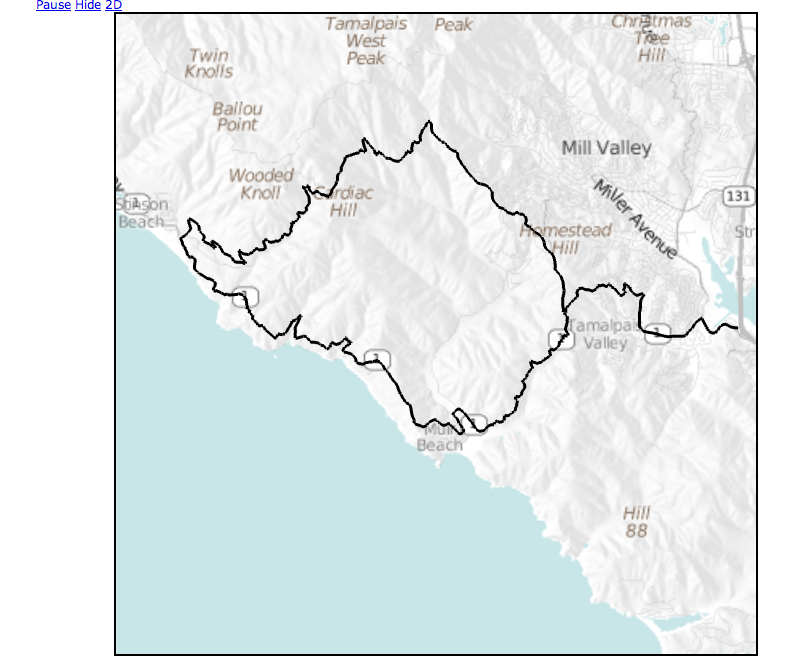
I am trying to use Cesium.Polyline to draw a route on a 3D terrain, filling in the elevation values from my dataset (NED 1/3 arc second). I'm noticing occasional gross misalignment, even when looking "straight down". I have high confidence in the route waypoint coordinates as they line up perfectly with OpenLayers and Google maps (2D).
What could I be doing wrong? Could this be caused by inaccuracies in tile re-projection or differences between my elevation data and yours? I would think that if the only error was elevation differences, it would be evident in the shape of the polyline -- it would end up directly above or directly below the road, but still vertically aligned. So I'm led to believe that there's projection issues. How would I go about debugging this?

Many thanks,
Peter

Kevin Ring
Dec 14, 2012, 1:49:31 PM12/14/12
to cesiu...@googlegroups.com
Hi Peter,
I agree that looks like some sort of projection problem, but I'm not sure where the problem might lie. Can you share a bit of your code + data so I can take a look? Also, it might help to hear a little more about how you're getting the data into Google Maps and Cesium. Are you specifying longitude/latitude/height coordinates in both cases? When you move the camera around in Cesium, does the polyline appear to move relative to the same line on the map? Or are they always the same (wrong) distance apart?
Thanks,
Kevin
Peter Antypas
Dec 14, 2012, 2:14:44 PM12/14/12
to cesiu...@googlegroups.com
Hi Kevin,
Peter
Peter Antypas
Dec 14, 2012, 7:53:45 PM12/14/12
to cesiu...@googlegroups.com
I'm having a hard time with Google posting attachements and/or screenshots, keep getting errors. Can I email?
Peter
On Friday, December 14, 2012 10:49:31 AM UTC-8, Kevin Ring wrote:
On Friday, December 14, 2012 10:49:31 AM UTC-8, Kevin Ring wrote:
Kevin Ring
Dec 14, 2012, 7:58:39 PM12/14/12
to cesiu...@googlegroups.com
I believe you can email the list just by sending an email to cesiu...@googlegroups.com. If that doesn't work, you can email me directly. It's just my first name at kotachrome.com.
Peter Antypas
Dec 14, 2012, 8:16:55 PM12/14/12
to cesiu...@googlegroups.com
Let me try once more. I think I figured it out. When discarding elevation and terrain rendering, things line up. So it's our heightmaps that differ. Need to build a TerrainProvider for our elevation data (which was used to hillshade our tiles in the first place), so we are consistent.
Peter
Kevin Ring
Dec 14, 2012, 8:44:06 PM12/14/12
to cesiu...@googlegroups.com
NED is referenced to mean sea level, right? Are you taking that into account when placing your polyline on terrain? Cesium uses SRTM, which is lower resolution than NED but I wouldn't expect them to be drastically different. If you're not accounting for MSL, though, the heights could be tens or hundreds of meters off.
For what it's worth, I have the entire 3 terabyte NED dataset on my desk. Someday in the not-too-distant future, it will be in Cesium as well.
Peter--
Peter Antypas
Dec 14, 2012, 10:42:31 PM12/14/12
to cesiu...@googlegroups.com
Yikes! Good point. Let me see if I can compensate and re-try.
Peter Antypas
Dec 16, 2012, 1:00:13 AM12/16/12
to cesiu...@googlegroups.com
I researched the geoid for this region and it only ~34m below NAD83 (and WGS84 for all practical purposes). I adjusted my data but things still didn't line up.
Is there an easy way to spot-query your terrain data? Even Javascript will work for this -- I just want to cross reference a few key points and determine if the discrepancy explains what I'm seeing.
Thanks,
Peter
Message has been deleted
Kevin Ring
Dec 16, 2012, 8:13:17 PM12/16/12
to cesiu...@googlegroups.com
Hey Peter,
I don't know if I'm understanding you completely, but it is definitely possible to properly georeference lines on terrain. Terrain pushes the height up along the ellipsoid surface normal, so the point on the ellipsoid and the point on terrain have the same longitude and latitude. What I think we're seeing in your screen shot is just the effect of the perspective transformation. That is, objects that are farther away from the camera look smaller or closer together.
If two objects (say a polyline and a feature on an imagery layer) have the same longitude and latitude but different heights, they can look significantly misaligned depending on the camera position. If that's happening, you'll see the alignment change as you move the camera around. For example, when the feature is in the center of the viewport it will look fairly well-aligned, but as it moves to the edges the misalignment increases. The more different the heights, the greater this effect.
I'm reasonably confident that the Cesium terrain is properly accounting for the geoid, but not 100%. I'll check it out as soon as I get a chance and let you know what I find.
Regarding your other question about querying the Cesium terrain, there's no built-in way to do that currently. But you can download the tiles yourself from JavaScript code and interpolate the heightmap.
Kevin
On Sun, Dec 16, 2012 at 6:54 PM, Peter Antypas <peter....@gmail.com> wrote:
After struggling with this for a bit, it just dawned on me. I wondered, if tiles get texturized and fit on a mesh, don't they "stretch" at high elevations? So I did a quick and dirty test by rendering two images of the exact same location, one with terrain data and the other without. This GIMP screenshot shows what happens.
That's why what I'm trying to do cannot work. When the tiles stretch, the geographic coordinates of the futures they depict shift. Doh!--

Peter Antypas
Dec 16, 2012, 10:23:34 PM12/16/12
to cesiu...@googlegroups.com
You're right, it's only perspective. In fact, I thought I had deleted this post :(
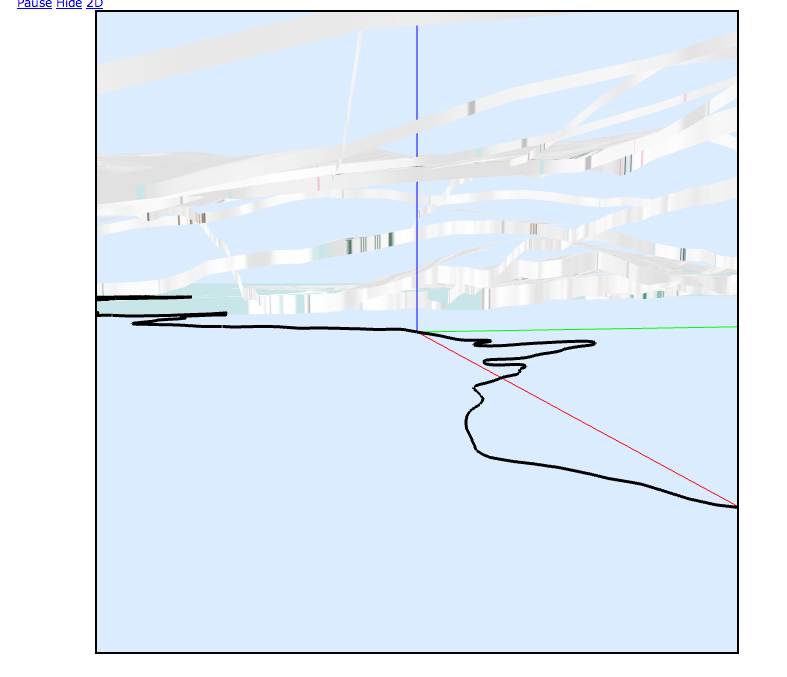
Where can I see the code that transforms heightmap data to vertices? I need to make sure I'm making consistent transformations. I did notice that when I left my polyline on the ellipsoid while rendering terrain normally, the lines fell exactly underneath the roads. While we're on this topic, shouldn't a polyline which lies on the ellipsoid be occluded by a terrain high above it? I could see it straight through the terrain depending on zoom level. The black line in this example screenshot is under the terrain. See next screenshot for proof.

Here is what I see when the camera goes "mining":
Peter Antypas
Dec 16, 2012, 11:48:34 PM12/16/12
to cesiu...@googlegroups.com
Got it to work. Silly me, I didn't notice that Cesium.Cartographic.fromDegrees() takes a height parameter as well to do all the right transforms, so I was trying to do them outside of it.
(embarassed).

There are still minor deviations and they are strictly due to elevation differences. I think this is good enough though for me to "highlight" a route with the right visual to compensate for the inaccuracies.
Case closed :)
Reply all
Reply to author
Forward
0 new messages