How to convert x,y,z to longitude, latitude, altitude in Cesium?

7,463 views
Skip to first unread message

Premkumar Jayaseelan

unread,
Apr 21, 2015, 7:00:42 AM4/21/15
to cesiu...@googlegroups.com, premk...@cloudjetlabs.com

Using three.js library I have assembled a design(plant). That design is contains of so many smaller models which have the reference of position in (x,y,z) from origin (0,0,0). Attached the sample screenshot in the below link

Assembled Model Ref Image

Now I wanted to load the individual model with its own position into Cesium. When I try to load the directly converting the position (x,y,z) to (north, east, up) the result is not as expected. All the models are scattered.

The functionality which I am trying to achieve is, based on some origin (lon, lat, alt) point, I should position the model into cesium with reference of (x,y,z) relative to cesium coordinates (lon, lat, alt)

E.g. 

origin geo-coordinates (ori_lon, ori_lat, ori_alt) => (-106.690647, 36.806761, 0) 

Model coordinates (m_x, m_y, m_z) => (-150.9, 126.26, 217.7)

Expecting Coordinates for Cesium : (ori_lon + m_x, ori_lat + m_y, ori_alt + m_z) 

or some algorithm to achieve this.

I have tried with the below article to convert the (x,y,z) to the (long, lat, alt) with some origin (long, lat, alt), but no luck :(

(x, y, z) coordinates >> geo-coordinates

Advice/help to fix the issue.

Matthew Amato

unread,
Apr 21, 2015, 9:35:39 AM4/21/15
to cesiu...@googlegroups.com
This is easy to do, but you need to know what reference frame the XYZ offsets are in, Earth Fixed, NorthEastDown, EastNorthUp or something else entirely.  That's the crucial piece of information you're missing.  Ultimately, all positions get converted to Earth Fixed but you need to know the starting reference frames.

If they are in Earth Fixed, the code would just be simple edition:

//Convert origin to earth-fixed Cartesian
var position = Cesium.Cartesian3.fromDegrees(oLon, oLat, oAlt);

Then for each offset you just add the values

var finalPos = Cesium.Cartesian3.add(position, offset, new Cesium.Cartesian3());

If the code is in another reference frame, it needs to be transformed, but you need to know what frame that is.  For example, if it's eastNorthUP

//Convert origin to earth-fixed
var position = Cesium.Cartesian3.fromDegrees(oLon, oLat, oAlt);

//Compute a transform that converts ENU offsets to Earth-fixed
var transform = Cesium.Transforms.eastNorthUpToFixedFrame(position);

Then for each offset you just apply the transform.

var finalPos = Cesium.Matrix4.multiplyByPointAsVector(transform, offset, new Cesium.Cartesian3());


--
You received this message because you are subscribed to the Google Groups "cesium-dev" group.
To unsubscribe from this group and stop receiving emails from it, send an email to cesium-dev+...@googlegroups.com.
For more options, visit https://groups.google.com/d/optout.

Premkumar Jayaseelan

unread,
Apr 22, 2015, 11:06:35 AM4/22/15
to cesiu...@googlegroups.com

Hi Matthew,

Thank you so much for the explanation. I'm working on to implement the solution. I've a bit challenge to understanding some of the concepts. 

·         Reference frame the XYZ offset are in EarthFixed or NorthEastDown or EastNorthUp. How to find this? I've created these models with the reference of 0,0,0 in 3D plane. I'm not sure what exactly I need to convert or find out. Can you please send me some reference article on this?

·         Screenshot :
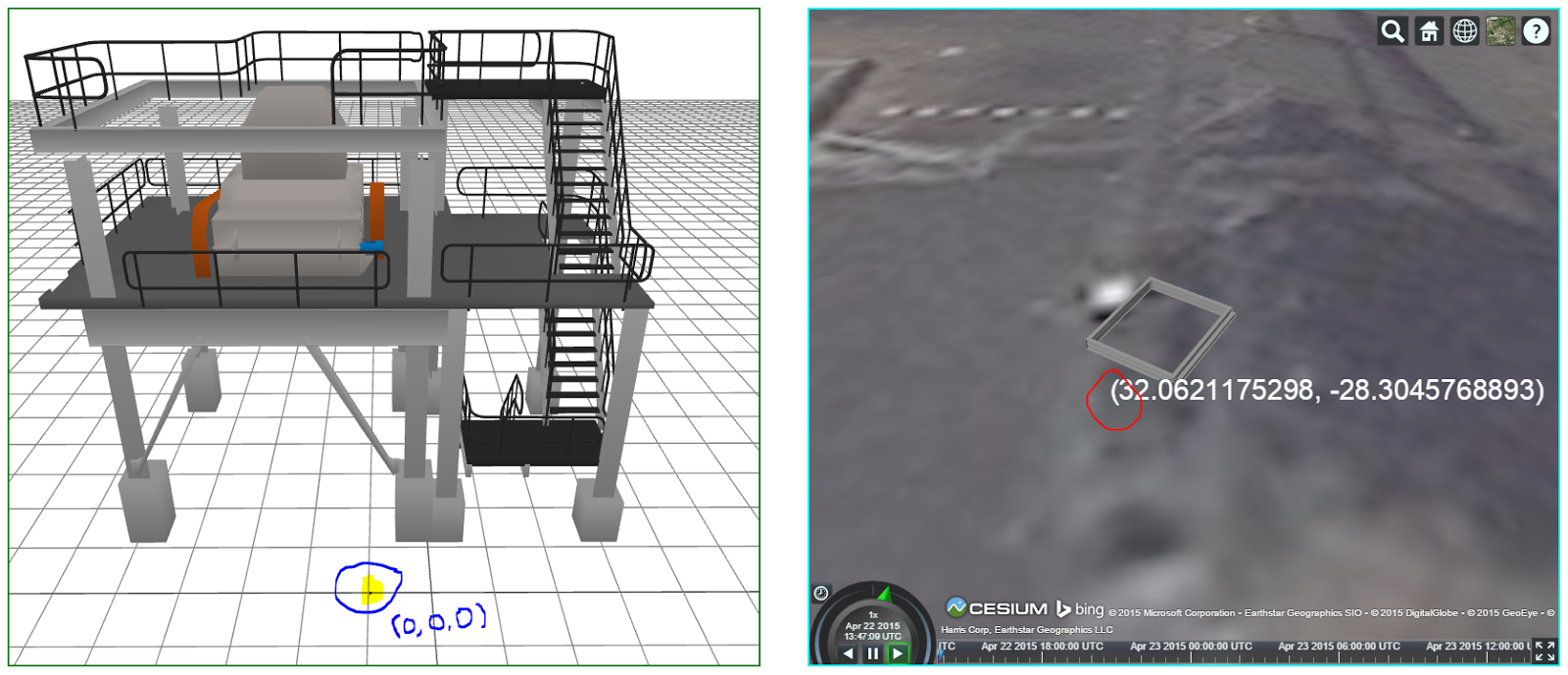
Above screenshot will give the reference of model designed in three.js and the reference point on cesiumjs. The model which I’ve build is based in (0,0,0) axis point of 3D plane. And I want to build the same model in Cesium in the selected geo-coordinate point (32.0621175298, -28.3045768893, 0) as origin.

So, from the explanation, “convert origin to earth-fixed Cartesian” will refer to convert geo-coordinate point (32.0621175298, -28.3045768893, 0) to origin to earth-fixed Cartesian

i.e. var position = Cesium.Cartesian3.fromDegrees (oLon, oLat, oAlt) => (32.0621175298, -28.3045768893, 0); ??

 Also, required little explanation on this “Then for each offset you just add the values.

 It will be very much helpful, If I get some reference on this.

 Note: If required, I shall share the source code.

Thanks,Premkumar

Hyper Sonic

unread,
Apr 22, 2015, 12:13:55 PM4/22/15
to cesiu...@googlegroups.com
A good way to figure out how the coordinate system of your model corresponds to the world is by placing it on 3 key spots on Earth without performing any transformations.
At (0,0) local up is world +x, so the part of the model facing local up corresponds to world +x
at (90,0) local up is world +y, so the part of the model facing local up corresponds to world +y
at (0,90) local up is world +z, so the part of the model facing local up corresponds to world +z

With the rotation of the modelMatrix set to Matrix3.IDENTITY.

Premkumar Jayaseelan

unread,
Apr 23, 2015, 7:58:04 AM4/23/15
to cesiu...@googlegroups.com
Hi,

Thank you for taking time to respond to my post.

I've tried with your approach with keeping the models in all 3 key spots. The only problem I'm facing here is appending the value "X" or "Y" or "Z" with the world. Because, the value XYZ are quite big. e.g. (x,y,z) --> (0, 34.68, 0) or (10, 54.25, 5.2). Also, I'm having 50+ models. All the models got scattered in the world.

I'm missing the offset conversion mechanisa (i.e. XYZ value to the world coordinates). I'm still fighting with the conversion.

Let me know, if you have any clue on this.

Thank you!

Premkumar Jayaseelan

unread,
Apr 23, 2015, 10:21:09 AM4/23/15
to cesiu...@googlegroups.com
Hi Matthew,

Greetings to you!

Thank you for taking time to respond. It was very much helpful. I'm completely new to Cesiumjs so taking a bit time to understand on the basics.

Now I got a better understand on the axis conventions. I'm going to have the starting reference frame as earth fixed Cartesian. Now I'm facing bit challenge on manipulate offset value. Can you please give your support on manipulate offset value.

//Convert origin to earth-fixed Cartesian
var position = Cesium.Cartesian3.fromDegrees(oLon, oLat, oAlt);

Then for each offset you just add the values

var finalPos = Cesium.Cartesian3.add(position, offset, new Cesium.Cartesian3());

Currently, I'm trying the offset 

E.g.

"modelPosition": {
        "x": 336.27653593294048,
        "y": -91.184997686408721,
        "z": -346.19807702970149
    }

    var oLat = -28.3045985862, oLon = 32.0621455464, oAlt = 0;

    var lat = oLat + ((modelPosition.x) / 1000000), long = oLon + (modelPosition.z / 1000000), alt = oAlt + ((modelPosition.y + 100) / 10);

    var position = Cesium.Cartesian3.fromDegrees(long, lat, alt);

Is't the right way of implementing the offset value? Please advice.

Thank you!


On Tuesday, 21 April 2015 19:05:39 UTC+5:30, Matthew Amato wrote:

Hyper Sonic

unread,
Apr 23, 2015, 11:16:41 AM4/23/15
to cesiu...@googlegroups.com
I've made some SandCastle apps demonstrating transforms
var viewer = new Cesium.Viewer('cesiumContainer');
var ellipsoid = viewer.scene.globe.ellipsoid;
var ENU = new Cesium.Matrix4();
var position = Cesium.Cartesian3.fromDegrees(0,0,0);
Cesium.Transforms.eastNorthUpToFixedFrame(position,ellipsoid,ENU);
console
.log(ENU);
ENU is a local Cartesian (which itself is in terms of Earth-Fixed) from which you can use to offset the model
east is +x, north is +y, up is +z

For example, at 0lon,0lat
local East(1,0,0) is Earth Fixed (0,1,0) 1st column
local North(0,1,0) is Earth Fixed (0,0,1) 2nd column
local Up(0,0,1) is Earth Fixed (1,0,0) 3rd column
position in terms of Earth-Fixed is (6378137,0,0) 4th column

if you do
modelMatrix=ENU.clone();
Your model's x will face east,y face north,z face up at that position.

//Transform a point
var viewer = new Cesium.Viewer('cesiumContainer');
var ellipsoid = viewer.scene.globe.ellipsoid;
var ENU = new Cesium.Matrix4();
var position = Cesium.Cartesian3.fromDegrees(0,0,0);
Cesium.Transforms.eastNorthUpToFixedFrame(position,ellipsoid,ENU);
var offset=new Cesium.Cartesian3(2,0,0);
console
.log(position);
var finalPos = Cesium.Matrix4.multiplyByPoint(ENU, offset, new Cesium.Cartesian3());
console
.log(finalPos);

this moves 2 meters local east, which in Earth Fixed is 2 meters in the y direction

//Transform a vector
var viewer = new Cesium.Viewer('cesiumContainer');
var ellipsoid = viewer.scene.globe.ellipsoid;
var ENU = new Cesium.Matrix4();
var position = Cesium.Cartesian3.fromDegrees(0,0,0);
Cesium.Transforms.eastNorthUpToFixedFrame(position,ellipsoid,ENU);
var localDir=new Cesium.Cartesian3(0,0,2);
console
.log(localDir);
var EarthDir = Cesium.Matrix4.multiplyByPointAsVector(ENU, localDir, new Cesium.Cartesian3());
console
.log(EarthDir);

A vector facing 2 meters local up is a vector facing 2 meters Earth Fixed +x direction
Message has been deleted

Premkumar Jayaseelan

unread,
Apr 27, 2015, 6:29:31 AM4/27/15
to cesiu...@googlegroups.com
Hi,

Thank you so much for the guidance.

I've tried your solution. I'm half way through to meet my goal. I'm facing some challenges, when perform transform (point or vector). The place of the models is going wrong.

Here is the code and demo site.

var viewer = new Cesium.Viewer("globe-Container", {
    infoBox: false,
    selectionIndicator: false
});

var globeScene = viewer.scene;
var ellipsoid = viewer.scene.globe.ellipsoid;

function addMesh(fileName, modelPosition, modelRotation) {

    var oLat = -28.3045985862,
        oLon = 32.0621455464,
        oAlt = 0,

    lat = oLat + (modelPosition.x / 1000000),
    long = oLon + (modelPosition.z / 1000000),
    alt = 0 + ((modelPosition.y) / 10),

    heading = Cesium.Math.toRadians(modelRotation.y),
    pitch = Cesium.Math.toRadians(modelRotation.z),
    roll = Cesium.Math.toRadians(modelRotation.x),

    offsetLat = (modelPosition.x / 1000000), // Adjusting the position to geo position. 
    offsetLong = (modelPosition.z / 1000000),
    offsetAlt = (modelPosition.y / 10);


    if (model1Flag) {
        alt = 0 + ((modelPosition.y) / 10);
    } else {
        /* The models are loading below the ground level, So added +100 to the altitude */
        alt = 0 + ((modelPosition.y + 100) / 10);
    }

    /* var ENU = new Cesium.Matrix4();
       var position = Cesium.Cartesian3.fromDegrees(oLon, oLat, oAlt);
       Cesium.Transforms.eastNorthUpToFixedFrame(position, ellipsoid, ENU);
       var offset = new Cesium.Cartesian3(offsetLat, offsetLong, offsetAlt);
       console.log(position);
       var finalPos = Cesium.Matrix4.multiplyByPointAsVector(ENU, offset, new Cesium.Cartesian3());
       console.log(finalPos);*/

    var finalPos = Cesium.Cartesian3.fromDegrees(long, lat, alt);

    var orientation = Cesium.Transforms.headingPitchRollQuaternion(finalPos, heading, pitch, roll);

    var entity = viewer.entities.add({
        name: "gltf/" + fileName,
        position: finalPos,
        orientation: orientation,
        model: {
            uri: "gltf/" + fileName,
            minimumPixelSize: 0
        }
    });
    viewer.trackedEntity = entity;
}


function removeGlobeMesh() {
    viewer.entities.removeAll();
}

var models = [
{gltffilename:"productsizingcrusher.gltf",position:{x:0,y:34.6866455477384,z:0},rotation:{x:0,y:1.5707963267948966,z:0}},
{gltffilename:"smallpiller.gltf",position:{x:0,y:0,z:0},rotation:{x:0,y:1.5707963267948966,z:0}},
{gltffilename:"basicironbeam.gltf",position:{x:1.8474245779789382,y:56.978831129127812,z:.436160116231305},rotation:{x:0,y:1.5707963267948966,z:0}},
{gltffilename:"roof05.gltf",position:{x:0,y:32.993313735315141,z:10.52622915735363},rotation:{x:0,y:0,z:0}}]

/* On click */
$("#loadModel").click(function () {
    
    /* remove the models */
    removeGlobeMesh();

    /* To load the model into cesiumjs */
    for (var j = 0; j < models.length; j++) {
        if (models[j].gltffilename !== "") {
           addMesh(models[j].gltffilename, models[j].position, models[j].rotation);
        }
    }
});


The complete source code can be downloaded from here

I'm totally struck with this problem. Please advice to fix it. 

Thank you!

Hyper Sonic

unread,
Apr 27, 2015, 8:40:22 PM4/27/15
to cesiu...@googlegroups.com
I'm a bit confused by these lines, they seem to be mixing Cartographic and Cartesian components

lat = oLat + (modelPosition.x / 1000000),
long = oLon + (modelPosition.z / 1000000),
alt = 0 + ((modelPosition.y) / 10),

offsetLat = (modelPosition.x / 1000000), // Adjusting the position to geo position.
offsetLong = (modelPosition.z / 1000000),
offsetAlt = (modelPosition.y / 10);

I'd comment those out and comment in this to determine finalPos, experiment with offsets set to 0, then start changing those later. Use multiplyByPoint instead of multiplyByPointAsVector for position.
offsetEast= 0;
offsetNorth = 0;
offsetUp = 0;


var ENU = new Cesium.Matrix4();
var position = Cesium.Cartesian3.fromDegrees(oLon, oLat, oAlt);
Cesium.Transforms.eastNorthUpToFixedFrame(position, ellipsoid, ENU);//return result via parameter
var offset = new Cesium.Cartesian3(offsetEast, offsetNorth, offsetUp);

var finalPos = Cesium.Matrix4.multiplyByPoint(ENU, offset, new Cesium.Cartesian3());

Neat app BTW! So the Three viewer is on the left and Cesium on the right. Can the Three viewer show x,y,z labels by chance?

Premkumar Jayaseelan

unread,
Apr 28, 2015, 3:54:55 AM4/28/15
to cesiu...@googlegroups.com
Thank you so much for your support!

I've updated the demo link and the project to show the XYZ on mouse over and show the XYZ of the model on selection (mouse click on the model). The updated demo and source code.

I've converted my position transformation to "multiplyByPoint" and trying to adjust the offset. All the models are loading in the origin point. 

Now, experimenting with giving my modelposition to offset values. But it's not exactly placing in the right place.

Can you help me on this.

Thank you!

Hyper Sonic

unread,
Apr 28, 2015, 12:42:34 PM4/28/15
to cesiu...@googlegroups.com
Thanks, I'll take a look at it. Before worrying about offsets, getting the models in one piece in Cesium would be nice, like it is in threejs. On model 2 I'm seeing at least one part of the model buried deep under the ellipsoid, and many components have dropped to the ground. Each of the 2 model arrays (models1 models2) have many gltf models. 

I'm not sure if this has anything to do with up in threejs being y and up in Cesium being z. Maybe in function addMesh start with 
//swap y and z
var temp = modelPosition.z;
modelPosition
.z=modelPosition.y;
modelPosition
.y=temp;
and see what that does.

Hyper Sonic

unread,
Apr 28, 2015, 12:50:50 PM4/28/15
to cesiu...@googlegroups.com
While testing the swap be sure to comment this out
 /* altitude adjustment */
 
if (model1Flag) { alt = 0 + ((modelPosition.y) / 10); }

 
else { /* The models are loading below the ground level, So added +100 to the altitude */ alt = 0 + ((modelPosition.y + 100) / 10); }
Also I think you've inadvertently commented this out

Premkumar Jayaseelan

unread,
Apr 29, 2015, 9:45:38 AM4/29/15
to cesiu...@googlegroups.com
Hi,

Thank you for your kind help.

I've tried with your suggestions, by swapping the y and z and comment out the altitude adjustment. Still the same problem. If I swap y & z them I need to adjust offsetUp and offsetEast. there is nothing much difference on swap.

I'm currently experimenting by adjusting the offset value. So far no success. so still exploring.... You can find that page here (http://creative-labs.in/webglv2/)

Have you get some time to spend on this issue? any good news?

Premkumar Jayaseelan

unread,
Apr 29, 2015, 11:07:48 AM4/29/15
to cesiu...@googlegroups.com
Hi,

Thank you so much for the suggestion.

I've examined your approach by swap y & z and commenting the altitude adjustment. Also, I made the change on offsetSouth and offsetUp. But I got the same result which I get it before. 

I'm currently experimenting on adjusting the offset position. So far no luck :( You can see those changes here.

Have you get some time to spend on this issue? Any luck?

Thank you!

Hyper Sonic

unread,
Apr 29, 2015, 11:41:03 AM4/29/15
to cesiu...@googlegroups.com
I was busy most of yesterday, I'll definitely take a look at it today.

I just found out how to get the modelMatrix of each model, via viewer.scene.primitives._primitives array
such as (can also type these in the console to get values)
viewer.scene.primitives._primitives[0].modelMatrix //primitive 0 modelMatrix
viewer.scene.primitives._primitives[17].modelMatrix //primitive 17 modelMatrix

Maybe just like you can select and move models around in ThreeJS, the same can be done in Cesium. Similar to the app I wrote here
However include orientation adjustments as well. 

//to get model position
viewer
.scene.primitives._primitives[i].modelMatrix[12] //position x of primitive 0
viewer
.scene.primitives._primitives[i].modelMatrix[13] //position y of primitive 1
viewer
.scene.primitives._primitives[i].modelMatrix[14] //position z of primitive 2

//to get model EAST NORTH UP orientation
var myMatrix4 = new Cesium.Matrix4();
var myMatrix3 = new Cesium.Matrix3();
var EAST = new Cesium.Cartesian3();
var NORTH = new Cesium.Cartesian3();
var UP = new Cesium.Cartesian3();
myMatrix4
= viewer.scene.primitives._primitives[i].modelMatrix.clone();
Cesium.Matrix4.getRotation(myMatrix4,myMatrix3);
Cesium.Matrix3.getColumn(myMatrix3,0,EAST);
Cesium.Matrix3.getColumn(myMatrix3,0,NORTH);
Cesium.Matrix3.getColumn(myMatrix3,0,UP);

Currently the models are scattered all over the place in Cesium, collecting this data should help figure out what is going on.

Message has been deleted

Hyper Sonic

unread,
Apr 29, 2015, 11:48:33 AM4/29/15
to cesiu...@googlegroups.com
A few typos due to sloppy copy/pasting
-where it says //position of x of primitive 0 it should read of primitive i, same with the other 2 comments
-also I forgot to alter the 2nd parameter
Cesium.Matrix3.getColumn(myMatrix3,0,EAST);
Cesium.Matrix3.getColumn(myMatrix3,1,NORTH);
Cesium.Matrix3.getColumn(myMatrix3,2,UP);


Hyper Sonic

unread,
Apr 29, 2015, 12:37:23 PM4/29/15
to cesiu...@googlegroups.com
Just realized you already made a LEFT DOUBLE CLICK event to get position data of a primitive.

Premkumar Jayaseelan

unread,
Apr 29, 2015, 12:37:28 PM4/29/15
to cesiu...@googlegroups.com
Hi,

Thank you so much for spending time on this. 

Today I also spend some time on dynamically change the translation value from modelMatrix. On LEFT_DOUBLE_CLICK, I'm picking the model and getting the position value from Cesium.Matrix4.getTranslation and try to change it in console. But the value is not updating in the model. 

I believe we should render the canvas or model again after changing the position. Any clue how to re-render the canvas after update any value?

By the way, I want to load the model from threejs to cesiumjs with out changing the position and orientation. I've tried this approach to get to know about the position value so that I can adjust the offset value based on that. 

It would be of great help if, you can help to position the models in exact place as we can see it in threejs. As mentioned, Orientation also I should look into.. But if we fix the position then I believe changing the orientation won't take much time. 

Currently I'm experimenting on changing the offset values as shown below. Is this the right approach to find the exact offset value or I'm travelling in wrong direction. 

    offsetNorth = modelPosition.x + adjustment value; // trying with different operators (+, -, * , /)
    offsetEast = modelPosition.y + adjustment value;
    offsetUp
= modelPosition.z / adjustment value;

Please guide me. Also, it would be of great help if I got some solution for this.

Thank you!

Hyper Sonic

unread,
Apr 29, 2015, 1:15:16 PM4/29/15
to cesiu...@googlegroups.com
I'd just comment out everything dealing with offset for now, including the Cesium.Matrix4.multiplyByPoint , basically offset is already 'built into' the varying model positions relative to eachother.

Both ThreeJS and CesiumJS are fed the same position data, yet ThreeJS is also fed scale information, which may or may not be a factor. Maybe scale in ThreeJS not only determines size of the model for each dimension, but also determines scaling of position. For example say position data is 10. 10 what? Meters, Milli-Meters? I believe Cesium always assumes meters for position, so maybe you need to convert position to meters based on scale. I'll look into this some more to see if this is the case or not, it's just a guess.

Taking a look at the data inputted into function addMesh for model 2 without swapping (y is up, z is the direction you face when walking the stairs)
x varies between 325 to 401
y varies between -27 to -91
z varies between -301 to -348


Hyper Sonic

unread,
Apr 29, 2015, 2:14:58 PM4/29/15
to cesiu...@googlegroups.com
Wait a minute, model.position IS offset. Sorry, I wasn't thinking straight!

There's a geopositon property on models1 but not models2. I suppose that's not important as ThreeJS doesn't use it and it renders just fine.

ThreeJS is using json models while CesiumJS is using gltf. I noticed that the json models are easily readable in a text editor while gltf compresses some data into base64, I suppose for better bandwidth usage. Can CesiumJS use those json models, or do they have to be converted to gltf?


Premkumar Jayaseelan

unread,
Apr 29, 2015, 2:18:36 PM4/29/15
to cesiu...@googlegroups.com
Hi,

There are no units in three.js. Just have to be consistent with what the units mean. 

Regarding the model 2 inputs.

In the actual design, the models will load below the ground level. Also, the model is build in negative z axis. That is the reason, You can see the below code in addModel function from "WebGL.three.js" file. It is just to position the models in the center. 

       if (model1Flag) {
            mesh.position.set(position.x, position.y, position.z);
        } else {
            mesh.position.set(position.x - 350, position.y + 100, position.z + 300); 
        }

x varies between 325 to 401  from the origin; so I adjusted  -350 from x;
y varies between -27 to -91 from the origin, so I adjusted  +100 from y;
z varies between -301 to -348 from the origin, so I adjusted +300 from z;

If you comment out the else condition from the above code. the model will get load in the same position. you should zoom out and see the model. But the models will still in the same structure. only the position will be differs.

Premkumar Jayaseelan

unread,
Apr 29, 2015, 2:34:56 PM4/29/15
to cesiu...@googlegroups.com
I believe, CesiumJS is not supporting JSON format. I may be wrong!

The 3D models are designed in Blender and exported as Collada (for Cesium and converted into gltf) and  JSON (for Three.JS).

Three.JS is having separate plugin for Blender to convert to model into JSON (https://github.com/mrdoob/three.js/tree/master/utils/exporters/blender).

If CesiumJS supports same JSON format, then we can use it directly. But I didn't see a single example with JSON loader in CesiumJS.

Regarding geoposition, I try to convert the XY to LAT & LONG from this link (http://www.whoi.edu/marine/ndsf/cgi-bin/NDSFutility.cgi?form=0&from=XY&to=LatLon). But it's of no use!

Hyper Sonic

unread,
Apr 29, 2015, 3:10:22 PM4/29/15
to cesiu...@googlegroups.com
If CesiumJS can't load JSON models, maybe try loading GLTF models into ThreeJS and see what happens.


Are these JSON models uncompressed GLTF models?

Is this the only other resource to the duck model?


Hyper Sonic

unread,
Apr 29, 2015, 3:35:30 PM4/29/15
to cesiu...@googlegroups.com
I made some changes just to the addMesh function, and it affected the model in ThreeJS, is that supposed to happen?

Hyper Sonic

unread,
Apr 29, 2015, 4:05:48 PM4/29/15
to cesiu...@googlegroups.com
JavaScript is pass by value for primitives, but not for objects. I changed to 
addMesh(models[j].gltffilename, {x:models[j].position.x,y:models[j].position.y,z:models[j].position.z}, models[j].rotation);
So when modelPosition is changed in addMesh it no longer affects the models in ThreeJS.

Just in case I also did
addModel(models[i].filename, {x:models[i].position.x,y:models[i].position.y,z:models[i].position.z}, models[i].scale, models[i].rotation);

Hyper Sonic

unread,
Apr 29, 2015, 6:21:51 PM4/29/15
to cesiu...@googlegroups.com
Primitives give you full control over the modelMatrix. I've been scaling the primitives, I don't know how to scale entity models.

 if(0) //make as entity
 
{

 
var entity = viewer.entities.add({
 name
: "gltf/" + fileName,
 position
: finalPos,
 orientation
: orientation,
 model
: {
 uri
: "gltf/" + fileName,
 minimumPixelSize
: 0
 
}
 
});
   viewer
.trackedEntity = entity;
 
}

 
else //make as primitive
 
{
 
var model = viewer.scene.primitives.add(Cesium.Model.fromGltf({
  url
: "gltf/"+fileName,
  modelMatrix
: ENU
 
}));
 
}

Place this within the double click code so each time you double click a part it increases in size 10 fold, for example
var j=0;while(j<11)
{
 
if( (j!=3) && (j!=7) ){pick.primitive.modelMatrix[j]*=10;}
 j
+=1;
}

Premkumar Jayaseelan

unread,
Apr 30, 2015, 12:04:08 AM4/30/15
to cesiu...@googlegroups.com
Hi,

I don't have any problem with ThreeJS. I can load gltf or JSON or OBJ formats. In CesiumJS we have only GLTF file support. That's fine. we were able to load the 3D models.

Premkumar Jayaseelan

unread,
Apr 30, 2015, 12:14:42 AM4/30/15
to cesiu...@googlegroups.com
The below code will help to load the models with the scaling. I've tried using the same scaling from ThreeJS to CesiumJS. But still not resolving the position problem. 

var entity = viewer.entities.add({
        name: "gltf/" + fileName,
        position: finalPos,
        orientation: orientation,
        model: {
            uri: "gltf/" + fileName,
            minimumPixelSize: 0,
            scale: 10
        }
    });
    viewer.trackedEntity = entity;

I believe, I'm missing some minor thing. 

Let me know, if you got any clue.

Thank you!

Hyper Sonic

unread,
Apr 30, 2015, 2:53:08 AM4/30/15
to cesiu...@googlegroups.com
The reason I was suggesting loading GLTF models in ThreeJS was to see how the pieces come together there using the provided model positions as the model origin might be different between the GLTF and JSON models. For example, let's say verticie B is +2 x units from verticie A. Well there are an infinite amount of ways to achieve by the sliding the model around relative to the origin
-A could be (-1,0,0) and B would be (1,0,0)
-A could be (3,2,4) and B would be (5,2,4)
-And so on.
Model origin is placed at the translation point specified by modelMatrix, in terms of Earth coordinates.
East component of ENU Matrix determines what direction +x points towards, in terms of Earth coordinates.

To make things more complicated is the model scale. Even if you had the models in the correct positions it wouldn't be obvious if they were at the wrong scale.

OK so you might be able to initialize the modelMatrix of a model in a entity, but can you change it after that? That's what's nice about primitives, you have full control over the modelMatrix at all times. I think I'll work on a full-blown modelMatrix editor for the selected primitive in Cesium to figure out how to put these sub-models together, though it wouldn't be nearly as as fancy as the one in ThreeJS.


Premkumar Jayaseelan

unread,
Apr 30, 2015, 6:01:34 AM4/30/15
to cesiu...@googlegroups.com
Hi,

Thank you for your support.

I'm working on to update my code to support GLTF format. It seems there is a bug in the plugin. I'm trying to fix it. I shall send you the link shortly.

Meantime, if you find something positive. Please update.

Thank you!

Premkumar Jayaseelan

unread,
May 1, 2015, 12:18:15 PM5/1/15
to cesiu...@googlegroups.com
Hi Hyper Sonic,

I really appreciate your support on this.

I've spend time on experimenting the Three.JS gltf loader. It is not compatible with the version of gltf convertor. So, I'm not in a position to update the site with gltf loader. I'm still following with the issue to be fix.

So, have you get some time to spend on this (modelMatrix editor for the selected primitive in Cesium to figure out how to put these sub-models together.). any findings?

Thank you!   

Hyper Sonic

unread,
May 1, 2015, 4:38:40 PM5/1/15
to cesiu...@googlegroups.com
I plan to work on it this weekend. I'm thinking of making a modelMatrix manipulator module for a selected model in my Space Navigator plugin https://groups.google.com/d/msg/cesium-dev/PHEkXPyLKQw/-FQuJswORjwJ
This way I can easily add Space Navigator control over the modelMatrix for very fine precision manipulation. The plugin can easily be plugged into any app.

Premkumar Jayaseelan

unread,
May 2, 2015, 12:51:18 PM5/2/15
to cesiu...@googlegroups.com
Excellent feature! Thank you so much Hyper!

Premkumar Jayaseelan

unread,
May 4, 2015, 2:23:21 AM5/4/15
to cesiu...@googlegroups.com
Hi Hyper,

Greetings to you!

Have you get some time to spend on "Adding Space Navigator control over the selected model"...?

Thank you!

Hyper Sonic

unread,
May 4, 2015, 2:51:01 AM5/4/15
to cesiu...@googlegroups.com
I've got it started, I've added a test model that can be selected and unselected to test with. When selected I'm having it put it through the same paces as I do the camera, so you're be able to move the model in 5DOF or 6DOF, with keyboard or with a Space Navigator, maybe even with a 2D Mouse. I have to make my own functions for the models, can't use the camera functions to manipulate those. I should have it done soon!

Premkumar Jayaseelan

unread,
May 4, 2015, 5:17:23 AM5/4/15
to cesiu...@googlegroups.com
Thank you for the update!

Once the navigator for the selected model is implemented, I can go for reverse engineering to find the offset value between the XYZ and Geo-location to load the model at the exact place.

Thank you!

Premkumar Jayaseelan

unread,
May 6, 2015, 9:31:57 AM5/6/15
to cesiu...@googlegroups.com
Hi Hyper,

Have you get some time to spend to implement space navigator for the selected model? Any luck?

Thank you!

Hyper Sonic

unread,
May 7, 2015, 8:01:58 PM5/7/15
to cesiu...@googlegroups.com
Sorry, I haven't checked the forum lately, though that gives me more time to work on my projects!

All of model1's sub-models have the model origin near the center of the mesh (as can be observed by rotating around their own axis), same with most of model2's sub-models, all except for the first 2 as indicated in the video. 

Model manipulation (rotations and translations) is all done with the plugin, all the app has to do it just include it. You can use keyboard or 3DMouse. I plan to add add a few different rotation modes that use different reference frames (self,ENU,cam.) Once all models are placed, the position/orientation information can be saved, world relative or relative to any other reference. Perhaps a measuring grid model could be placed in Cesium and the models could be scaled to the proper size as well all on the fly.

manp...@gmail.com

unread,
Jul 28, 2016, 4:21:21 PM7/28/16
to cesium-dev, premk...@cloudjetlabs.com
hi,I am working on cesium flight simulator and I just wanted to run my final code without going into sandcastle.for example if user have to see the model then he should just double click on a html or any file that contains cesium code. can you help me with this?
Reply all
Reply to author
Forward
0 new messages