
how to development cesiumn in .NetFrameWork using C# (WinForm Application)
1,932 views
Skip to first unread message

FKAss
Feb 10, 2014, 6:30:30 AM2/10/14
to cesiu...@googlegroups.com
i want to use cesiumn in my winform application ,how to this? is there any web broswer control support webgl5 like chrome that i can use it in Visual Studio 2010

Matthew Amato
Feb 10, 2014, 10:26:21 AM2/10/14
to cesiu...@googlegroups.com
There's no good solution for embedding Cesium in a .NET application at this time. I expect this to improve greatly as soon as Internet Explorer 11 supports enough WebGL for Cesium to run. At that point you'll be able to use the standard Web Browser control. In the mean time, you're best bet would be to look for one of the many projects that try and wrap Chrome/Firefox/WebKit in a C# API; though when I've looked for these in the past, I was never able to find one that was satisfactory. If you have any success, I'd be interested in hearing more about it.
On Mon, Feb 10, 2014 at 6:30 AM, FKAss <zhuwan...@gmail.com> wrote:
i want to use cesiumn in my winform application ,how to this? is there any web broswer control support webgl5 like chrome that i can use it in Visual Studio 2010
--
You received this message because you are subscribed to the Google Groups "cesium-dev" group.
To unsubscribe from this group and stop receiving emails from it, send an email to cesium-dev+...@googlegroups.com.
For more options, visit https://groups.google.com/groups/opt_out.
FKAss
Feb 11, 2014, 5:41:46 AM2/11/14
to cesiu...@googlegroups.com
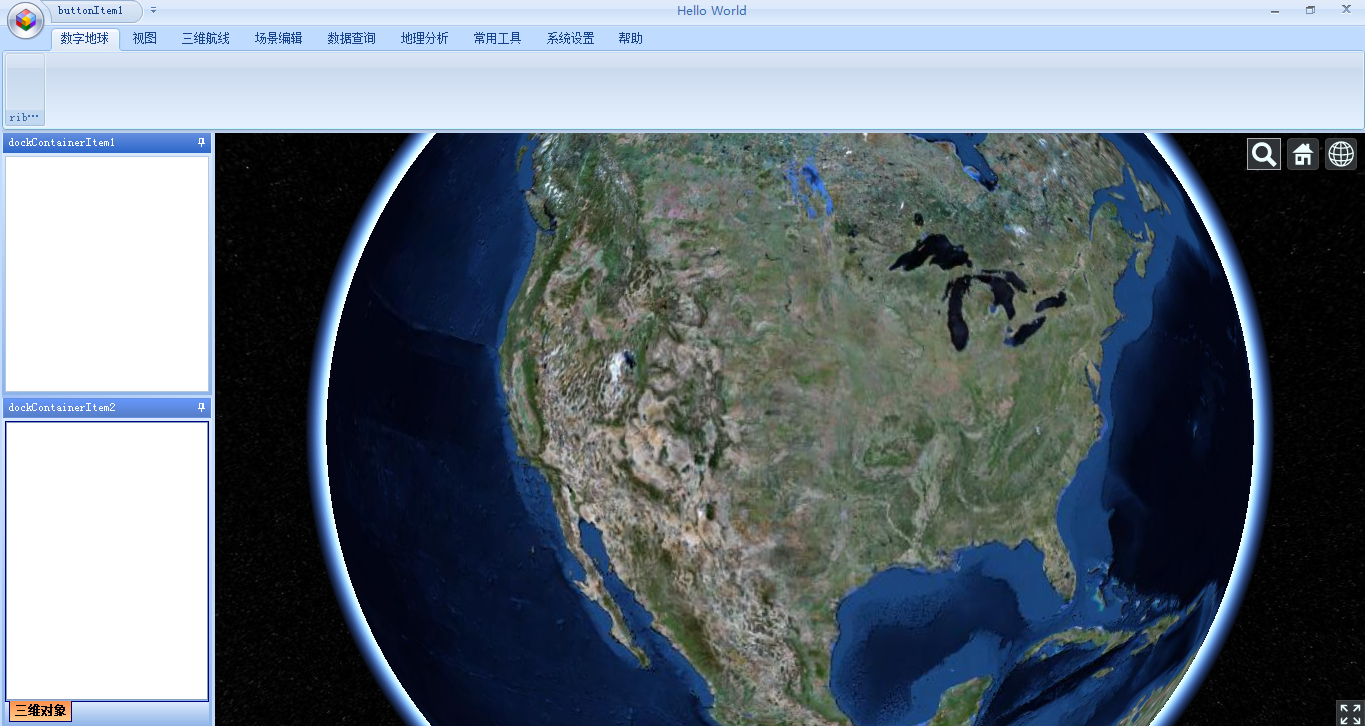
thank you very much for your replay and thank you for you can understand my poor english. i install ie11, but i found that standard Web Browser control did not support webgl at this time.so i am studing WebKit now, and it works well .
在 2014年2月10日星期一UTC+8下午11时26分21秒,Matthew Amato写道:
在 2014年2月10日星期一UTC+8下午11时26分21秒,Matthew Amato写道:

Steven
Feb 12, 2014, 2:10:44 PM2/12/14
to cesiu...@googlegroups.com
There is a book called 3D Engine Design for Virtual Globes written by Kevin and Patrick. The demos in the book use C# and OpenGL to provide similar functionalities like Cesium. Since Kevin and Patrick are both Cesium's developers, I think the book shares some same design concept as Cesium. It would be helpful if you want to build a cesium-like application.
Steven
在 2014年2月10日星期一UTC-8上午3时30分30秒,FKAss写道:
在 2014年2月10日星期一UTC-8上午3时30分30秒,FKAss写道:

robin...@gmail.com
Oct 23, 2014, 4:43:09 AM10/23/14
to cesiu...@googlegroups.com
Thanks
Matthew Amato
Oct 26, 2014, 8:19:15 PM10/26/14
to cesiu...@googlegroups.com
Cesium works great inside of a Windows Forms app with WebBrowser control; you just need to be sure to register your application as needing 3D acceleration for web pages. See this StackOverflow link for some details on that: http://stackoverflow.com/questions/25051072/ie-11-webgl-performance-slow-when-using-webbrowser-control
For more options, visit https://groups.google.com/d/optout.

Jackie Ng
Oct 27, 2014, 12:17:21 AM10/27/14
to cesiu...@googlegroups.com
Just use CefSharp (https://github.com/cefsharp/CefSharp) and never have to worry about what version of Internet Explorer you're embedding because you'll be embedding the best WebGL-capable browser out there: Chrome

This took me only several minutes to get working (mostly fudging around with build settings to ensure CEF unmanaged dlls are properly copied)
- Jackie
robin...@gmail.com
Oct 27, 2014, 8:37:20 AM10/27/14
to cesiu...@googlegroups.com
@Matthew : Thanks! I tried this soluce last week, but I made a mistake... I forgot my debug session doesn't have same name (*.exe and *.shost.exe)... So my KEY config was not working ^^
After a last graphic drivers update, this soluce work!
Inter'
Matthew Amato
Oct 27, 2014, 9:08:00 AM10/27/14
to cesiu...@googlegroups.com
Jackie, I had tried CEFSharp a while back but ran into a bunch of issues. Good to know it's working now.

ni...@s3.co.za
Apr 22, 2015, 8:59:24 AM4/22/15
to cesiu...@googlegroups.com
Is there an example app for getting Cesium to work in a Windows form application using the webbrowser? I have installed the node.js, but cannot work out how to visualise the Cesium engine as yet. I am using Visual Studio Community 2013 express.
Thanks.
Matthew Amato
Apr 22, 2015, 9:37:03 AM4/22/15
to cesiu...@googlegroups.com
Just to be clear, Cesium does not depend or otherwise require Node.js. We use it during internal development, but writing Cesium apps can do whatever they want.
Using Cesium in a Windows WebBrowser control is no different than using any other web content. You just need to initialize hardware accelerated browser content on application startup. I usually do this in Program.cs at the top of Main()
using (var software = Microsoft.Win32.Registry.CurrentUser.OpenSubKey("Software"))
using (var microsoft = software.OpenSubKey("Microsoft"))
using (var internetExplorer = microsoft.OpenSubKey("Internet Explorer"))
using (var main = internetExplorer.OpenSubKey("Main"))
using (var featureControl = main.OpenSubKey("FeatureControl", true))
{
using (var gpu = featureControl.CreateSubKey("FEATURE_GPU_RENDERING"))
{
gpu.SetValue(Path.GetFileName(Application.ExecutablePath), 1, Microsoft.Win32.RegistryValueKind.DWord);
}
}
To test this, you can just set the WebBrowser URL to http://cesiumjs.org/Cesium/Build/Apps/CesiumViewer/index.html and you'll get the demo Viewer app that ships with Cesium.
One caveat is that using any WebGL content inside of a WebBrowser control requires the system have IE 11 installed on it, since that is the earliest version that supports WebGL.
ni...@s3.co.za
Apr 22, 2015, 9:53:25 AM4/22/15
to cesiu...@googlegroups.com
Hi Matthew
Thanks so much for your quick response. I am very new to Cesium and still trying to follow exactly how it works. Normally program in VB and very little in the way of web. I do not see a control available for Cesium within Visual Studio and have simply placed a web browser, added the code you just after the static void Main() line, however know I am missing something to enable it to work.
Could you please let me know how I can get the initial project working?
Thanks.
Thanks so much for your quick response. I am very new to Cesium and still trying to follow exactly how it works. Normally program in VB and very little in the way of web. I do not see a control available for Cesium within Visual Studio and have simply placed a web browser, added the code you just after the static void Main() line, however know I am missing something to enable it to work.
Could you please let me know how I can get the initial project working?
Thanks.

Willem
Apr 28, 2015, 3:48:56 AM4/28/15
to cesiu...@googlegroups.com, ni...@s3.co.za
You may also need to check "FEATURE_BROWSER_EMULATION" in the registry to enforce the use of IE11, see https://msdn.microsoft.com/en-us/library/ee330730(v=vs.85).aspx .
With all that in place you can have a browser-control on your Form that works with Cesium.
Willem
ni...@s3.co.za
May 6, 2015, 10:17:56 AM5/6/15
to cesiu...@googlegroups.com, ni...@s3.co.za
I now have the code in a VS2013 C# project and have used the Helloworld.html file as my url. How though do I incorporate the javascript 'var viewer = new Cesium.Viewer('cesiumContainer');' to active the viewer?
Thanks,
Nigel
Willem
May 7, 2015, 3:53:57 AM5/7/15
to cesiu...@googlegroups.com, ni...@s3.co.za
I assume your url points to Cesium/Apps/HelloWorld.html , and the browser shows the Cesium globe.
The HelloWorld.html already has the javascript to start the viewer, that is a good starting point for your app.
Nigel Berjak
May 7, 2015, 4:32:51 AM5/7/15
to Willem, cesiu...@googlegroups.com
Hi Willem
Thanks for your response. I did a test on the url on the form to point it to my localhost (http://localhost:8080/Apps/HelloWorld.html) page, which produced an error about the webGL of the widget. If I change the FEATURE_BROWSER_EMULATION registry, it seems that this would create the fix (I have not done this yet), however would it be better to use a browser, within Visual Studio, that is already able to handle webGL? i.e. if I give the software to someone to use, would they then need to edit their registry etc, which I would not want?
This is the code I am using to load the HelloWorld.html file:
string curDir = "D/Visual Studio/Source/Repos/SenseIt/Cesium/Apps/HelloWorld.html";
webBrowser1.Url = new System.Uri(curDir, System.UriKind.Absolute);
PS. I have attached the screen I get from the localhost error.
Thanks, Nigel
Thanks for your response. I did a test on the url on the form to point it to my localhost (http://localhost:8080/Apps/HelloWorld.html) page, which produced an error about the webGL of the widget. If I change the FEATURE_BROWSER_EMULATION registry, it seems that this would create the fix (I have not done this yet), however would it be better to use a browser, within Visual Studio, that is already able to handle webGL? i.e. if I give the software to someone to use, would they then need to edit their registry etc, which I would not want?
This is the code I am using to load the HelloWorld.html file:
string curDir = "D/Visual Studio/Source/Repos/SenseIt/Cesium/Apps/HelloWorld.html";
webBrowser1.Url = new System.Uri(curDir, System.UriKind.Absolute);
PS. I have attached the screen I get from the localhost error.
Thanks, Nigel


karlkarls...@gmail.com
May 7, 2015, 5:34:53 AM5/7/15
to cesiu...@googlegroups.com
Am Montag, 10. Februar 2014 12:30:30 UTC+1 schrieb GHT:
> i want to use cesiumn in my winform application ,how to this? is there any web broswer control support webgl5 like chrome that i can use it in Visual Studio 2010
check out my question some threads below.
> i want to use cesiumn in my winform application ,how to this? is there any web broswer control support webgl5 like chrome that i can use it in Visual Studio 2010
I posted there a sample code which uses Chrome and it works without any problems.
ni...@s3.co.za
May 7, 2015, 5:38:36 AM5/7/15
to cesiu...@googlegroups.com, karlkarls...@gmail.com
I cannot see any sample code on this group thread. Could you send the link?
Thanks.
Willem
May 7, 2015, 8:48:21 AM5/7/15
to cesiu...@googlegroups.com, ni...@s3.co.za
Hi Nigel,
I think Karl refers to a post titled "How to use C# with CesiumJS to display one or many GPS points?" where he uses a Chrome browser. Simply do a search for that title.
If you use IE11 in the webform, the registry must be set correctly on the PC. This can also be done in software, see Matthew's code of April 22 in this thread.
Willem
ni...@s3.co.za
May 7, 2015, 10:39:14 AM5/7/15
to cesiu...@googlegroups.com, ni...@s3.co.za
Hi Willem and Karl
I take it then that you have Chrome on your machine as a browser and then use that as a control on your form, loading it as a reference?
Currently I only have Firefox on the machine I am coding on.
Thanks,
Nigel
I take it then that you have Chrome on your machine as a browser and then use that as a control on your form, loading it as a reference?
Currently I only have Firefox on the machine I am coding on.
Thanks,
Nigel
ni...@s3.co.za
May 7, 2015, 10:56:00 AM5/7/15
to cesiu...@googlegroups.com, ni...@s3.co.za
Hi Willem and Karl
Well, I have located the CefSharp library and it is currently downloading the NuGet package data. I will continue in the morning and hoping to be able to get it working.
Thanks and I will let you know how it goes.
Well, I have located the CefSharp library and it is currently downloading the NuGet package data. I will continue in the morning and hoping to be able to get it working.
Thanks and I will let you know how it goes.
ni...@s3.co.za
May 8, 2015, 9:48:55 AM5/8/15
to cesiu...@googlegroups.com, ni...@s3.co.za
Hi Karl and Willem
Ok, so I have been able to get Cessium running in the CefSharp browser, however I need to start my node server manually each time. In order to get this installed and running on someone's machine, from an installer, would I need to add a Node.js project to my project and initiate it from there?
Thanks.
Ok, so I have been able to get Cessium running in the CefSharp browser, however I need to start my node server manually each time. In order to get this installed and running on someone's machine, from an installer, would I need to add a Node.js project to my project and initiate it from there?
Thanks.
Reply all
Reply to author
Forward
0 new messages