
How to make page have a transparent background?

Qbeta
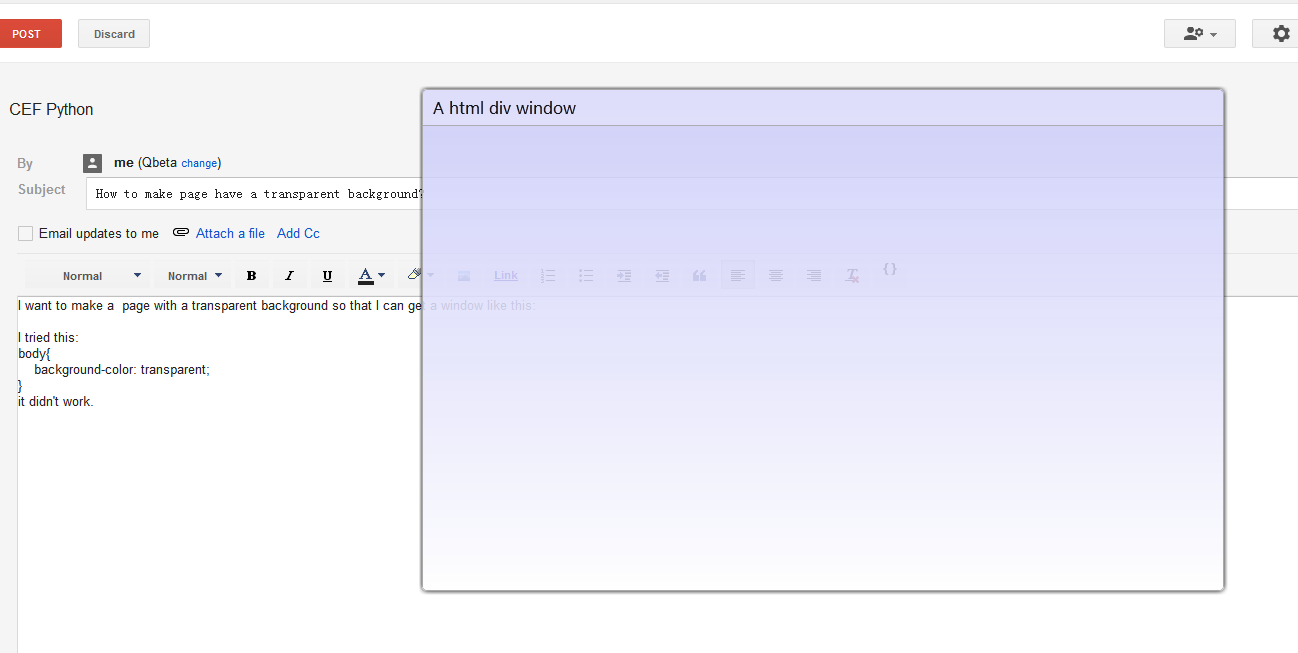
I tried this:
body{
background-color: transparent;
}
it didn't work.I got a page with white background
Any way to get a transparent background?
Thanks in advance.

Czarek Tomczak
Qbeta
I read the CEF wiki and it seems transparent only work with off-screen rendering mode.
I found it's panda3d rendering the page in panda3d example
Does that mean the html page must be rendered by third-party engine in off-screen mode?
I tried to remove the panda3d in panda3d example then CEF(maybe skia) will rendering pages itself(I hope).
But I can't make it ,I just got a window with gray background and no content.(CEF 1)
I also read the "Layered Windows" article then got a transparent window but the CEF background is still white.
Could you just write a example to create a frameless window with a whole transparent html background?
Thanks a lot.
PS:I tried another CEF binding TideSDK and It support transparent when you set <transparent-background>true</transparent-background> in xml
Czarek Tomczak
windowInfo = cefpython.WindowInfo()
windowInfo.SetAsPopup(self.browser.GetWindowHandle(), "transparent")
windowInfo.SetTransparentPainting(True)
cefpython.CreateBrowserSync(windowInfo, browserSettings={},
navigateUrl=GetApplicationPath("cefsimple.html"))Qbeta
I got a transparent popup window successfully.
Then there still are some questions:
Can I get a main transparent window(not a popup window) ?Now I just create a main window and hide it so the popup window looks like a main window.
Any possibility to make the background totally invisible(not Aero glass) so I can create a shaped window?And is this transparent effect windows only?
Looking forward to your reply.
Czarek Tomczak
Can I get a main transparent window(not a popup window) ?
Any possibility to make the background totally invisible(not Aero glass)
so I can create a shaped window?
And is this transparent effect windows only?
Czarek Tomczak
Czarek Tomczak
Qbeta
I tried to call SetTransparentPainting() in main window and it didn't work.
I'm studying about Layered Windows and hope I can get a totally invisible window soon.(maybe a long time :)
To create a shaped window
- I think I should get a totally transparent(invisible) layered window first(CEF embedded) as you say
- then I should set the CEF background to transparent too. off-screen mode or function setIsTransparent() in CEF may help,but I'm not sure how to call it in cefpython.
I will try to create a totally transparent layered window in cefpython first.I wll share the code if I succeed.
PS:The information about CEF and off-screen mode in it's wiki is too little.BTW I can't edit posts either.
Qbeta
when I got a transparent layered window,It makes everything transparent,not only the window background.
I guess what I want is a window without style
WS_TILED.Then I tried to set the window style to remove the border and titlebar.
hWnd = cefwindow.CreateWindow(
            title="CefSimple", className="cefsimple", width=800, height=600,
            icon="icon.ico", windowProc=wndproc)
    windowInfo = cefpython.WindowInfo()
    windowInfo.SetAsChild(hWnd)
    #windowInfo.SetTransparentPainting(True)
    #windowInfo.SetAsOffscreen(hWnd)
    browser = cefpython.CreateBrowserSync(
            windowInfo, browserSettings={},
           navigateUrl=GetApplicationPath("cefsimple.html"))
    wndStyle = win32gui.GetWindowLong(hWnd,win32con.GWL_STYLE)
    win32gui.SetWindowLong(hWnd, win32con.GWL_STYLE, wndStyle|(~win32con.WS_TILED))   #It didn't work!
    #win32gui.SetWindowLong(hWnd, win32con.GWL_STYLE, wndStyle|(~win32con.WS_MAXIMIZE)) #It didn't work!

    exStyle = win32gui.GetWindowLong(hWnd,win32con.GWL_EXSTYLE)
    win32gui.SetWindowLong(hWnd, win32con.GWL_EXSTYLE, exStyle|win32con.WS_EX_LAYERED)
    win32gui.SetLayeredWindowAttributes(hWnd, 0, 200, win32con.LWA_ALPHA) #Not what I want;It make everything transparent,not only the background.

    cefpython.MessageLoop()
    cefpython.Shutdown()
It didn't not work correctly.Did I do something wrong?
Pls see the attached.
Qbeta
Czarek Tomczak
wndStyle & ~(win32con.WS_TILED)
Also you need to call SetWindowPos() with the SWP_FRAMECHANGED flag
Qbeta
win32gui.SetWindowLong(hWnd, win32con.GWL_STYLE, wndStyle &~ (win32con.WS_TILED)) )
win32gui.SetWindowPos(hWnd,win32con.HWND_TOP,100,100,800,600,win32con.SWP_FRAMECHANGED)Czarek Tomczak
Qbeta
WS_TILEDWINDOW work correctly.
Thank you Czarek!

ric...@gmail.com
The most I can see is the semi-transparent pop-up. Fully transparent would be nice, to appear like an overlay.
ric...@gmail.com
to do so, in cefwindow, around line 120:
windowID = win32gui.CreateWindow(....)
add this add:
win32gui.SetWindowLong(windowID, win32con.GWL_EXSTYLE, win32con.WS_EX_LAYERED)
win32gui.SetLayeredWindowAttributes(windowID, 0, 128, win32con.LWA_ALPHA)
Another approach I heard of is sort of a trick.
Take a screenshot of the desktop and use that as your window background, adjusting for your window-size and position of course.
ric...@gmail.com
same as before, after line 120 in cefwindow.py:
win32gui.SetWindowLong(windowID, win32con.GWL_EXSTYLE, win32con.WS_EX_LAYERED)
win32gui.SetLayeredWindowAttributes(windowID, win32api.RGB(255,255,255), 0, win32con.LWA_COLORKEY)
ric...@gmail.com
--------------------------------
== Transparent Everything ==
We set an opacity level and the whole window follows that.
- after line 120 in cefwindow.py after: windowID = win32gui.CreateWindow(...)
win32gui.SetWindowLong(windowID, win32con.GWL_EXSTYLE, win32con.WS_EX_LAYERED)
win32gui.SetLayeredWindowAttributes(windowID, 0, 128, win32con.LWA_ALPHA)
--------------------------------
== Transparent Background ==
This works by making a certain color into a color key, and that color becomes transparent and click through. In this example, white. After setting the Alpha, we need to run SetWindowPos to get the title bar to work, although only the right side can move the window.
- after line 120 in cefwindow.py after: windowID = win32gui.CreateWindow(...)
win32gui.SetWindowLong(windowID, win32con.GWL_EXSTYLE, win32con.WS_EX_LAYERED)
win32gui.SetLayeredWindowAttributes(windowID, win32api.RGB(255,255,255), 0, win32con.LWA_COLORKEY)
(left, top, right, bottom) = (200, 200, 1400, 900) # your window size
win32gui.SetWindowPos(windowID, None, left, top, right-left, bottom-top, win32con.SWP_NOMOVE | win32con.SWP_NOACTIVATE | win32con.SWP_FRAMECHANGED)
--------------------------------
== Transparent Background, no borders or captions ==
Here we need to modify win32gui.CreateWindow() to be a WS_POPUP, and for the transparency we use the white color key.
- around line 120 in cefwindow.py which starts: windowID = win32gui.CreateWindow(...)
- replace "WS_OVERLAPPEDWINDOW | win32con.WS_CLIPCHILDREN" with win32con.WS_POPUP
- After line 120: