
Problem with a custom pupup and window.opener (CefLifeSpanHandler)
1,776 views
Skip to first unread message

Stefan Jonsson
Nov 22, 2012, 10:37:50 AM11/22/12
to cef...@googlegroups.com
This is how i initialize my new window:
protected override bool OnBeforePopup(CefBrowser parentBrowser, CefPopupFeatures popupFeatures, CefWindowInfo windowInfo, string url, ref CefClient client, CefBrowserSettings settings)
{
    PopupForm customPopUp = new PopupForm(parentBrowser, popupFeatures, windowInfo, url, ref client, settings);
    customPopUp.Show();
    return true;
}
Problem is on this line:if (!window.opener){.....DoSomething}When clicking an element in that window I trigger a java script that causes "!window.opener" to evaluate to true. If I do the same action in Chrome "!window.opener" evaluates to false. I assume that this is cause my opener is null, but what can I do to fix it. I also assume that I'm not creating the popup correctly.Thanks for the help

Dmitry Azaraev
Nov 22, 2012, 10:41:19 AM11/22/12
to cef...@googlegroups.com
Read documentation for OnBeforePopup carefully:
/// Called before a new popup window is created. The |parentBrowser| parameter
/// will point to the parent browser window. The |popupFeatures| parameter will
/// contain information about the style of popup window requested. Return false
/// to have the framework create the new popup window based on the parameters
/// in |windowInfo|. Return true to cancel creation of the popup window. By
/// default, a newly created popup window will have the same client and
/// settings as the parent window. To change the client for the new window
/// modify the object that |client| points to. To change the settings for the
/// new window modify the |settings| structure.
I.e. you must return false, but set parent window handle in windowInfo.
--
Best regards,
Dmitry
Best regards,
Dmitry
Stefan Jonsson
Nov 23, 2012, 8:17:10 AM11/23/12
to cef...@googlegroups.com, dmitry....@gmail.com
Thank you. I'll try and let you know to see how it works.
Message has been deleted
Stefan Jonsson
Nov 28, 2012, 10:41:07 AM11/28/12
to cef...@googlegroups.com, dmitry....@gmail.com
I'm sorry but I do not understand. Is there any examples anywhere with custom pop ups?
Also, how am i supposed to use CefBrowser parentBrowser? I assume I have to use this somewhere but I don't know where.
Den torsdagen den 22:e november 2012 kl. 16:41:41 UTC+1 skrev Dmitry Azaraev:
If I want to make a custom pop up window (my own window), the way I read it is that I must return true, otherwise "Return false to have the framework create the new popup window based on the parameters". I tried to return true and then the framework opened my window and the standard window.
Also, what should the windowInfo.Parent be? Should it be the Handle of my custom created form or should it point to something else? Since it does "m_windowInfo.Dispose();" in "on_before_popup" I also think I need to make the showing of my pop up blocking (IE, form.ShowDialog())?
Also, how am i supposed to use CefBrowser parentBrowser? I assume I have to use this somewhere but I don't know where.
I'm sorry if I misunderstand you, I'll try to keep figuring it out and post if I find something.
Best Regards
Den torsdagen den 22:e november 2012 kl. 16:41:41 UTC+1 skrev Dmitry Azaraev:
Dmitry Azaraev
Nov 28, 2012, 4:24:01 PM11/28/12
to cef...@googlegroups.com
Currently no sample available.
--
Best regards,
Dmitry
> If I want to make a custom pop up window (my own window), the way I read it is that I must return true, otherwise "Return false to have the framework create the new popup window based on the parameters". I tried to return true and then the framework opened my window and the standard window.
Returning true means cancel popup creation, returning false continuing creation of browser by cef, with parameters based on windowsInfo struct.
windowInfo.Parent must points to Forms/Control's Handle which will contain native child window. You can extend CefWebBrowser control to make it usable in this situations. I.e. you can create window, set windowInfo.Parent to this window, and return false. windowInfo it is just simple DTO/POCO object. Later (after you return false), when CEF creates browser, it will fire OnAfterCreated method and you must grab created CefBrowser and attach to winforms control. I.e. it is same as you create main browser, except that CEF request you about windowInfo / client.
Try make sample for self or for others, if you fail on this way - let me know. At next week i can help with sample.
On Wed, Nov 28, 2012 at 4:50 PM, Stefan Jonsson <koru...@gmail.com> wrote:
I'm sorry but I do not understand. Is there any examples anywhere with custom pop ups?If I want to make a custom pop up window (my own window), the way I read it is that I must return true, otherwise "Return false to have the framework create the new popup window based on the parameters". I tried to return true and then the framework opened my window and the standard window.Also, what should the windowInfo.Parent be? Should it be the Handle of my custom created form or should it point to something else? Since it does "m_windowInfo.Dispose();" in "on_before_popup" I also think I need to make the showing of my pop up blocking (IE, form.ShowDialog())?
I'm sorry if I misunderstand you, I'll try to keep figuring it out and post if I find something.Best Regards
Den torsdagen den 22:e november 2012 kl. 16:41:41 UTC+1 skrev Dmitry Azaraev:
Best regards,
Dmitry
Stefan Jonsson
Nov 29, 2012, 1:49:09 AM11/29/12
to cef...@googlegroups.com, dmitry....@gmail.com
Thank you yet again, I feel I understand it better now. I'll try it today and see if I can come up with something useful.
Stefan Jonsson
Dec 3, 2012, 2:55:03 AM12/3/12
to cef...@googlegroups.com, dmitry....@gmail.com
Currently I get the parent(my custom form)/child (CEF-created window) relationship, but the child-window is outside of my form. I know that it is a parent child-relationship because when I close my custom form, the CEF-created window closes. In my code I've just copied your classes and added the PopUp suffix (e.g. CefWebBrowserPopUp, WebBrowserPopUp) and tried to edit them so that they do not create a new browser, but attach the existing one we get in OnAfterCreated. When I get it working I will merge my test classes with your working code.
So problem is that I still get two windows.
In OnBeforePopup:
Edited LifeSpanHandler: http://pastebin.com/n4sA1MGJ
My popup form: http://pastebin.com/CESJe957
The copied and slighly modified CefWebBrowser control: http://pastebin.com/c0ZzURbF
The slightly modified WebBrowser class: http://pastebin.com/aYzA9qUA
My method is like this:
In OnBeforePopup:
- Create custom PopUp form.
-- When creating the form, Create a CefWebBrowserPopUp control, pass in settings that we got from OnBeforePopUp
--- When creating CefWebBrowserPopUp create a WebBrowserPopUp
-- Set windowInfo.Parent to our custom pop up form handle.
- Show the created form
- Return false.
In OnAfterCreated:
- Check if created browser has a parent (is popup)
- If PopUp and customPopUpForm != null call custPop.AttachBrowser
-- custPop.Attach will forward call to CefWebBrowserPopUp.WebBrowser.Attach(cefrBrowser)
--- In WebBrowserPopUp.Attach set the _browser member with our reference from OnAfterCreated.
--- Call OnCreated from the Attach method
I apologize if I missed something obvious. Best regards.
Dmitry Azaraev
Dec 3, 2012, 3:17:44 AM12/3/12
to cef...@googlegroups.com
Looks like you must fill windowInfo in OnBeforePopup method. And no have any sense to store windowInfo somewhere, 'cause once OnBeforePopup method finished - window info will be disposed.
--
Best regards,
Dmitry
Best regards,
Dmitry
Stefan Jonsson
Dec 3, 2012, 6:08:05 AM12/3/12
to cef...@googlegroups.com, dmitry....@gmail.com
I'd first like to thank you for all the help and attention you are giving my problem, it is much appreciated as I am lost on how to do this thing. Your help has been priceless.
** UPDATED ** Edited LifeSpanHandler: http://pastebin.com/nrEGPUS3
** UPDATED ** My popup form: http://pastebin.com/PN5sGNkq
The copied and slightly modified CefWebBrowser control: http://pastebin.com/c0ZzURbF
The slightly modified WebBrowser class: http://pastebin.com/aYzA9qUA
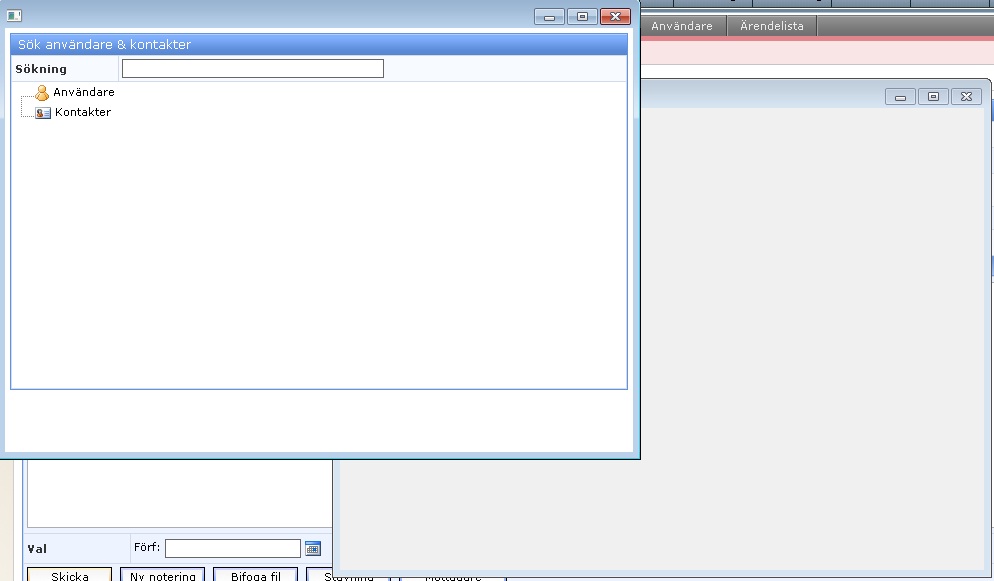
Best regards
Dmitry Azaraev
Dec 3, 2012, 6:16:49 AM12/3/12
to cef...@googlegroups.com
Yeah, i see. Can you provide complete repro sample?
--
Best regards,
Dmitry
Best regards,
Dmitry
Dmitry Azaraev
Dec 3, 2012, 8:49:05 AM12/3/12
to cef...@googlegroups.com
Add
public void SetAsChild(IntPtr parentHandle)
{
var self = (cef_window_info_t_windows*)_self;
self->parent_window = parentHandle;
self->style = (uint)(WindowStyles.WS_CHILD
| WindowStyles.WS_CLIPCHILDREN
| WindowStyles.WS_CLIPSIBLINGS
| WindowStyles.WS_TABSTOP
| WindowStyles.WS_VISIBLE)
;
}
this method to CefWindowInfo.cs, and use it instead of Parent property. You window becomes overlapped 'due to no styles set. And then use it like:
windowInfo.SetAsChild(customPopUp.Handle);
this method to CefWindowInfo.cs, and use it instead of Parent property. You window becomes overlapped 'due to no styles set. And then use it like:
windowInfo.SetAsChild(customPopUp.Handle);
Later you need setup parent correctly, 'cause in your's situation you will get, that window invisible, due to parenthesis issues. I.e. you probably want pass CefWebBrowserPopUp control's handle instead of forms handle (but in general form, also is ok, but you need move CefWebBrowserPopUp login to PopupForm2.
I attach this changes.
See attached sample
--
Best regards,
Dmitry
Best regards,
Dmitry
Stefan Jonsson
Dec 3, 2012, 9:05:13 AM12/3/12
to cef...@googlegroups.com, dmitry....@gmail.com
Thank you very much sir, you are the best.
I'll try it in a few minutes and it works I'll try adding it as a general sample (with good code:p) to the demo projects so others can benefit from your help.
Best regards
Reply all
Reply to author
Forward
0 new messages