
No result from G-code generated by MasterCam X8
109 views
Skip to first unread message

Mats Webjörn
Aug 17, 2015, 9:27:26 AM8/17/15
to OpenSCAM Users
I have a part which has been prepared in MasterCam X8 with postprocessor for Mach3, but when I open the G-code file (attached) in OpenSCAM it shows that some simulation happens but then nothing is seen on the screen. I've tried the same file with other simulators and there I can see the result.
Is MasterCam using some G-codes which aren't supported? I checked against the list on openscam.com but none of these codes are used.
Mats Webjörn
Aug 18, 2015, 8:55:20 AM8/18/15
to OpenSCAM Users
I've now simplified the model (se below) to be just a cube with a circular pocket on top. The cube is 60 x 60 (center at [30,30], and the simulation plot by MasterCam show what it's supposted to look like.
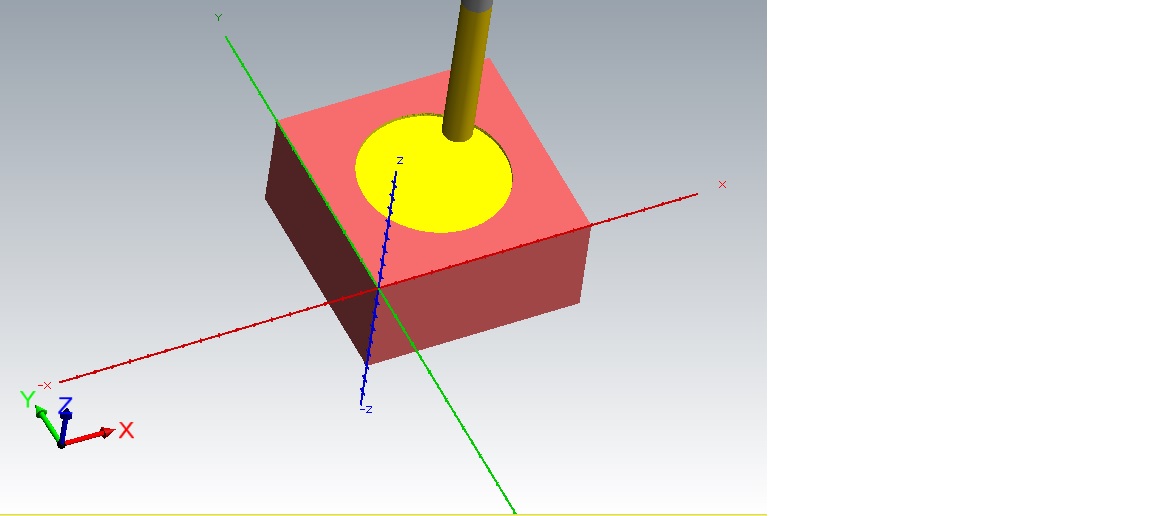
But OpenSCAM still won't show any output. And another G-Code simulator (NCsim) show a really wheird tool path which sort of resembles what Mach3 also shows which is to run far outside what it's supposed to do.

Is there some way to get some more diagnostic info from OpenSCAM as to understand why it doesn't like the .nc file?
%
O0000 (PART1)
(MASTERCAM - V17.)
(MC9 FILE - Q:\IRONCAD\DRAWINGS\MATS\TEST\PART1.MCX-8)
(POST - )
(MATERIAL - ALUMINUM MM - 2024)
(PROGRAM - PART1.nc)
(DATE - AUG-18-15)
(TIME - 14:39)
(POST DEV - NovaLab)
(NWDTOOL N"8. FLAT ENDMILL" T8 D8. F50. L75. CD50. CL25. SD50. C0)
(NWDSTOCK X60. Y60. Z30. OTC OX-30. OY-30. OZ0.)
N10 G00 G17 G21 G40 G49 G80 G90
N20 T8 M06 (8. FLAT ENDMILL)
N30 (MAX - Z25.)
N40 (MIN - Z-2.)
N50 G00 Z25.
N60 G00 X31.855 Y36.126 S2000 M03
N70 Z10.
N80 G01 Z1. F238.7
N90 G03 Z-1.634 I5.145 J-6.126
N100 X29. Y30. Z-2. I5.145 J-6.126
N110 G01 X32. F477.4
N120 G03 I-2. J0.
N130 X31. I-.5 J0.
N140 X34. I1.5 J0.
N150 I-4. J0.
N160 X32. I-1. J0.
N170 X38. I3. J0.
N180 I-8. J0.
N190 X36. I-1. J0.
N200 X42. I3. J0.
N210 I-12. J0.
N220 X40. I-1. J0.
N230 X46. I3. J0.
N240 I-16. J0.
N250 G00 Z25.
N260 M05
N270 G90
N280 M30
%
O0000 (PART1)
(MASTERCAM - V17.)
(MC9 FILE - Q:\IRONCAD\DRAWINGS\MATS\TEST\PART1.MCX-8)
(POST - )
(MATERIAL - ALUMINUM MM - 2024)
(PROGRAM - PART1.nc)
(DATE - AUG-18-15)
(TIME - 14:39)
(POST DEV - NovaLab)
(NWDTOOL N"8. FLAT ENDMILL" T8 D8. F50. L75. CD50. CL25. SD50. C0)
(NWDSTOCK X60. Y60. Z30. OTC OX-30. OY-30. OZ0.)
N10 G00 G17 G21 G40 G49 G80 G90
N20 T8 M06 (8. FLAT ENDMILL)
N30 (MAX - Z25.)
N40 (MIN - Z-2.)
N50 G00 Z25.
N60 G00 X31.855 Y36.126 S2000 M03
N70 Z10.
N80 G01 Z1. F238.7
N90 G03 Z-1.634 I5.145 J-6.126
N100 X29. Y30. Z-2. I5.145 J-6.126
N110 G01 X32. F477.4
N120 G03 I-2. J0.
N130 X31. I-.5 J0.
N140 X34. I1.5 J0.
N150 I-4. J0.
N160 X32. I-1. J0.
N170 X38. I3. J0.
N180 I-8. J0.
N190 X36. I-1. J0.
N200 X42. I3. J0.
N210 I-12. J0.
N220 X40. I-1. J0.
N230 X46. I3. J0.
N240 I-16. J0.
N250 G00 Z25.
N260 M05
N270 G90
N280 M30
%
Mats Webjörn
Aug 18, 2015, 2:45:30 PM8/18/15
to OpenSCAM Users
The core problem with the odd circles turned out to be Issue #42, MasterCam doesn't issue G91.1 to set incremental IJ-mode. But it still hasn't solved why OpenSCAM doesn't show my model

Joseph Coffland
Aug 20, 2015, 10:27:32 PM8/20/15
to OpenSCAM Users

The problem is that OpenSCAM does not like the line O0000 (PART1). This is not valid LinuxCNC GCode. I was able to get a simulation by removing this line. You probably also want to set tool 8 to 8mm. OpenSCAM is not able to read MasterCAM tool descriptions from the comments. I also attached a compressed STL of the simulation at high resolution.

Mats Webjörn
Aug 22, 2015, 2:21:14 PM8/22/15
to OpenSCAM Users
Thanks Joseph!
From what I understand from Wikipedia does "O0000" mean "Program name 0000", so it's safe to remove from the code. But it also seems to be a trivial thing to support, at least ignore.
But how did you figure this out? I couldn't find any status-output from OpenSCAM which makes it hard to figure out why it fails.
Joseph Coffland
Aug 22, 2015, 3:04:04 PM8/22/15
to OpenSCAM Users
You are right "O0000" is safe to remove. I will update the parser to handle this code more gracefully. To see the console output in Windows you have to run OpenSCAM from a console. The next version has a built in log console which will make finding errors such as this easier.
Reply all
Reply to author
Forward
0 new messages