
Launch4j (a cross-platform tool for wrapping Java applications distributed as jars in lightweight Windows native executables)
602 views
Skip to first unread message

Michael Beijer
Jun 4, 2015, 9:14:23 PM6/4/15
to cafetra...@googlegroups.com
Hi Igor,
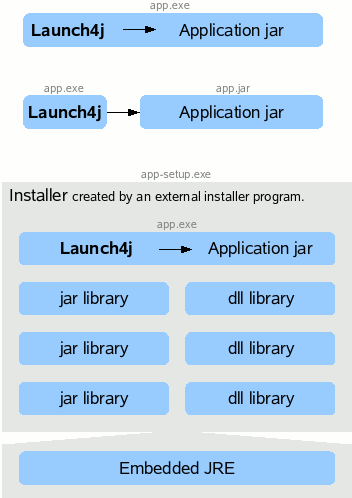
I just stumbled across this, and thought it might be interesting to make CT more Windows-like to newbies when downloading and installing it:
“Cross-platform Java executable wrapper
Launch4j is a cross-platform tool for wrapping Java applications distributed as jars in lightweight Windows native executables. The executable can be configured to search for a certain JRE version or use a bundled one, and it's possible to set runtime options, like the initial/max heap size. The wrapper also provides better user experience through an application icon, a native pre-JRE splash screen, and a Java download page in case the appropriate JRE cannot be found.
Features
- Launch4j wraps jars in Windows native executables and allows to run them like a regular Windows program. It's possible to wrap applications on Windows, Linux and Mac OS X!
- Also creates launchers for jars and class files without wrapping.
- Supports executable jars and dynamic classpath resolution using environment variables and wildcards.
- Doesn't extract the jar from the executable.
- Custom application icon with multiple resolutions and color depths.
- Native pre-JRE splash screen in BMP format shown until the Java application starts.
- Initial priority and single application instance features.
- Works with a bundled JRE or searches for newest Sun or IBM JRE / JDK in given version range and type (64-bit or 32-bit).
- Opens Java download page if an appropriate Java version cannot be found or a support website in case of an error.
- Supports GUI and console apps.
- Supports Windows application manifests.
- Passes command line arguments, also supports constant arguments.
- Allows to set the initial/max heap size also dynamically in percent of free memory.
- JVM options: set system properties, tweak the garbage collection...
- Runtime JVM options from an .l4j.ini file.
- Runtime command line switches to change the compiled options.
- Access to environment variables, the registry and executable file path through system properties.
- Set environment variables.
- Option to change current directory to the executable location.
- The JRE's bin directory is appended to the Path environment variable.
- Ability to restart the application based on exit code.
- Custom version information shown by Windows Explorer.
- Digital signing of the executable with sign4j.
- Supports Windows Security Features of the Windows 8 certification kit.
- GUI and command line interface.
- Build integration through an Ant task and a Maven Plugin.
- Lightweight: 35 KB!
- It's free and may be used for commercial purposes.
- Includes a sample application and Ant script that automates the build process from Java sources to native executable.
- The wrapped program works on all Windows platforms (98/Me/NT/2K/XP/Vista/7/8), Launch4j works on NT/2K/XP/Vista/7/8, Linux and Mac OS X. ”
<This email was dictated using Dragon NaturallySpeaking 13 Professional. Please excuse any typos!>
Hans list
Jun 5, 2015, 12:39:22 AM6/5/15
to cafetra...@googlegroups.com
Innovative cat tool
Proactive developer
Helpful and creative users
What a great tool and community
Happy again
Proactive developer
Helpful and creative users
What a great tool and community
Happy again

Dominique Pivard
Jun 5, 2015, 7:13:25 AM6/5/15
to cafetra...@googlegroups.com
On 5 June 2015 at 04:14, Michael Beijer <mic...@beijer.uk> wrote:
I just stumbled across this, and thought it might be interesting to make CT more Windows-like to newbies when downloading and installing it:
Excellent idea. "Windows" programs that don't install following established conventions are a nuisance.
Cheers,
Dominique
Michael Beijer
Jun 5, 2015, 9:06:58 AM6/5/15
to cafetra...@googlegroups.com
Yeah, I think it could potentially scare people off when first trying to download and install the program, being confronted with the various Java requirements.
Michael
--
You received this message because you are subscribed to the Google Groups "CafeTranslators" group.
To unsubscribe from this group and stop receiving emails from it, send an email to cafetranslato...@googlegroups.com.
For more options, visit https://groups.google.com/d/optout.
Hans List
Jun 5, 2015, 9:11:50 AM6/5/15
to CafeTran Google Group
On 05 Jun 2015, at 15:06, Michael Beijer <mic...@beijer.uk> wrote:Yeah, I think it could potentially scare people off when first trying to download and install the program, being confronted with the various Java requirements.
Yes
Reply all
Reply to author
Forward
0 new messages