
FFPMEG/BubbleUPNP Server
178 views
Skip to first unread message

Philip Haines
Mar 14, 2021, 7:02:36 AM3/14/21
to BubbleUPnP
I am running Minimserver 2 with the Naim app on my control point very happily with my Synology DS716 DSM 6. rendering primarily to a Naim NAC-N172XS, but also a first generation Mu-So. The server and renderer are connected on a wired ethernet. I transcode from Flac to Wav and all is well, playing up to 192.24.
Separately I had a rest from my Spotify subscription and looked at alternatives and decided on Qobuz. In order to stream Qobuz to my Naim 172 streamer I installed BubbleUPnP server on the Synology and use Android BubbleUPNP on my control point. All works well and I can stream up to 192.24 from Qobuz. A big improvement on Spotify and only £149 a year and although I haven't tried it yet I understand that the Qobuz app will work with Android Auto for downloaded files which is good.
My problem is that I cannot transcode from flac to Wav using Bubble. On the Open Home settings for my Naim NAC-N172 renderer and the Mu-So in Bubble Server the Audio decoding section is greyed out. Initially I read some stuff about the Synology version of ffmpeg being older and installed the ffmpeg version from SynoCommunity but no joy.
Has anyone else achieved this and if so how please?
Once resolved, or even now as it's streaming in Flac anyway, it's kicked some extended life into my Naim 172, which is good news as I'm very happy with it otherwise (except for the dead display?!).

Bubblesoft
Mar 14, 2021, 12:55:31 PM3/14/21
to BubbleUPnP
To use the community Syno ffmpeg (which is very complete), you must indicate its location to BubbleUPnP Server.
This will not be necessary in the next BubbleUPnP Server update which will auto-detect it and use it if found.
In the meantime, you can do it manually:
- login via ssh
- go into /volume1/@appstore/BubbleUPnPServer
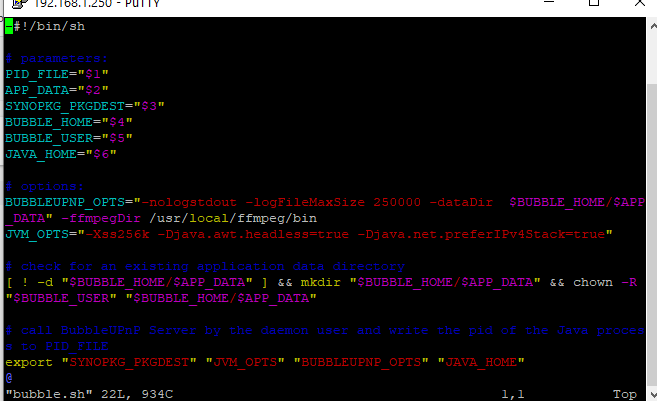
- edit bubble.sh and add '-ffmpegDir /usr/local/ffmpeg/bin' (without the quotes) at the end of variable BUBBLEUPNP_OPTS
- stop and restart BubbleUPnP Server to make the change effective

Bubblesoft
Mar 14, 2021, 1:59:41 PM3/14/21
to BubbleUPnP
This is incorrect. You need to place it at the end of the BUBBLEUPNP_OPTS, and there is at lest one space between -ffmpegDir and /usr/local/ffmpeg/bin.
So it should look like (the ... are there only for not me having to copy the whole line):
BUBBLEUPNP_OPTS="... $BUBBLE_HOME/$APP_DATA -ffmpegDir /usr/local/ffmpeg/bin"
Bubblesoft
Mar 14, 2021, 2:20:28 PM3/14/21
to BubbleUPnP
You need to put -ffmpegDir /usr/local/ffmpeg/bin inside the double quote !
Not:
... $BUBBLE_HOME/$APP_DATA" -ffmpegDir /usr/local/ffmpeg/bin
but:
... $BUBBLE_HOME/$APP_DATA -ffmpegDir /usr/local/ffmpeg/bin"

0 new messages