
Displaying an Image with Brython
1,169 views
Skip to first unread message

Caleb John
Feb 4, 2013, 7:35:39 PM2/4/13
to bry...@googlegroups.com
I've been playing with context but i havn't been able to actually display an image using canvas. I was hoping for an explanation on how this might be possible.

Matthew Parry
Feb 4, 2013, 8:17:32 PM2/4/13
to bry...@googlegroups.com
I'm new to Brython, and perhaps this version is not sufficiently Brythonic, but you can find a working example below.
For this example, I re-engineered the tutorial at this other site.
You can find the demo hosted through Dropbox: Demo.
You can also download the source including the distribution version of Brython for testing: Source.
Hope that helps,
Matthew Parry

Francois Dion
Feb 4, 2013, 8:38:33 PM2/4/13
to bry...@googlegroups.com
Another way is using SVG instead of canvas. It allows animations too
that way. Note that you will need to use xlink_href and that since
from is a reserved keyword, you have to use From with a capital F or
all uppercase FROM.
<!DOCTYPE svg PUBLIC "-//W3C//DTD SVG 1.1//EN"
"http://www.w3.org/Graphics/SVG/1.1/DTD/svg11.dtd">
<html>
<head>
<title>Brython test</title>
<script src="py_tokenizer.js"></script>
<script src="py_utils.js"></script>
<script src="py_tokens.js"></script>
<script src="py_classes.js"></script>
<script src="py_list.js"></script>
<script src="py_string.js"></script>
<script src="py_dom.js"></script>
<script src="py2js.js"></script>
<script src="py_ajax.js"></script>
<script src="py_svg.js"></script>
</head>
<body onLoad="brython()">
<script type="text/python">
doc["display"] <= SVG.image(id="logo",
xlink_href="brython.png", x="0", y="0", height="60px", width="192px")
doc["display"] <=
SVG.animate(attributeName="x",xlink_href="#logo", From="0", to="100",
dur="5s",repeatCount="indefinite" )
</script>
<svg width="10cm" height="4cm" version="1.1" width="300px"
height="100px" xmlns="http://www.w3.org/2000/svg"
xmlns:xlink="http://www.w3.org/1999/xlink" id="display">
</svg>
</body>
</html>
Francois
> --
> You received this message because you are subscribed to the Google Groups
> "brython" group.
> To unsubscribe from this group and stop receiving emails from it, send an
> email to brython+u...@googlegroups.com.
> To post to this group, send email to bry...@googlegroups.com.
> To view this discussion on the web visit
> https://groups.google.com/d/msg/brython/-/G_blTJtdb90J.
> For more options, visit https://groups.google.com/groups/opt_out.
>
>
that way. Note that you will need to use xlink_href and that since
from is a reserved keyword, you have to use From with a capital F or
all uppercase FROM.
<!DOCTYPE svg PUBLIC "-//W3C//DTD SVG 1.1//EN"
"http://www.w3.org/Graphics/SVG/1.1/DTD/svg11.dtd">
<html>
<head>
<title>Brython test</title>
<script src="py_tokenizer.js"></script>
<script src="py_utils.js"></script>
<script src="py_tokens.js"></script>
<script src="py_classes.js"></script>
<script src="py_list.js"></script>
<script src="py_string.js"></script>
<script src="py_dom.js"></script>
<script src="py2js.js"></script>
<script src="py_ajax.js"></script>
<script src="py_svg.js"></script>
</head>
<body onLoad="brython()">
<script type="text/python">
doc["display"] <= SVG.image(id="logo",
xlink_href="brython.png", x="0", y="0", height="60px", width="192px")
doc["display"] <=
SVG.animate(attributeName="x",xlink_href="#logo", From="0", to="100",
dur="5s",repeatCount="indefinite" )
</script>
<svg width="10cm" height="4cm" version="1.1" width="300px"
height="100px" xmlns="http://www.w3.org/2000/svg"
xmlns:xlink="http://www.w3.org/1999/xlink" id="display">
</svg>
</body>
</html>
Francois
> You received this message because you are subscribed to the Google Groups
> "brython" group.
> To unsubscribe from this group and stop receiving emails from it, send an
> email to brython+u...@googlegroups.com.
> To post to this group, send email to bry...@googlegroups.com.
> To view this discussion on the web visit
> https://groups.google.com/d/msg/brython/-/G_blTJtdb90J.
> For more options, visit https://groups.google.com/groups/opt_out.
>
>
Caleb John
Feb 5, 2013, 12:36:11 AM2/5/13
to bry...@googlegroups.com
Thank you for the reply's i tried both methods without luck, the canvas loads but no image is displayed and the same for the svg method. Could this be my setup that is causing these problems?

MR Essop
Feb 5, 2013, 7:25:27 AM2/5/13
to Brython
May be a silly question, but just checked your source code, and want to confirm: your brython.js script file IS in the root folder, right? Have you tried "piggybacking" off a remote "CDN" source, and/or a different version
Regards, MR Essop
From: Matthew Parry <kurofu...@gmail.com>
Sender: bry...@googlegroups.com
Date: Mon, 4 Feb 2013 17:17:32 -0800 (PST)
To: <bry...@googlegroups.com>
ReplyTo: bry...@googlegroups.com
Subject: Re: Displaying an Image with Brython
--
You received this message because you are subscribed to the Google Groups "brython" group.
To unsubscribe from this group and stop receiving emails from it, send an email to brython+u...@googlegroups.com.
To post to this group, send email to bry...@googlegroups.com.
To unsubscribe from this group and stop receiving emails from it, send an email to brython+u...@googlegroups.com.
To post to this group, send email to bry...@googlegroups.com.
To view this discussion on the web visit https://groups.google.com/d/msg/brython/-/ioRr5BkGWvkJ.
Francois Dion
Feb 5, 2013, 7:33:36 AM2/5/13
to bry...@googlegroups.com
What browser are you using? Do you get any errors in the console?
Francois
Francois
Thank you for the reply's i tried both methods without luck, the canvas loads but no image is displayed and the same for the svg method. Could this be my setup that is causing these problems?
--
You received this message because you are subscribed to the Google Groups "brython" group.
To unsubscribe from this group and stop receiving emails from it, send an email to brython+u...@googlegroups.com.
To post to this group, send email to bry...@googlegroups.com.
To view this discussion on the web visit https://groups.google.com/d/msg/brython/-/m9FayZyNHqYJ.
Caleb John
Feb 5, 2013, 6:19:34 PM2/5/13
to bry...@googlegroups.com
I tested on both chrome and firefox and didn't get errors on either. The clock demo works for me but it just seems to be these demos using drawImage

DI DIO Salvatore
Feb 6, 2013, 1:44:17 AM2/6/13
to bry...@googlegroups.com
Le 6 févr. 2013 à 00:19, Caleb John a écrit :
I tested on both chrome and firefox and didn't get errors on either. The clock demo works for me but it just seems to be these demos using drawImage
--
You received this message because you are subscribed to the Google Groups "brython" group.
To unsubscribe from this group and stop receiving emails from it, send an email to brython+u...@googlegroups.com.
To post to this group, send email to bry...@googlegroups.com.
To view this discussion on the web visit https://groups.google.com/d/msg/brython/-/3aPUc7tYq64J.
Francois Dion
Feb 7, 2013, 4:12:07 PM2/7/13
to brython
On Feb 5, 6:19 pm, Caleb John <calebjo...@gmail.com> wrote:
> I tested on both chrome and firefox and didn't get errors on either. The
> clock demo works for me but it just seems to be these demos using drawImage
Bump brython to 1 or 2 ( ie. call brython(1) or brython(2) in the
> I tested on both chrome and firefox and didn't get errors on either. The
> clock demo works for me but it just seems to be these demos using drawImage
code). Also, can you get a screenshot with the console open? Need to
know the exact version of firefox and whatever output from the
console. There has to be some. These demos work on firefox 14 and
above without problem (the oldest I currently have installed - I'll
set up some VMs with some older versions to test too). Are you sure
you dont have indentation issues, maybe mixed tabs and spaces?
Francois
Caleb John
Feb 7, 2013, 7:30:07 PM2/7/13
to bry...@googlegroups.com
Thanks for the reply,
It appears that Matthew Parry's example has started working for me but i still can't get mine to work,
I am using firefox v. 18.0.2
This is the link to my test
attached is my screenshot of the console
hopefully you can see where i went wrong
It appears that Matthew Parry's example has started working for me but i still can't get mine to work,
I am using firefox v. 18.0.2
This is the link to my test
attached is my screenshot of the console
hopefully you can see where i went wrong
Caleb John
Feb 7, 2013, 9:33:00 PM2/7/13
to bry...@googlegroups.com
So it appears that i had a number of comments in the code and when i removed those it started working fine,
Thank you all for the help and I'm excited for the future of this project.
Thank you all for the help and I'm excited for the future of this project.

Jamie Keefer
Feb 8, 2013, 12:30:33 PM2/8/13
to bry...@googlegroups.com
I'd like to see the source on this. I think there is room to improve the controls; not sure how you are handling Key_up and Key_down event handlers, but I am curious to see if the latency is in the javascript translation or in the python code.
On Thu, Feb 7, 2013 at 9:33 PM, Caleb John <caleb...@gmail.com> wrote:
So it appears that i had a number of comments in the code and when i removed those it started working fine,
Thank you all for the help and I'm excited for the future of this project.
--
You received this message because you are subscribed to the Google Groups "brython" group.
To unsubscribe from this group and stop receiving emails from it, send an email to brython+u...@googlegroups.com.
To post to this group, send email to bry...@googlegroups.com.
To view this discussion on the web visit https://groups.google.com/d/msg/brython/-/eMG2RYQgmuAJ.
Message has been deleted
Jamie Keefer
Feb 8, 2013, 3:02:31 PM2/8/13
to bry...@googlegroups.com
Ah shucks, I forgot about that...just clicking on the pie.py should work. Thanks. We are getting bunch of snow tonight so I will be hunkered down at the keyboard. I will let you know.
jamie
On Fri, Feb 8, 2013 at 2:33 PM, Caleb John <caleb...@gmail.com> wrote:
That would be great if you could take a look, I'll post the source when I get home but if you want to take a look now just open the page source in the link and the source should link to pie.py
--
You received this message because you are subscribed to the Google Groups "brython" group.
To unsubscribe from this group and stop receiving emails from it, send an email to brython+u...@googlegroups.com.
To post to this group, send email to bry...@googlegroups.com.
To view this discussion on the web visit https://groups.google.com/d/msg/brython/-/GdhBbyvw-ZIJ.
Jamie Keefer
Feb 8, 2013, 3:45:29 PM2/8/13
to bry...@googlegroups.com
Your suggestion to just click the link in the source worked. I think I see what can be done to make it smoother. Rather than update position with each key press, you have a keypress change the velocity of the paddle which in turn updates the position. I want to see if I can fix it, for fun, but if you know what I mean, don't let me stop you.
you have:
ship_pos[0] += x
ship_pos[1] += y (not going to be changed...yet? :) )
but instead:
ship_pos[0] += ship_vel_x
### where ship_vel_x is a variable to change based on user input and until either the key_up event sets the velocity to zero to stop or the keypress changes to negative ship_x_vel and makes ship go other way...
On Fri, Feb 8, 2013 at 2:43 PM, Caleb John <caleb...@gmail.com> wrote:
Here is the link to the source, I just through this together last night, but I hope you can find the issue
--
You received this message because you are subscribed to the Google Groups "brython" group.
To unsubscribe from this group and stop receiving emails from it, send an email to brython+u...@googlegroups.com.
To post to this group, send email to bry...@googlegroups.com.
To view this discussion on the web visit https://groups.google.com/d/msg/brython/-/p_rOz0tooxkJ.
Caleb John
Feb 8, 2013, 4:52:14 PM2/8/13
to bry...@googlegroups.com
Great idea! I think I've got what you mean but if you want to experiment with it by all means go ahead, i would love to see what you come up with
Caleb John
Feb 8, 2013, 5:01:00 PM2/8/13
to bry...@googlegroups.com
I ended up using a queue to hold directional key presses so that you can press two keys at once without the ship jolting. Let me know what you think and maybe what needs to be changed :)
Jamie Keefer
Feb 8, 2013, 7:39:28 PM2/8/13
to bry...@googlegroups.com
Just got settled in at home here...taking a look now
On Fri, Feb 8, 2013 at 5:01 PM, Caleb John <caleb...@gmail.com> wrote:
I ended up using a queue to hold directional key presses so that you can press two keys at once without the ship jolting. Let me know what you think and maybe what needs to be changed :)
--
You received this message because you are subscribed to the Google Groups "brython" group.
To unsubscribe from this group and stop receiving emails from it, send an email to brython+u...@googlegroups.com.
To post to this group, send email to bry...@googlegroups.com.
To view this discussion on the web visit https://groups.google.com/d/msg/brython/-/WSFQb0oWlwAJ.
Jamie Keefer
Feb 8, 2013, 7:46:52 PM2/8/13
to bry...@googlegroups.com
Hah! You got it!! Now just need to check for edges and you are solid :)
Caleb John
Feb 8, 2013, 9:00:07 PM2/8/13
to bry...@googlegroups.com
Thanks a lot for the help, I wont be working much on it tonight but I'm hoping to put in shields and make the aliens actually able to shoot tomorrow
Jamie Keefer
Feb 8, 2013, 9:02:14 PM2/8/13
to bry...@googlegroups.com
Thanks for sharing your code, you helped me see how brython works with canvas.
On Fri, Feb 8, 2013 at 9:00 PM, Caleb John <caleb...@gmail.com> wrote:
Thanks a lot for the help, I wont be working much on it tonight but I'm hoping to put in shields and make the aliens actually able to shoot tomorrow
--
You received this message because you are subscribed to the Google Groups "brython" group.
To unsubscribe from this group and stop receiving emails from it, send an email to brython+u...@googlegroups.com.
To post to this group, send email to bry...@googlegroups.com.
To view this discussion on the web visit https://groups.google.com/d/msg/brython/-/vAUHc42zRkUJ.

dan d.
Dec 8, 2014, 3:45:59 PM12/8/14
to bry...@googlegroups.com
Thats odd. The example code you gave runs and displays the image with the version of Brython contained in the Zip file.
But when I try to run the same HTML and Python code with a Brython version 3.0 , the example does not work.
I get the following in the console:
"RuntimeError: ReferenceError: doc is not defined
Traceback (most recent call last):"
I'm guessing that Brython has changed since your post? (February 2013).
Could someone post a working example of displaying an image on the canvas?
Thanks in advance
Dan
But when I try to run the same HTML and Python code with a Brython version 3.0 , the example does not work.
I get the following in the console:
"RuntimeError: ReferenceError: doc is not defined
Traceback (most recent call last):"
I'm guessing that Brython has changed since your post? (February 2013).
Could someone post a working example of displaying an image on the canvas?
Thanks in advance
Dan

Pierre Quentel
Dec 8, 2014, 4:35:40 PM12/8/14
to bry...@googlegroups.com
Le lundi 8 décembre 2014 21:45:59 UTC+1, dan d. a écrit :
Thats odd. The example code you gave runs and displays the image with the version of Brython contained in the Zip file.
But when I try to run the same HTML and Python code with a Brython version 3.0 , the example does not work.
I get the following in the console:
"RuntimeError: ReferenceError: doc is not defined
Traceback (most recent call last):"
I'm guessing that Brython has changed since your post? (February 2013).
Could someone post a working example of displaying an image on the canvas?
If you put this code in site/gallery it should display an image :
<!doctype html>
<html>
<meta charset="utf-8">
<head>
<script type="text/javascript" src="../../src/brython.js"></script>
</head>
<body onLoad="brython(1)">
<script id="ascript" type="text/python">
from browser import window, document
import javascript
img = javascript.JSConstructor(window.Image)()
img.src = 'img/sky.jpg'
canvas = document["myCanvas"]
ctx = canvas.getContext("2d")
ctx.drawImage(img,0,0)
</script>
<canvas id="myCanvas" width="200" height="100">
</canvas>
</body>
</html>
With Javascript, creating an image is done by
img = new Image()
The equivalent in Brython is the line
img = javascript.JSConstructor(window.Image)()
To get a reference to the built-in Javascript object Image, use attribute "Image" of the object window defined in module browser : window.Image
Since this object is a constructor, the Brython object that generates instances is built with javascript.JSConstructor (see the documentation page "Using Javascript objects and libraries")

Joao S. O. Bueno
Dec 9, 2014, 7:04:06 AM12/9/14
to bry...@googlegroups.com
On 8 December 2014 at 19:35, Pierre Quentel <pierre....@gmail.com> wrote:
> img = new Image()
>
> The equivalent in Brython is the line
>
> img = javascript.JSConstructor(window.Image)()
Oh, please. no!! If it was this way, writting Brython would be harder
> img = new Image()
>
> The equivalent in Brython is the line
>
> img = javascript.JSConstructor(window.Image)()
than Javascript, and the whole purpose of the thing is to be simpler
and saner.
The Brython equivalent to create an Image is:
from browser import html
img = html.IMG()
Pierre Quentel
Dec 9, 2014, 7:14:17 AM12/9/14
to bry...@googlegroups.com, gwi...@gmail.com
You are right, but dan wanted a working example, and for the moment this version with html.IMG doesn't work : canvas.drawImage(img, 0, 0) raises an Exception. It's on my todo list
dan d.
Dec 9, 2014, 9:59:53 AM12/9/14
to bry...@googlegroups.com, gwi...@gmail.com
Yes, thank you Pierre.
Indeed, I am all for short clean syntax, if it works. But if does not, then I would rather have the long syntax that does work :)
Just to give you some context, I am completely new to Brython.
And I would like to port a simple little game I wrote, to Brython. Right now it is written in Python but on top of a web browser framework (HTML5), but which is not open source. It uses Skulpt as the Python translator, and it has additional libraries for handling all the graphics and sound, and user interface. These libraries are not open source.
So the idea is to use Brython instead for this game. If this is possible...
Pierre, can you tell me if it is possible to play sounds (mp3/ogg files) via Brython?
Thanks
Dan
Indeed, I am all for short clean syntax, if it works. But if does not, then I would rather have the long syntax that does work :)
Just to give you some context, I am completely new to Brython.
And I would like to port a simple little game I wrote, to Brython. Right now it is written in Python but on top of a web browser framework (HTML5), but which is not open source. It uses Skulpt as the Python translator, and it has additional libraries for handling all the graphics and sound, and user interface. These libraries are not open source.
So the idea is to use Brython instead for this game. If this is possible...
Pierre, can you tell me if it is possible to play sounds (mp3/ogg files) via Brython?
Thanks
Dan
dan d.
Dec 10, 2014, 5:36:10 AM12/10/14
to bry...@googlegroups.com, gwi...@gmail.com
Hello Pierre,
I am trying to do something rather simple, rotatating the image using the canvas context rotate() method and using a timer.I got the timer working fine looking at the Brython docs.
In the code below if I hard code the value 150 for (img.width/2) or (img.height/2), the code works. The image is positioned correctly and spins on itself.
If I leave (img.width/2) or (img.height/2) this is evaluated to 0, for some reason, although the image is 300x300 pixels...
Line 18 and 28, the img.width and myImage.width do not contain the correct value for the image.
Since we created the img object using a 300x300 image, shouldn't img.width contain the value 300 ? Or is this a Brython / Javascript interaction particularity?
Or maybe I just made some dump mistake.
from browser import window, document, timer
import javascript
import math
img = javascript.JSConstructor(window.Image)()
img.src = 'img/sun_300x300.png'
canvas = document["stage"]
I am trying to do something rather simple, rotatating the image using the canvas context rotate() method and using a timer.I got the timer working fine looking at the Brython docs.
In the code below if I hard code the value 150 for (img.width/2) or (img.height/2), the code works. The image is positioned correctly and spins on itself.
If I leave (img.width/2) or (img.height/2) this is evaluated to 0, for some reason, although the image is 300x300 pixels...
Line 18 and 28, the img.width and myImage.width do not contain the correct value for the image.
Since we created the img object using a 300x300 image, shouldn't img.width contain the value 300 ? Or is this a Brython / Javascript interaction particularity?
Or maybe I just made some dump mistake.
from browser import window, document, timer
import javascript
import math
img = javascript.JSConstructor(window.Image)()
img.src = 'img/sun_300x300.png'
canvas = document["stage"]
ctx = canvas.getContext("2d")
ctx.drawImage(img,0, 0)
counter = 0
TO_RADIANS = math.pi/180.0
def loop():
global ctx, counter, img
ctx.clearRect(0,0,canvas.width, canvas.height)
drawRotatedImage(img,(img.width/2),(img.height/2),counter)
#drawRotatedImage(img,150,150,counter)
counter+=2
def drawRotatedImage(myImage, x, y, angle):
global ctx
ctx.save()
#move to the middle of where we want to draw our image
ctx.translate(x, y)
ctx.rotate(angle * TO_RADIANS)
#ctx.drawImage(myImage, -(myImage.width/2), -(myImage.height/2))
ctx.drawImage(myImage, -150, -150)
ctx.restore()
timer.set_interval(loop,1000/1)
TO_RADIANS = math.pi/180.0
def loop():
global ctx, counter, img
ctx.clearRect(0,0,canvas.width, canvas.height)
drawRotatedImage(img,(img.width/2),(img.height/2),counter)
#drawRotatedImage(img,150,150,counter)
counter+=2
def drawRotatedImage(myImage, x, y, angle):
global ctx
ctx.save()
#move to the middle of where we want to draw our image
ctx.translate(x, y)
ctx.rotate(angle * TO_RADIANS)
#ctx.drawImage(myImage, -(myImage.width/2), -(myImage.height/2))
ctx.drawImage(myImage, -150, -150)
ctx.restore()
timer.set_interval(loop,1000/1)
Le mardi 9 décembre 2014 13:14:17 UTC+1, Pierre Quentel a écrit :
Joao S. O. Bueno
Dec 10, 2014, 5:53:55 AM12/10/14
to Pierre Quentel, bry...@googlegroups.com
method where equivalent to ones that could be created with window.*
methods and wrapped.
Are you working on that now? Could you summarize the difference in a
few words? (If it is too long an explanation, just leave it, I will
look on the sources)
Regards,
js
-><-

Kiko
Dec 10, 2014, 6:11:21 AM12/10/14
to bry...@googlegroups.com, gwi...@gmail.com
I think that during the evaluation of the script the image is not loaded so the script (Brython/js) cannot access the height and width attributes (0,0).
In this case, you should load the image previously or already know the size of the image.
For example, this is working fine:
See here:
Le mardi 9 décembre 2014 13:14:17 UTC+1, Pierre Quentel a écrit :
Le mardi 9 décembre 2014 13:04:06 UTC+1, João Sebastião de Oliveira Bueno a écrit :On 8 December 2014 at 19:35, Pierre Quentel <pierre....@gmail.com> wrote:
> img = new Image()
>
> The equivalent in Brython is the line
>
> img = javascript.JSConstructor(window.Image)()
Oh, please. no!! If it was this way, writting Brython would be harder
than Javascript, and the whole purpose of the thing is to be simpler
and saner.
The Brython equivalent to create an Image is:
from browser import html
img = html.IMG()
You are right, but dan wanted a working example, and for the moment this version with html.IMG doesn't work : canvas.drawImage(img, 0, 0) raises an Exception. It's on my todo list
--
You received this message because you are subscribed to the Google Groups "brython" group.
To unsubscribe from this group and stop receiving emails from it, send an email to brython+u...@googlegroups.com.
To post to this group, send email to bry...@googlegroups.com.
To view this discussion on the web visit https://groups.google.com/d/msgid/brython/b9333f36-bbfa-49dc-8273-8bc53ee0f790%40googlegroups.com.
For more options, visit https://groups.google.com/d/optout.
dan d.
Dec 10, 2014, 6:57:37 AM12/10/14
to bry...@googlegroups.com, gwi...@gmail.com
Hello Kiko.
Thank you for your response. But I am not sure this answers my question.
The code does work, as you said (this is also what I said in my original post) , but only when the values are hard coded and not gotten from the image object.
From what I see in the JSFiddle link you gave, that copies my code, you added a couple variables: IW and IH and you "hard coded" the image width and height to those variables. So yeah, in that cas it also works. But what I want is to be able to load an image and then use the img.width and img.height properties of the JS image object.
I am going to try to add a delay before trying to get the values. To allow the browser to load the image before the code is executed. We'll see if this helps.
But this is surprising since, I am loading the image (JS object) in the Brython code and not in the HTML. So the object should exist when I try to access the width and height properties. I'll try the delay anyways... its a quirky hack, but if it works...
Dan
Thank you for your response. But I am not sure this answers my question.
The code does work, as you said (this is also what I said in my original post) , but only when the values are hard coded and not gotten from the image object.
From what I see in the JSFiddle link you gave, that copies my code, you added a couple variables: IW and IH and you "hard coded" the image width and height to those variables. So yeah, in that cas it also works. But what I want is to be able to load an image and then use the img.width and img.height properties of the JS image object.
I am going to try to add a delay before trying to get the values. To allow the browser to load the image before the code is executed. We'll see if this helps.
But this is surprising since, I am loading the image (JS object) in the Brython code and not in the HTML. So the object should exist when I try to access the width and height properties. I'll try the delay anyways... its a quirky hack, but if it works...
Dan
Joao S. O. Bueno
Dec 10, 2014, 7:07:50 AM12/10/14
to dan d., bry...@googlegroups.com
On 10 December 2014 at 09:57, dan d. <dandelso...@gmail.com> wrote:
> Hello Kiko.
>
> Thank you for your response. But I am not sure this answers my question.
> The code does work, as you said (this is also what I said in my original
> post) , but only when the values are hard coded and not gotten from the
> image object.
>
> From what I see in the JSFiddle link you gave, that copies my code, you
> added a couple variables: IW and IH and you "hard coded" the image width
> and height to those variables. So yeah, in that cas it also works. But what
> I want is to be able to load an image and then use the img.width and
> img.height properties of the JS image object.
>
> I am going to try to add a delay before trying to get the values. To allow
> the browser to load the image before the code is executed. We'll see if this
> helps.
> But this is surprising since, I am loading the image (JS object) in the
> Brython code and not in the HTML. So the object should exist when I try to
> access the width and height properties. I'll try the delay anyways... its a
> quirky hack, but if it works...
Hi Dan - just remember that instead of a "synchronous" delay you'd
> Hello Kiko.
>
> Thank you for your response. But I am not sure this answers my question.
> The code does work, as you said (this is also what I said in my original
> post) , but only when the values are hard coded and not gotten from the
> image object.
>
> From what I see in the JSFiddle link you gave, that copies my code, you
> added a couple variables: IW and IH and you "hard coded" the image width
> and height to those variables. So yeah, in that cas it also works. But what
> I want is to be able to load an image and then use the img.width and
> img.height properties of the JS image object.
>
> I am going to try to add a delay before trying to get the values. To allow
> the browser to load the image before the code is executed. We'll see if this
> helps.
> But this is surprising since, I am loading the image (JS object) in the
> Brython code and not in the HTML. So the object should exist when I try to
> access the width and height properties. I'll try the delay anyways... its a
> quirky hack, but if it works...
better return control to the browser, and then continue your work on
the image object - you can do that with timer.set_timeout. It is one
of those javascript quirks we can't get rid of at the moment. Maybe
in a future when we get "yield from" and "tulip" working. :-)
Kiko
Dec 10, 2014, 7:24:28 AM12/10/14
to bry...@googlegroups.com, João Sebastião de Oliveira Bueno
2014-12-10 12:57 GMT+01:00 dan d. <dandelso...@gmail.com>:
Hello Kiko.
Thank you for your response. But I am not sure this answers my question.
The code does work, as you said (this is also what I said in my original post) , but only when the values are hard coded and not gotten from the image object.
From what I see in the JSFiddle link you gave, that copies my code, you added a couple variables: IW and IH and you "hard coded" the image width and height to those variables. So yeah, in that cas it also works. But what I want is to be able to load an image and then use the img.width and img.height properties of the JS image object.
I am going to try to add a delay before trying to get the values. To allow the browser to load the image before the code is executed. We'll see if this helps.
But this is surprising since, I am loading the image (JS object) in the Brython code and not in the HTML. So the object should exist when I try to access the width and height properties. I'll try the delay anyways... its a quirky hack, but if it works...
To view this discussion on the web visit https://groups.google.com/d/msgid/brython/b4da4bae-ac11-407d-bfaf-cb6dbd91e841%40googlegroups.com.
Kiko
Dec 10, 2014, 7:36:06 AM12/10/14
to bry...@googlegroups.com, João Sebastião de Oliveira Bueno
2014-12-10 13:24 GMT+01:00 Kiko <kikoco...@gmail.com>:
2014-12-10 12:57 GMT+01:00 dan d. <dandelso...@gmail.com>:Hello Kiko.
Thank you for your response. But I am not sure this answers my question.
The code does work, as you said (this is also what I said in my original post) , but only when the values are hard coded and not gotten from the image object.
From what I see in the JSFiddle link you gave, that copies my code, you added a couple variables: IW and IH and you "hard coded" the image width and height to those variables. So yeah, in that cas it also works. But what I want is to be able to load an image and then use the img.width and img.height properties of the JS image object.
I am going to try to add a delay before trying to get the values. To allow the browser to load the image before the code is executed. We'll see if this helps.
But this is surprising since, I am loading the image (JS object) in the Brython code and not in the HTML. So the object should exist when I try to access the width and height properties. I'll try the delay anyways... its a quirky hack, but if it works...Ok, the following seems it is working as you expect:
BTW, you are creating the image dynamically. I think the browser parses first the script so the script itself doesn't have access to the attributes of the image because it doesn't 'exists'.
You can include (load) a hidden image via markup and then use the code to work with the image. I think this should work.


Billy Earney
Dec 10, 2014, 7:43:08 AM12/10/14
to bry...@googlegroups.com, João Sebastião de Oliveira Bueno
dan,
I only had about 5 minutes to look into this, but this is what I came up with:It seems to be rotating at a pivot at (0,0), but it is one step closer (ie, don't have to hardcode the values)..
To view this discussion on the web visit https://groups.google.com/d/msgid/brython/CAB-sx602UaEfJCVNRPhp-Kaw_uQxKAC-%2BX0sYAS5wfBjcTwnVg%40mail.gmail.com.
Pierre Quentel
Dec 10, 2014, 8:02:21 AM12/10/14
to bry...@googlegroups.com, gwi...@gmail.com
Le mercredi 10 décembre 2014 11:36:10 UTC+1, dan d. a écrit :
Hello Pierre,
I am trying to do something rather simple, rotatating the image using the canvas context rotate() method and using a timer.I got the timer working fine looking at the Brython docs.
In the code below if I hard code the value 150 for (img.width/2) or (img.height/2), the code works. The image is positioned correctly and spins on itself.
If I leave (img.width/2) or (img.height/2) this is evaluated to 0, for some reason, although the image is 300x300 pixels...
Line 18 and 28, the img.width and myImage.width do not contain the correct value for the image.
Since we created the img object using a 300x300 image, shouldn't img.width contain the value 300 ? Or is this a Brython / Javascript interaction particularity?
There is a bug in the code that gets the attributes "width" and "height". It currently uses the Javascript attribute offsetWidth and offsetHeight, but these values are apparently not set for images. It will be fixed in the next release
Pierre Quentel
Dec 10, 2014, 8:03:57 AM12/10/14
to bry...@googlegroups.com, gwi...@gmail.com
Le mardi 9 décembre 2014 15:59:53 UTC+1, dan d. a écrit :
Yes, thank you Pierre.
Indeed, I am all for short clean syntax, if it works. But if does not, then I would rather have the long syntax that does work :)
Just to give you some context, I am completely new to Brython.
And I would like to port a simple little game I wrote, to Brython. Right now it is written in Python but on top of a web browser framework (HTML5), but which is not open source. It uses Skulpt as the Python translator, and it has additional libraries for handling all the graphics and sound, and user interface. These libraries are not open source.
So the idea is to use Brython instead for this game. If this is possible...
Pierre, can you tell me if it is possible to play sounds (mp3/ogg files) via Brython?
HTML5 provides the AUDIO tag, so you can generate a player with the usual play/pause buttons with :
from browser import document, html
document <= html.AUDIO(src='mymusic.mp3', controls=True)
from browser import document, html
document <= html.AUDIO(src='mymusic.mp3', controls=True)
dan d.
Dec 10, 2014, 11:35:30 AM12/10/14
to bry...@googlegroups.com, gwi...@gmail.com
Hey Pierre,
No need for play/pause buttons for the audio. Although why not....
But the main goal is to programmatically be able to start the game music, and game sounds.
So for example, the player presses the "fire" button (space bar) the ship shoots a rocket, and the game plays a rocket sound.
I hope I am not asking for things that are completely not suited for Brython and its original intended use...
Thanks Dan
No need for play/pause buttons for the audio. Although why not....
But the main goal is to programmatically be able to start the game music, and game sounds.
So for example, the player presses the "fire" button (space bar) the ship shoots a rocket, and the game plays a rocket sound.
I hope I am not asking for things that are completely not suited for Brython and its original intended use...
Thanks Dan
dan d.
Dec 10, 2014, 11:44:09 AM12/10/14
to bry...@googlegroups.com, gwi...@gmail.com
Yeah Billy,
That's exactly the result I get too... which is not what it should do, and not what I want it to do :)
It should rotate on itself (around the image center) and not on a (0,0) origin. If you hard code 150 everywhere on a 300x300 pixel pic, everything works perfect. But you need to hard code.
Pierre Q. answered the question, saying there is a bug in Brython and it is going to get fixed in the next release.
So I am just unlucky since the little I am trying to accomplish so far in Brython does a lot of image manipulations, and there seem to be a couple of bugs, in that area, in the current version of Brython. But I guess its cool, since they are going to get fixed and Brython will be that much better!
Sorry for creating more work for the Brython dev team :)
Thanks for giving it a shot Billy.
Dan
That's exactly the result I get too... which is not what it should do, and not what I want it to do :)
It should rotate on itself (around the image center) and not on a (0,0) origin. If you hard code 150 everywhere on a 300x300 pixel pic, everything works perfect. But you need to hard code.
Pierre Q. answered the question, saying there is a bug in Brython and it is going to get fixed in the next release.
So I am just unlucky since the little I am trying to accomplish so far in Brython does a lot of image manipulations, and there seem to be a couple of bugs, in that area, in the current version of Brython. But I guess its cool, since they are going to get fixed and Brython will be that much better!
Sorry for creating more work for the Brython dev team :)
Thanks for giving it a shot Billy.
Dan
Billy Earney
Dec 10, 2014, 11:52:25 AM12/10/14
to bry...@googlegroups.com
Dan, this seems to be inline with pygame, which is on my todo list to translate to brython. I can try to help by finding how to do these sound effects in html5 (brython) and then try to create the relevant function in pygame. You might want to check the site-packages directory under Lib to see if pygame is there in the repo. I personally have not added a sounds module but some else may have.
Good luck!
Billy
--
You received this message because you are subscribed to the Google Groups "brython" group.
To unsubscribe from this group and stop receiving emails from it, send an email to brython+u...@googlegroups.com.
To post to this group, send email to bry...@googlegroups.com.
To view this discussion on the web visit https://groups.google.com/d/msgid/brython/c328cea0-ad7b-49e4-9fd2-9e8b52114a1d%40googlegroups.com.
Billy Earney
Dec 10, 2014, 1:17:40 PM12/10/14
to bry...@googlegroups.com
Thanks for pointing that out. We definitely need to know, so we can make brython better!
To view this discussion on the web visit https://groups.google.com/d/msgid/brython/29cd9be0-e8a2-4b80-9f16-a70e0ca100d6%40googlegroups.com.
Billy Earney
Dec 10, 2014, 1:29:19 PM12/10/14
to bry...@googlegroups.com
Dan,
I've looked in the brython repo, and pygame is not there. It must only be in my local repo. I can push it to the brython repo, but don't be shocked, there isn't much there, mainly some skeleton files. Probably not much use to anyone seriously wanting a library to develop from.dan d.
Dec 11, 2014, 11:05:44 AM12/11/14
to bry...@googlegroups.com
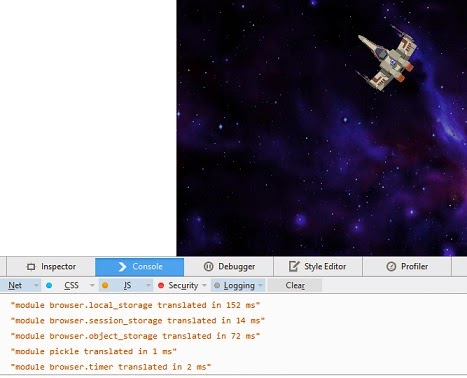
Runs pretty well. And I have the background music going. Good start for the port of the game.
Now I need to look into Brython UI event handling for picking up keyboard events. To control the ship :)
Dan
Billy Earney
Dec 11, 2014, 11:12:47 AM12/11/14
to bry...@googlegroups.com
Dan,
Once you get it working could you send us the code (or donate the code to brython's gallery)?.
This maybe a good candidate for me to translate to pygame (and help bring the pygame library to better functionality).Once you get it working could you send us the code (or donate the code to brython's gallery)?.
Billy
To view this discussion on the web visit https://groups.google.com/d/msgid/brython/a1290cfb-cf64-4615-8e09-eece2f6fc5c7%40googlegroups.com.
dan d.
Dec 11, 2014, 4:08:54 PM12/11/14
to bry...@googlegroups.com
First lets see if I get it finished :)
Sure, if its decent enough for theBrython gallery, no problem.
Just remember that I am not really a programmer... so don't expect too much from the code :)
If I get it done, it will work, but it will most likely not be as elegant as code can be, and it will not have any "crazy advanced" Python or JS stuff in it.
Dan
Sure, if its decent enough for theBrython gallery, no problem.
Just remember that I am not really a programmer... so don't expect too much from the code :)
If I get it done, it will work, but it will most likely not be as elegant as code can be, and it will not have any "crazy advanced" Python or JS stuff in it.
Dan
Reply all
Reply to author
Forward
0 new messages