
(``-_-´´) + BrinKadeiraS: 2522 BrinKadeiraS

(``-_-´´) BrinKadeiraS
BrinKadeiraS
|

|

- US Court: RapidShare Not Guilty of Copyright Infringement
- NewsRob 3.9
- Bones 5x22 [720P - HDTV - DIMENSION]
- Google e o Video na Web - WebM
- Android Tablet da Nvidia
- Notícias do Dia
- Google IO - Dia 2 - Android e Google TV
- Google TV Announced
- World Has Moved On
- The Google TV Story
- Android 2.2: Froyo Is a Major Update
- Cartão do Cidadão e Ubuntu 10.04 (Lucid Lynx) – Parte 1
- (``-_-´´) + BrinKadeiraS: 2521 BrinKadeiraS
|
US Court: RapidShare Not Guilty of Copyright Infringement Posted: 20 May 2010 02:35 PM PDT
The California-based company called for a jury trial in the United States to settle the issue. RapidShare responded by requesting that the case be postponed and transferred to Europe and heard under German law. This request was denied last month and the case went ahead in the United States. This week the District Court of California rejected Perfect 10’s request for a temporary injunction. The Court stated in its ruling that as a file-hosting company, RapidShare cannot be accused of any copyright infringements. The ruling is a significant victory for RapidShare and the case sets an important precedent in the United States. “The view that RapidShare does not promote any infringements of copyright, unlike other file-hosts, appears to be gradually catching on,” Christian Schmid, founder of RapidShare said. “It is a milestone for us that this is also happening in the US. We are happy that the court in California has not bought into the odd line of argument put forward by Perfect 10 and we look forward to increasingly emphasize the major difference between RapidShare and illegal share-hosts,” Schmid added. For Rapidshare this is the second high profile legal victory this month. Earlier, a German Court of Appeal overturned an earlier verdict in the case against the movie rental company Capelight Pictures. In the verdict it stated that RapidShare is not liable for acts of copyright infringement committed by its users. It is not entirely clear what Schmid means by “illegal share-hosts” in his comment, but we assume that he refers to sites that encourage copyright infringement. The company previously said it would distance itself from other file-hosters that try to win the favor of those users that upload and distribute copyrighted content. RapidShare itself does all it can to avoid such claims and is hoping to convert pirates into paying customers. Instead of simply removing pages where copyrighted material can be downloaded, RapidShare would like to redirect users to an online store where the same content can be bought legally. Article from: TorrentFreak.     
 |
|
Posted: 20 May 2010 07:02 AM PDT Want to report a bug? Discuss a feature? Need help? Please come to the mailing list: http://bit.ly/nr_list Want to submit a feature suggestion? http://bit.ly/nr_suggest Looking for the FAQ: http://bit.ly/nr_faq NewsRob 3.9 Fit-To-Width for Images This was one of the top 10 feature requests (link). Images that are larger than the current width of the screen are now automatically downsized to fit the width. Play with it, it's simple. You can skip to the next section now, but here is also some more background info that you can later on refer to when you have more questions. The functionality works independently from the current orientation, density and zoom level. The downsizing happens when the content is first loaded however, so if you change any of the aforementioned parameters afterwards the resizing will only take effect for the next article you view (or you need to tap twice on the article header, which also forces a content reload). This functionality needs to change the content of the actual web page and only works for the feed view, not the web view, as this would mean NewsRob would change the color scheme of a website that it doesn't know. As NewsRob knows what the pages look like that are processed with the Google Wireless Transcoder (option: Simplified Web Page) those pages are processed too when downloaded. New Theme For Night Time Reading (Pro) This was the top feature request (link). The theme was implemented with somebody in mind who woke up in the middle of the night and whose eyes don't expect to look into a flash light right away. Or with the dad in mind who wants to do some reading when rocking his little one into sleep and who doesn't want to keep the baby awake with the bright screen. Therefore the new theme uses muted colors and a low contrast. Hence the theme is not meant to be an alternative look or to be used under direct sunlight. From an implementation point of view this feature doesn't only change the lists and other UI elements owned by NewsRob but also changes the feed content. Hence the some caveats apply as for the image-autofit-feature above. Other Enhancements And Bug Fixes New Swipe-To-Read implementation The swipe gestures on the article list (left-to-right to mark an article as read, right-to-left to mark an article unread) are implemented differently than before and should work much more reliable. Not Enough Space Notification NewsRob doesn't want to surprise you with a full SD card. Therefore NewsRob stops downloading the content of new articles when there are less than 100 MB free on your SD card. With this version NewsRob now shows a notification that it did so. You need to make more space on your SD card then or reduce the configured number of articles in Settings/Local Cache/Reading List. Otherwise you'll see this notification after each sync ;-) "Unread Only" Is The New Sync Type Default A couple of releases ago "Unread Only" was introduced as an option for "Settings/Sync/Sync Type". When choosing this option during a sync all read articles will be deleted and older unread articles will be fetched to fill up your local database again. Details: Actually not all read articles are deleted. The most recently read article will not automatically deleted, so that you can change your mind on the read status of this article even after a sync. Also if you have the Pro version your shared articles, starred articles and notes are not deleted if they do not exceed the configured capacities for those entities. I declared this functionality experimental in the beginning, but it worked great so far and so for all new NewsRob installations this is the default. Old installation will not be force-migrated to this new default, but I would recommend you to consider this option. No Hovering Zoom Controls On HTC Incredible Because of a bug with the HTC Incredible the hovering zoom controls are disabled for the time being. I will reconsider this after the next OS upgrade for those devices. Good Bye Android 2.0 Now that Android 2.0 is on its way out I removed the workaround for an Android 2.0 bug. As a result the NewsRob download is now quite a bit lighter. For people with Android 2.0 devices the icons will look a bit fuzzy now - please upgrade to Android 2.1. Download Timeout Some people commented in the Android Market that NewsRob was sucking their battery dry. Fortunately some users came forward and entered a two communication. Looking at their log files I saw that some servers were very sloooooooooooooooow to respond. From this version on, NewsRob will interrupt the downloading of a web page after two minutes. Articles that fall victim to this drastic measure will be marked with a little red dot. Closing Empty Feed Lists Returning to an empty feed list will now close it, if it is not the task that launched NewsRob. This is now consistent to the other lists' behaviors and also with auto-skipping empty levels, like feed lists with only one feed etc. Articles in Bundles / Duplicates Articles that are in a bundle will now also be below a folder that is called "xyz bundle", where xyz is the bundle's label. As a consequence you won't see any duplicate articles anymore when you have a bundle and label with the same name. Background Data Setting Also NewsRob will now obey Android's system-wide background data setting. If this is disabled NewsRob's auto-sync will not fetch new articles, upload changed articles' status or download any pages. However a manual sync – including a trigger from Setting Profiles or Locale – will still work. This is consistent with NewsRob's "WiFi-Only" setting for auto-sync and downloading. If you start NewsRob afresh and have auto-sync enabled, but background data disabled you'll see a quick toast mentioning that discrepancy. Froyo / Android 2.2 At least according to my initial testing NewsRob runs well on Android 2.2. The I am a bit torn here. The Android Market comments were very loud and angry, but despite that and my promotion of the two alternatives to solve it, still less than 20 people have actually voted for either the option to remove the action bar or to optionally move it to the bottom. Both options will add to the download size of NewsRob, but more importantly take significantly time to implement. Time that I cannot use to implement other features. This lack of actual features will impact all users. Still, as this topic seems so very close to the heart of some, I will implement one or the other, but only one. Currently there is no clear winner. So if you have voted for both, please retract your vote from the one that is less important to you. If they stay head-to-head I will implement the one that costs less time, but can't tell you off the bat which one this will be. Or if you haven't voted before, please do so now. If you have voted, but meanwhile totally love the action bar and can't live without it anymore, you could also remove your vote ;-) If the numbers of the leading one significantly falls I'll skip the whole thing ... one can dream. Here are the suggestions again:        
 |
|
Bones 5x22 [720P - HDTV - DIMENSION] Posted: 20 May 2010 08:24 PM PDT  
 |
|
Google e o Video na Web - WebM Posted: 20 May 2010 02:57 AM PDT  Uma das novidades mais aguardadas no HTML5 era a capacidade de suportar vídeo e áudio sem a necessidade de plugins como o Flash. No entanto essa capacidade foi "castrada" ao não obrigar qualquer plugin a suportar qualquer codec. Assim, cada browser decidiu pelas tecnologias "da casa", fazendo com que o sonho de um formato de vídeo unificado e standard entre todos fosse de novo adiado... Uma das novidades mais aguardadas no HTML5 era a capacidade de suportar vídeo e áudio sem a necessidade de plugins como o Flash. No entanto essa capacidade foi "castrada" ao não obrigar qualquer plugin a suportar qualquer codec. Assim, cada browser decidiu pelas tecnologias "da casa", fazendo com que o sonho de um formato de vídeo unificado e standard entre todos fosse de novo adiado...Mas eis que o Google parece estar decidido a acelerar o passo nesta área, e depois da aquisição da On2, uma empresa que detinha um codec vídeo chamado VP8, veio agora torná-lo público e livre para todos. Um codec que será acompanhado do codec Vorbis no áudio, e encapsulado num formato WebM - basicamente um Matroska. Qual o motivo para festejos?... Bem... É que para além do Firefox, que acolheu este formato de braços abertos, o Google conseguiu angariar um enorme conjunto de empresas que o irão suportar igualmente: desde a Adobe com o seu Flash, o Opera, e até a Microsoft com o seu Internet Explorer 9 (desde que o codec seja instalado pelo utilizador.) O Google vai converter todos os seus vídeos no YouTube para este novo formato, e assim será dado um importante passo para que o video em HTML5 finalmente se concretize em pleno. Portanto, preparem-se para incluir a palavra WebM no vosso dicionário do "dia-a-dia". :) (Falta saber como irá a Apple reagir a isto... E há também quem diga que o VP8 tem ainda que evoluir para chegar ao h.264 e que tem partes "copiadas" que estarão sujeitas a guerras de patentes.)    
  
 |
|
Posted: 20 May 2010 03:11 AM PDT 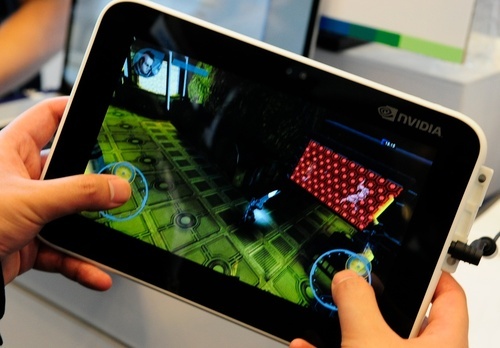 A Nvidia continua a fazer crescer água na boca aos utilizadores, desta vez com mais um protótipo de um tablet Android com o seu novíssimo chipset Tegra 2, e um CPU dual core Cortex A9 - uma geração mais recente do que serviu de base ao A4 da Apple que está no iPad. Tem também 1GB de Ram (ao invés dos reduzidos 256MB que temos no iPad), câmara frontal, e portas USB. Falta saber que tipo de autonomia terá, o seu preço, e... talvez o mais importante... quando é que estará disponível para compra.   
  
 |
|
Posted: 20 May 2010 04:51 AM PDT O Google tem dominado as notícias com o seu Google I/O a ser palco de inúmeras apresentações e novidades (incluindo o novo formato de vídeo aberto WebM), mas mais coisas há que merecem destaque hoje: como a Adobe e o seu suporte para HTML5, o Flash a recorrer aos torrents - sim, leram bem - e até a autonomia nos Androids. :)
Flash recorre aos Torrents  É aquilo que já se sabe há muito... distribuir conteúdos "pesados" fica caro, em servidores e largura de banda - a não ser que se utilizem técnicas P2P como o BitTorrent. É aquilo que já se sabe há muito... distribuir conteúdos "pesados" fica caro, em servidores e largura de banda - a não ser que se utilizem técnicas P2P como o BitTorrent.A Adobe finalmente percebeu isso e vai permitir que o seu novo Flash 10.1 utilize streaming de vídeo utilizado o mesmo tipo de tecnologia P2P. Em vez de necessitarem de inúmeros servidores monstruosos, capazes de aguentar com milhares ou milhões de utilizadores, essa carga será distribuída pelos utilizadores - fazendo com que todos possam ver os conteúdos sem problemas de "excesso de tráfego." Com cada vez mais serviços a utilizarem esta tecnologia quero ver a Zon (ou qualquer outro ISP) a continuar a fazer shaping aos torrents! Adobe abraça o HTML5 Mais uma vez demonstrando que o panorama na Web pode mudar mais rapidamente do que se imagina, a Adobe - talvez motivada pela "guerrilha" com a Apple ao rejeitar o Flash no iPhone e iPad - dá agora um novo passo em frente, adaptando as suas ferramentas para a criação de conteúdos em HTML5. Seria caricato ver as posições inverterem-se, e ser a Adobe a suportar estas funcionalidades (como o vídeo WebM), enquanto os dispositivos da Apple ficam "para trás" no seu ecossistema fechado... Parece que a decisão de optar por um iPhone nos próximos meses se tornará numa proposta cada vez mais arriscada... Há uns meses atrás diria que o domínio dos iPhone ainda estaria "garantido" pelos próximos 12 meses, hoje em dia já me recusaria a fazer tal afirmação. Falta ver as cartas que Steve Jobs irá jogar na apresentação oficial do novo iPhone. mSpot - A tua música na Cloud 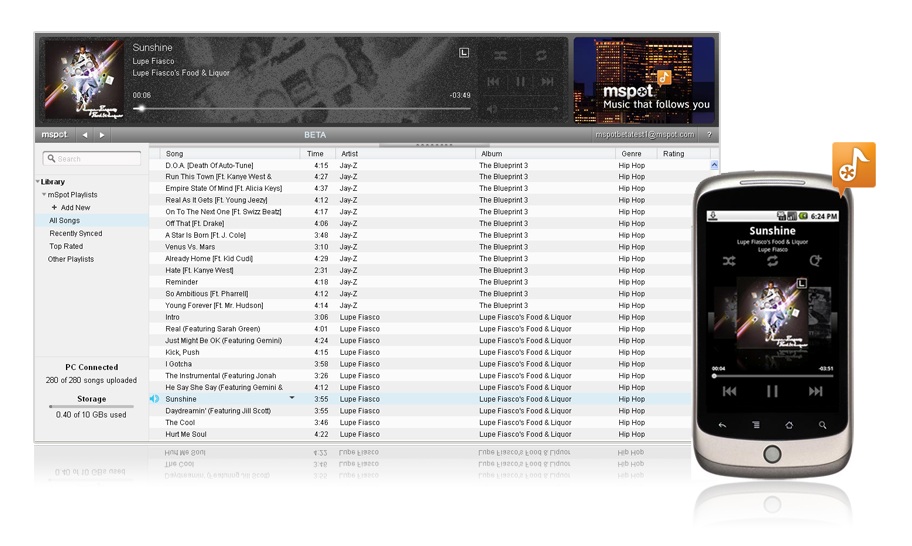 Com este mSpot começamos finalmente a modernizar esse tipo de coisas: com os nossos conteúdos a estarem na web, e acessíveis de qualquer dispositivo: seja ele um smartphone, ou um browser de um computador de secretária. Será esse o futuro, podermos ver e ouvir o que quisermos, quando quisermos, e onde quiseremos. Bateria dos Android "deveria durar um dia" Por muito mal que se possa dizer de algumas atitudes de Steve Jobs, o que é certo é que há coisas que ele sabe fazer bem. Veja-se a questão do multitasking, que tanto tempo demorou a chegar ao iPhone (só no OS 4.0, ainda em fase beta, que chegará ao público nas próximas semanas.) Não é caso para dizer "eu bem te avisei", mas eis que o próprio Larry Page lhe veio dar razão ao responder a uma crítica de um utilizador de Android relativamente à autonomia do seu aparelho, ao responder: "Se a bateria não durar um dia, então a culpa é das Apps que têm a correr!" Isso já todos sabemos... mas serve exactamente para justificar todos aqueles argumentos do Steve Jobs acerca do multitasking. Chrome ganha Web Store  As "stores" estão aí para ficar. Depois do iPhone, Androids e tudo o resto, eis que chega a vez do Chrome ter direito também a um Web Store onde os utilizadores podem facilmente adquirir e instalar aplicações. Se para muitos pode parecer estranho ter uma coisa deste tipo num browser, rapidamente perceberão o porquê quando se lembrarem que isto cairá que nem uma luva no futuro Chrome OS. Google Web Fonts  Se quiserem utilizar tipo de letra "bonitos" nos vossos sites, agora poderão ter a vossa vida simplificada.   
  
 |
|
Google IO - Dia 2 - Android e Google TV Posted: 20 May 2010 09:55 AM PDT  Claro que rapidamente passaram ao que realmente interessa, as melhorias do Android: mais rápido, mais amigável (com uma App Store toda Web Based), e claro... com Flash. Como é habitual nestes eventos, o Google não deixou de oferecer uma rica prenda a todos os presentes: desta vez um espectacular HTC EVO 4G!  Mas... aquilo que já se suspeitava estava para chegar... o Google quer chegar às televisões!  Com este Google TV o Google pretende fazer desaparecer a fronteira que separa a TV "tradicional" dos conteúdos na internet. Passará a ser possível fazer uma pesquisa sobre tudo o que pretendam: o horário dos próximos episódios ou jogos desportivos que desejarem; marcarem-nos para gravação; etc... Enfim, tudo aquilo que uma "box" deveria ser (espero bem que a Zon esteja atenta e aproveite esta oportunidade para reformar as suas arcaicas caixas que são um autêntico suplício de utilizar!) Finalmente, menos um motivo para ter um PC a fazer de media center ligado à TV apenas para se poder pesquisar coisas sobre as séries e filmes que estamos a ver... Venha de lá uma box Google TV que eu nem penso duas vezes!  Claro que poder pesquisar por uma série e descobrir que está disponível via inúmeras vias é interessante... desde que esteja realmente disponível. Cá em Portugal já estou a imaginar a quantidade de "Desculpe mas este conteúdo não está acessível na sua região"! Espero sinceramente que a questão dos "direitos de autor" seja algo em que o Google "bata o pé" num futuro próximo - tal como agora o está a fazer com o formato de vídeo - para que as coisas evoluam... Talvez começando com os seus eBooks Google Editions... Bem... amanhã dou-vos mais pormenores sobre as novidades relevantes... Actualização: vídeo do Google TV   
  
 |
|
Posted: 20 May 2010 12:53 PM PDT Google TV is a new platform that aims to bring the Web to TVs. Google developed a custom Android version that runs Google Chrome and improves the TV viewing experience by allowing you to find TV programs, showing recommendations and integrating content from the Web.
"With Google Chrome built in, you can access all of your favorite websites and easily move between television and the web. This opens up your TV from a few hundred channels to millions of channels of entertainment across TV and the web. Your television is also no longer confined to showing just video. With the entire Internet in your living room, your TV becomes more than a TV — it can be a photo slideshow viewer, a gaming console, a music player and much more," explains Google. Google's demo from the Google I/O conference wasn't very convincing. Google acknowledged that many other companies tried to create similar products without too much success. The explanation is probably that they were ahead of their time, but Google says that they were unsuccessful because they dumbed down the Web experience, they were closed and users had to choose between watching TV and browsing the Web. "The project started 2½ years ago, with a vision of a walled garden of TV-optimized web services. But the landscape keeps shifting, particularly in the capabilities of mobile devices. The only solution big enough for the problem is to bring the whole web to your TV," says Vincent Dureau, who is in charge of Google TV. Google partnered with Sony, Intel and Logitech to add Google TV to "televisions, Blu-ray players and companion boxes". The first Internet-enabled TV that runs Google's software will be launched this fall by Sony and it promises to provide "richer internet access so you can browse the web just like you would from a computer." But why not connect your TV to a computer? Android is a great operating system for a mobile phone, but it doesn't look very well on a big HDTV. Not all the Android applications are useful on a TV and those that are useful won't take advantage on the huge screen estate of the TV. Google promises to introduce a Google TV SDK and some APIs for web applications, but that will happen next year. Google TV has a lot of potential and I'm sure it could eventually become a great product. The software could make TV programs more interactive by detecting phone numbers, addresses or URLs, it could allow you to chat with a friend while watching the same TV show, it could create chat rooms for everyone who watches the same show, it could use visual search to show information about an object from the screen or it could translate a foreign-language movie. If you already have an Android phone, you can use it as a remote control. Since the TV and the phone can run the same applications, you'll be able to sign in using the same Google Account and synchronize your data. Favorite an YouTube video on a phone, watch it later on your TV and use it to generate a list of recommended TV shows. Can we switch to the other box?      
  
 |
|
Posted: 20 May 2010 01:06 PM PDT |
|
Posted: 19 May 2010 02:47 PM PDT  Vincent Dureau, who’s in charge of Google TV, is a lean, bony-faced man with a strong French accent; not too far off my own age, I’d say. With the announcement imminent, he’s been too busy to write; I'm reporting on my talk with him to give a feel for the thinking behind the project. You’ll notice an absence of quotation marks; Vincent’s half of the conversation is reconstructed from the combination of my memory and notes. I think it’s accurate in essence, but certainly not in detail; among other things I can’t write with a French accent.


 |
|
Android 2.2: Froyo Is a Major Update Posted: 20 May 2010 11:35 AM PDT Google announced today Android 2.2, a major update for Google's mobile operating system. There are many changes and a lot of new features that are really useful.
Android now uses a just-in-time compiler that improves the performance for some applications, especially for games. "The new Dalvik JIT compiler in Android 2.2 delivers between a 2-5X performance improvement in CPU-bound code vs. Android 2.1 according to various benchmarks," says Xavier Ducrohet. Android's browser includes the V8 JavaScript engine created for Google Chrome, so web pages that use JavaScript heavily will load much faster (some benchmarks show a 2-3X improvement). Google claims that Android's browser is the fastest mobile browser available today. Developers have a new API for app data backup, which is really useful if you want to switch to a new Android device or you want to install a custom version of Android. There's also an extremely useful messaging API for sending data to an Android phone from another device. For example, you'll be able to send a link from your computer to your Android phone and the phone will automatically open the browser and navigate to the web address. You can also send files and install applications from your computer over the air. Android Market will have a web interface, applications can auto-update and you can quickly install all the updates, instead of manually installing each update. Another change is that applications can be moved to the SD card. Google also announced that it has acquired SimplifyMedia, a company that developed some cool applications for streaming your music. Android 2.2 has built-in support for tethering and it can transform a phone into a portable hotspot. Android Market includes some great applications for tethering, but it's nice to see that's now a built-in feature. You can add multiple languages to the keyboard and switch between them by swiping across the space bar, there's a new UI for the camera, there's support for Exchange calendars and remote wipe, LED flash for the Camcorder, support for sharing contacts with other phones and much more. Flash 10.1 is now available as a beta application in the Android Market, but it requires Android 2.2. Nexus One and Motorola Droid will be updated to Froyo next month. The other HTC phones launched this year will be updated in the second half of the year. "This includes popular models like the Desire and Droid Incredible as well as hotly anticipated phones like the Evo 4G, MyTouch slide and upcoming models." 
  
  
 |
|
Cartão do Cidadão e Ubuntu 10.04 (Lucid Lynx) – Parte 1 Posted: 20 May 2010 11:14 AM PDT O Cartão do Cidadão permite a assinatura digital e acesso autenticado a vários serviços online, em particular do Portal do Cidadão e Portal da Empresa (mudança de morada, criação de empresas, etc). Para essa utilização, é necessário ter:
Seguem as instruções para quem quiser instalar o software do Cartão do Cidadão no Ubuntu 10.04. Resumindo os passos são:
Nota Importante: o software do Cartão do Cidadão só funciona em versões de 32 bits do sistema operativo. Transferir para o seu computador o software do Cartão do CidadãoIr ao sítio web do Cartão do Cidadão, secção de software e transferir a versão para Ubuntu: http://www.cartaodecidadao.pt/index.php?option=com_content&task=view&id=102&Itemid=44&lang=pt (eu usei a versão 1.22 para Ubuntu 9.10). Descomprimir o ficheiroAbrir o ficheiro com o gestor de arquivos (basta fazer duplo-clique) e carregar em Extrair. Deve encontrar o ficheiro na sua Área de Trabalho, que pode ser acedida por Locais -> Área de Trabalho. Depois de carregar em Extrair terá uma nova pasta chamada Cartao_de_Cidadao. Instalar o softwareAbra uma consola: Aplicações -> Acessórios -> Consola. Escreva os seguintes comandos, carregando na tecla Enter no fim: cd "~/Área de Trabalho/Cartao_de_Cidadao/" sudo ./install.sh Aceite os termos da licença de utilização, escrevendo sim. Nota: Ao contrário da Bélgica e da Estónia, Portugal decidiu restringir a utilização do Cartão do Cidadão ao distribuir o software de forma restrita e proprietária. Se discorda, faça chegar a sua opinião à AMA – Agência para a Modernização Administrativa. Instalar os pacotes extra necessáriosPara o programa fundionar pode precisar de mais alguns pacotes. Execute o seguinte comando: sudo apt-get install pcscd libpcsclite1 libccid Nesta altura deve poder lançar o programa do cartão do cidadão. Ligue o leitor do cartão ao computador, ponha o cartão do cidadão no leitor e execute: pteidgui Neste programa poderá ver a informação disponível no cartão do cidadão e testar os pins de acesso.   
 |
|
(``-_-´´) + BrinKadeiraS: 2521 BrinKadeiraS Posted: 20 May 2010 02:03 PM PDT (``-_-) BrinKadeiraS
////////////////////////////// ///////////// Posted: 20 May 2010 08:31 AM PDT   
 |
 Last year, adult media company Perfect 10 filed a lawsuit against the leading file-hosting service, RapidShare. Among other claims, Perfect 10’s lawsuit


| You are subscribed to email updates from (``-_-´´) BrinKadeiraS
To stop receiving these emails, you may unsubscribe now. |
Email delivery powered by Google |
| Google Inc., 20 West Kinzie, Chicago IL USA 60610 | |
You received this message because you are subscribed to the Google Groups "BrinKadeiraS" group.
To post to this group, send email to brinka...@googlegroups.com.
To unsubscribe from this group, send email to brinkadeiras...@googlegroups.com.
For more options, visit this group at http://groups.google.com/group/brinkadeiras?hl=en.