

Rich Beckman
Sep 5, 2021, 9:54:54 AM9/5/21
to Brennan Forum
As many before me, I cannot connect my B2 library of ripped CDs with the Sonos App. I am using the Sonos App on an iPhone and also have tried on my MacBook. I get the familiar error on either - Denied, check Username and password. When I talk to Sonos customer support they asked me about SMBv1. I think that Apple supports that natively, but they asked me if it was turned on on my Brennan B2. They also asked me if file sharing was allowed on my Brennan B2. I don't know the answers to those questions or how to determine them. I don't see anything relevant in the Brennan menus. I can see my music library on a browser by typing in the IP address, so I know it is there and on the same network. On the Sonos App, I use \\BRENNANB2\music as the path, root as the username and brennan as the password. If these are still correct, they don't work. I have NAS turned on on the Brennan, I select Networked devices on the Sonos App. Instructions from Brennan say to add Music from Your Networked Share and show a Browse button on that screen. I don't have a browse button on my screen, so no idea how to browse for the folder. One Brennan screen says to use forward slashed instead of backward slashed, but that doesn't work either. I know this must work. I am not a programmer and I can't imagine that this is meant to be this difficult. Can someone explain how to do this in non-techie language? Thanks. I don't have previous experience with either Brennan or Sonos.

Mark Fishman
Sep 5, 2021, 11:15:22 AM9/5/21
to Brennan Forum
The B2 supports SMB 1.1 out of the box -- in fact there's no (easy) way to turn it off.
Having NAS turned on means file sharing is allowed.
The username and password are correct (unless you have gone to the trouble to change them, which, again, is not easy).
So your problem is with your iPhone and the Sonos app, not with the B2.

David L Raines
Sep 5, 2021, 11:19:31 AM9/5/21
to Brennan Forum
What if you replace BRENNANB2 with the IP address of the B2? For example \\192.168.1.205\music does it work?

fred.w....@gmail.com
Sep 5, 2021, 11:58:11 AM9/5/21
to Brennan Forum
While I am not an apple user, I would suggest that you first get your Apple device to see the B2's NAS. If rhe B2's NAS is turned on, then
IT WILL BE THERE, many of us use it!
You need to get you Mac's file browser to see the B2 (music), then when you know this is woking on your Mac, then start problem solving the Sonos bit.
As has been said your issues are NOT with the Brennan, NAS on Brennan is good and solid, if a bit slow - the computer in the Brennan is very small!
Fred

PMB
Sep 6, 2021, 5:05:35 AM9/6/21
to Brennan Forum
Hi Rich.B...,
The Sonos app shows \\BRENNANB2\music whereas what actually works is //BRENNANB2/music or //192.168.1.127/music (use the IP address from your B2). So please try that.
NAS mode does need to be turned on - use the front control to go to Settings >> Maintenance >> Start NAS. I think you may have that turned on already as you are able to see the music folder on your computer.
Paul
Brennan Support.
Rich Beckman
Sep 6, 2021, 11:33:19 AM9/6/21
to Brennan Forum
NAS is on (Done) neither path //BRENNANB2/music or //IP address/music with either forward of backward slashes works. Same error message: Denied. Check login and/or password (using root and brennan).
Mark Fishman
Sep 6, 2021, 11:53:08 AM9/6/21
to Brennan Forum
You said you have a MacBook? In Finder, on the menu bar, "Connect to Server" (I think it's in a "Go To" menu?). You should tell the Mac explcitly what protocol to use:
smb://[IPaddressofB2here]/music (without the [brackets])
if it finds the B2, it should ask for username and password. If plain old root and brennan aren't working, it might be because the Mac actually HAS a root account and "brennan" is NOT the password, so it's getting confused. In that case, try this instead of the above in the Connect to Server window:
smb://[IPaddressofB2here];root:brennan@[IPaddressofB2here]/music
(again without the [brackets])
Please report back; screen shots could be helpful also.
Thanks -- m.
Rich Beckman
Sep 6, 2021, 12:16:56 PM9/6/21
to Brennan Forum
Thanks Mark. I only used my MacBook to make sure I could see the NAS drive at the NAS IP address. My MacBook is actually on a different network (5 ghz) and won't connect to the slower network that the NAS is on (not sure why). My iPhone, where I have the Sonos app is on the same network as the NAS and recognizes the NAS when I check the network. I'm not sure how to connect to the server with my iPhone, but there is likely a way, so I'll try to research that.
Rich Beckman
Sep 6, 2021, 12:21:50 PM9/6/21
to Brennan Forum
OK. I used Files to connect to server using my iPhone and it connects to the Brennan B2 using the IP address and root and brennan and I can see the music folder and all of its contents.
Mark Fishman
Sep 6, 2021, 12:24:54 PM9/6/21
to Brennan Forum
If your MacBook and B2 have IP addresses that match in the first three numeric fields, differing only in the last field, yet they cannot see each other on the network, perhaps you have a BT router? BT effed up their router firmware, preventing devices on the same network from talking to each other, and were supposed to have fixed it back in July -- maybe you could ask them to fix yours.
5GHz and 2.4GHz are NOT different networks: they are simply different frequency bands used for wireless communication. The network is defined by the IP address range in the router.
Rich Beckman
Sep 6, 2021, 12:31:48 PM9/6/21
to Brennan Forum
OK. Thanks. I can see the music folder on my MacBook and my iPhone using root and brennan. Still can't load music library. Same error: Sonos was unable to add the music folder. Access to the shared folder is denied - check username and password.
Mark Fishman
Sep 6, 2021, 1:33:20 PM9/6/21
to Brennan Forum
I've been doing a little poking around the Internet for this error -- it seems to be VERY common for Sonos app users, and most people are using Windows or Macs as the servers for their music libraries. So it's not specifically related to the Brennan devices or software.
One of the more interesting potential causes for this problem is that all the devices you use -- your iPhone, your B2, your computer -- have to be in the same time zone and have the time/date set to be very close to the same on each other. Time differences or time zone differences can cause the Sono app to fail authentication, apparently. Maybe it's worth checking the clock synchronization on the B2 and your iPhone?
Good luck -- m.

JFBUK
Sep 6, 2021, 1:56:38 PM9/6/21
to Brennan Forum
Hi,
I would expect that Sonos speakers need to synchronise time in order for its network connectivity to work successfully so Marks suggestion could be a big clue.
John
Rich Beckman
Sep 6, 2021, 3:00:26 PM9/6/21
to Brennan Forum
Everything has the correct/same time. The B2 library plays on the Sonos speaker from the Brennan app, so there doesn't seem to be a problem with the Brennan talking to the Sonos speaker, just the Brennan music library and the Sonos app. I spent an hour on the phone with Sonos support this morning. Talk about a waste of time. Thanks for trying. This obviously needs more work and better coordination between Sonos and Brennan. It can't really be this difficult.
Mark Fishman
Sep 6, 2021, 5:07:28 PM9/6/21
to Brennan Forum
I've continued poking around. This is DEFINITELY a Sonos issue. Apparently Sonos refuse to update the way they connect to NAS shares, persisting in telling users to open up security holes on their systems. Not only do they require SMB v1 (which we've discussed many times on this forum), they also require NTLM v1 authentication, a protocol that Microsoft told people to stop using back in 2013. Most NAS devices, and the Samba software used in the B2 for the NAS function, turned off NTLMv1 support by default a while back.
Sonos refuse to move to SMB v2 and/or NTLM v2. So it's probably necessary to re-enable NTLM v2 on the B2 if you want it to work as a NAS for Sonos.
Does anyone else on this forum use the Sonos app to play stuff from the B2 (as NAS), or has everyone with a Sonos system switched to letting the B2 control the speakers?
PMB
Sep 7, 2021, 4:14:00 AM9/7/21
to Brennan Forum
Hi All,
I am not a MAC user so if any of you have used MAC + Sonos app to load B2 as a library please let Rich.B know how you did it.
I've attached some instructions from Peter Lowham for connecting the MAC and B2 - it may have some helpful clues.
Thanks,
Paul
Brennan Support.
Rich Beckman
Sep 7, 2021, 9:13:45 AM9/7/21
to Brennan Forum
Thanks for these detailed instructions. I already have my MacBook set up like this and can already see the drive in the network section of my Finder. However, it won't load into the Sonos app. Were you able to load your Music Library into the Sonos app? If so, please advise. I am running Big Sur, Version 11.5.2. Otherwise, I've gotten as far as you have.

Peter Lowham
Sep 7, 2021, 12:21:39 PM9/7/21
to Brennan Forum
Hi All,
Yes, I have the Sonos app running from a Motorola G6 (Android) phone, using the B2 as the NAS music source and it works perfectly. I also have the Sonos app running from a MacBook Pro (High Sierra) without any problems.
What I did was as follows.
1. Sonos Front Screen (orange colour) --> 'Settings' --> 'System' --> 'Music Library' --> 'Music Library Setup' --> '+ Add Shared Music Folder'
2. A sub window opens up 'Add New Share' --> '\\192.168.1.60\music' --> Username: 'root', --> Password: 'brennan'. (don't use the quotes and substitute your B2's IP address)
3. If you go back to the 'System' --> 'Music Library' screen you will see a message 'Updating Music Index'. This will take a little while to complete.
4. Once the Sonos indexing completes, go into 'Music Library' and at bottom left of the screen tap on the musical note icon and that will take you to the B2's music listing.
Something to check is that in the 'System' screen --> 'Date & Time' I have ''Adjust for Daylight Savings' and 'Set Time from Internet' both switched on.
As a matter of note, if you go back into the 'Music Library Setup' you will see that the shared address now shows as '//192.168.1.60/music' (note the forward slashes now). The app seems to do this.
@Rich, if you are still having problems it looks like the Sonos app and the iPhone are not authenticating correctly and the problem lies in there. Your B2 is functioning correctly, NAS is running, there is nothing more to do at the B2 end.
Regarding the 'Browse' button that you refer to, you will find 'Browse' when you open up the Sonos app, then on the bottom of the first screen, the second icon from the left is a 'musical note' symbol. Tap on that and the screen changes to the 'Browse' screen. There you will see 'Music Library' showing. Tap on that and this takes you into the B2 music content, but you will need to fix the authentication problem first. That lies somewhere between Apple and Sonos I think.
Regards,
Peter.
Rich Beckman
Sep 7, 2021, 1:48:30 PM9/7/21
to Brennan Forum
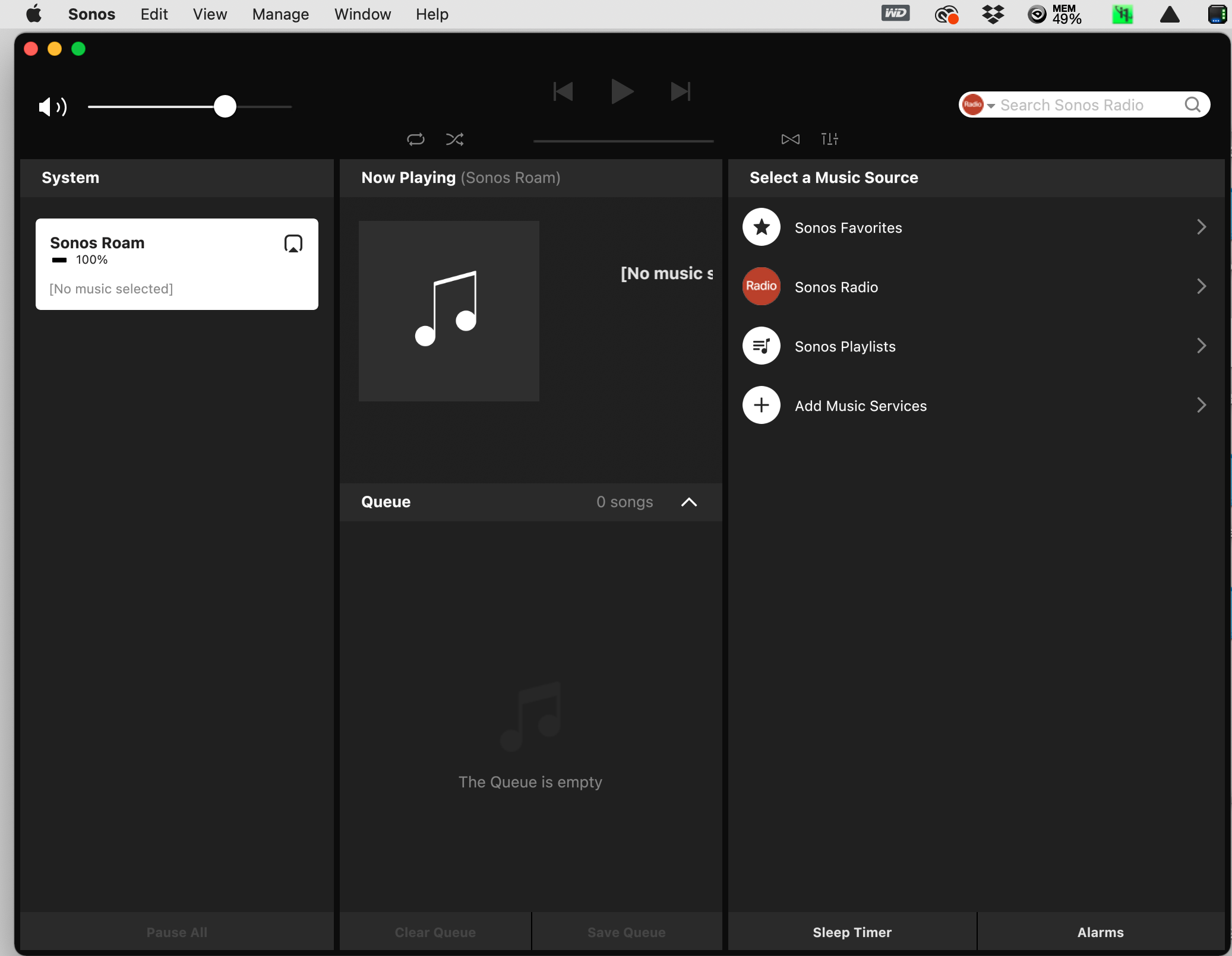
Now I am really confused. Do I have the wrong Sonos app? I attached the front screen. I use the Manage/Music Library Settings to attempt to add the Music Library. When I click on the plus sign at the bottom of the screen it goes to Add Music Folder and I select Networked Device (ex. NAS Drive). Then add the path, then the login and password. Then I get the attached denied message. Can you show me the orange screen you are talking about with the Settings/System/Music Library path and the music note and browse buttons you are talking about.

Rich Beckman
Sep 7, 2021, 2:09:45 PM9/7/21
to Brennan Forum
The Sonos App on my iPhone does have all of the above, just not the Sonos App on my MacBook. Clicking on the musical note brings up the Browse window but it shows only Sonos Radio. The rest is the same. Error message is the same. Not sure how to get the Sonos App and iPhone to authenticate correctly. Not even sure what that means. The Brennan B2 shows up as a device on my network with the same IP address as is displayed on the front of the B2. The Brennan app on my iPhone successfully controls playback of my Music Library. I'm probably missing something simple, but I don't know what. Thanks to everyone. I'll just use the Brennan app.
Rich Beckman
Sep 7, 2021, 3:51:45 PM9/7/21
to Brennan Forum
This screen grab shows that I am in the Sonos App., that I am connected as root to the brennanb2 and that the music folder is on the drive. Then it shows the error message. Does it want some other username and password?
On Tuesday, September 7, 2021 at 9:21:39 AM UTC-7 peter....@gmail.com wrote:

JFBUK
Sep 7, 2021, 4:37:28 PM9/7/21
to Brennan Forum
Hi Rich,
The username and password you are typing in I am sure are correct.
This goes back to Mark Fishman’s post about NTLM authentication.
Because of the Sonos implementation of the protocol they have created an issue when trying to connect to later versions which are more secure.
John
Peter Lowham
Sep 7, 2021, 4:52:25 PM9/7/21
to Brennan Forum
Hi Rich,
My understanding of setting up the Sonos connection is that the initial setup has to be run from the mobile phone app. So all of my notes above are taken from using the mobile phone app (in my case from the Motorola Moto G6 phone).
So, once the setup is completed by using the mobile app, then the MacBook (or Windows) app will work.
I'll see if I can take some screenshots of my mobile phone, but I'm not at home tonight or tomorrow.
Regards,
Peter.
Reply all
Reply to author
Forward
0 new messages