

William Mathieson
Dec 1, 2021, 8:52:45 AM12/1/21
to Brennan Forum
Hi, I'm a new B2 owner and cannot connect it to my wifi. I have followed the videos and troubleshooting advice on the website. It can see my router (Sky dual band) and after entering my password all I see is Connecting 1...2...3...failed. My B2 and router are about 2m apart with nothing between them, I have rebooted both the B2 and router and swapped the wifi dongle between USB ports all with no luck. As far as I can tell both bands on my router have the same address and I'm not sure whether I can disable the 5GHz band without it affecting everything else connected in the house. Any advice and help would be welcomed but if replying please imagine you are Albert Einstein explaining the theory of relativity in German to someone who just scraped a pass in O level German!

fred.w....@gmail.com
Dec 1, 2021, 9:38:28 AM12/1/21
to Brennan Forum
Hi bill
How frustrating,!
Your router and B2 are a definitely close enough together and if your B2 is going to stay there then there is a BETTER way of connecting your B2. However lets confirm a few WiFi things first.
1) Your Sky router will have come with what is called a SSID which will be printed on it or on a card that came with it. Make sure that the B2 is displaying this SSID when you are attempting the setup. The point to note here is that if the
B2 see (display) the SSID of your router the B2 and B2 WiFi dongle are working OK!
2) along with the SSID your router will have come with a WiFi password (which is case sensitive) and an "admin" password. You want to use the WiFi password which is entered using the front knob on the B2.
Essentially the same process as connecting your phone, tablet or PC to the WiFi.
If this fails then the next thing to try is downloading the free edition of Netspot onto your PC (https://www.netspotapp.com/netspotpro.html) and look at your WiFi network to see if the channel /band you are using is overlapping with another router.
Have a play round and tell us if you think you can see an issue, it is the 2.4 Ghz band that you want to look at.
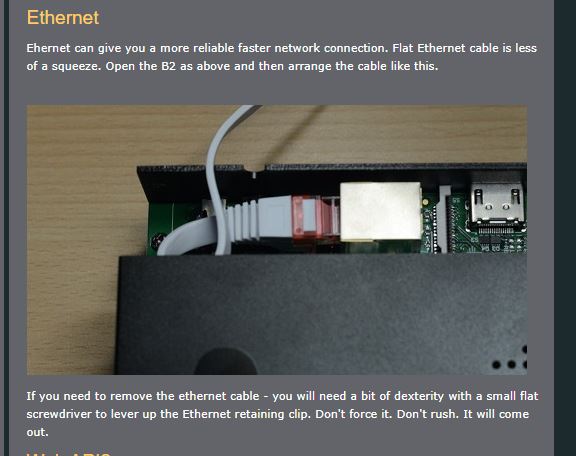
If all this still fails then (and this will not invalidate your warranty) get an ethernet cable and plug one end into an ethernet port at the back of your router and the other into the B2. You will need to take the back off the B2 to do this as described here on
the Brennan Web site. Just remove the top two screws form either side of the back of the B2. There is a flat and a round cutout to allow the cable through the back plate - just go slowly.
Once you have done this, remove the WiFi dongle from the B2 you do not need it now and it will confuse things if you leave it in.
Reboot your B2 and you should be presented with an IP number on your B2's front display.
By the way a Ethernet connection is the BEST sort of connection for the B2.
Fred

JFBUK
Dec 1, 2021, 9:39:33 AM12/1/21
to Brennan Forum
Hi Bill,
the fact that when you attempt to Setup Wi-Fi you can see your home network name in the list of available networks would confirm that your Wi-Fi dongle is OK and that it is seeing the 2.4Ghz band network. The B2 will not list 5Ghz band networks.
Some stupid questions.
When you run the SETUP WIFI menu command you are choosing the correct network name (SSID) ?
Are you typing in the password on the B2 exactly as its written and respecting lower and uppercase of the characters appropriately in your Wi-Fi password ?
I am on Virgin Media, as are several of my neighbours, and the default network names can look very similar.
Have you tried this from the menu ?
>SETTINGS>MAINTENANCE>RESET WIFI
If not, try that and then try a SETUP WIFI again
John
fred.w....@gmail.com
Dec 1, 2021, 9:42:36 AM12/1/21
to Brennan Forum
Once you have a connection the first thing to do from the front display/menu system is a "main menu > settings > Web Upgrade" to ensure that you are on the latest release of the Brennan OS.
Fred
fred.w....@gmail.com
Dec 1, 2021, 10:37:06 AM12/1/21
to Brennan Forum
This went on in my private Email.
---------------------------------------------------------
Hi Fred
Thanks for responding. As my B2 has seen the router and I have entered the password ok I think it’s after that it goes wrong. I’ve downloaded the netspot app. On the discovery page I can see my router listed several times and it differentiates between the 2.4 and 5 bands, each with a different BSSID. Not sure what I am looking at or how it helps.
While I understand that an ethernet connection is better as the B2 and router are on opposite sides of the room this is a reconfiguration I would prefer not to do!
Maybe a silly question, can I use the ethernet to make the connection and then revert to a wifi connection?
Cheers
Bill
---------------------------------------------------------------------- Hi Bill
Please try to use the Forum to communicate (I will copy this conversation there) so that others can see what is going on and help.
The answer to your last question is no you can not connect by Ethernet and have this carry over to WiFi.
The fact that your Router's SSID is listed several times is your problem.
What you need to do is use your PC to log onto your Router (on your router an IP number will be given - type this into your PC browser) you will log on as "admin" and the admin password will be on your router too.
When you are in there you need to assign one of your 2.4 Ghz WiFi's a different SSID (and password) so that you know which one you B2 is connecting to. If you tell us your Sky router model (or point us to its manual) we may be able to help you do this.
Fred
JFBUK
Dec 1, 2021, 10:45:06 AM12/1/21
to Brennan Forum
Hi Fred,

Netspot showing the same SSID twice should not be a problem.
Netspot will pick up the two frequency bands being broadcast as separate networks and they have separate MAC addresses
I agree though that differentiating the SSIDs for 2.4 & 5 would aid diagnosis.
John

Jeff. M.
Dec 1, 2021, 11:07:37 AM12/1/21
to Brennan Forum
My B2 is connected by ethernet using powerline adapters, and is pretty stable! but, I went into my router settings and turned off 5ghz band, nothing was connected to it, and, as most things connect on 2.4 it saves any hassle and confusion, easier life.!
William Mathieson
Dec 1, 2021, 11:25:01 AM12/1/21
to Brennan Forum
Hi
Sorry about responding the wrong way!
On the netspot discovery page my router shows up 7 times (2.4 band 4 times, 5 band 3 times). I have logged on to my Sky Hub and the hub is set to auto to assign the channel with the alternative being to set it to any specific channel between 1 and 13 I can disable the 5GHz band WAP separately so will give that a try.
Jeff. M.
Dec 1, 2021, 11:35:25 AM12/1/21
to Brennan Forum
Bill, before turning off 5ghz make sure in your device list, that nothing is connected to it!
JFBUK
Dec 1, 2021, 11:50:12 AM12/1/21
to Brennan Forum
Bill,
Netspot has the habit of leaving networks listed even when they have had their router re-booted, switched off or gone out of range.
You can see this by looking at the 'last seen' column on the right.
Restarting Netspot will refresh your list.
John
fred.w....@gmail.com
Dec 1, 2021, 12:11:24 PM12/1/21
to Brennan Forum
Try simply turning off the 5Ghz network and then reboot the router an the B2. Then netspot should just see 1 network of that SSID , tell us if that is not the case!
If that works, we will go on from there, if it does not then we are all going to be scratching our heads....it may be a software issue on the B2
My next step would be to reflash the SD card or ask Brennan to sen you a new card (comes with software on it) wee will see what Paul thinks in the morning.
Fred
William Mathieson
Dec 1, 2021, 12:32:29 PM12/1/21
to Brennan Forum
I was wrong I can't see how to turn off the 5GHz band so that option is out unless anyone with a sky hub can tell me how

PMB
Dec 2, 2021, 6:39:22 AM12/2/21
to Brennan Forum
Hi Bill,
We would normally suggest turning off the 5GHz band while trying to get the B2 to connect and/or changing the name of one of the bands on the router - you would then need to log all devices on the renamed band on again.
Failing that, one or two other owners have told me they have purchased a cheap portable router - such as the TP Link TL-WR702N - which connects to your main router via an Ethernet cable and the B2 connects to the portable router.
Paul
Brennan Support.
Jeff. M.
Dec 2, 2021, 9:09:22 AM12/2/21
to Brennan Forum
Paul, Bill has just said he can't turn off 5ghz, I have just tried to find Sky hub settings and their site is not
very helpful!
Jeff. M.
Dec 2, 2021, 9:47:48 AM12/2/21
to Brennan Forum
Bill, if you type
192.168.0.1 into your browser address bar and press enter, the hub setiing s should appear. You may need to log on to this to change your 2.4 5 ghz settings. The Admin settings for this are maybe printed somewhere on the hub, if not it could be
username admin
password sky
Have a look, and see what you think.
Jeff
fred.w....@gmail.com
Dec 2, 2021, 10:10:16 AM12/2/21
to Brennan Forum
This is the sort of thing you should see do (untick the blue boxes) on a Sky router
Reply all
Reply to author
Forward
0 new messages