
Need help with Point Grey Camera and NI DAQ Card control
742 views
Skip to first unread message

Tony
Dec 13, 2015, 10:27:53 PM12/13/15
to Bonsai Users

goncaloclopes
Dec 14, 2015, 10:05:32 AM12/14/15
to Bonsai Users
Hi Tony and welcome to the forums!
Are you using the PointGrey cameras in triggered mode? That is, are the outputs from NI-DAQ set to trigger when each frame from the cameras is captured? If so, then a simple Bonsai workflow to record the data would be the following:

This basically sends every frame from the camera to to a movie file and all the GPIO pin data (the sync pulses) to a text file. You can copy paste the nodes for the second camera. Don't forget to tick the checkbox "GPIO Pin State" under Advanced Camera Settings (see also this thread).
I'm attaching the workflow as well. This should get the raw data out successfully.
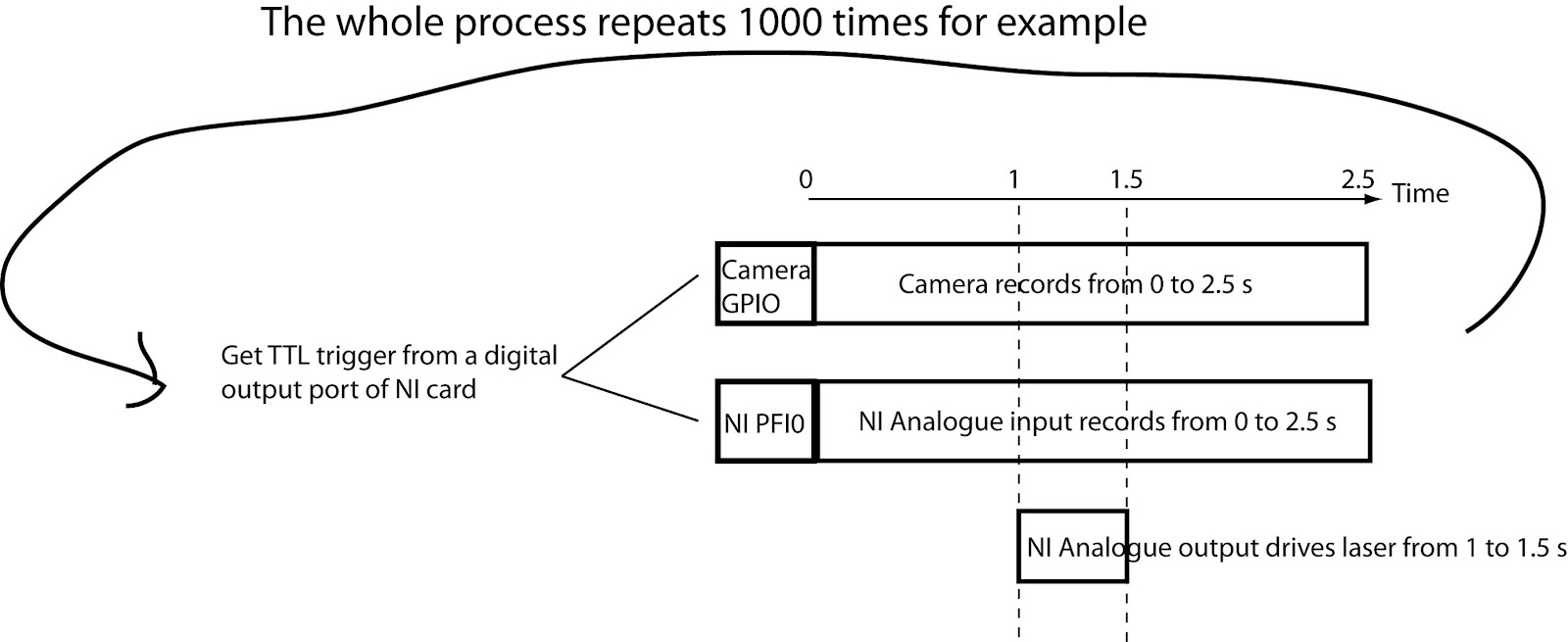
However, from your description I get the impression you have some kind of trial structure as well, aligned to the laser stimulation. Do you want independent videos to be created aligned on these stimulation pulses? One way to do this would be to use the SelectMany operator as explained in the Bonsai paper Fig 3E.

This basically checks for a rising edge of one of the GPIO pins to start a new trial and chops up a new video at that frame.
Let me know which scenarios are you interested in an we can work out more details.
Best,
Tony
Dec 14, 2015, 5:14:37 PM12/14/15
to Bonsai Users
Hi Goncalo,
Thank you so much for your quick reply. The experiment flow I proposed is the second scenario. I tested the workflow you attached today. It works well with small number of triggers like 30 or less, but when the trigger number increases, the program starts to miss triggers. For example, for 160 triggers, it only saves ~153 videos. This maybe because the frame rate is high (100 Hz) and the camera is continuously running and logging without free intervals. One solution I can imagine is to introduce an interval allowing the logging process to finish. For example, when rising edge detected in the camera GPIO pin, the camera starts to record 3.5 s but only the first 2.5 s data is logged into disk. I am not sure whether this can solve the problem, but is this possible in Bonsai? Thanks.
Thank you so much for your quick reply. The experiment flow I proposed is the second scenario. I tested the workflow you attached today. It works well with small number of triggers like 30 or less, but when the trigger number increases, the program starts to miss triggers. For example, for 160 triggers, it only saves ~153 videos. This maybe because the frame rate is high (100 Hz) and the camera is continuously running and logging without free intervals. One solution I can imagine is to introduce an interval allowing the logging process to finish. For example, when rising edge detected in the camera GPIO pin, the camera starts to record 3.5 s but only the first 2.5 s data is logged into disk. I am not sure whether this can solve the problem, but is this possible in Bonsai? Thanks.
goncaloclopes
Dec 15, 2015, 6:18:35 AM12/15/15
to Bonsai Users
Hi Tony,
It should work with an arbitrary number of triggers, so this may be indicative of a problem. When you say a "large number of triggers" do you mean larger frequency or simply total count (i.e. 160 triggers at 1 Hz or 160 Hz triggers)? The logging process should already finish by its own as long as you don't shutdown Bonsai prematurely. Every frame goes to its respective write buffer in parallel.
Best,
goncaloclopes
Dec 15, 2015, 6:59:36 AM12/15/15
to Bonsai Users
Another explanation for the "missing" videos could be that some of the interval boundaries had no frames.
Videos can only be created if there is at least one frame. If your inter-trigger interval is fast enough that no frame arrived from the camera in that period of time, no video would be created for that interval. Again, the critical bit of information is knowing how frequently are you sending your trigger.
Hope this helps,
Tony
Dec 15, 2015, 10:20:41 PM12/15/15
to Bonsai Users
Hi Goncalo,
I found the source of the problem which is I checked the 'Enable/disable trigger' in the trigger control panel of Flycapture2. When I unchecked it, everything works beautifully.
Thank you so much for your help!
Tony
I found the source of the problem which is I checked the 'Enable/disable trigger' in the trigger control panel of Flycapture2. When I unchecked it, everything works beautifully.
Thank you so much for your help!
Tony
Reply all
Reply to author
Forward
0 new messages