
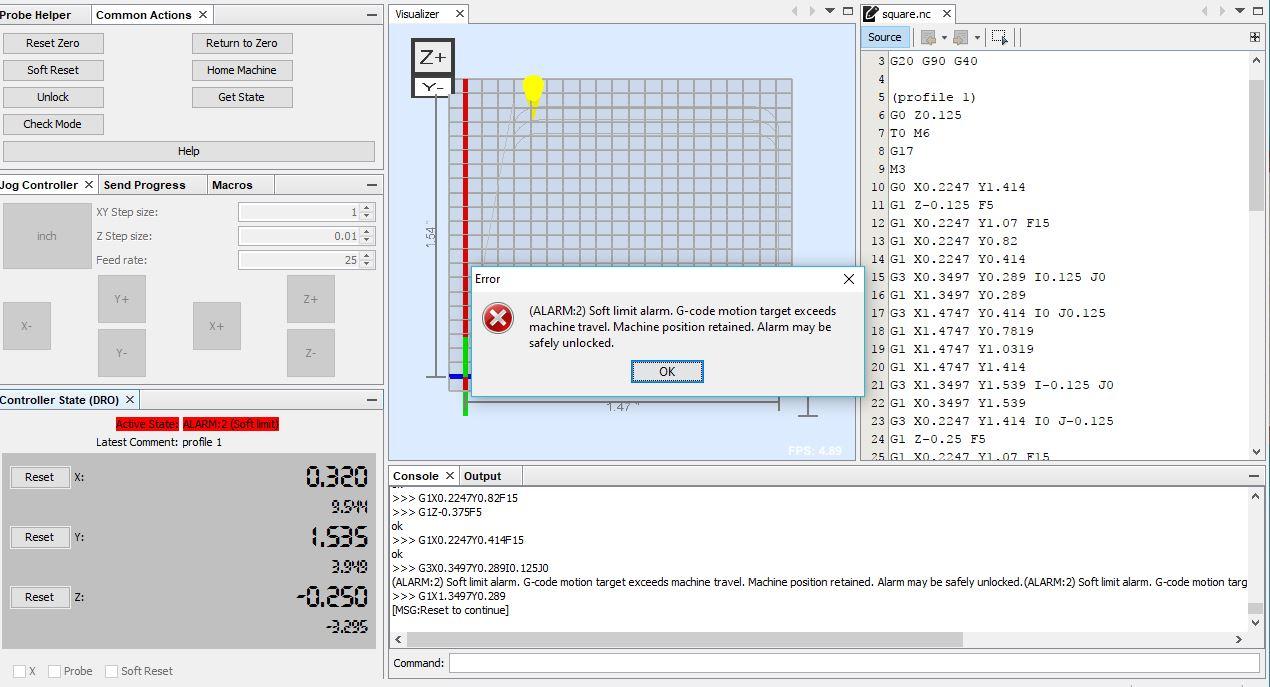
(ALARM:2) Soft limit alarm. G-code motion target exceeds machine travel.
5,987 views
Skip to first unread message

Andrew Davis
Sep 30, 2017, 3:51:32 PM9/30/17
to BobsCNC
Unfortunately, I have yet to be able to cut out the simplest test part. Here's an example of a 1" x 1" test square. The gcode looks fine and seems to run fine as long as the tool is above the work. I'm trying to cut .375" plywood with .125" per pass. Typically, the machine will make two passes. then I get this alarm 2 before the third pass. The machine travel settings are the default grbl 1.1 values...do they need to be reset?
$100 = 80.000 (X-axis travel resolution, step/mm)
$101 = 80.000 (Y-axis travel resolution, step/mm)
$102 = 2267.717 (Z-axis travel resolution, step/mm)
$110 = 10000.000 (X-axis maximum rate, mm/min)
$111 = 10000.000 (Y-axis maximum rate, mm/min)
$112 = 500.000 (Z-axis maximum rate, mm/min)
$120 = 800.000 (X-axis acceleration, mm/sec^2)
$121 = 800.000 (Y-axis acceleration, mm/sec^2)
$122 = 300.000 (Z-axis acceleration, mm/sec^2)
$130 = 450.000 (X-axis maximum travel, millimeters)
$131 = 390.000 (Y-axis maximum travel, millimeters)
$132 = 85.000 (Z-axis maximum travel, millimeters)
Separately, Alarm 2 says that it can be reset; however, the soft reset command seems to have no effect. In other words, I am unable to reset the machine once this error has occurred...I have to turn it off and restart ugs (which would spoil a real part).
I don't really understand how this is possible, since the gcode runs perfectly when the tool is above the work (and there is no resistance to motion)
Any insights?

Bob Wood
Sep 30, 2017, 4:18:31 PM9/30/17
to BobsCNC
The Alarm2 means that the E3 thinks that the spindle has moved past one of the travel limits. When you home the E3 the firmware sets soft limits for both negative and positive ends of travel for each axis. The Alarm2 means there has been a g-code command or a jog move that is asking to go past one of these limits. For example, if you home the E3 then jog up in the positive Z direction, then you will get the Alarm2 because you are already up as high as you can go. The same is true if you move in the negative direction for X or Y.
Please home the E3, then jog to the starting position, then zero all the axis. Then start the g-code file.
Reply all
Reply to author
Forward
0 new messages