
Issue Installing @blockly/plugin-strict-connection-checker with NPM
147 views
Skip to first unread message

Seth Swango
Aug 4, 2021, 2:57:26 PM8/4/21
to Blockly
Hello all,
I am attempting to install the strict connection checker. Repro steps:
node version: v16.1.0
npm version: 7.11.2
blockly version: blo...@3.20200924.3
Here is the output when I try to install blockly via various methods: 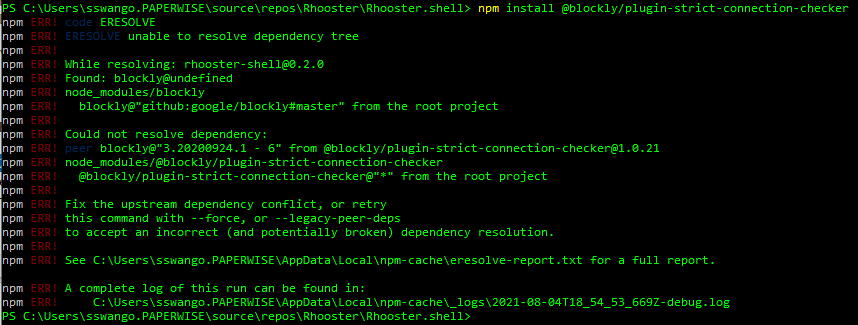

Can anyone point me in the right direct to begin troubleshooting this? Your help is much appreciated.
Best,
Best,
Seth

Sam El-Husseini
Aug 4, 2021, 3:23:17 PM8/4/21
to Blockly
Hello,
What does the rest of your package.json look like. I'm unable to reproduce your issue with the following package.json:
{
"name": "test-blockly-strict",
"dependencies": {
"@blockly/plugin-strict-connection-checker": "^1.0.21",
"blockly": "github:google/blockly#master"
}
}
Note: you could try acquiring Blockly from npm instead of Github. ie, use "blockly": "3.20200924.3" instead of "blockly": "github:google/blockly#master" in your package.json.
Could you try the above package.json in a new project, and let me know if you have trouble installing the plugin in that project?
Cheers,
Sam
Seth Swango
Aug 4, 2021, 4:10:23 PM8/4/21
to Blockly
Sam! Thank you for getting back to me so quickly.
My package.json is extensive but I am able to recreate this error in a simpler project with the following package.json:
{
"name": "my-first-app",
"version": "0.0.0",
"scripts": {
"ng": "ng",
"start": "ng serve",
"build": "ng build",
"test": "ng test",
"lint": "ng lint",
"e2e": "ng e2e"
},
"private": true,
"dependencies": {
"@angular/animations": "~11.0.0",
"@angular/common": "~11.0.0",
"@angular/compiler": "~11.0.0",
"@angular/core": "~11.0.0",
"@angular/forms": "~11.0.0",
"@angular/platform-browser": "~11.0.0",
"@angular/platform-browser-dynamic": "~11.0.0",
"@angular/router": "~11.0.0",
"blockly": "^3.20200924.3",
"bootstrap": "^3.4.1",
"rxjs": "~6.6.0",
"tslib": "^2.0.0",
"zone.js": "~0.10.2"
},
"devDependencies": {
"@angular-devkit/build-angular": "^0.1100.7",
"@angular/cli": "~11.0.0",
"@angular/compiler-cli": "~11.0.0",
"@types/jasmine": "~3.6.0",
"@types/node": "^12.11.1",
"codelyzer": "^6.0.0",
"jasmine-core": "~3.6.0",
"jasmine-spec-reporter": "~5.0.0",
"karma": "~5.1.0",
"karma-chrome-launcher": "~3.1.0",
"karma-coverage": "~2.0.3",
"karma-jasmine": "~4.0.0",
"karma-jasmine-html-reporter": "^1.5.0",
"protractor": "~7.0.0",
"ts-node": "~8.3.0",
"tslint": "~6.1.0",
"typescript": "~4.0.2"
}
}
Looks like in both cases I am getting the package from npm and still getting the error: 'blockly-scripts' is not recognized as an internal or external command
Is there something I need to add to my path? Do I need to be installing via WSL rather than just through windows?
Once again any help is appreciated.
Thank you!,
Seth
Seth Swango
Aug 5, 2021, 10:15:07 AM8/5/21
to Blockly
Seth Swango
Aug 5, 2021, 11:15:27 AM8/5/21
to Blockly
It appears that the path of the script the package install tries to call does not exist:
\node_modules\@blockly\plugin-strict-connection-checker

\node_modules\@blockly\plugin-strict-connection-checker
Reply all
Reply to author
Forward
Message has been deleted
0 new messages