
Create variables in generator, to use in Functions and if-then statements
714 views
Skip to first unread message

Michiel Erasmus
Apr 11, 2017, 5:15:23 PM4/11/17
to Blockly
I'd like to create global variables without clicking 'create variable'.
It should be done from within (Javascript) generator. The variables should be of user defined type (JSON?), and me able to set a variable name and type by program code.
step 1. The user selects a Function from toolbox, drags it onto the cancas
and selects the javascript tabpage
and selects the javascript tabpage
// this must be generated. (see 'procedures_defreturn')function do_something()
{
}
step 2. User drags a if-then into do_something. This usually happens.
function do_something()
{
  if(true) {
  }}
step 3 Code generator should do...
- I whish to create the variable randomNameVar1 in code, and it must be unique.
- I want randomNameVar1 to be global. Eg. Create variable, not from toolbox, but in code.
- I whish to assign values to randomNameVar1 from within generator code.
- When either do_something, or the if-then is removed, then also randomNameVar1 must be deleted.
- The generated variable (randomNameVar1) must be added to the toolbox, and available.
- The generated variable (randomNameVar1) should be deletable by both generator and Toolbox.
Step 4. When a user this clicks Javascript-tab page, this is the generated code he would (potentially) see.
var randomNameVar1 = {"name":"John", "married":false, "age":35, kids:["Anne", "Laura", "Zach"]};
var x1 = "";
function do_something() {
  if(true) {
     var i;
     for (i in randomNameVar1.kids) {       x += randomNameVar1.kids[i] + "<br>";     }
  }
}
Anyone knows how..?
regards,
Michiel Erasmus

Erik Pasternak
Apr 12, 2017, 4:43:36 PM4/12/17
to Blockly
I'm not really clear what your use case is, but you should be able to do this by registering an onChange listener (workspace.addChangeListener) and creating your variable and block when you see the conditions you care about.
You might want to take a look at the way colour_random is implemented for some other ideas of how you can implement blocks that generate random output.

cireyoretihw
Apr 12, 2017, 10:33:19 PM4/12/17
to Blockly
my understanding of BLOCKLY i hope is not wrong but it sounds like you just have to make a BLOCK that has a LOCAL variable and return it as result
so the resulting created values within the BLOCK can be access by future programming
as far as the code generators produced should all work as normally designed
because you did not show how the variable would be used different then just returning it and assigning it to a new variable
... so i say it does not need to be removed from the LOCAL and be made GLOBAL ...
so the resulting created values within the BLOCK can be access by future programming
as far as the code generators produced should all work as normally designed
because you did not show how the variable would be used different then just returning it and assigning it to a new variable
... so i say it does not need to be removed from the LOCAL and be made GLOBAL ...
On Tuesday, April 11, 2017 at 2:15:23 PM UTC-7, Michiel Erasmus wrote:
Michiel Erasmus
Apr 14, 2017, 8:03:58 AM4/14/17
to Blockly
just have to make a BLOCK that has a LOCAL variable and return it as result
That sounds omplicated, and i dont know how to do it :(
Op donderdag 13 april 2017 04:33:19 UTC+2 schreef cireyoretihw:
To explain..
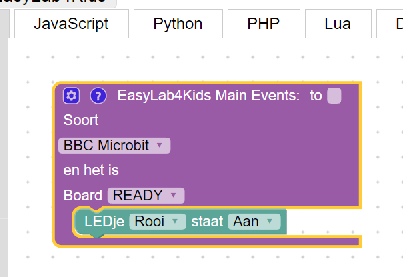
What i want, is the variables in block generator LEDje must become globals. See further down.
Step 1. A user drags a function "EasyLab4Kids Main Event" block onto the canvas.

Step 2. The user clicks Javascript tabpage, and the system generates code below.
this works, yet... I want var ROOD to be global, and able to create unique global variables ROOD1, ROOD2 etc.
var board = new five.Board();

board.on("ready", function () {
  var ROOD;
  ROOD = new five.Led("A2");
  ROOD.on();
});
And this is the generator-code for the LEDje;
Blockly.JavaScript['test_dropdown1'] = function(block) {
    var digitalIOPoort;
    var actie1;
    var dropdown_ledkleur = block.getFieldValue('LEDKLEUR');
    var dropdown_led_stat2 = block.getFieldValue('LED_STAT2');


    switch (dropdown_ledkleur) {
        case "ROOD":
            digitalIOPoort = "\"A2\"";
            break;
        case "GROEN":
            digitalIOPoort = "\"A1\"";
            break;
        case "BLOU":
            digitalIOPoort = "\"A0\"";
            break;
        default:
            digitalIOPoort = 13;
    }


    var code = "";
    code += "\nvar " + dropdown_ledkleur + ";\n"
    code += dropdown_ledkleur + " = new five.Led(" + digitalIOPoort + ");\n";


    if (dropdown_led_stat2 == 'AAN') {
        actie1 = ".on();";
    } else if (dropdown_led_stat2 == 'UIT') {
        actie1 = ".off();";
    } else if (dropdown_led_stat2 == 'KNIPPER') {
        actie1 = ".blink(500);";
    } else if (dropdown_led_stat2 == 'FADEIN') {
        actie1 = ".fadeIn();\n";
        actie1 += "this.wait(1000, function() {\n";
        actie1 += "  " + dropdown_ledkleur + ".fadeOut();\n";
        actie1 += "});";
    } else if (dropdown_led_stat2 == 'FADEOUT') {
        actie1 = ".fadeOut();\n";
        actie1 += "this.wait(1000, function() {\n";
        actie1 += "   " + dropdown_ledkleur + ".fadeIn();\n";
        actie1 += "});";
    }


    code += dropdown_ledkleur + actie1 + "\n";


    return code;
};
The generated code should be;
var board = new five.Board();
var ROOD1;               // this must be global
var ROOD2;               // this must be global

board.on("ready", function () {
  ROOD1 = new five.Led("A2");
  ROOD1.on();

  ROOD2 = new five.Led("A3");
  ROOD2.on();
});
I noticed, than a enduser can Create Variable 'item' and add function_dosomething() onto the canavas. The 'item' variable he creates is then global.
Just dont know how to do that. Or, would like to know how to implement the advice of cireyoretihw.
regards,
Michiel
Michiel
Op donderdag 13 april 2017 04:33:19 UTC+2 schreef cireyoretihw:
Erik Pasternak
Apr 14, 2017, 12:13:01 PM4/14/17
to Blockly
Ah, this is something that's hard to do with Blockly.
- You can get some of the way there by changing the LEDje block to use a field_variable instead of a field_dropdown. That will pull up any variables to be global.
- But, you'll have to think a bit more about how to initialize the LED pins. A user can create new variables and name them anything they want, so you can't depend on the variable name to decide on pin#. You could just define two blocks, create LED and set LED (JSON for these blocks is below).


- Also, there's not currently a way to filter different types of variables. If you want separate LED and Sensor variables, for instance, this won't work because all the variables will be in the same dropdown. The Typed Variables proposal Rachel sent out will eventually allow this.
- Finally, you need to think about what happens if more than one variable references the same pin or assigns it to something else. Both these cases are probably fine, but you might want to double check
Take a look at OpenRoberta for another way to do this kind of configuration, though they did a fair amount of customization to make it work.
Here's the JSON definitions for the two smaller blocks
{
  "type": "led_on_off",
  "message0": "turn LED %1 %2",
  "args0": [
    {
      "type": "field_variable",
      "name": "NAME",
      "variable": "led1"
    },
    {
      "type": "field_dropdown",
      "name": "STATE",
      "options": [
        [
          "on",
          "OPT_ON"
        ],
        [
          "off",
          "OPT_OFF"
        ]
      ]
    }
  ],
  "previousStatement": null,
  "nextStatement": null,
  "colour": 230,
  "tooltip": "",
  "helpUrl": ""
}
{
  "type": "led_create",
  "message0": "LED %1 on pin %2",
  "args0": [
    {
      "type": "field_variable",
      "name": "NAME",
      "variable": "led1"
    },
    {
      "type": "field_dropdown",
      "name": "TYPE",
      "options": [
        [
          "A2",
          "A2"
        ],
        [
          "A3",
          "A3"
        ],
        [
          "A4",
          "A4"
        ]
      ]
    }
  ],
  "previousStatement": null,
  "nextStatement": null,
  "colour": 230,
  "tooltip": "",
  "helpUrl": ""
}
--
You received this message because you are subscribed to a topic in the Google Groups "Blockly" group.
To unsubscribe from this topic, visit https://groups.google.com/d/topic/blockly/ecvPPnxp5vY/unsubscribe.
To unsubscribe from this group and all its topics, send an email to blockly+unsubscribe@googlegroups.com.
For more options, visit https://groups.google.com/d/optout.
cireyoretihw
Apr 14, 2017, 5:54:22 PM4/14/17
to Blockly
your complicate response is very good
but it seems to me that misunderstanding of what BLOCKLY is the real problem here
don't think when original question says GLOBAL that it is in the GRAPHIC WEB page that is asked for but only in the LANUAGE GENERATED CODE that variable needs to be GLOBAL variable is to be used
please simple example of what you want to happen
1) screen shot of what BLOCKLY should look at
2) sample code of what you want your generated code to look like
please brake down in steps what you need ... word are not enough we need the idea cleared up and simple
look at https://create.arduino.cc/projecthub/libreduc/blockly-rduino-create-code-with-blocks-b6d3e4
or http://blocklyduino.github.io/BlocklyDuino/blockly/apps/blocklyduino/
if these don't show you what you need then please tell us more details so we may help us
but it seems to me that misunderstanding of what BLOCKLY is the real problem here
don't think when original question says GLOBAL that it is in the GRAPHIC WEB page that is asked for but only in the LANUAGE GENERATED CODE that variable needs to be GLOBAL variable is to be used
please simple example of what you want to happen
1) screen shot of what BLOCKLY should look at
2) sample code of what you want your generated code to look like
please brake down in steps what you need ... word are not enough we need the idea cleared up and simple
look at https://create.arduino.cc/projecthub/libreduc/blockly-rduino-create-code-with-blocks-b6d3e4
or http://blocklyduino.github.io/BlocklyDuino/blockly/apps/blocklyduino/
if these don't show you what you need then please tell us more details so we may help us
To unsubscribe from this group and all its topics, send an email to blockly+u...@googlegroups.com.
Michiel Erasmus
Apr 21, 2017, 4:25:16 AM4/21/17
to Blockly
I've solved my problem of making global variables. Thanks f
4. Did a commandline python ./build.py
Op vrijdag 14 april 2017 23:54:22 UTC+2 schreef cireyoretihw:
I noticed BlocklyDuino does EXACTLY what i wanted :)))
Blockly.Arduino.definitions_['define_custom_read'] = '#include <Servo.h>\n';which creates code like this: (https://github.com/BlocklyDuino/BlocklyDuino/wiki/CreateNewBlock)
#include <Servo.h>
Servo servo_1;

void setup()
{
  servo_1.attach(1);

}
the code Blockly.Arduino.definitions_ contains the global variables, which is what i needed.
To summarize, what i did;
1. Downloaded BlocklyDuino from https://github.com/BlocklyDuino/
2. Ran BlocklyDuino locally, and generated code places #include <Servo.h> in the top of the code. EXACTLY what i was looking for.
3. Searched for #include <Servo.h> and replaced it with 'var myVar' in generators/arduino/base.js.
like this;
var globalVar1 = "var myServo = 'test1';";
Blockly.Arduino.definitions_["globalvar_my_test"] = globalVar1;
4. Did a commandline python ./build.py
5. pressed F5 in the Chrome browser to reload the BlocklyDuino page, clicked Arduino and.. WTF?? :)))
The new code, as i wanted it!!
var myServo = 'test1';     // global variable generated :))

Servo servo_1;

void setup()
{
  servo_1.attach(1);

}
As for pin# i looked at BlocklyDuino again, which contains mostly all i needed.
My question is solved. Thanks.
regards,
Michiel Erasmus
Op vrijdag 14 april 2017 23:54:22 UTC+2 schreef cireyoretihw:
Reply all
Reply to author
Forward
0 new messages