
Use Blockly in my Angular 4+ Component
2,603 views
Skip to first unread message

Christian Cardozo
Dec 11, 2017, 12:53:23 PM12/11/17
to Blockly
Hi, I´m trying to use blockly in my angular 4+ component. I've seen some post in the group but i couldn´t make it work. Any good idea? :) . Thanks in advance!
Christian Cardozo
Dec 15, 2017, 12:17:32 PM12/15/17
to Blockly
I found a solution:
Component.html
1 - Add scripts in angular-cli.json. Previously install blockly in your node modules -> npm install blockly
"scripts": [
        "../node_modules/blockly/blockly_compressed.js",
        "../node_modules/blockly/blocks_compressed.js",
        "../node_modules/blockly/msg/js/en.js"
      ],
2 - in your component add the var declaration
import { Component, OnInit } from '@angular/core';

declare var Blockly: any;
3 - Follow the blockly official guide:
My component:
import { Component, OnInit } from '@angular/core';

declare var Blockly: any;


@Component({
  selector: 'app-services',
  templateUrl: './services.component.html'
})


export class ServicesComponent implements OnInit{

  public toolbox:string =
  `<xml xmlns="http://www.w3.org/1999/xhtml" id="toolbox" style="display: none;">
    <category name="Logic" colour="#5C81A6">
        <block type="controls_if"></block>
        <block type="logic_compare">
            <field name="OP">EQ</field>
        </block>
        <block type="logic_operation">
            <field name="OP">AND</field>
        </block>
        <block type="logic_negate"></block>
        <block type="logic_boolean">
            <field name="BOOL">TRUE</field>
        </block>
        <block type="logic_null"></block>
        <block type="logic_ternary"></block>
    </category>
    <category name="Loops" colour="#5CA65C">
        <block type="controls_repeat_ext">
            <value name="TIMES">
                <shadow type="math_number">
                    <field name="NUM">10</field>
                </shadow>
            </value>
        </block>
        <block type="controls_whileUntil">
            <field name="MODE">WHILE</field>
        </block>
        <block type="controls_for">
            <field name="VAR" id="TWD31WlVifV63ZP6vMC~" variabletype="">i</field>
            <value name="FROM">
                <shadow type="math_number">
                    <field name="NUM">1</field>
                </shadow>
            </value>
            <value name="TO">
                <shadow type="math_number">
                    <field name="NUM">10</field>
                </shadow>
            </value>
            <value name="BY">
                <shadow type="math_number">
                    <field name="NUM">1</field>
                </shadow>
            </value>
        </block>
        <block type="controls_forEach">
            <field name="VAR" id="1E#/ieTE6ryfCX*05^S" variabletype="">j</field>
        </block>
        <block type="controls_flow_statements">
            <field name="FLOW">BREAK</field>
        </block>
    </category>
    <category name="Math" colour="#5C68A6">
        <block type="math_round">
            <field name="OP">ROUND</field>
            <value name="NUM">
                <shadow type="math_number">
                    <field name="NUM">3.1</field>
                </shadow>
            </value>
        </block>
        <block type="math_number">
            <field name="NUM">0</field>
        </block>
        <block type="math_single">
            <field name="OP">ROOT</field>
            <value name="NUM">
                <shadow type="math_number">
                    <field name="NUM">9</field>
                </shadow>
            </value>
        </block>
        <block type="math_trig">
            <field name="OP">SIN</field>
            <value name="NUM">
                <shadow type="math_number">
                    <field name="NUM">45</field>
                </shadow>
            </value>
        </block>
        <block type="math_constant">
            <field name="CONSTANT">PI</field>
        </block>
        <block type="math_number_property">
            <mutation divisor_input="false"></mutation>
            <field name="PROPERTY">EVEN</field>
            <value name="NUMBER_TO_CHECK">
                <shadow type="math_number">
                    <field name="NUM">0</field>
                </shadow>
            </value>
        </block>
        <block type="math_arithmetic">
            <field name="OP">ADD</field>
            <value name="A">
                <shadow type="math_number">
                    <field name="NUM">1</field>
                </shadow>
            </value>
            <value name="B">
                <shadow type="math_number">
                    <field name="NUM">1</field>
                </shadow>
            </value>
        </block>
        <block type="math_on_list">
            <mutation op="SUM"></mutation>
            <field name="OP">SUM</field>
        </block>
        <block type="math_modulo">
            <value name="DIVIDEND">
                <shadow type="math_number">
                    <field name="NUM">64</field>
                </shadow>
            </value>
            <value name="DIVISOR">
                <shadow type="math_number">
                    <field name="NUM">10</field>
                </shadow>
            </value>
        </block>
        <block type="math_constrain">
            <value name="VALUE">
                <shadow type="math_number">
                    <field name="NUM">50</field>
                </shadow>
            </value>
            <value name="LOW">
                <shadow type="math_number">
                    <field name="NUM">1</field>
                </shadow>
            </value>
            <value name="HIGH">
                <shadow type="math_number">
                    <field name="NUM">100</field>
                </shadow>
            </value>
        </block>
        <block type="math_random_int">
            <value name="FROM">
                <shadow type="math_number">
                    <field name="NUM">1</field>
                </shadow>
            </value>
            <value name="TO">
                <shadow type="math_number">
                    <field name="NUM">100</field>
                </shadow>
            </value>
        </block>
        <block type="math_random_float"></block>
    </category>
    <category name="Text" colour="#5CA68D">
        <block type="text_charAt">
            <mutation at="true"></mutation>
            <field name="WHERE">FROM_START</field>
            <value name="VALUE">
                <block type="variables_get">
                    <field name="VAR" id="uJtQDB4G4ZaKe.4Mkln3" variabletype="">text</field>
                </block>
            </value>
        </block>
        <block type="text">
            <field name="TEXT"></field>
        </block>
        <block type="text_append">
            <field name="VAR" id="bkgT?Q+Pzb{Pwz90n=Jg" variabletype="">item</field>
            <value name="TEXT">
                <shadow type="text">
                    <field name="TEXT"></field>
                </shadow>
            </value>
        </block>
        <block type="text_length">
            <value name="VALUE">
                <shadow type="text">
                    <field name="TEXT">abc</field>
                </shadow>
            </value>
        </block>
        <block type="text_isEmpty">
            <value name="VALUE">
                <shadow type="text">
                    <field name="TEXT"></field>
                </shadow>
            </value>
        </block>
        <block type="text_indexOf">
            <field name="END">FIRST</field>
            <value name="VALUE">
                <block type="variables_get">
                    <field name="VAR" id="uJtQDB4G4ZaKe.4Mkln3" variabletype="">text</field>
                </block>
            </value>
            <value name="FIND">
                <shadow type="text">
                    <field name="TEXT">abc</field>
                </shadow>
            </value>
        </block>
        <block type="text_join">
            <mutation items="2"></mutation>
        </block>
        <block type="text_getSubstring">
            <mutation at1="true" at2="true"></mutation>
            <field name="WHERE1">FROM_START</field>
            <field name="WHERE2">FROM_START</field>
            <value name="STRING">
                <block type="variables_get">
                    <field name="VAR" id="uJtQDB4G4ZaKe.4Mkln3" variabletype="">text</field>
                </block>
            </value>
        </block>
        <block type="text_changeCase">
            <field name="CASE">UPPERCASE</field>
            <value name="TEXT">
                <shadow type="text">
                    <field name="TEXT">abc</field>
                </shadow>
            </value>
        </block>
        <block type="text_trim">
            <field name="MODE">BOTH</field>
            <value name="TEXT">
                <shadow type="text">
                    <field name="TEXT">abc</field>
                </shadow>
            </value>
        </block>
        <block type="text_print">
            <value name="TEXT">
                <shadow type="text">
                    <field name="TEXT">abc</field>
                </shadow>
            </value>
        </block>
        <block type="text_prompt_ext">
            <mutation type="TEXT"></mutation>
            <field name="TYPE">TEXT</field>
            <value name="TEXT">
                <shadow type="text">
                    <field name="TEXT">abc</field>
                </shadow>
            </value>
        </block>
    </category>
    <category name="Lists" colour="#745CA6">
        <block type="lists_indexOf">
            <field name="END">FIRST</field>
            <value name="VALUE">
                <block type="variables_get">
                    <field name="VAR" id="@|eFaNfze;*D8(]KS}X)" variabletype="">list</field>
                </block>
            </value>
        </block>
        <block type="lists_create_with">
            <mutation items="0"></mutation>
        </block>
        <block type="lists_repeat">
            <value name="NUM">
                <shadow type="math_number">
                    <field name="NUM">5</field>
                </shadow>
            </value>
        </block>
        <block type="lists_length"></block>
        <block type="lists_isEmpty"></block>
        <block type="lists_create_with">
            <mutation items="3"></mutation>
        </block>
        <block type="lists_getIndex">
            <mutation statement="false" at="true"></mutation>
            <field name="MODE">GET</field>
            <field name="WHERE">FROM_START</field>
            <value name="VALUE">
                <block type="variables_get">
                    <field name="VAR" id="@|eFaNfze;*D8(]KS}X)" variabletype="">list</field>
                </block>
            </value>
        </block>
        <block type="lists_setIndex">
            <mutation at="true"></mutation>
            <field name="MODE">SET</field>
            <field name="WHERE">FROM_START</field>
            <value name="LIST">
                <block type="variables_get">
                    <field name="VAR" id="@|eFaNfze;*D8(]KS}X)" variabletype="">list</field>
                </block>
            </value>
        </block>
        <block type="lists_getSublist">
            <mutation at1="true" at2="true"></mutation>
            <field name="WHERE1">FROM_START</field>
            <field name="WHERE2">FROM_START</field>
            <value name="LIST">
                <block type="variables_get">
                    <field name="VAR" id="@|eFaNfze;*D8(]KS}X)" variabletype="">list</field>
                </block>
            </value>
        </block>
        <block type="lists_split">
            <mutation mode="SPLIT"></mutation>
            <field name="MODE">SPLIT</field>
            <value name="DELIM">
                <shadow type="text">
                    <field name="TEXT">,</field>
                </shadow>
            </value>
        </block>
        <block type="lists_sort">
            <field name="TYPE">NUMERIC</field>
            <field name="DIRECTION">1</field>
        </block>
    </category>
    <category name="Colour" colour="#A6745C">
        <block type="colour_picker">
            <field name="COLOUR">#ff0000</field>
        </block>
        <block type="colour_random"></block>
        <block type="colour_rgb">
            <value name="RED">
                <shadow type="math_number">
                    <field name="NUM">100</field>
                </shadow>
            </value>
            <value name="GREEN">
                <shadow type="math_number">
                    <field name="NUM">50</field>
                </shadow>
            </value>
            <value name="BLUE">
                <shadow type="math_number">
                    <field name="NUM">0</field>
                </shadow>
            </value>
        </block>
        <block type="colour_blend">
            <value name="COLOUR1">
                <shadow type="colour_picker">
                    <field name="COLOUR">#ff0000</field>
                </shadow>
            </value>
            <value name="COLOUR2">
                <shadow type="colour_picker">
                    <field name="COLOUR">#3333ff</field>
                </shadow>
            </value>
            <value name="RATIO">
                <shadow type="math_number">
                    <field name="NUM">0.5</field>
                </shadow>
            </value>
        </block>
    </category>
    <sep></sep>
    <category name="Variables" colour="#A65C81" custom="VARIABLE"></category>
    <category name="Functions" colour="#9A5CA6" custom="PROCEDURE"></category>
</xml>`;


  ngOnInit(){

    this.createBlocks();


  }


    createBlocks(){

        let workspacePlayground = Blockly.inject('blocklyDiv',
                        {toolbox: this.toolbox});


        return workspacePlayground;
    }


}
Component.html
<div id="blocklyDiv" style="height: 480px; width: 600px;"></div>
Erik Pasternak
Dec 15, 2017, 2:14:03 PM12/15/17
to Blockly
Thanks for sharing how you solved it, Christian!

andy birenzi
Mar 1, 2018, 8:38:45 PM3/1/18
to Blockly
Thanks Christian Cardozo for sharing this. It worked for me, but my question is that I can't get the code generator work, I keep getting :ERROR TypeError: a.getVariableMap is not a function. Here is my codegenerator function:
generateJavaCode(event){
var code =Blockly.JavaScript.workspaceToCode(this.workspace);
console.log("generated code: "+code);
}
"scripts": [
"../node_modules/blockly/blockly_compressed.js",
"../node_modules/blockly/blocks_compressed.js",
"javascript_compressed.js",
"../node_modules/blockly/msg/js/en.js",
"../node_modules/jquery/dist/jquery.min.js",
"../node_modules/bootstrap/dist/js/bootstrap.min.js",
"mycomponents.js"
],
I'm using Angular 4+TypeScript.
Any help on this?
--------------------------------------------
Rachel Fenichel
Mar 2, 2018, 3:23:36 PM3/2/18
to Blockly
Try updating your blockly files, including generators/javascript.js.
andy birenzi
Mar 2, 2018, 8:03:42 PM3/2/18
to Blockly
Hi Rachel, Thanks for your response, I did run npm install blockly but still I'm getting this error:
ERROR TypeError: a.getVariableMap is not a function
at Blockly.Generator.Blockly.JavaScript.init (scripts.bundle.js:1469)
at Blockly.Generator.workspaceToCode (scripts.bundle.js:1318)
at AppComponent.generateJavaCode (app.component.ts:190)
at Object.eval [as handleEvent] (AppComponent.html:31)
at handleEvent (core.js:13543)
at callWithDebugContext (core.js:15052)
at Object.debugHandleEvent [as handleEvent] (core.js:14639)
at dispatchEvent (core.js:9958)
at eval (core.js:10583)
at HTMLAnchorElement.eval (platform-browser.js:2628)
Any help on this?
Note: I'm using Angular4, Typescript,
Rachel Fenichel
Mar 2, 2018, 8:13:58 PM3/2/18
to Blockly
The Blockly team does not own or update the blockly package on npm, and we cannot guarantee that it is up to date. You should pull from our repo on github instead.
andy birenzi
Mar 2, 2018, 8:22:39 PM3/2/18
to Blockly
Thanks Rachel, any guidance on how to install github version on angular? Sorry I'm new to Blockly. I appreciate your help.
Rachel Fenichel
Mar 2, 2018, 8:35:19 PM3/2/18
to Blockly
I don't have specific instructions, but someone else on the forum may be able to help.
andy birenzi
Mar 2, 2018, 9:03:36 PM3/2/18
to Blockly
Thanks again Rachel. Here is what I did to get it work. I downloaded Blockly master branch on github, I copied it to my angular project under node_modules, and make sure to include ../node_modules/msg/messages.js after blockly_compressed.js then other blocky js files. It's working now.
Thanks for your help.
Rachel Fenichel
Mar 2, 2018, 9:07:18 PM3/2/18
to Blockly
Awesome. Thanks for posting your solution as well.
Message has been deleted
razc...@shr.global
Mar 5, 2018, 6:59:19 PM3/5/18
to Blockly
Any Idea on how to add my custom blocks?
I've been tryng to add my own custom blocks but no lucky
andy birenzi
Mar 5, 2018, 7:51:13 PM3/5/18
to blo...@googlegroups.com
Hi. Are you using Angular 4+? If yes, I can guide you. Let me know what technologies you're using.
On Mon, Mar 5, 2018 at 6:59 PM, <razc...@shr.global> wrote:
Any Idea on how to add my custom blocks?
I've been tryng to add my own custom blocks but no lucky
--
You received this message because you are subscribed to a topic in the Google Groups "Blockly" group.
To unsubscribe from this topic, visit https://groups.google.com/d/topic/blockly/bQHtXnt_6MY/unsubscribe.
To unsubscribe from this group and all its topics, send an email to blockly+unsubscribe@googlegroups.com.
For more options, visit https://groups.google.com/d/optout.
André Birenzi
Software engineer and webdesigner
razc...@shr.global
Mar 6, 2018, 5:46:07 PM3/6/18
to Blockly
Yes I'm using angular 4+, I finally added my custom blocks, but I'm still stuck with the code generation of those blocks any help on that?
On Monday, March 5, 2018 at 6:51:13 PM UTC-6, andy birenzi wrote:
Hi. Are you using Angular 4+? If yes, I can guide you. Let me know what technologies you're using.
On Mon, Mar 5, 2018 at 6:59 PM, <razc...@shr.global> wrote:
Any Idea on how to add my custom blocks?
I've been tryng to add my own custom blocks but no lucky
--
You received this message because you are subscribed to a topic in the Google Groups "Blockly" group.
To unsubscribe from this topic, visit https://groups.google.com/d/topic/blockly/bQHtXnt_6MY/unsubscribe.
To unsubscribe from this group and all its topics, send an email to blockly+u...@googlegroups.com.
andy birenzi
Mar 6, 2018, 9:29:40 PM3/6/18
to blo...@googlegroups.com
Can you share the error you're getting? Make sure you have a generator stub code for any custom block you created. What generator are you using? JS, PHP or ... I had same issue then I downloaded the latest version of Blockly from github master branch, then installed it. Share more information.
To unsubscribe from this group and all its topics, send an email to blockly+unsubscribe@googlegroups.com.
razc...@shr.global
Mar 7, 2018, 10:44:02 AM3/7/18
to Blockly
Yeah sure and sorry if it took me to much time to reply but when you replied I wasn't at the office.
So here is what I did
I added myscripts to angular-cli.json
As you can see i'm using a package not the official one but I could no find a way to work with the one that is on the repo.
Then in my code I did this:
So here is what I did
I added myscripts to angular-cli.json
"scripts": [
"../node_modules/google-blockly/blockly_compressed.js",
"../node_modules/google-blockly/blocks_compressed.js",
"../node_modules/google-blockly/javascript_compressed.js",
"../node_modules/google-blockly/generators/javascript.js",
"../node_modules/google-blockly/generators/javascript/eventsCode.js",
"../node_modules/google-blockly/generators/javascript/propertiesCode.js",
"../node_modules/google-blockly/generators/javascript/logicCode.js",
"../node_modules/google-blockly/generators/javascript/actionsCode.js",
"../node_modules/google-blockly/generators/javascript/valuesCode.js",
"../node_modules/google-blockly/msg/js/en.js",
"../node_modules/google-blockly/blocks/events.js",
"../node_modules/google-blockly/blocks/properties.js",
"../node_modules/google-blockly/blocks/logics.js",
"../node_modules/google-blockly/blocks/actions.js",
"../node_modules/google-blockly/blocks/values.js",
"../node_modules/google-blockly/core/css.js"
],
As you can see i'm using a package not the official one but I could no find a way to work with the one that is on the repo.
Then in my code I did this:
import { Component, OnInit } from '@angular/core';
declare var Blockly: any;
@Component({
selector: 'app-rule-maker',
templateUrl: './rule-maker.component.html',
styleUrls: ['./rule-maker.component.scss']
})
export class RuleMakerComponent implements OnInit {
workspacePlayground : any;
public toolbox:string =
`<xml xmlns="http://www.w3.org/1999/xhtml" id="toolbox" style="display: none;">
<category name="Events" colour="#80a55b">
<block type="checkindateevent"></block>
<block type="checkoutdateevent"></block>
<block type="addroomevent"></block>
</category>
<category name="Logic" colour="#5C81A6">
<block type="controls_if"></block>
<block type="logic_compare">
<field name="OP">EQ</field>
</block>
<block type="logic_operation">
<field name="OP">AND</field>
</block>
<block type="logic_negate"></block>
<block type="logic_null"></block>
<block type="logic_ternary"></block>
<block type="lessequalsgraterlogic">
<field name="options">less</field>
</block>
<block type="equalslogic"></block>
</category>
<category name="Properties" colour="#935ba5">
<block type="genderproperty"></block>
<block type="nationalityproperty"></block>
<block type="ageproperty"></block>
</category>
<category name="Actions" colour="#a55b5b">
<block type="discountaction"></block>
<block type="showhideaction">
<field name="showhideValue">Show</field>
</block>
</category>
<category name="Values" colour="#5ba593">
<block type="gendervalue">
<field name="genderInput">male</field>
</block>
<block type="percentagevalue">
<field name="percentage">0</field>
</block>
<block type="text_value">
<field name="textInput">Text_field</field>
</block>
<block type="numericvalue">
<field name="number">0</field>
</block>
<block type="booleanvalue">
<field name="boolValue">True</field>
</block>
</category>
</xml>`;
ngOnInit(){
this.createBlocks();
}
createBlocks(){
this.workspacePlayground = Blockly.inject('blocklyDiv',
{toolbox: this.toolbox});
return this.workspacePlayground;
}
generateCode() {
var code = Blockly.JavaScript.workspaceToCode(this.workspacePlayground);
var xmlLayout = Blockly.Xml.workspaceToDom(this.workspacePlayground);
var xmlText =Blockly.Xml.domToPrettyText(xmlLayout);
console.log(xmlText);
}
}
I'm pretty new to Blockly so any advice will be nice.
The error I'm getting is
ERROR
TypeError: b is undefined
Stack trace:
Blockly.Generator.prototype.blockToCode@http://qplrazcorra01.shrhdc.local:4300/scripts.bundle.js:1470:264
Blockly.Generator.prototype.workspaceToCode@http://qplrazcorra01.shrhdc.local:4300/scripts.bundle.js:1468:241
RuleMakerComponent.prototype.generateCode@webpack-internal:///./src/app/rule-maker/rule-maker.component.ts:22:20
View_RuleMakerComponent_0/<@ng:///AppModule/RuleMakerComponent.ngfactory.js:150:27
handleEvent@webpack-internal:///./node_modules/@angular/core/esm5/core.js:13763:115
callWithDebugContext@webpack-internal:///./node_modules/@angular/core/esm5/core.js:15272:39
debugHandleEvent@webpack-internal:///./node_modules/@angular/core/esm5/core.js:14859:12
dispatchEvent@webpack-internal:///./node_modules/@angular/core/esm5/core.js:10178:16
renderEventHandlerClosure/<@webpack-internal:///./node_modules/@angular/core/esm5/core.js:10803:38
decoratePreventDefault/<@webpack-internal:///./node_modules/@angular/platform-browser/esm5/platform-browser.js:2680:53
ZoneDelegate.prototype.invokeTask@webpack-internal:///./node_modules/zone.js/dist/zone.js:421:17
onInvokeTask@webpack-internal:///./node_modules/@angular/core/esm5/core.js:4956:24
ZoneDelegate.prototype.invokeTask@webpack-internal:///./node_modules/zone.js/dist/zone.js:420:17
Zone.prototype.runTask@webpack-internal:///./node_modules/zone.js/dist/zone.js:188:28
ZoneTask.invokeTask@webpack-internal:///./node_modules/zone.js/dist/zone.js:496:24
invokeTask@webpack-internal:///./node_modules/zone.js/dist/zone.js:1517:9
globalZoneAwareCallback@webpack-internal:///./node_modules/zone.js/dist/zone.js:1543:17
razc...@shr.global
Mar 8, 2018, 12:47:56 PM3/8/18
to Blockly
any clue?
Message has been deleted

Adamo Ludwig
May 22, 2018, 4:22:33 PM5/22/18
to Blockly
Hi Andy, are u ok?
Dude, I've trying so hard to make blockly work with angular 4 but I simply can't. Can u help me?
I did the solution of Christian Cardozo but still the issues:
- Problem into import: blocks_compressed.js and en.js were I did:
Dude, I've trying so hard to make blockly work with angular 4 but I simply can't. Can u help me?
I did the solution of Christian Cardozo but still the issues:
- Problem into import: blocks_compressed.js and en.js were I did:
"scripts": [
"googleBlockly/blockly_compressed.js",
"googleBlockly/blocks_compressed.js",
"googleBlockly/msg/js/en.js"
],
*googleBlockly is just a folder who contain the sorce code on documentation -> https://developers.google.com/blockly/guides/get-started/web
- The second problem is on the createBlocks -> ERROR TypeError: Blockly.inject is not a function
createBlocks() {
this.workspacePlayground = Blockly.inject('blocklyDiv',
{ toolbox: this.toolbox });
return this.workspacePlayground;
}
Em segunda-feira, 5 de março de 2018 21:51:13 UTC-3, andy birenzi escreveu:
Hi. Are you using Angular 4+? If yes, I can guide you. Let me know what technologies you're using.
On Mon, Mar 5, 2018 at 6:59 PM, <razc...@shr.global> wrote:
Any Idea on how to add my custom blocks?
I've been tryng to add my own custom blocks but no lucky
--
You received this message because you are subscribed to a topic in the Google Groups "Blockly" group.
To unsubscribe from this topic, visit https://groups.google.com/d/topic/blockly/bQHtXnt_6MY/unsubscribe.
To unsubscribe from this group and all its topics, send an email to blockly+u...@googlegroups.com.
andy birenzi
May 22, 2018, 8:54:07 PM5/22/18
to blo...@googlegroups.com
- Here is what I did to get it work. I downloaded Blockly master branch on github because other npm version were not uptodate, I copied it to my angular project under node_modules, and make sure to include ../node_modules/msg/messages.js after blockly_compressed.js then other blocky js files. see screen shot below:
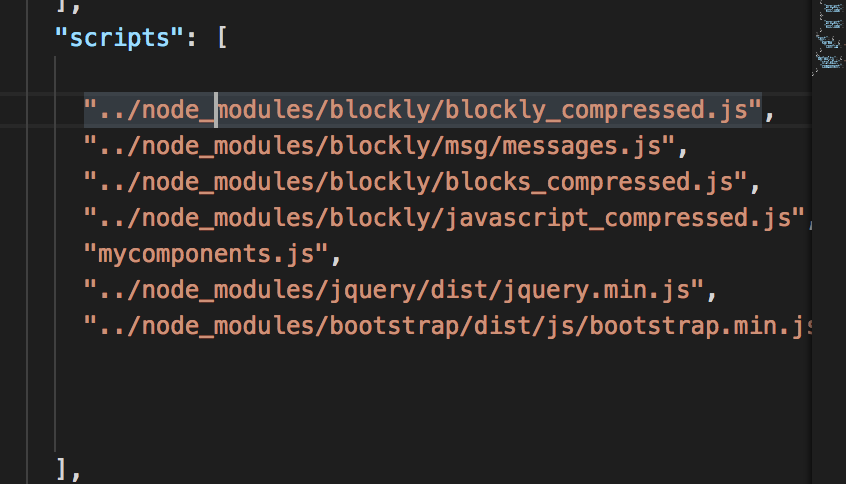
I hope this helps, if you still have issues, copy paste your errors in your response
On Tue, May 22, 2018 at 4:15 PM, Adamo Ludwig <ludwi...@gmail.com> wrote:
Hi Andy, are u ok?
Dude, I've trying so hard to make blockly work with angular 4 but I simply can't. Can u help me?
I did the solution of Christian Cardozo but still the issues:
- Problem into import: blocks_compressed.js and en.js were I did:
"scripts": ["googleBlockly/blockly_compressed.js","googleBlockly/blocks_compressed.js","googleBlockly/msg/js/en.js"],
Em segunda-feira, 5 de março de 2018 21:51:13 UTC-3, andy birenzi escreveu:
Hi. Are you using Angular 4+? If yes, I can guide you. Let me know what technologies you're using.
On Mon, Mar 5, 2018 at 6:59 PM, <razc...@shr.global> wrote:
Any Idea on how to add my custom blocks?
I've been tryng to add my own custom blocks but no lucky
--
You received this message because you are subscribed to a topic in the Google Groups "Blockly" group.
To unsubscribe from this topic, visit https://groups.google.com/d/topic/blockly/bQHtXnt_6MY/unsubscribe.
To unsubscribe from this group and all its topics, send an email to blockly+u...@googlegroups.com.
For more options, visit https://groups.google.com/d/optout.
--André BirenziSoftware engineer and webdesigner
--
You received this message because you are subscribed to a topic in the Google Groups "Blockly" group.
To unsubscribe from this topic, visit https://groups.google.com/d/topic/blockly/bQHtXnt_6MY/unsubscribe.
To unsubscribe from this group and all its topics, send an email to blockly+unsubscribe@googlegroups.com.
For more options, visit https://groups.google.com/d/optout.
Adamo Ludwig
May 22, 2018, 10:52:36 PM5/22/18
to Blockly
So, I put those scripts, but still the same problem :/
The problems are follow:
"scripts": [
"googleBlockly/blockly_compressed.js",
"googleBlockly/msg/messages.js",
"googleBlockly/blocks_compressed.js",
"googleBlockly/javascript_compressed.js",
"googleBlockly/msg/js/en.js",
]
My Component is very simple:
export class BlaComponent implements OnInit {
workspacePlayground: any;
constructor() { }
public toolbox = `<xml id="toolbox" style="display: none">
<block type="controls_if"></block>
<block type="controls_repeat_ext"></block>
<block type="logic_compare"></block>
<block type="math_number"></block>
<block type="math_arithmetic"></block>
<block type="text"></block>
<block type="text_print"></block>
</xml>`;
ngOnInit() {
this.createBlocks();
}
createBlocks() {
this.workspacePlayground = Blockly.inject('blocklyDiv',
{ toolbox: this.toolbox });
return this.workspacePlayground;
}
}
The problems are follow:


Thanks for answer me so fast
Reply all
Reply to author
Forward
0 new messages