
Saving and loading Blockly workspace to/from local storage
1,122 views
Skip to first unread message

Marius
Apr 21, 2022, 6:15:22 AM4/21/22
to Blockly
Hi !

I'm trying to save my workspace to local storage and if the page is refreshed the last instance of the workspace would be loaded. I'm using react-blockly for this project. My main problem is that I'm able to save the XML to local storage, but retrieving it is causing me some issues.
Here's my code:
What I'm trying to achieve in the snippet above is to set xml to the default value, then on xml change I invoke the onXmlChange and set it to a new value, the value then gets save to local storage and I'm able to view the changes in the developer tools. But I can't get the "code to return" part work because it just returns me an empty workspace.
I'm missing something here 😵 Could someone point out my mistakes and help me out, I would appreciate it a lot !
I'm missing something here 😵 Could someone point out my mistakes and help me out, I would appreciate it a lot !

Aaron Dodson
Apr 21, 2022, 11:17:15 AM4/21/22
to Blockly
Hi,
I may be misunderstanding what you're trying to do, but it looks like what's happening is that, when workspaceDidChange is triggered, it writes out the current state of the workspace to local storage and then loads that value right back into the workspace, so nothing visibly changes, but your old stored XML is gone. If you moved the "code to return" portion into a DOMContentLoaded event handler (or a click handler for a restore button or however you want to do it), I'd expect it to load the saved workspace state from before.
- Aaron
Marius
Apr 21, 2022, 12:20:53 PM4/21/22
to Blockly
I've tried the DOMContentLoader, but it didn't help. When I navigate to another page and come back the local storage resets to the empty xml tags.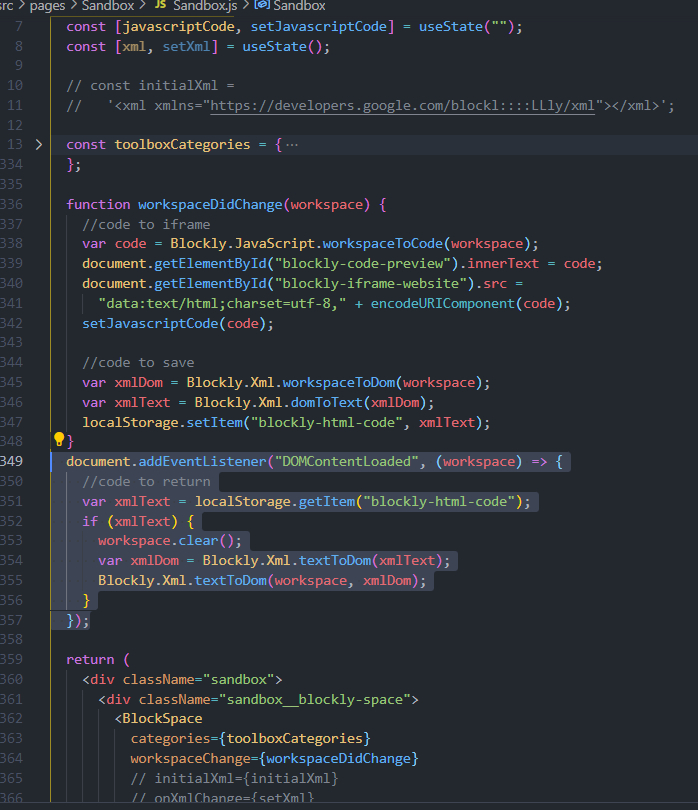
The interesting thing is when I'm on another page I see that the original xml with all of the blocks is still intact, but it instantly erases when I come back to the blockly page.
Here's the code:
At first I thought that the initialXml and onXmlChange props were causing this, but now I have no idea who resets the local storage.
And to clarify what I'm trying to achieve: I want to save the last instance of my workspace blocks in to the local storage so when I close the tab and reopen it the blocks from before would still be there.
I was thinking maybe the workspaceDidChange runs when the page is loaded and the "code to save" part runs thus saving an empty workspace and overriding the local storage. But how could I prevent that ? Separate the function in to several functions ?
Aaron Dodson
Apr 21, 2022, 6:43:28 PM4/21/22
to blo...@googlegroups.com
I think you're on the right track - workspaceDidChange is likely getting called with the initial/default state of the workspace on load and overwriting your saved data in local storage. A couple potential approaches might be using a variable to check whether this is the first time workspaceDidChange is being called, and if so toggling the variable but not writing out the workspace data. Alternatively, you could check if the workspace data being saved is blank and not save it if so, but that has the drawback that if you intentionally clear the workspace then that change would not be persisted.
On Apr 21, 2022, at 9:20 AM, Marius <oren...@gmail.com> wrote:
I've tried the DOMContentLoader, but it didn't help. When I navigate to another page and come back the local storage resets to the empty xml tags.The interesting thing is when I'm on another page I see that the original xml with all of the blocks is still intact, but it instantly erases when I come back to the blockly page.Here's the code:
<Caasdasdpture.PNG>At first I thought that the initialXml and onXmlChange props were causing this, but now I have no idea who resets the local storage.And to clarify what I'm trying to achieve: I want to save the last instance of my workspace blocks in to the local storage so when I close the tab and reopen it the blocks from before would still be there.I was thinking maybe the workspaceDidChange runs when the page is loaded and the "code to save" part runs thus saving an empty workspace and overriding the local storage. But how could I prevent that ? Separate the function in to several functions ?2022 m. balandžio 21 d., ketvirtadienis 18:17:15 UTC+3 Aaron Dodson rašė:Hi,I may be misunderstanding what you're trying to do, but it looks like what's happening is that, when workspaceDidChange is triggered, it writes out the current state of the workspace to local storage and then loads that value right back into the workspace, so nothing visibly changes, but your old stored XML is gone. If you moved the "code to return" portion into a DOMContentLoaded event handler (or a click handler for a restore button or however you want to do it), I'd expect it to load the saved workspace state from before.- AaronOn Thursday, April 21, 2022 at 3:15:22 AM UTC-7 oren...@gmail.com wrote:Hi !I'm trying to save my workspace to local storage and if the page is refreshed the last instance of the workspace would be loaded. I'm using react-blockly for this project. My main problem is that I'm able to save the XML to local storage, but retrieving it is causing me some issues.Here's my code:What I'm trying to achieve in the snippet above is to set xml to the default value, then on xml change I invoke the onXmlChange and set it to a new value, the value then gets save to local storage and I'm able to view the changes in the developer tools. But I can't get the "code to return" part work because it just returns me an empty workspace.
I'm missing something here 😵 Could someone point out my mistakes and help me out, I would appreciate it a lot !
--
You received this message because you are subscribed to the Google Groups "Blockly" group.
To unsubscribe from this group and stop receiving emails from it, send an email to blockly+u...@googlegroups.com.
To view this discussion on the web visit https://groups.google.com/d/msgid/blockly/dc51a18b-94c8-4ee4-bbd2-7a1e21c66989n%40googlegroups.com.
<Caasdasdpture.PNG>
Marius
Apr 22, 2022, 6:45:20 AM4/22/22
to Blockly
I've got it to work !
I set up a variable which is checked on the first run onWorkspaceChange and if it is a first time then it checks the local storage for an item "blockly-html-code". If the item is empty, then it assigns a default xml variable called initialXml, then the first time variable is set to false and it continues to save the workspace.
Here's the code:
Thanks for the advice ! Appreciate it a lot.
Reply all
Reply to author
Forward
0 new messages