
Error : Uncaught (in promise) TypeError: Expecting tuple from value block blockly
775 views
Skip to first unread message

Eleftheria Papageorgiou
Jul 19, 2023, 3:54:03 PM7/19/23
to Blockly
I am trying to 'set' a variable, then 'get' it to use it in a custom block I've created. But I'm not getting the value of the variable, I'm getting this error instead: Uncaught (in promise) TypeError: Expecting tuple from value block blockly.
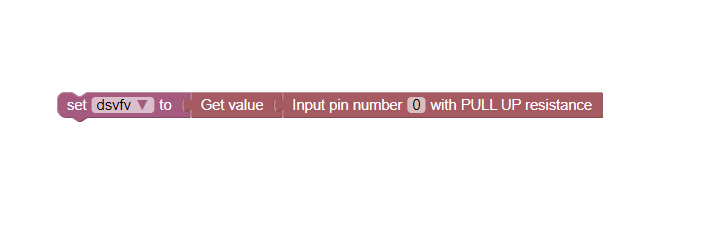

When I add the blocks this way, everything works okay
When I try to use a variable , it does not work !
Th code :
Blockly.Blocks['digital_input_pin_value'] = {
init: function () {
this.appendValueInput('NAME')
.setCheck('INPUT_PIN')
.appendField('Get value')
this.setOutput(true, null)
this.setColour(355)
this.setTooltip('')
this.setHelpUrl('')
},
}
Blockly.Python['digital_input_pin_value'] = function (block) {
var value_name = Blockly.Python.valueToCode(block, 'NAME',
Blockly.Python.ORDER_ATOMIC)
var code = value_name + '.value()\n'
return code
}
What should I change to fix it ?
Eleftheria Papageorgiou
Jul 19, 2023, 4:02:07 PM7/19/23
to Blockly
PULL UP RESISTANCH BLOCK
//INPUT PIN -- PULL UP RESISTANCE
Blockly.Blocks['digital_input_pin_obj_up_down_resistance'] = {
init: function () {
this.appendDummyInput()
.appendField('Input pin number')
.appendField(new Blockly.FieldNumber(0, 0, 40), 'pin_number')
.appendField('with PULL UP resistance')
this.setOutput(true, 'INPUT_PIN')
this.setColour(355)
this.setTooltip('')
this.setHelpUrl('')
},
}
Blockly.Python['digital_input_pin_obj_up_down_resistance'] = function (block) {
var pin_number = block.getFieldValue('pin_number')
//Assemble Python into code variable.
var code = 'Pin(' + pin_number + ', Pin.IN, Pin.PULL_UP)\n'
//Change ORDER_NONE to the correct strength.
return [code, Blockly.Python.ORDER_NONE]
}

Maribeth Bottorff
Jul 19, 2023, 6:53:04 PM7/19/23
to Blockly
Hello,
Your "Get value" block is a "value" block because it has an output connection (as opposed to a "statement" block which has a next connection). Value blocks must return a tuple, where the first item is the code string like you have, and the second item is the operator precedence value. You are already doing this in the "digital_input_pin_obj_up_down_resistance" block and need to follow a similar format for the other value block. See more in our docs.
Eleftheria Papageorgiou
Jul 20, 2023, 5:14:59 PM7/20/23
to Blockly
Thank you ! I made it work this way ! But if I change the code for the get value block to :
Blockly.Blocks['digital_input_pin_value'] = {
init: function () {
this.appendValueInput('NAME')
.setCheck('INPUT_PIN')
.appendField('Get value')
this.setOutput(true, null)
this.setColour(355)
this.setTooltip('')
this.setHelpUrl('')
},
}
Blockly.Python['digital_input_pin_value'] = function (block) {
var value_name = Blockly.Python.valueToCode(block, 'NAME',
Blockly.Python.ORDER_ATOMIC)
var code = value_name + '.value()\n'
return [code, B;lockly.Python.ORDER_NONE]
}
This now works only if I connect a varibale. Is there a way to make it work for both a variable or a pull up resistance block ?

Christopher Allen
Jul 24, 2023, 7:32:02 AM7/24/23
to blo...@googlegroups.com
Hi Eleftheria,
I'm glad that Maribeth was able to help you with your code-generating problem. I'm now looking at your follow-up question, but I am not sure I completely understand what is going on. In particular, I was at first very confused about what the "Get value" block does: from the text and the shape of the block it looks like it might just take its input and pass it through to its output unmodified, which seems kind of useless:
When I add the blocks this way, everything works okayWhen I try to use a variable , it does not work !
Fortunately your code clarifies that it is calling the .value() method on whatever is being returned by the "Input pin number" block:
Th code :Blockly.Blocks['digital_input_pin_value'] = {init: function () {this.appendValueInput('NAME').setCheck('INPUT_PIN').appendField('Get value')this.setOutput(true, null)this.setColour(355)this.setTooltip('')this.setHelpUrl('')},}Blockly.Python['digital_input_pin_value'] = function (block) {var value_name = Blockly.Python.valueToCode(block, 'NAME',Blockly.Python.ORDER_ATOMIC)var code = value_name + '.value()\n'return code}
You updated the generator for digital_input_pin_value as Maribeth suggested:
Blockly.Blocks['digital_input_pin_value'] = {init: function () {this.appendValueInput('NAME').setCheck('INPUT_PIN').appendField('Get value')this.setOutput(true, null)this.setColour(355)this.setTooltip('')this.setHelpUrl('')},}Blockly.Python['digital_input_pin_value'] = function (block) {var value_name = Blockly.Python.valueToCode(block, 'NAME',Blockly.Python.ORDER_ATOMIC)var code = value_name + '.value()\n'return [code, B;lockly.Python.ORDER_NONE]}
Which looks fine to me (except for a spurious ";" in "B;lockly" on the last line).
This now works only if I connect a varibale.Is there a way to make it work for both a variable or a pull up resistance block ?
This is curious. What do you mean by "now works only if"—what happens when you connect the pull up resistance block directly?
Does code generation fail, or is the generated code incorrect? In the latter case it would be helpful to see the full generated Python code for each of the two examples in your original post.
Christopher
Reply all
Reply to author
Forward
0 new messages