
String variables and custom blocks
1,282 views
Skip to first unread message

Steven Kitzes
Nov 19, 2015, 6:51:54 PM11/19/15
to Blockly
I tried to figure out how to use variables to represent strings instead of numbers.

The Blockly.Blocks and Blockly.JavaScript for this text block look like this:
Blockly.Blocks['string_block'] = {
  init: function() {
    this.appendDummyInput()
        .appendField(new Blockly.FieldTextInput("[string]"), "content");
    this.setOutput(true, "String");
    this.setColour(180);
    this.setTooltip('');
    this.setHelpUrl('http://www.example.com/');
  }
};


Blockly.JavaScript['string_block'] = function(block) {
  return block.getFieldValue('content');
};
When I eval(), I get this error:
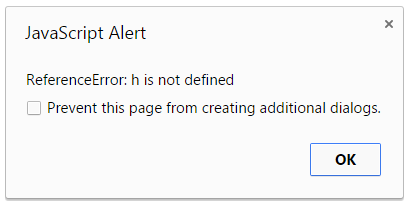
I tried putting my text in quotes like so:

Which results in a different error:
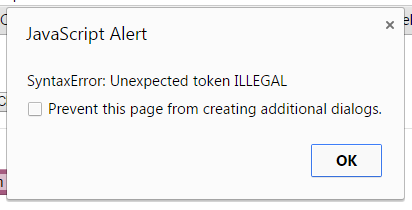
Where have I gone wrong? Is there simply a stock/included String version of the Blockly Variable blocks that I could be using? Would those work with the Blockly Boolean blocks?
Alternatively, have I got the fundamentals of Blockly wrong to begin with?
Steven Kitzes
Nov 19, 2015, 7:07:41 PM11/19/15
to Blockly
After some more searching I discovered the Text category, but I can't find documentation on how to include the blocks, what the block type parameters should be for me to include them, etc.
For example, I tried the following:
    <category name="Text" custom="TEXT"></category>
    <category name="Variables" custom="VARIABLE"></category>
    <category name="Functions" custom="PROCEDURE"></category>
The Variables and Functions categories appeared as expected, but not the Text category. I don't know the types names of the individual blocks to add them myself manually one-by-one. Is there documentation for this?
I am also still curious about the original issue I posted, why my custom text block doesn't work, and how I could modify it to work.
I am also still curious about the original issue I posted, why my custom text block doesn't work, and how I could modify it to work.

Avi
Nov 20, 2015, 1:15:35 AM11/20/15
to Blockly
You could try this ..
<category name="Text" id="catText">
<block type="text"></block>
<block type="text_join"></block>
<block type="text_append">
<value name="TEXT">
<block type="text"></block>
</value>
</block>
<block type="text_length"></block>
<block type="text_isEmpty"></block>
<block type="text_indexOf">
<value name="VALUE">
<block type="variables_get">
<field name="VAR" class="textVar">...</field>
</block>
</value>
</block>
<block type="text_charAt">
<value name="VALUE">
<block type="variables_get">
<field name="VAR" class="textVar">...</field>
</block>
</value>
</block>
<block type="text_getSubstring">
<value name="STRING">
<block type="variables_get">
<field name="VAR" class="textVar">...</field>
</block>
</value>
</block>
<block type="text_changeCase"></block>
<block type="text_trim"></block>
<block type="text_print"></block>
<block type="text_prompt_ext">
<value name="TEXT">
<block type="text"></block>
</value>
</block>
</category>
<category name="Text" id="catText">
<block type="text"></block>
<block type="text_join"></block>
<block type="text_append">
<value name="TEXT">
<block type="text"></block>
</value>
</block>
<block type="text_length"></block>
<block type="text_isEmpty"></block>
<block type="text_indexOf">
<value name="VALUE">
<block type="variables_get">
<field name="VAR" class="textVar">...</field>
</block>
</value>
</block>
<block type="text_charAt">
<value name="VALUE">
<block type="variables_get">
<field name="VAR" class="textVar">...</field>
</block>
</value>
</block>
<block type="text_getSubstring">
<value name="STRING">
<block type="variables_get">
<field name="VAR" class="textVar">...</field>
</block>
</value>
</block>
<block type="text_changeCase"></block>
<block type="text_trim"></block>
<block type="text_print"></block>
<block type="text_prompt_ext">
<value name="TEXT">
<block type="text"></block>
</value>
</block>
</category>
Steven Kitzes
Nov 24, 2015, 8:55:45 PM11/24/15
to Blockly
Thanks Avi, where did you find this? If I want to read more on this and other block types, is there any documentation available? Did you simply look in the code to discover these?
Avi
Nov 25, 2015, 3:35:27 PM11/25/15
to Blockly
For the most part, to get the toolbox, I looked up the 'page source' of various blockly sample apps. for eg. the page source for code editor sample at https://blockly-demo.appspot.com/static/demos/code/index.html should give you all the blocks.
Besides the code in 'blocks' directory has code for all the blocks. You can look at the code to see the details of blocks.
https://github.com/google/blockly/tree/master/blocks
The end user level documentation of the blocks is also available at https://github.com/google/blockly/wiki/Text
Regards
Avi
Besides the code in 'blocks' directory has code for all the blocks. You can look at the code to see the details of blocks.
https://github.com/google/blockly/tree/master/blocks
The end user level documentation of the blocks is also available at https://github.com/google/blockly/wiki/Text
Regards
Avi

Mark Friedman
Nov 25, 2015, 4:39:34 PM11/25/15
to blo...@googlegroups.com
I assume you already know about the Blockly docs at https://developers.google.com/blockly/, but in case you didn't now you do!
-Mark
--
You received this message because you are subscribed to the Google Groups "Blockly" group.
To unsubscribe from this group and stop receiving emails from it, send an email to blockly+u...@googlegroups.com.
For more options, visit https://groups.google.com/d/optout.
Steven Kitzes
Nov 27, 2015, 2:24:22 PM11/27/15
to Blockly
Thank you, the answers have been very helpful!!
Reply all
Reply to author
Forward
0 new messages