
My first major contribution - Shapes for Blockly

Jim Brown
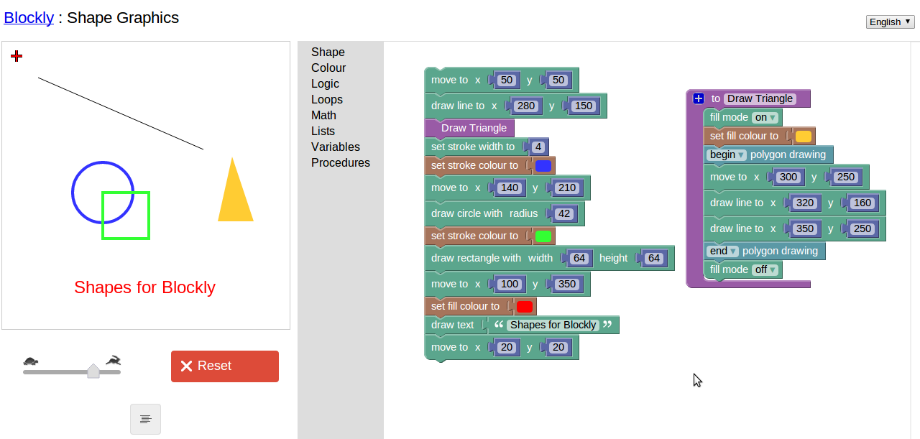
- Move To - Move the drawing point to x/y
- Draw Line To - Draw a line from the current point to x/y
- Draw Rectangle - Draw a rectangle (filled/unfilled)
- Draw Circle - Draw a circle (filled/unfilled)
- Begin / End polygon drawing blocks. Draws polygons as constructed by Draw Line To blocks placed between these blocks
- Draw Text - Draws text at the current drawing point
- Set Stroke Width - Sets the width of lines (applies to unfilled polygons too), unfilled rects, and unfilled circles
- Fill Mode - Sets whether or not rectangles, circles, or polygons are filled.
- Set Stroke Colour - Sets the color for lines (plus unfilled polygons), unfilled rects, and unfilled circles
- Set Fill Colour - Sets the color for filled rects, filled circles, and filled polygons. Also sets the text colour (currently filled text only available)
- Hide / Show Crosshairs - Hide or show the drawing cursor

Ellen Spertus
--
You received this message because you are subscribed to the Google Groups "Blockly" group.
To unsubscribe from this group and stop receiving emails from it, send an email to blockly+u...@googlegroups.com.
For more options, visit https://groups.google.com/groups/opt_out.
Jim Brown

My block.js code section for the cursor x/y position block is:
Blockly.Language.draw_getcursorpos = {
// Block for getting the cursors x or y position
helpUrl: '',
init: function() {
this.setColour(160);
this.appendDummyInput()
.appendTitle(new Blockly.FieldDropdown(this.STATE), 'POS');
this.setOutput(true, "Number");
this.setTooltip(BlocklyApps.getMsg('Shape_cursorPosTooltip'));
}
};
Blockly.Language.draw_getcursorpos.STATE =
[[BlocklyApps.getMsg('Shape_getCursorXPos'), 'getCursorXPos'],
[BlocklyApps.getMsg('Shape_getCursorYPos'), 'getCursorYPos']];
Blockly.JavaScript.draw_getcursorpos = function() {
// Generate JavaScript for returning the cursor x or y pos
return 'Shape.' + this.getTitleValue('POS') +
'(\'block_id_' + this.id + '\')';
};
It appears to generate the code accordingly. I want it to call one of the following JavaScript calls within the shape.js:
Shape.getCursorXPos = function(id) {
return Shape.x;
};
Shape.getCursorYPos = function(id) {
return Shape.y;
};
