
How to load saved workspace
133 views
Skip to first unread message

Bablu Gupta
Oct 13, 2023, 12:04:52 PM10/13/23
to Blockly
So I have this Android Application developed using webView in Android Studio this is the homepage.png?part=0.1&view=1)
.png?part=0.4&view=1)
.png?part=0.2&view=1)
So whenever i click on a file It is supposed to resume the workspace from where i left but it is opening the default workspace like this
This is the code which returns the file content in XML:
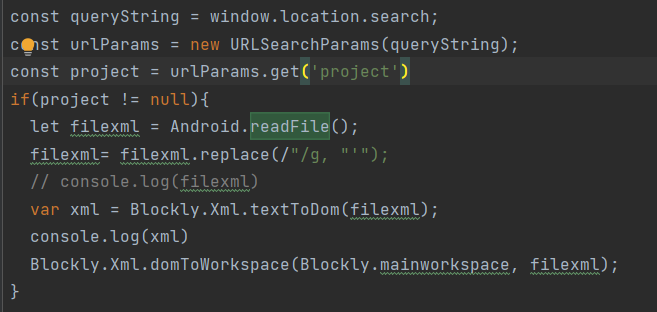
This code is supposed to load the saved workspace:
And yes the function is indeed returning the file content but it is not getting in the workspace.
But the workspace is loading with default blocks, what could be the issue ?

Beka Westberg
Oct 13, 2023, 2:35:16 PM10/13/23
to Blockly
Hello,
Are you receiving any errors from your application? It looks like all of your code is correct! So either you're getting an error about something I'm missing, or it's possibly your default blocks are getting loaded after your save. I would also try adding `console.trace` statements anywhere you call `domToWorkspace` so you can make sure your workspace isn't getting overwritten!
I hope that gives you some places to start! If you have any further questions please reply!
--Beka
--Beka
Bablu Gupta
Oct 17, 2023, 3:27:06 AM10/17/23
to Blockly
No, I'm not receiving any errors and also that you mentioned "
t's possibly your default blocks are getting loaded after your save" this is not the case since i checked it my self actual workspace is getting saved and still when i try to open a file it opens the default blockly editor
Bablu Gupta
Oct 17, 2023, 3:47:11 AM10/17/23
to Blockly
Here's the code which saves the workspace .png?part=0.2&view=1)


Maribeth Moffatt
Oct 17, 2023, 12:13:56 PM10/17/23
to Blockly
Hello,
`Blockly.Xml.domToWorkspace` takes two arguments. The first one is the XML and the second one is the workspace, so you have your arguments switched. Also, `Blockly.mainworkspace` is not a variable defined by Blockly. You will want to use `Blockly.getMainWorkspace()` instead.
Calling domToWorkspace with the arguments swapped like that definitely should be throwing a JavaScript error. Do you have a way of checking the JS console? I would imagine that JS errors wouldn't cause a crash in your application by default given how relatively common they are on still-functioning webpages.
Best,
Maribeth
Bablu Gupta
Oct 24, 2023, 2:09:43 AM10/24/23
to Blockly

I swapped the arguments still it didnt work also i m not getting anything on my logcat

Christopher Allen
Oct 24, 2023, 2:25:54 PM10/24/23
to blo...@googlegroups.com
Hi Bablu,
I swapped the arguments still it didnt work also i m not getting anything on my logcat
Do you have the ability to set breakpoints in JavaScript? If so, I'd put a breakpoint on the first line of Blockly.Xml.domToWorkspace and check to see how many times (and from where) it is being called.
Also, I'd add some console.log calls to your JavaScript and make sure that you are seeing the resulting log output in logcat. If not then you will need to do some research about how to get access to the JavaScript console on Android webview apps. (Alas I have no relevant advice as I am not an Android developer.)
Best wishes,
Christopher
Maribeth Moffatt
Oct 24, 2023, 2:32:04 PM10/24/23
to Blockly
You will need to call `Blockly.getMainWorkspace()` as a function - right now, you are leaving off the parentheses, so you are not calling the function. This should definitely be throwing an error in the JavaScript console. As Christopher said, you will need to do some additional research to find out how to view the JavaScript console logs for your application.
Maribeth

Mark Friedman
Oct 24, 2023, 4:24:38 PM10/24/23
to blo...@googlegroups.com
Bablu,
There are a couple of things to note. One is that in your call to domToWorkspace you are passing Blockly.getMainWorkspace as one of the arguments. However, Blockly.getMainWorkspace is a function. You need to actually call it in order to get the workspace, i.e. call Blockly.getMainWorkspace(). Also, in order to view your JavaScript console logs in your Android logcat, you need to take a few extra steps. See here for the details. Alternatively, you can also use Chrome remote debugging to view Android WebView console output. See here for details on that.
Hope this helps.
-Mark
--
You received this message because you are subscribed to the Google Groups "Blockly" group.
To unsubscribe from this group and stop receiving emails from it, send an email to blockly+u...@googlegroups.com.
To view this discussion on the web visit https://groups.google.com/d/msgid/blockly/85b8141b-7579-45b1-8a2a-eaf59a7edb03n%40googlegroups.com.
Bablu Gupta
Oct 25, 2023, 1:02:13 PM10/25/23
to Blockly
So, I fixed the code and called "Blockly.getMainWorkSpace()" as a function still the workspace is default and I'm also getting the file content as you can see in the logcat panel


I dont know why line 849 is giving that weird console
The error at line 1130 in Blockly.compressed.js I dont what that error is
Christopher Allen
Oct 25, 2023, 8:30:57 PM10/25/23
to blo...@googlegroups.com
Hi Bablu,
Good work getting access to the JavaScript console—and thanks, Mark, for your assistance with that!
I'm also getting the file content as you can see in the logcat panel…
I'm not sure why you're seeing Blockly XML in the console. Perhaps this is coming from console.log statements you added to your own code?
I dont know why line 849 is giving that weird console
The error at line 1130 in Blockly.compressed.js I dont what that error is
Unfortunately without your debugger/console supporting sourcemaps it's very hard for me to know what those errors are either.
Can you tell me the exact version of Blockly you are using? I might be able to figure it out if I knew exactly what version of blockly_compressed.js you were using.
Best wishes,
Chrisotpher
Bablu Gupta
Oct 26, 2023, 11:23:26 AM10/26/23
to Blockly
I'm not sure why you're seeing Blockly XML in the console. Perhaps this is coming from console.log statements you added to your own code?
Yes its because of those log statements
Can you tell me the exact version of Blockly you are using? I might be able to figure it out if I knew exactly what version of blockly_compressed.js you were using.
The Version is 9.2.1
Bablu Gupta
Nov 12, 2023, 8:43:51 AM11/12/23
to Blockly
Any Update?
Maribeth Moffatt
Nov 13, 2023, 3:06:24 PM11/13/23
to Blockly
Hello,
The error is because `Blockly.getMainWorkspace()` is null. Have you already injected Blockly? You can't load blocks into a workspace until the workspace has been created. You probably want to save a reference to the workspace and use that reference instead of using `Blockly.getMainWorkspace()` anyway.
Maribeth
Reply all
Reply to author
Forward
0 new messages