
is there a blockly web component available anywhere??
1,284 views
Skip to first unread message

phil cleaver
Jul 18, 2014, 5:46:17 AM7/18/14
to blo...@googlegroups.com
Hi,
I'm new to web components but they seem awesome. I'm about to try to write a polymer web component for Blockly, but was wondering if there is one available anywhere, or if anyone has started this and can help out.
Thanks
Phil
phil cleaver
Jul 18, 2014, 6:22:06 AM7/18/14
to blo...@googlegroups.com
this is what I have so far. It loads the element, loads blockly, finds the element in the shadow DOM, but gives the error :
- Uncaught Error: container is not in current document. blockly_compressed.js:1129
- Blockly.injectblockly_compressed.js:1129
- Polymer.domReadyblockly_container.htm:61
- (anonymous function)utils.js:29
<!doctype html>
<html>
<head>
<script src="../../polymer/bower_components/platform/platform.js"></script>
</head>
<body fullbleed unresolved>
<link rel="import" href="../../polymer/bower_components/polymer/polymer.html">
<polymer-element name="blockly-element">
<script src="../../../site/Blockly/blockly_compressed.js"></script>
<script src="../../../site/Blockly/blocks_compressed.js"></script>
<script src="../../../site/Blockly/msg/js/en.js"></script>
<script src="../../../site/Blockly/javascript_compressed.js"></script>
<template>
<style>
#core_card {
position: absolute;
width: 100%;
margin : 0;
border-top-left-radius: 2px;
border-top-right-radius: 2px;
border-bottom-right-radius: 2px;
border-bottom-left-radius: 2px;
box-shadow: rgba(0, 0, 0, 0.0980392) 0px 2px 4px, rgba(0, 0, 0, 0.0980392) 0px 0px 3px;
left: 0px;
top: 0px;
background-color: rgb(255, 255, 255);
}
</style>
<core-card id="core_card" layout vertical>
<div id="drop">
<div id="toolboxDiv">
<xml id="toolbox">
<category id="category" name="top level">
</category>
</xml>
</div>
</div>
</core-card>
</template>
<script>
Polymer('blockly-element', {
domReady: function () {
Blockly.inject(this.$.toolboxDiv, {
path: '../../../site/Blockly/',
rtl: false,
toolbox: this.$.toolbox
});
}
});
</script>
</polymer-element>
<blockly-element></blockly-element>
</body>
</html>

David Claughton
Nov 12, 2014, 7:39:05 PM11/12/14
to blo...@googlegroups.com
Hi,
Ok, I realise this post is six months old, but still...
I've just had a go at doing this myself, as part of a crazy idea I had of integrating blockly into polymer-designer (probably a bit ambitious for my first attempt at using blockly, but I love a good challenge!)
Basically the solution to this is to comment out the first three lines of Blockly.inject (in core/inject.js) and recompile blockly. I don't exactly know the implications of doing this, but it seems to work for me - although in my case the rendering is getting a bit messed up, but that might be polymer-designer's fault.
Cheers,
David.
phil cleaver
Nov 16, 2014, 9:34:26 PM11/16/14
to blo...@googlegroups.com
Hi David,
I managed to get it running in an iframe in a web component, but it has it's limitations and your solution seems to be much neater, I'll give it a try, thanks.
Integrating Blockly into Polymer Designer sounds intriguing, what did you have in mind?
Cheers
Phil
David Claughton
Nov 21, 2014, 9:46:36 AM11/21/14
to blo...@googlegroups.com
Hi Phil,
Well, it's just a vague idea at the moment, rather than an actual plan - but I'm sort of aiming for something not entirely unlike an "App Inventor for Web Components".
First things first though - I've discovered the rendering issue is almost certainly due to Blockly inserting its CSS into the document head, where it has no effect on the contents of a shadowroot.
While trying to debug my attempt to fix that I've also discovered I can't HTML Import 'blockly_uncompressed.js' as it has a trio of 'document.write' commands at the end which don't work because HTML Imports are async (well this is optional with native support but polymer's polyfill uses xhr anyway). Even if these didn't error they still wouldn't work with blockly in a shadowroot.
Strangely I don't see this problem with the compressed code - are these statements optimised out by Closure I wonder? In which case how does Blockly get initialised?
Cheers,
David.
Well, it's just a vague idea at the moment, rather than an actual plan - but I'm sort of aiming for something not entirely unlike an "App Inventor for Web Components".
First things first though - I've discovered the rendering issue is almost certainly due to Blockly inserting its CSS into the document head, where it has no effect on the contents of a shadowroot.
While trying to debug my attempt to fix that I've also discovered I can't HTML Import 'blockly_uncompressed.js' as it has a trio of 'document.write' commands at the end which don't work because HTML Imports are async (well this is optional with native support but polymer's polyfill uses xhr anyway). Even if these didn't error they still wouldn't work with blockly in a shadowroot.
Strangely I don't see this problem with the compressed code - are these statements optimised out by Closure I wonder? In which case how does Blockly get initialised?
Cheers,
David.
David Claughton
Dec 23, 2014, 6:50:20 PM12/23/14
to blo...@googlegroups.com
Hi,
Just a quick update to this ... after plugging away at it on and off over the last few weeks I've got something which *almost* works. I've had to make few changes to blockly core, which you can see on my fork on github (branch 'webcomponent')[1]. I've also added a demo in demos/webcomponent.
The biggest stumbling block has been trying to get categories to work - unfortunately the Closure TreeControl isn't expecting to be used within a shadowRoot, so I've had to put in a bit of a hack with a DomHelper to work around the limitations. This mostly works, the only thing that doesn't is <hr> separators - I haven't managed to track down why that is yet.
[1] https://github.com/eclecticdave/blockly/commits/webcomponent
Cheers,
David.
Just a quick update to this ... after plugging away at it on and off over the last few weeks I've got something which *almost* works. I've had to make few changes to blockly core, which you can see on my fork on github (branch 'webcomponent')[1]. I've also added a demo in demos/webcomponent.
The biggest stumbling block has been trying to get categories to work - unfortunately the Closure TreeControl isn't expecting to be used within a shadowRoot, so I've had to put in a bit of a hack with a DomHelper to work around the limitations. This mostly works, the only thing that doesn't is <hr> separators - I haven't managed to track down why that is yet.
[1] https://github.com/eclecticdave/blockly/commits/webcomponent
Cheers,
David.
phil cleaver
Dec 23, 2014, 10:04:07 PM12/23/14
to blo...@googlegroups.com
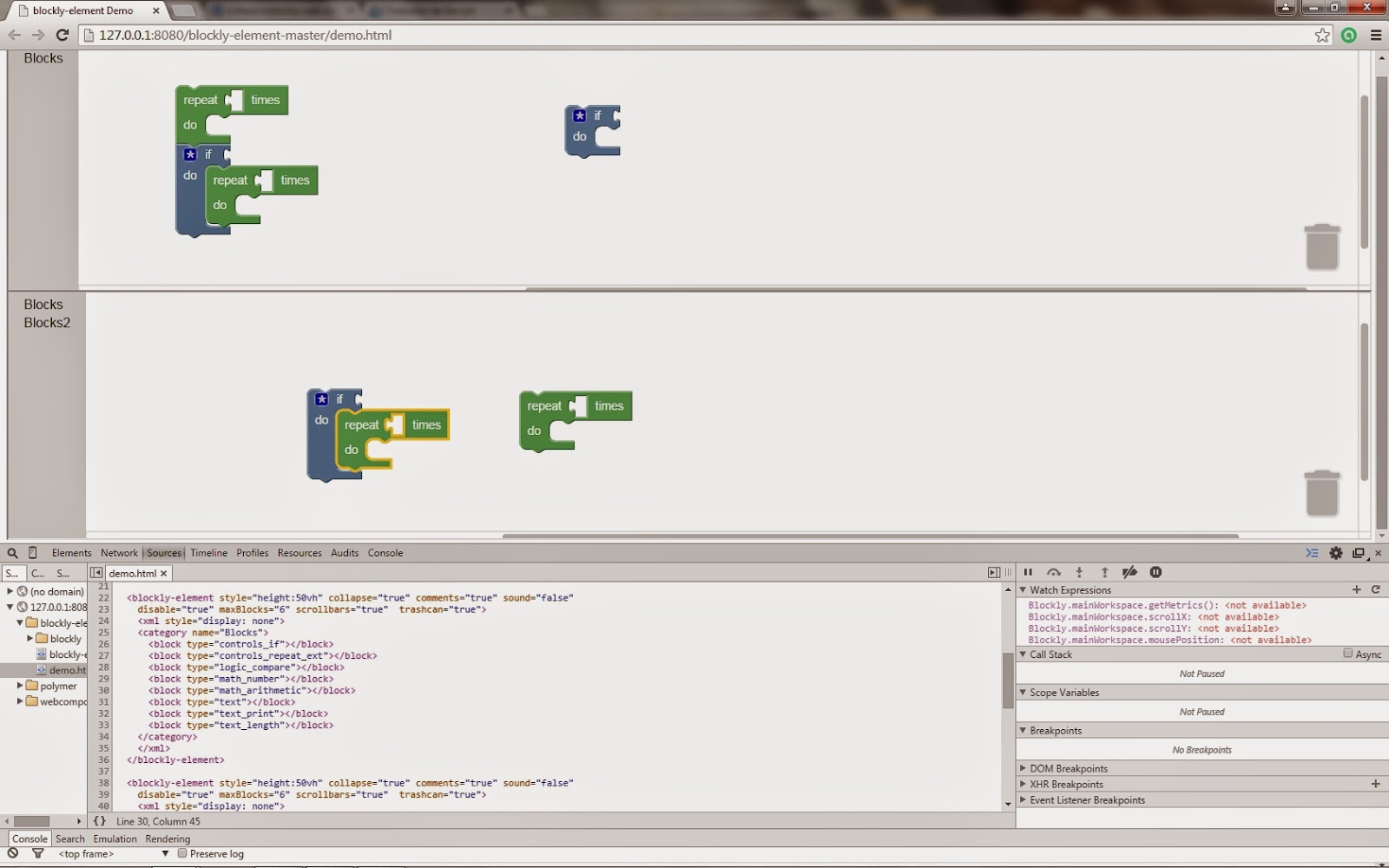
Good work getting it going. Does your method allow multiple Blockly components to co exist in a webpage without messing with each other. For example as in the block factory where one instance is used for block creation, and one instance for displaying the block?
Are things going to have to be wrapped up in an iframe for this as Blockly.mainworkspace is global?
Giggles
Are things going to have to be wrapped up in an iframe for this as Blockly.mainworkspace is global?
Giggles
David Claughton
Dec 24, 2014, 2:01:40 PM12/24/14
to blo...@googlegroups.com
Hi Phil,
Well, in theory it should be possible to put more than one blockly-control on a page without resorting to iframes - each Blockly object should be encapsulated in its own shadowRoot so shouldn't interfere with each other. That said I've just tried it and it's not working right now!
Bear with me - I'll keep tinkering with it.
Cheers,
David.
Well, in theory it should be possible to put more than one blockly-control on a page without resorting to iframes - each Blockly object should be encapsulated in its own shadowRoot so shouldn't interfere with each other. That said I've just tried it and it's not working right now!
Bear with me - I'll keep tinkering with it.
Cheers,
David.
David Claughton
Dec 30, 2014, 2:13:27 PM12/30/14
to blo...@googlegroups.com
Seems this is more difficult than I thought! I was wrong about Polymer creating a separate Blockly object for each control, only the 'Polymer' object itself behaves like that.. Blockly just gets a single global object per page/iframe as it would normally.
There may be a clever way to hack around this, but I haven't found it so far. In theory the best approach is probably to re-factor Blockly using constructors, but that seems like a lot of effort given that needing multiple controls on the same page isn't likely to be a common requirement.
There may be a clever way to hack around this, but I haven't found it so far. In theory the best approach is probably to re-factor Blockly using constructors, but that seems like a lot of effort given that needing multiple controls on the same page isn't likely to be a common requirement.
phil cleaver
Jan 13, 2015, 3:54:33 AM1/13/15
to blo...@googlegroups.com
So iframe looks like the way forward?
I will clean up my code and post it on git hub.
Giggles
I will clean up my code and post it on git hub.
Giggles

Carlos Galarza
Mar 1, 2015, 10:29:53 AM3/1/15
to blo...@googlegroups.com
Reply all
Reply to author
Forward
Message has been deleted
0 new messages