
Blender Bas Relief
369 views
Skip to first unread message

Jacob Klingel
Oct 12, 2013, 11:28:43 PM10/12/13
to blender-...@googlegroups.com
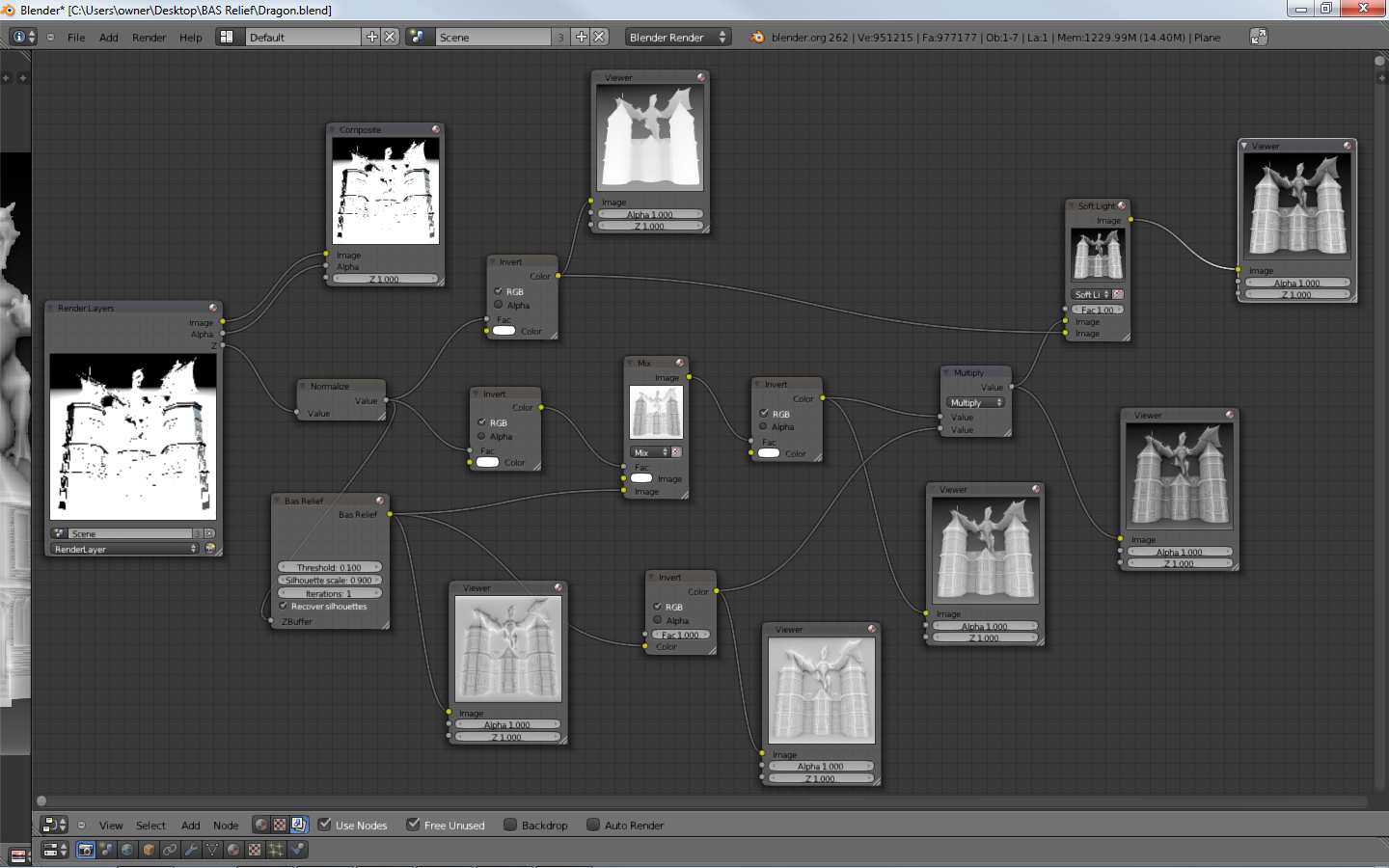
I was curious if anyone else is using the Bas Relief Node? I've been making some headway with it and hope to have some carvings by tomorrow. I had an issue with my download so a lot of the video tutorials were messed up so I've just been tinkering with the nodes to get what I think are decent results. Now to test with some gcode!

Gaeldk
Oct 14, 2013, 2:18:20 AM10/14/13
to blender-...@googlegroups.com
Looks good ! I did not know there was a Bas Relief Node... Do you have a sample file that shows how to use it ?

blenderCAM developer
Oct 14, 2013, 5:43:18 AM10/14/13
to blender-...@googlegroups.com
Regarding Bas-relief node, I am the original developer of it...
But I would have to have 2-3 days to find out how to build it again, which I don't have.
I know some guy is selling it with tutorials..quite funny but why not.
But, it would be nice if somebody uploads the build somewhere for free, it is GPL code, I guess what is being sold are the tutorials right?
here is some explanation of the use.
I use the node for all my reliefs.
;)
Message has been deleted
Jacob Klingel
Oct 14, 2013, 10:17:16 AM10/14/13
to blender-...@googlegroups.com
On Monday, October 14, 2013 5:47:13 AM UTC-8, Jacob Klingel wrote:
> I wanted to see if there was a way that I could make it work with the latest version of Blender? My copy works with Version 2.62. Yes when I bought the tutorials it comes with the updated node but the videos seem to have had some issues? I haven't the slightest clue on how to compile the code to make it compatible, but I do have the drive to figure it out of someone is willing to point me in the right direction;) I've seen several of your relief carvings Vilem and they are great. That is why I built my machine, I'm hoping to be able to carve full size doors, cabinets, tables and maybe the occasional bed frame using Blender with all the FREE add-ons that people like you create.
> I wanted to see if there was a way that I could make it work with the latest version of Blender? My copy works with Version 2.62. Yes when I bought the tutorials it comes with the updated node but the videos seem to have had some issues? I haven't the slightest clue on how to compile the code to make it compatible, but I do have the drive to figure it out of someone is willing to point me in the right direction;) I've seen several of your relief carvings Vilem and they are great. That is why I built my machine, I'm hoping to be able to carve full size doors, cabinets, tables and maybe the occasional bed frame using Blender with all the FREE add-ons that people like you create.
blenderCAM developer
Oct 15, 2013, 12:23:31 PM10/15/13
to blender-...@googlegroups.com
Jacob, it seems I accidentaly deleted your message. I don't know why, your messages get marked as spam or something, and I wanted to confirm the message is ok, but it somehow disappeared...
here are the original instructions>
my node setup is always almost the same. Trick is to always have something in background - at least a plane. At the moment the background is infinite, the algorithm doesn't work well.

acrou...@gmail.com
Oct 17, 2013, 4:05:16 PM10/17/13
to blender-...@googlegroups.com
Hi Jacob, I've been experimenting with the bas-relief node, and the results look very good ( although I have not had a chance to do any machining yet). I use an older version of blender on ubuntu 12.04 with the node pre-compiled( 2.49 I think). I don't know how you set your nodes up, but I put a tonemap node before the relief node to achieve the desired results. Good luck.
On Sunday, 13 October 2013 4:28:43 UTC +1 Jacob Klingel wrote (a):
On Sunday, 13 October 2013 4:28:43 UTC +1 Jacob Klingel wrote (a):
I was curious if anyone else is using the Bas Relief Node? I've been making some headway with it and hope to have some carvings by tomorrow. I had an issue with my download with a lot of the video tutorials were messed up so I've just been tinkering with the nodes to get what I think are decent results. Now test it with some Gcode!
Jacob Klingel
Oct 19, 2013, 2:10:10 PM10/19/13
to blender-...@googlegroups.com
Well I've tried using the tone map node but I just did not like the results I was getting. It seemed to me to be "washed out"? So I kept tinkering with the nodes and seeing what the results looked like in BlenderCAM. This is what I'm getting as far as results go. I'm working up some tutorials for my lithophanes and my Bas Reliefs, as soon as I have some real results from my machine.
blenderCAM developer
Oct 19, 2013, 3:56:28 PM10/19/13
to blender-...@googlegroups.com
Jacob, the result seem ok,
just maybe put a flat plane right behind the objects, so that the zbuffer is not too deep even before using the algorithm.
For achieving good results with the reliefs, it's also good to do these things: Use really small cutters for finishing - I use 1.5mm diameter (0.75 radius) now for the finishing.
I am also recently experimenting with the pencil pass, which seems to improve stuff a tiny bit.
Regarding the algorithm - I see you use only 1 iteration. I usually use up 25 iterations(!) that takes much longer to compute. With big images you have to wait for up to 10 or 20 minutes.
This brings the relief more back to the original shape of the 3d scene. Less iterations are closer to , e.g. persian reliefs, which are more shallow.
Also, another thing that influences the result is the depth scale you set up in blender CAM.
Another thing - try to increase resolution of the simulation object, that is done in the properties window in blender, in modifier section.
If you want to know how to use modifiers, look e.g. here: http://www.youtube.com/watch?v=jFFluHcIU14
Good luck with that all :)
Good luck with that all :)
acrou...@gmail.com
Oct 19, 2013, 4:28:42 PM10/19/13
to blender-...@googlegroups.com
Hello. I haven't really experimented with different node set ups, my set up was pretty simple, but it gives the impression of the relief carved into the wood, and quite flat, as opposed to being raised up from the surface. I think quite a lot of different effects and styles can be achieved that make good source material for use in blendercam. Here's a picture of a bas-relief image that had toolpaths generated, then simulated. The simulation was then rendered with a wood texture.
Dne neděle, 13. října 2013 4:28:43 UTC+1 Jacob Klingel napsal(a):
Dne neděle, 13. října 2013 4:28:43 UTC+1 Jacob Klingel napsal(a):

bgio...@gmail.com
Oct 19, 2013, 6:44:53 PM10/19/13
to blender-...@googlegroups.com, acrou...@gmail.com
(For my works on wood I also use a two flute straight (or helical) ball nose bit, diameter 1.5 mm.)
Excuse me please, probably I have not completly understood your messages, but I am asking to myself: why to use bass-relief when we have BlenderCAM?
Excuse me please, probably I have not completly understood your messages, but I am asking to myself: why to use bass-relief when we have BlenderCAM?
Jacob Klingel
Oct 19, 2013, 7:39:03 PM10/19/13
to blender-...@googlegroups.com
Okay so here goes nothing:)
I own a copy of Vectric's PhotoVCarve which I've used many time to create Lithophanes and calculate simulations of Bas Reliefs based on all the images I've created in Blender.
What I meant by looking washed out was it seems like the detail was lacking in the image with tone mapping vs my node setup.
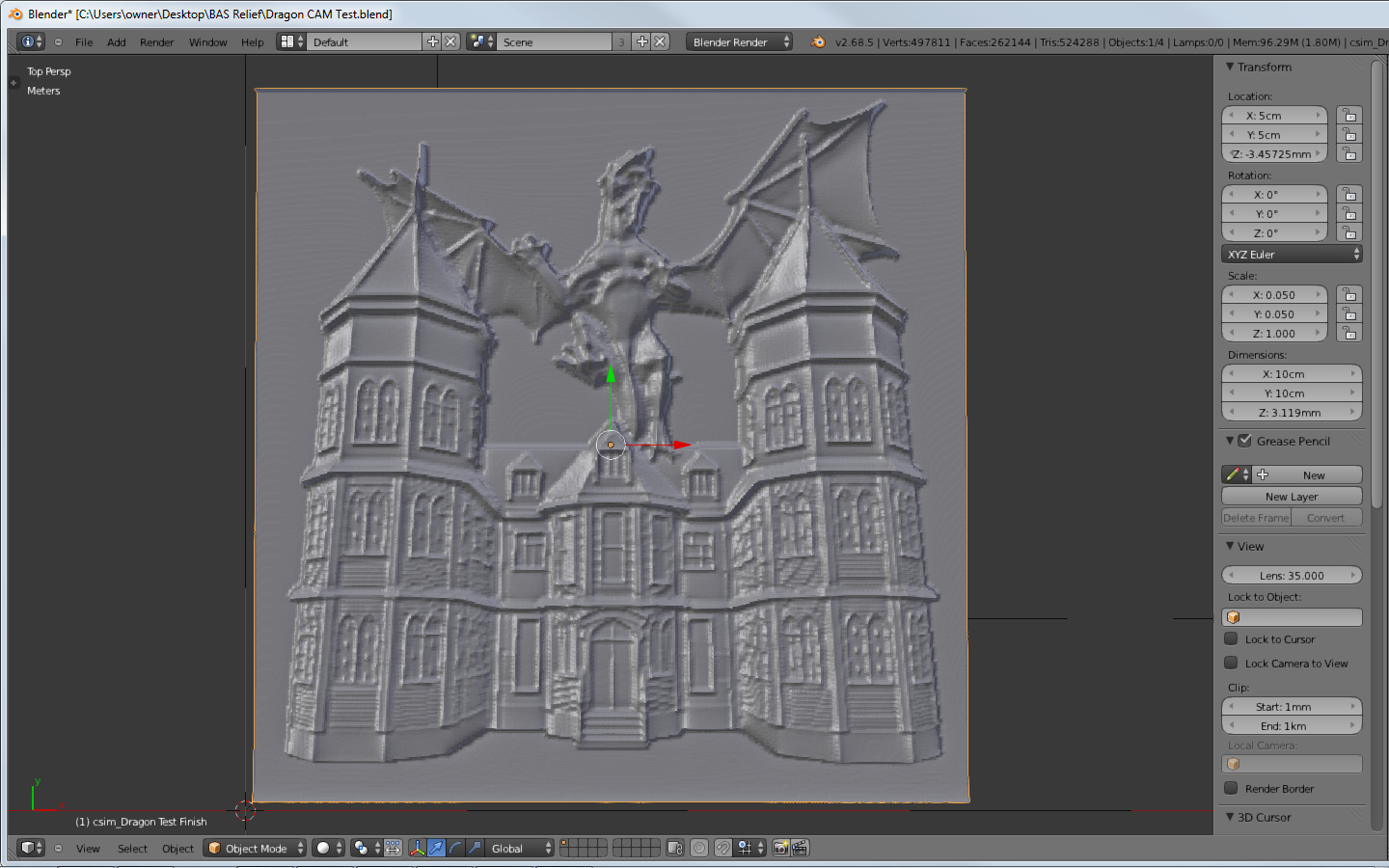
All renderings are using a 1000 pixel by 1000 pixel image, the size of the carving is 6 inches square, .25 inch depth with a .075 inch 2 flute ball nose.
The first photo is 25 Iterations on my node setup
The second photo is my original 1 Iteration render on my nodes
The third photo is using just the tone map node and bas relief node with 25 Iterations, basically the settings that are on the bas relief wiki.
The last photo is an actual carving using BlenderCAM, image was my original node settings via bas relief nodes at 1000 pixel x 1000 pixel, .2MM tool path spacing parallel step back using a .035 inch ball nose 2 flute end mill.
No worries Vilem I'm fairly proficient with Blenders modifiers, I use the 2 subsurf modifiers at 6 and 4 respectively which I believe puts me at about 2 million polygons on the displaced plane.
As to why I use the Bas Relief setup, there is no way I could have created the dragon and the house on my own, I downloaded the 3D models, posed them, rendered the filtered Z buffer with the Bas Relief node and bammo, I have a very nice relief carving that is only one quarter of an inch thick.
On a side note, if I render an image that I will be using in BlenderCAM later I use PNG or better yet the EXR file formats. If you've ever noticed the "plateauing" effect on the images the only file format that doesn't do that is the OPENEXR file. I believe that's why Vilem uses it to "simulate" the operations.
P.S. Tutorials coming soon, I swear!
blenderCAM developer
Nov 20, 2013, 6:02:57 AM11/20/13
to blender-...@googlegroups.com
Hello guys,
I finally had time to recode the code. I am now giving it to all who donated to blenderCAM or participated in any other way. I tried to send a group mail, so if you didn't recieve a copy of this mail, please let me know.
I will keep this code for some time as closed source, to try to raise some more money for blender CAM ;) But if this doesn't work, It will become GPL anyway... :)
I was sincerelly also a bit upset seeing the way somebody else was making bussiness out of something I gave out for free.
more info here:





bdrag...@gmail.com
Sep 17, 2017, 7:52:57 PM9/17/17
to blender CAM forum
Trying to figure out how to use the bas relief addon. Getting a traceback error. Full traceback can be seen here:
There is almost no documentation or info of any kind anywhere, even though the blenderCAM site claims that it's part of the tutorials :((( Thank you for your contributions bigtime but i cannot figure out how to use it
Reply all
Reply to author
Forward
0 new messages