1Password module can't locate the Agile keychain

483 views
Skip to first unread message

Keith Kastorff

unread,
Dec 28, 2011, 7:00:08 AM12/28/11
to blacktree-...@googlegroups.com
Running OS X 10.7.2, B63. New install of QS on this machine. I'm getting --

Quicksilver: Unable to determine 1Password keychain path. Assumed it was in /Users/username/Library/Application Support/1Password/1Password.agilekeychain, but file not found.

The 1Password keychain is located in a 1Password folder at the root of my Dropbox folder. 1Password functions normally.

I haven't found a place to specify the path for the plugin. Solution?

Tim Lawson

unread,
Dec 28, 2011, 8:05:13 AM12/28/11
to blacktree-...@googlegroups.com
Keith -

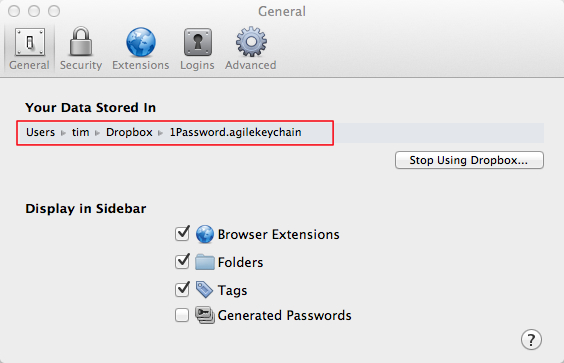
Open 1Password's prefs and, with the 'general' tab ticked, you should see that your iPassword keychain is stored at ~/Dropbox per the screenshot below:


Then open your Dropbox app. prefs. and, on the 'Advanced' pane, you can see where to change the location for your Dropbox.  I remember reading something somewhere about the need for it to be in the users folder root (if that's the right expression) per my own as you'll see from the screenshot below.

Keith Kastorff

unread,
Dec 30, 2011, 9:13:53 PM12/30/11
to blacktree-...@googlegroups.com
Any place I can find specific installations instructions for the 1Password module? The same configuration I successfully used in Snow Leopard isn't working in Lion. Not saying the above doesn't work, just that I didn't have to make similar changes in SL.

yoose

unread,
Dec 31, 2011, 4:02:10 AM12/31/11
to Blacktree: Quicksilver
Just a thought, if you had not tried already, maybe try restarting QS
and/or clearing its cache. if you changed the location of the
1Password key after installing the module maybe it didnt read the new
location from within 1Password. I can tell you that it works as I
moved my keychain and QS does works and reads new entries that I have
made since I moved it.

Patrick Robertson

unread,
Dec 29, 2011, 11:34:20 AM12/29/11
to blacktree-...@googlegroups.com
Thanks Tim for your help,

What Tim has said is indeed correct; it's worth ensuring your Dropbox folder is located within your home folder (the folder named your username). This is what Dropbox recommends.

If it is already located there, then I suggest you un-tick then re-tick the option to place your keychain in the Dropbox folder (if you are using the Mac App Store version of 1Password) or re-selecting the Dropbox folder if you are using a non-Mac App Store version of 1Password.

If this still does not solve your problem, then please do let me know:

a) which version of 1Password you are using (Mac App Store or not)
b) The exact location of your keychain (right click and select 'get info' and see the 'where' section)
c) the file located at ~/Library/Preferences/ws.agile.1Password.plist (if it exists) -- I suggest you don't share this with the group, but feel free to email me directly on patrick [at] qsapp.com

I will most likely be unable to help further until after the 12th of January as I am away at the moment, but I hope this helps!


On 28 Dec 2011, at 16:05, Tim Lawson wrote:

> Keith -
>
> Open 1Password's prefs and, with the 'general' tab ticked, you should see that your iPassword keychain is stored at ~/Dropbox per the screenshot below:
>

> <General.jpg>


>
> Then open your Dropbox app. prefs. and, on the 'Advanced' pane, you can see where to change the location for your Dropbox. I remember reading something somewhere about the need for it to be in the users folder root (if that's the right expression) per my own as you'll see from the screenshot below.
>

> <Advanced.jpg>

Keith Kastorff

unread,
Jan 2, 2012, 11:06:03 PM1/2/12
to blacktree-...@googlegroups.com
Everything is as Patrick suggested as far as file/folder paths go. I've removed the 1Password plugin and reinstalled it (proper restart of QS to allow update). I've completed removed QS and all support files and done a clean install. I've toggled the Dropbox option on 1Password without QS running, re-enabled it, waited for Dropbox to sync, and relaunched QS. The Console messages indicate that QS is looking for the 1Password keychain in the ~/Library folder regardless of the 1Password settings. If I configure 1Password not to use Dropbox, QS finds the 1Password keychain and works properly. If I use Dropbox, it fails. Consistently.

I've emailed Patrick the info he requested, in addition to a Console excerpt showing the QS messages.

Tim Lawson

unread,
Jan 3, 2012, 5:36:31 AM1/3/12
to blacktree-...@googlegroups.com
Have you been to qsapp.com and made sure to dl the latest 1PWD plugin? Dunno - may be worth a try?

Keith Kastorff

unread,
Jan 3, 2012, 6:43:13 PM1/3/12
to blacktree-...@googlegroups.com
Yea, I tried that too. The version numbers were the same, as I'd expect given the recent integration of the qsapp.com site plugins with QS. Didn't help. But it's a good suggestion.

Mohammad A. Haque

unread,
Jan 6, 2012, 12:31:03 PM1/6/12
to blacktree-...@googlegroups.com
What I ended up doing was:

1. Delete plugin
2. Quick QS
3. Launch QS
4. Add plugin
5. Verify item's checked in QS 1Password catalog

Keith Kastorff

unread,
Jan 7, 2012, 5:20:26 AM1/7/12
to blacktree-...@googlegroups.com
I've tried that, and pretty much any variation of that I could imagine. Frustrating.

Mohammad A. Haque

unread,
Jan 7, 2012, 8:37:35 AM1/7/12
to blacktree-...@googlegroups.com
Actually, that got the catalog populated but I still can not copy password to the clipboard.

Patrick Robertson

unread,
Jan 8, 2012, 2:32:04 AM1/8/12
to blacktree-...@googlegroups.com
Hi Keith,

I managed to find a minute whilst I was away to look into this, and if you download the latest version of the module (click update 'now' in the prefs) the plugin should work correctly for you.

Good luck, and let me know if it works!

Keith Kastorff

unread,
Jan 8, 2012, 7:05:37 PM1/8/12
to blacktree-...@googlegroups.com
Patrick,

Works great! Thank you.

yoose

unread,
Jan 10, 2012, 1:02:44 AM1/10/12
to Blacktree: Quicksilver
Hi Patrick,

I noticed something when using the 1Password plugin so i thought I
would put it here, if 1Password is locked and I try to reveal an entry
using the QS command, it will fill the master password field with the
search term and after I put in the actual password it will not
populate the search field since it thinks it already did. Not really a
big deal , but just wondering if there is an easy way to fix this?

Regards,
Kyle

On Jan 8, 3:32 pm, Patrick Robertson <robertson.patr...@gmail.com>
wrote:
> Hi Keith,
>
> I managed to find a minute whilst I was away to look into this, and if you
> download the latest version of the module (click update 'now' in the prefs)
> the plugin should work correctly for you.
>
> Good luck, and let me know if it works!
>

Patrick Robertson

unread,
Jan 11, 2012, 7:54:00 AM1/11/12
to blacktree-...@googlegroups.com
Hi Kyle,

Thanks for your feedback. I've been in touch with the 1Password developers about this, and unfortunately there's no way of knowing if 1Password is locked or unlocked, so no way round this.

They have said that they will look into making 1Password more accessible to external plugins, so we can but hope!

Patrick

yoose

unread,
Jan 12, 2012, 8:01:54 AM1/12/12
to Blacktree: Quicksilver
Hi Patrick,

Thank you for the update! let's hope they do make it easier to work
with then maybe we can create entries from QS.

Kyle


On Jan 11, 8:54 pm, Patrick Robertson <robertson.patr...@gmail.com>

Leo

unread,
Feb 7, 2016, 2:41:39 PM2/7/16
to Quicksilver


Hi,

I'm new to 1Password. I am using the 6 version. I have:
1) installed the QS plugin. 
2) enabled 3rd party apps.
3) saved 1Password.opvault to a folder

However, it seems that QS->1Password->"set your keychain folder" does not recognize .opvault files, just .agilekeychain. I tried in vain to find some command in the 1Password app to export from .opvault to .agilekeychain. 

Any ideas?

Thanks in advance

Rob McBroom

unread,
Feb 8, 2016, 10:21:48 AM2/8/16
to Quicksilver
On 7 Feb 2016, at 14:41, Leo wrote:

> I'm new to 1Password. I am using the 6 version. I have:
> 1) installed the QS plugin.
> 2) enabled 3rd party apps.
> 3) saved 1Password.opvault to a folder
>
> However, it seems that QS->1Password->"set your keychain folder" does
> not
> recognize .opvault files, just .agilekeychain. I tried in vain to find
> some
> command in the 1Password app to export from .opvault to
> .agilekeychain.

The 1Password plug-in hasn’t worked since version 3 or 4. It has been
updated and works, but needs some small tweaks.

https://github.com/pjrobertson/1Password-Plugin/pull/7

--
Rob McBroom
http://www.skurfer.com/

Leo

unread,
Feb 9, 2016, 4:55:21 AM2/9/16
to Quicksilver, mailin...@skurfer.com

Thanks for your answer, Rob. I believe I am using the most recent version of the plugin, namely 2.7.1 (10/05/14). I might be mistaken, but I could not find how to set my 1Pass key chain at the indicated URL. Please, let me know whether you have further directions.

Best

  L

Rob McBroom

unread,
Feb 9, 2016, 9:38:22 AM2/9/16
to Quicksilver
On 9 Feb 2016, at 4:55, Leo wrote:

> I might be mistaken, but I could not find how to set my 1Pass key
> chain at the indicated URL. Please, let me know whether you have
> further directions.

That was just a discussion of the updates to the plug-in to let you know
what’s going on. To actually get it working, you’d have to build the
new version yourself in Xcode.

Leo

unread,
Feb 27, 2016, 8:42:22 AM2/27/16
to Quicksilver, mailin...@skurfer.com

Saw you updated the plugin, Rob. Thank you much!
Reply all
Reply to author
Forward
0 new messages