
How to reload the OS on your BlackBerry Priv, DTEK50 or DTEK60

Aparajith Narayanan
How to reload the OS on your BlackBerry Priv, DTEK50 or DTEK60
By Bla1ze
This guide was updated on November 9, 2016 to reflect new changes within the reloading process.
With the autoloaders for all BlackBerry smartphones powered by Android, there's sure to be folks needing to know how the whole process works, and we're glad to help with that. Take a look at our full rundown of how to reinstall the OS on your BlackBerry Priv, DTEK50 orDTEK60. It's all fairly easy, but do keep in mind you will need to have a Windows or Mac computer to complete the process plus, reinstalling the OS will indeed erase all local data.
Overview
- Install the USB drivers for the BlackBerry smartphone powered by Android. To install the USB drivers, click here.
- BlackBerry smartphone powered by Android by visiting this support page
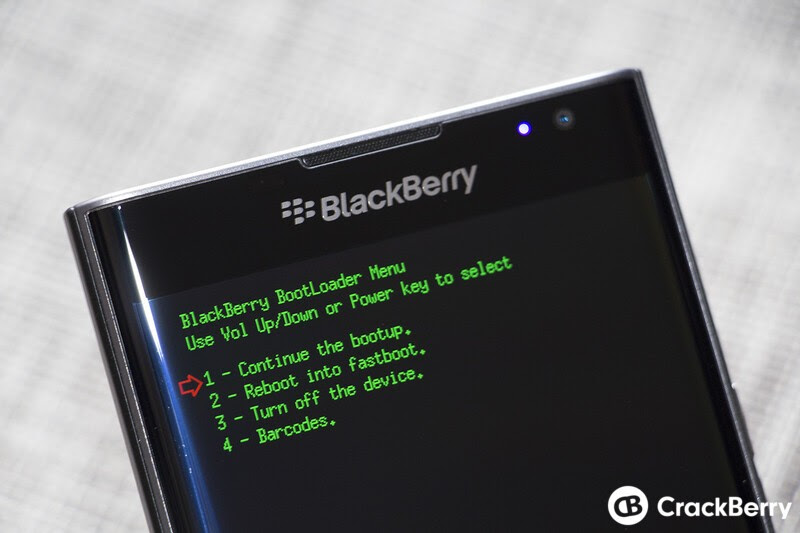
- Press and hold both the Power and Volume Down buttons for 30 seconds to boot the BlackBerry smartphone powered by Android into fastboot mode. Alternatively, press and hold the Volume Down while turning on your device and selecting Reboot into fastboot (when in fastboot mode, the Priv will display the BlackBerry Bootloader Menu and a purple LED while the DTEK50 and DTEK60 will display the BlackBerry Bootloader Menu with no LED )
Windows
- Open and extract the downloaded autoloader file (including all files and folders)
- Open the extracted folder
- Execute the flashall.bat
- Follow on screen instructions as prompted
Mac OS X
- Open and extract the autoloader file (note the location of the downloaded autoloader file (example: Documents, Downloads, Desktop)
- Rename extracted folder to Priv
- Open Terminal (Finder > Applications > Utilities > Terminal)
- Type cd /Priv
- Type ./flashall.sh and press Enter
- Follow on screen instructions as prompted
Additional Information
If the following message is displayed when attempting to reload the OS on the BlackBerry smartphone powered by Android:
"Loader is not valid for this variant, the device variant detected is subvariant:=. Please obtain a loader which supports the device variant above and try again."
Then please verify that the USB drivers have been installed using the steps below:
Windows
- Click Start
- Select Control Panel
- Select Programs and Features or Uninstall a program
- Verify BlackBerry USB Driver is listed
Mac OS X
- Open Finder
- In the title bar, select Go > Go to Folder...
- Type /Library/Extensions/
Verify BlackBerryUSBCDCNCM.kext and RIMBBUSB.kext are listed
Note: Completing the reload of the OS will erase all local data from your device
Once completed, you should have a fully wiped device and be able to start entirely fresh with the setup process again. If you run into any issues, be sure to head on into theCrackBerry forums to get some further help. And as always, you use these files at your own risk, don't blame us if you break things.
Aparajith
Sent from my BlackBerry 10 smartphone.