
Skip to first unread message

gruyere.e...@gmail.com
Mar 19, 2015, 12:06:22 PM3/19/15
to beagl...@googlegroups.com
I have been trying to get wifi to work on the latest debian image. It does work but requires me to manually start it after logging in. If I log in and type 'ifup wlan0' It works fine. Even putting 'ifup wlan0' in /etc/rc.local does not work.
Here is a link to my etc/network/interfaces http://pastebin.com/37AjV6tG
I also noticed this repeating over and over in /var/log/wicd/
2015/03/01 22:03:16 :: Autoconnecting...
2015/03/01 22:03:16 :: No wired connection present, attempting to autoconnect to wireless network
2015/03/01 22:03:18 :: Unable to autoconnect, you'll have to manually connect
The full file http://pastebin.com/8sznu2bB
Any help would be appreciated.

Graham
Mar 19, 2015, 5:28:23 PM3/19/15
to beagl...@googlegroups.com
It is a boot order problem.
I reported it a month ago, or so.
Debian is trying to start WiFi before the USB interface is fully up, therefore it fails.
If you wait until after the USB interface is fully up and running, you can manually start the WiFi.
Or, write a systemd service to start it automatically. I found waiting until 30 seconds after
the start of boot worked fine, to have systemd start WiFi successfully.
--- Graham
==
I reported it a month ago, or so.
Debian is trying to start WiFi before the USB interface is fully up, therefore it fails.
If you wait until after the USB interface is fully up and running, you can manually start the WiFi.
Or, write a systemd service to start it automatically. I found waiting until 30 seconds after
the start of boot worked fine, to have systemd start WiFi successfully.
--- Graham
==

Fredrik Olofsson
Mar 20, 2015, 7:32:57 AM3/20/15
to beagl...@googlegroups.com
i found out that 'allow-hotplug' made wlan0 start at startup. here's how i setup my interfaces file...
sudo pico /etc/network/interfaces
#auto eth0
allow-hotplug eth0
#auto wlan0
allow-hotplug wlan0
iface wlan0 inet dhcp
wpa-ssid ”<name>”
wpa-psk ”<pass>”
wireless-power off
sudo ifup wlan0
Nathaniel Johnson
Mar 20, 2015, 11:55:59 AM3/20/15
to beagl...@googlegroups.com
Thanks for the reply. I will try Fredrik Olofsson's solution first but if that doesn't work I will use the systemd method.
Nathaniel Johnson
Mar 24, 2015, 8:27:46 AM3/24/15
to beagl...@googlegroups.com
UPDATE: Fredrik Olofsson's solution worked for me. I left in my auto statement as well.
On Thursday, March 19, 2015 at 11:06:22 AM UTC-5, Nathaniel Johnson wrote:

Upol Ryskulova
Mar 26, 2015, 9:15:14 AM3/26/15
to beagl...@googlegroups.com
Hello Graham,
I have problem in getting stable wireless connection on BBB. I asked this quiestion yesterday, but then saw your answer here. Tried to force systemd service to start running after 30 sec as you said. And edited my service like this
To be sure that this new service started runnning after the 30sec I did systemd plot. As you see ifupwlan.service is not waiting for 30 sec. To achieve this result I also have tried systemd.timer but no use. I will be very glad for your advice.
[Unit]Description=Ifup wlan automatically
[Service]Type=oneshotRemainAfterExit=trueTimeoutStartSec=30sExecStart=/usr/testifup/ifupscript.sh
[Install]WantedBy=multi-user.target
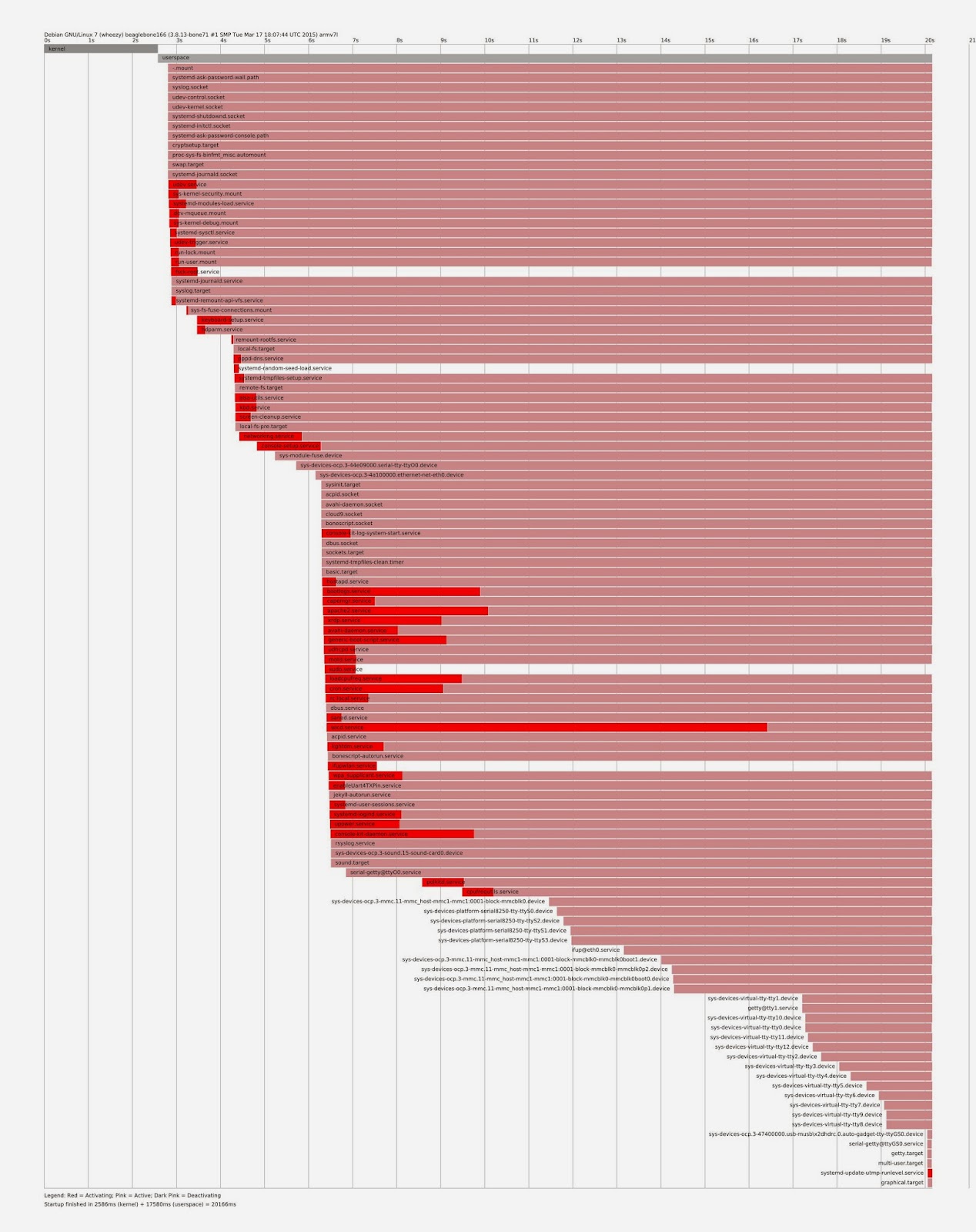
To be sure that this new service started runnning after the 30sec I did systemd plot. As you see ifupwlan.service is not waiting for 30 sec. To achieve this result I also have tried systemd.timer but no use. I will be very glad for your advice.
Thanks in advance.
Regards,
Upol
четверг, 19 марта 2015 г., 23:28:23 UTC+2 пользователь Graham написал:
четверг, 19 марта 2015 г., 23:28:23 UTC+2 пользователь Graham написал:
Graham Haddock
Mar 26, 2015, 12:54:13 PM3/26/15
to beagl...@googlegroups.com
To get a reliable start of the WiFi service with jessie, I did the following:
1.) do NOT uncomment the wireless enable/start lines in /etc/network/interfaces.Apparently, once "wpa_supplicant" gets the error, it will not try again.
This service is started when the .timer of the same file name is satisfied.
==
--
For more options, visit http://beagleboard.org/discuss
---
You received this message because you are subscribed to a topic in the Google Groups "BeagleBoard" group.
To unsubscribe from this topic, visit https://groups.google.com/d/topic/beagleboard/rRHUR8mltmg/unsubscribe.
To unsubscribe from this group and all its topics, send an email to beagleboard...@googlegroups.com.
For more options, visit https://groups.google.com/d/optout.
Nathaniel Johnson
Mar 26, 2015, 12:57:06 PM3/26/15
to beagl...@googlegroups.com
Graham, did you try Fredrik's solution? It works fine for me though left the auto wlan0 line in the interfaces file.
-Nathaniel
Graham Haddock
Mar 26, 2015, 1:04:11 PM3/26/15
to beagl...@googlegroups.com
I have not tried it. No time, yet. It seems like a much simpler solution than mine.
What I intend to do is look in the .service file called by Frederik's solution, and ==
Upol Ryskulova
Mar 27, 2015, 4:38:00 AM3/27/15
to beagl...@googlegroups.com
Hello Graham,
Thank you for your help. I re-implement systemd-timer service as you suggested. But service that timer expected to start after 30 sec , just starts after 4-5 sec after I start timer. So I just ended up to put "sleep 30" in my script. Now (at least 3 times I tried) it has got its' static IP. Btw in interface file I had not got any "auto wlan#" line.
Hello Nathaniel, my interface file always have contained "auto-hotplug wlan#" at the very top of the file but I had still had a problem in making the wireless stable in BBB (rev C). Or should this line come after the wpa_supplicant.conf command?
Regards,
Upol

Brian Anderson
Mar 27, 2015, 8:06:56 PM3/27/15
to beagl...@googlegroups.com
Since you are using Jessie images, have you tried using ConnMan to manage the WiFi connection rather than resorting to all of this systemd and ifup/ifdown stuff?
You can configure ConnMan using the "connmanctl" command line utility, or via the "cmst" GUI utility. to setup your link (ssid, credentials). Or, you can create a config file and put it in /var/lib/connman/my_config.config. There is documentation in the ConnMan source tree on this format. I've also attached a template for reference. You might also consider adding '/etc/connman/main.conf' and specify PreferredTechnologies in the order that you want. Again, there is documentation in the ConnMan source tree on this file, and also the Google will help.
Note that if you use this method, you should NOT do any wifi configuration in /etc/network/interfaces as ConnMan will override these. If you would rather use /etc/network/interfaces, then be careful that you don't also have conflicting configuration setup with ConnMan, as ConnMan will override configuration in /etc/network/interfaces.
I use the ConnMan method all the time for my work and have no problem getting a WiFi connection after boot using my TP-Link TL-WN-722N (uses an Atheros chipset), Jessie snapshot images, and 3.19.x kernels.
ba
You can configure ConnMan using the "connmanctl" command line utility, or via the "cmst" GUI utility. to setup your link (ssid, credentials). Or, you can create a config file and put it in /var/lib/connman/my_config.config. There is documentation in the ConnMan source tree on this format. I've also attached a template for reference. You might also consider adding '/etc/connman/main.conf' and specify PreferredTechnologies in the order that you want. Again, there is documentation in the ConnMan source tree on this file, and also the Google will help.
Note that if you use this method, you should NOT do any wifi configuration in /etc/network/interfaces as ConnMan will override these. If you would rather use /etc/network/interfaces, then be careful that you don't also have conflicting configuration setup with ConnMan, as ConnMan will override configuration in /etc/network/interfaces.
I use the ConnMan method all the time for my work and have no problem getting a WiFi connection after boot using my TP-Link TL-WN-722N (uses an Atheros chipset), Jessie snapshot images, and 3.19.x kernels.
ba
Graham Haddock
Mar 30, 2015, 10:14:46 PM3/30/15
to beagl...@googlegroups.com
Brian:
Thanks for the pointers.==
--

DeKay
Apr 2, 2015, 8:25:53 PM4/2/15
to beagl...@googlegroups.com
This solution worked great for me on an image from a few months back. I highly suggest taking this route.
http://madscientistlabs.blogspot.ca/2015/01/wifi-on-beaglebone-black-with-systemd.html
http://madscientistlabs.blogspot.ca/2015/01/wifi-on-beaglebone-black-with-systemd.html
Reply all
Reply to author
Forward
0 new messages