
Re: [beagleboard] BeagleBone Black (BBB) & 7" LCD LVDS bundle (Cape + 7" Display) form Chalkboard
2,100 views
Skip to first unread message

Gerald Coley
Jun 6, 2013, 5:15:19 PM6/6/13
to beagl...@googlegroups.com
Not me!
Gerald
On Thu, Jun 6, 2013 at 3:52 PM, Berthold Braun <b3r...@gmail.com> wrote:
Hello Guys,Today I received my BeagleBone Black and the 7" LCD LVDS bundle (Cape + 7" Display) form Chalkboard (http://www.chalk-elec.com/?page_id=1280#!/~/product/category=3094859&id=13727570).On thier page i couldn´t find any manual how to setup the bungle or software guides for the BBB just one small software guide for the BBW .I have updated to the current Angstrom version and would like to use the BBB with the LCD cape.First of all I am not really sure how to connect the hardware to the board.Of cause the cape is just plugged on top and also the connection to the display is self explaining, but there is another little PCB which can be plugin in two ways and has an mini USB port.
and this little board:which in my understanding can be plugged in here, but there is no failsave so i could also turn it around ...:
But the backlight of the LCD is running without this litte pcb when I plug the board to power.It stays black! Is that becasue the BBB isn´t configured for this display or becasue the little PCB needs to be connected.My Problem is I don´t have an micro HDMI cable here right now to see if the Cape is recognized by the board or not.I was under the impression that I wouldn´t need it, because it was "plug and play" :(Has anybody an BBB running with this cape and display and can give me some tips on how to configure it.Kindest Regards and many Thanks in advance.Berthold--
For more options, visit http://beagleboard.org/discuss
---
You received this message because you are subscribed to the Google Groups "BeagleBoard" group.
To unsubscribe from this group and stop receiving emails from it, send an email to beagleboard...@googlegroups.com.
For more options, visit https://groups.google.com/groups/opt_out.


Gerald

steffen....@googlemail.com
Jun 18, 2013, 4:03:37 PM6/18/13
to beagl...@googlegroups.com
Hello Berthold,
have you got it working? My setup looks like this - i have connected the usb port of the converter board
with the usb host port of the bbb. After connecting all wires i just get the green led on the
little usb touchscreen board blink. Screen keeps black.
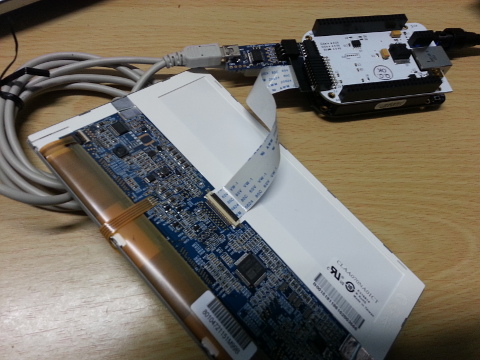
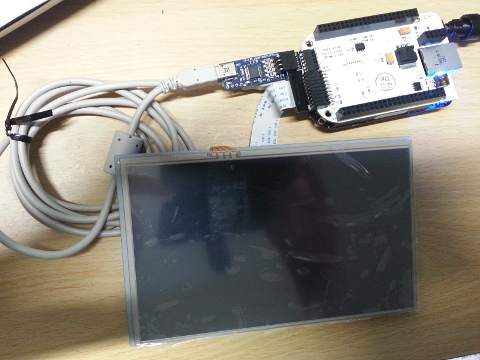
So we may have to try to rebuild the kernel with support for the cape?
http://www.chalk-elec.com/?p=1605
Hope for good news ...
Steffen

Berthold Braun
Jul 15, 2013, 4:36:26 AM7/15/13
to beagl...@googlegroups.com
I have put the bbb on ice for now, because it is quite new and i think that the bbw capes are not always compatible to it.
For now I am useing an beagleboard xM for my project with an LC display from chalkboard. It works out of the box, only the resulution has to be altered.
so the bbb will slumber till chalkboard or anybody else will build an 7"Display kit for the BBB.
KR
Berthold
Luiz Mata
Oct 31, 2013, 9:21:20 AM10/31/13
to beagl...@googlegroups.com
Hi Berthold,
I bought this cape too, but without the LCD, which I have many over my table, and have cable and monitor, to test.
Could I know if you make this cape works already ? if not, and I make some success :) I will share here.
Best Regards,

Vishnu S
Apr 9, 2014, 12:36:16 AM4/9/14
to beagl...@googlegroups.com
Hi,
I am also facing a similar issue wit beaglebone black. Have u been able to make the chalkboard display work with beaglebone black??
VS
Reply all
Reply to author
Forward
0 new messages