
Re: [beagle-alpha] Wilink8 features to explore: Wake on WLANand802.11s mesh

Gi Soo Kim
I successfully run MESH+STA or MESH+AP. However, I liked to run these mode on boot.
So I found website in order to make that happen.
Here is what I did
1. move script file on /etc/init.d/script_name(mesh_start.sh and ap_start.sh)
2. update-rc.d <script_name> defaults
So for the AP, i used for ap_start.sh. For Mesh, i used mesh_start.sh
After boot up ap_start.sh works fine but mesh_start.sh does not work perfect
[ 56.906613] wlcore: down
[ 56.996344] IPv6: ADDRCONF(NETDEV_UP): mesh0: link is not ready
[ 57.026577] IPv6: ADDRCONF(NETDEV_CHANGE): mesh0: link becomes ready
After that it supposed to be create mesh network but it does not.
I assumed in mesh_start.sh
wpa_supplicant -e/usr/share/wl18xx/entropy.bin \
-imesh0 -Dnl80211 -c mesh_supplicant.conf &
This two lines does not run properly
In order to run wpa_supplicant, am I have to initialize wpa_supplicant first because I do not have /etc/init.d/wpa_supplicant?
If you say, do you know how to initialize wpa_supplicant?
I am using
Linux version - 4.4.19-gdb0b54cdad
Board - BeagleBone Green Wireless
mesh_start.sh
#!/bin/sh
#!/usr/sbin/wpa_supplicant
sleep 15
MESH=mesh0
### add Mesh interface, if not present
if [ ! -d /sys/class/net/$MESH ]
then
echo "adding $MESH interface"
iw phy `ls /sys/class/ieee80211/` interface add $MESH type mp
fi
if ps -w | grep -v grep | grep wpa_supplicant | grep mesh0 > /dev/null
then
echo "wpa_supplicant is already running(Mesh)"
exit 0
fi
sleep 15
wpa_supplicant -e/usr/share/wl18xx/entropy.bin \
-imesh0 -Dnl80211 -c wpa_supplicant.conf &
sleep 1
iw phy phy0 set rts 0
ifconfig mesh0 10.20.30.41 netmask 255.255.255.0
iptables -t nat -A POSTROUTING -o mesh0 -j MASQUERADE
udhcpd /usr/share/wl18xx/udhcpd_mesh.conf
Thank you!
I am really sorry about not keep things in same context.For the Demo Presentation(midterm exam), I did not successfully accomplish my goal using mesh network. Therefore, I have to make it work some how for my Demo presentation.I attached Power Point and Demo video, I hope it gives you clear idea of what is drone system(slide 1), demo video setup(slide 2), and Final goal(slide 3).Slide 1 : It show the DJI own network. Basically Wi-Fi extender bridge Hidden SSID of camera and broadcast with differen SSID(Phantom_6132f). And user connect with Phantom_6132f and open DJI app. It can show live stream and do camera control.Slide 2 : I split the network by configuring SoftAp0. Because All BBGW using same network and ip address.However, it has major problems.This setup is only works for only drone is on Node 3. There is no re-defined the connection by the location of drone.Slide 3 : 1st node will not connect with drone. Therefore, 1st node will have SoftAp0 (User connection) and Mesh0(node connection)After 1st node, other nodes will have Mesh0(Node connection) and wlan0(wating for Phantom_6132f).I assumed BBGW has two wireless interface. When I used bone-debian-9.3-iot-armhf-2018-01-28-4gb.imgIt show one wireless interface used for SoftAp0 and other wireless interface used for wlan0(station mode?)After I installed Wilink 8 software(to use mesh network), I try to activate mesh network. However, all interfaces are already in use.Is there some way I can have full control of wl8 module?So I can changeThe 1st node : wlan0 -> Mesh0Other node : SoftAp0 -> Mesh0Thank you2018-02-23 6:41 GMT-06:00 Jason Kridner <jkri...@gmail.com>:Please cc beagl...@googlegroups.com.
Can you keep things in context of what you are trying to accomplish overall? Why have you dropped mesh0 from your setup?
How are you looking for the Access Point? Why do you need to change it from the default configuration? Are you sniffing for any SSID broadcasts?
I think it must be possible to change all of these parameters on SoftAp0. The am335x_evm.sh script might show where most of those variables are used.
What Ethernet connection are you talking about? Why do you suspect the IP address is used?
Do I understand correctly that wlan0 is provided by the Camera and your Beagle will connect to that as a client while serving its own SoftAp0? From the SoftAp0 WLAN, you’d like to expose the wlan0 as a routable subnet?
How do you envision eventually having things exposed to the Internet? As I recall, you wanted to be able to provide a route through a phone.
Is there a specific service you want to expose on the Camera? Without a proxy service, it would seem to me that the Camera would otherwise need to put itself on another network, rather than trying to serve its own.
While your point-to-point network summaries are informative, they don’t align with the concept of IP networking which is strictly hierarchical. While it is possible to bridge and proxy disparate IP networks, routing becomes rather complex and must generally live outside the concept of general IP routing. It would help if your summary understood the IP hierarchy.On Fri, Feb 23, 2018 at 12:15 AM Gi Soo Kim <rlarl...@tamu.edu> wrote:Hi!I tried different method.Here Is what i did so farI installed latest image bone-debian-9.3-iot-armhf-2018-01-28-4gb andThis stepStep 1 to Step 4 andgo toClean, Build, and Install a Specific Componentand use
./sudo_build_wl18xx.sh <module>for
- hostapd
- wpa_supplicant
- modules
- kernel (*)
- kernel_modules (*)
- utils
- iw
- openssl
- libnl
- crda
- uim
- bt-firmware
and./sudo_build_wl18xx.sh firmware./sudo_build_wl18xx.sh scriptsAnd it givesfs_skeleton.tbz2so i exact on/It seems like installed WiLink 8 softwareHere is my question with single boardI will start working mesh working after this work done! (However, it seems like SoftAp0 must be down and mesh is working)I just want to connect like thisCamera(Hidden SSID : FC200_0176db) <-> [wlan0] Chain Foward? [SoftAp0 : SSID : Phantom_GSK]I found DJI forum that in order to make connectionI have to change router ip address(interface of SoftAp0) as 192.168.1.2..So here is what I did1. change /etc/default/bb-wl18xx# TETHER_ENABLED: Whether or not to run the /usr/bin/bb-wl18xx-tether daemon; seet to no to disable.TETHER_ENABLED=yes# USE_CONNMAN_TETHER: Whether or not to just use connman tether inteface; set toono to disable.USE_CONNMAN_TETHER=no# USE_WL18XX_IP_PREFIX: default IP block of SoftAP0 interfaceUSE_WL18XX_IP_PREFIX="192.168.1.2"# USE_WL18XX_MAC_ADDRESS: use custom mac address, for when work wifi starts sendding deauthentication packet spam.#USE_WL18XX_MAC_ADDRESS="EC:11:27:B:14:97"# USE_PERSONAL_SSID: set custom ssidUSE_PERSONAL_SSID="Phantom_GSK"# USE_PERSONAL_PASSWORD: set ssid passwordUSE_PERSONAL_PASSWORD="gsk"# USE_GENERATED_DNSMASQ: use generated version of /etc/dnsmasq.d/SoftAp0; set toono so user can modify /etc/dnsmasq.d/SoftAp0USE_GENERATED_DNSMASQ=yes-----------------------------------------------------------------------------------------------------------------------------------2.change /etc/dnsmasq.d/SoftAp0interface=SoftAp0interface=usb0interface=usb1port=53dhcp-authoritativedomain-neededbogus-privexpand-hostscache-size=2048dhcp-range=SoftAp0,192.168.1.50,192.168.1.150,10mdhcp-range=usb0,192.168.7.1,192.168.7.1,2mdhcp-range=usb1,192.168.6.1,192.168.6.1,2mlisten-address=127.0.0.1listen-address=192.168.1.1listen-address=192.168.7.2listen-address=192.168.6.2listen-address=169.0.0.0 # wlan0 address keep chaningdhcp-option-force=interface:SoftAp0,option:dns-server,192.168.1.2dhcp-option-force=interface:SoftAp0,option:mtu,1500dhcp-option=usb0,3dhcp-option=usb0,6dhcp-option=usb1,3dhcp-option=usb1,6dhcp-leasefile=/var/run/dnsmasq.leasesResult :ifconfigAnd the Access point does not show up and it seems like 192.168.1.2 is already used in ethernet?It is possible to change SoftAp0's ip address, netmask, boradcastand change udhcp which is related with SoftAp0 with range of 192.168.1.200 to 192.168.1.220?Thank you!2018-02-21 17:31 GMT-06:00 Jason Kridner <jkri...@gmail.com>:There are too many steps missing for me to reproduce. Further, this should really be a discussion on-list.Can you repost to https://beagleboard.org/discuss and include all the steps you followed to configure your BeagleBone Green Wireless?--On Wed, Feb 21, 2018 at 4:15 PM Gi Soo Kim <rlarl...@tamu.edu> wrote:Hi!I had few question about so far I did on BBGWsI had major issue with packet forwarding between interfacesFirst, I would like to explain how did I set up the networkI would like to extend AP(Phantom_ 6132f6) which is came from DJI drone networkThe current DJI drone network isDrone(Camera hidden SSID : FC200_0176db) <-> Range extender(AP : Phantom_6132f6) <-> User Phone(DJI APP)What am I going to do isDrone(Camera hidden SSID : FC200_0176db) <-> Range extender(AP : Phantom_6132f6) <-> [wlan0(STA)-BBGW(1)-mesh0(MESH)][mesh0(MESH)-BBGW(2)-wlan0(AP : Phantom_GS)]<-> User Phone(DJI APP).BBGW(1) statusifconfigrouteiptablesBBGW(2) statusifconfigrouteiptablesFor the /etc/sysctl.conf on both BBGWSo When I connect to User Phone on BBGW(2) AP : Phantom_GS. It does not show the live stream dataCould you help with building network? I can not figure out what is the problem and where should I fix itIt seems like I have to dealing with IP forwarding and configure firewall(iptables?)Thank you2018-01-24 17:00 GMT-06:00 Gi Soo Kim <rlarl...@tamu.edu>:Hi!I'm glad to say that with your help, I was able to make some significant progress!That being said, I have hit a few snags I would really appreciate your consultation on.I tried to test Mesh standalone using BBGW(1) and BBGW(2)Based on attached filed name "TI Wilink 8 SDK.pdf"1. So, I modified "mesh_supplicant.conf" for BBGW1 and BBGW2*ssid = "Phantom_GS"2. Changed the IP address for BBGW1 and BBGW2BBGW1 : 192.168.1.3BBGW2 : 192.168.1.43. Ping and Iperf test resultIf seems like one of the devices has to be the server and the other has to be the client4. Mesh + STA modeI am trying use to Mesh + STA modeAccording to Section 5.3.2.1, I have to use the wpa_supplicant configuration file (I assume I have to change the wpa_supplicant, similar to what I did on mesh_supplicant)Here is what I got:5. Display of Hidden SSID when mesh0 is upAfter I tried Mesh + STA. I can view the Wi-Fi networks using iw dev wlan0 scan but, It shows no SSID defined but it has MESH ID as Phantom_GS which I defined in the mesh_supplicant configuration file.6. Mesh + API followed 5.4 and I got this output:I assume I have to install some apt and upgrade the kernel? I do not want to install apt and upgrade kernel before verifying the changes with you.And run mesh_start.shIt seems I have to make some additional modifications between AP and Mesh modes.I look forward to hearing your sage advice before continuing further.Thank you again for your invaluable support,Gi-Soo Kim2018-01-23 8:48 GMT-06:00 Jason Kridner <jkri...@gmail.com>:+RobertOn Tue, Jan 23, 2018 at 2:13 AM Iain Hunter <drhun...@gmail.com> wrote:Hi Gi Soo,
I see you are using my build scripts for the SDK. It’s always nice to see your work being used 😊.
Based on what you described I think this is the architecture you should be targeting
Drone <-> camera <-> BBGW(1) <-> BBGW(2) <-> BBGW(3) <-> User Phone
Mesh+Sta Mesh Mesh+AP
I’ve not tried the mesh+sta and mesh+ap combinations before. I think you will need to additionally connect the two interfaces together – either by the bridging method (section 5.2.2.3) or as done in the sensor gateway example between ap and sta.
I would also keep the pure mesh on a separate IP range so they are different subnets that you bridge at the edge.
For development I would also just get the mesh running first. Use ping and iperf to prove you have connectivity between BBGW1 and BBGW3, then move onto connecting the other subnets.
In fact I would use PCs or other BB devices to first emulate the camera and user phone. Prove you can push tcp/ip from “camera” to “phone” before trying to actually use a camera or phone.
From: Gi Soo Kim
Sent: 22 January 2018 20:07
To: Iain Hunter
Subject: Re: [beagle-alpha] Wilink8 features to explore: Wake on WLANand802.11s mesh
attached file
2018-01-22 14:06 GMT-06:00 Gi Soo Kim <rlarl...@tamu.edu>:
I finally the installed SDK and Wi-link 8 driver on the BBGW and booting with eMMC based on attached file instruction
First, I believe it would be helpful for me to explain what we intend to use the BBGW for in our project.
The goal of our project is to relay (extend) the live stream video data from the DJI Phantom 2 Vision+ drone, to the user’s cell phone. Therefore, we decided to utilize the Wi-Fi mesh functionality network to approach this solution.
The current communication network for the drone flows from Drone <-> Camera <-> Range Extender <-> User Phone
To satisfy the functionality of our project the effective range of the drone is to be extended by going through the network flow from Drone <-> camera <-> BBGW(1) <-> BBGW(2) <-> BBGW(3) <-> User Phone(App for camera control and show live stream)
We have discoved the Drone, Camera, User Phone IP address and how they function within the network.
1. Defined IP addresses
a. Drone – 192.168.1.1
b. Camera – 192.168.1.10
c. Range Extender – 192.168.1.2
d. User Phone – 192.168.1.xxx
2. How the network works
1.
a. When the range Extender is on. Hidden SSID of camera : FC200_0176db
b. Range Extender broad cast with Phantom_XXX
c. User phone connects to Phantom_XXX
Here is my question,
It seems like I have to use 5.3 Mesh + Station mode according to http://www.ti.com/lit/an/swaa166/swaa166.pdf
As my understanding, I have to connect hidden SSID of camera and broadcast with Phantom_XXX and it should also have mesh.
Thank you for your invaluable support and advice,
Gi Soo Kim
2018-01-21 4:28 GMT-06:00 Iain Hunter <drhun...@gmail.com>:
Hi Jason,
This mesh topic is something on my to do list. The problem is that customers are paying me to do other stuff at the moment 😊
For 11s I would be doing:
· A diff between R8.7SP3 and Robert’s current K4.9 to generate a patch set
· Add the patch set to Robert’s build system (https://eewiki.net/display/linuxonarm/BeagleBone+Black)
· Rebuilding supplicant with mesh support. I would need to see if TI had any 11s patches in their supplicant.
For WoWLAN the key thing is that WL_IRQ is mapped to an always on GPIO so it can wakeup A8 from suspend. I’ve done it with a TI SDK on a BBB but not tried with open source build. Apart from that it shouldjust following the setup on TI wiki.
Iain
Sent from Mail for Windows 10
From: Jason Kridner
Sent: 19 January 2018 02:09
To: Iain Hunter; Robert Nelson; rlarl...@tamu.edu
Subject: Fwd: [beagle-alpha] Wilink8 features to explore: Wake on WLAN and802.11s mesh
Bringing this thread back to the top.
Do I need a different patched iw? Other components need patching?
---------- Forwarded message ---------
From: Robert Nelson <robert...@gmail.com>
Date: Thu, Feb 2, 2017 at 3:11 PM
Subject: Re: [beagle-alpha] Wilink8 features to explore: Wake on WLAN and 802.11s mesh
To: Jason Kridner <jkri...@gmail.com>
CC: beagle...@googlegroups.com <beagle...@googlegroups.com>
On Thu, Feb 2, 2017 at 1:58 PM, Jason Kridner <jkri...@gmail.com> wrote:
> Per http://www.ti.com/lit/ug/swru423a/swru423a.pdf,
> 2.6 WoW (Wake on WLAN)
> WoW mode refers to the WLAN chip state when the host enters suspend. If WoW
> is enabled upon suspend, the WiLink8.0 chip stays turned on, the Station
> remains connected, and AP keeps transmitting beacons and preserves the
> links. In this state, a resume can also be triggered due to WLAN activity.
> Use the following to configure the packet types to wake up: 1. Enable or
> disable broadcast frames
> 2. Configure filters on data packets, such as filter by source and
> destination MAC address, and so forth
> 3. Configure to wake up on the beacon IEs
>
> Think we could enable at least memory suspend with that? Seems to me it
> would greatly add to Blue's battery life such that it could still be woken
> accessed by the network when desired. Thoughts?
>
> I was going to simply test suspend-to-RAM in general, but I don't see any
> items on the GPIO0 I can easily trigger (though the WLAN IRQ is there). I'll
> need to see later if I can do a wakeup via UART at least.
>
>
> Also, per http://www.ti.com/lit/an/swaa166/swaa166.pdf,
> 4.2 Software Requirements
> WiLink8 mesh solution is based on the open80211s implementation of the Linux
> kernel MAC80211 and the hostap user space package. Migration to any
> Linux-based operating system can be done using standard tools and
> compilation methods such as backports. For more information, see the Linux
> GettingStarted Guide. Note that the current solution provided in the
> mainline Linux has a limited performance due to its generic nature. WiLink8
> implementation have added several new features and adaptions to achieve a
> robust and high performance solution.
>
> Looking at https://github.com/o11s/open80211s/wiki/HOWTO, it seems like all
> sorts of things are patched and not mainline, but I'm not sure if I'm
> reading it properly. Thoughts?
4.4.x-ti/4.9.x-ti:
CONFIG_MAC80211_MESH=y
Regards,
--
Robert Nelson
https://rcn-ee.com/
--
You received this message because you are subscribed to the Google Groups "Beagle Alpha" group.
To unsubscribe from this group and stop receiving emails from it, send an email to beagle-alpha+unsubscribe@googlegroups.com.
For more options, visit https://groups.google.com/d/optout.--
--
--




Jason Kridner
Hi!
I successfully run MESH+STA or MESH+AP. However, I liked to run these mode on boot.
So I found website in order to make that happen.
Here is what I did
1. move script file on /etc/init.d/script_name(mesh_start.sh and ap_start.sh)
2. update-rc.d <script_name> defaults
So for the AP, i used for ap_start.sh. For Mesh, i used mesh_start.sh
After boot up ap_start.sh works fine but mesh_start.sh does not work perfect
[ 56.906613] wlcore: down
[ 56.996344] IPv6: ADDRCONF(NETDEV_UP): mesh0: link is not ready
[ 57.026577] IPv6: ADDRCONF(NETDEV_CHANGE): mesh0: link becomes readyAfter that it supposed to be create mesh network but it does not.
I assumed in mesh_start.sh
wpa_supplicant -e/usr/share/wl18xx/entropy.bin \
-imesh0 -Dnl80211 -c mesh_supplicant.conf &
This two lines does not run properlyIn order to run wpa_supplicant, am I have to initialize wpa_supplicant first because I do not have /etc/init.d/wpa_supplicant?
If you say, do you know how to initialize wpa_supplicant?
I am using
Linux version - 4.4.19-gdb0b54cdad
Board - BeagleBone Green Wireless
mesh_start.sh
#!/bin/sh
#!/usr/sbin/wpa_supplicant
sleep 15
MESH=mesh0
### add Mesh interface, if not present
if [ ! -d /sys/class/net/$MESH ]
then
echo "adding $MESH interface"
iw phy `ls /sys/class/ieee80211/` interface add $MESH type mp
fi
if ps -w | grep -v grep | grep wpa_supplicant | grep mesh0 > /dev/null
then
echo "wpa_supplicant is already running(Mesh)"
exit 0
fi
sleep 15
wpa_supplicant -e/usr/share/wl18xx/entropy.bin \
-imesh0 -Dnl80211 -c wpa_supplicant.conf &
sleep 1
iw phy phy0 set rts 0
ifconfig mesh0 10.20.30.41 netmask 255.255.255.0
iptables -t nat -A POSTROUTING -o mesh0 -j MASQUERADE
udhcpd /usr/share/wl18xx/udhcpd_mesh.conf
Thank you!
2018-03-09 2:16 GMT-06:00 Gi Soo Kim <rlarl...@tamu.edu>:
I am really sorry about not keep things in same context.For the Demo Presentation(midterm exam), I did not successfully accomplish my goal using mesh network. Therefore, I have to make it work some how for my Demo presentation.I attached Power Point and Demo video, I hope it gives you clear idea of what is drone system(slide 1), demo video setup(slide 2), and Final goal(slide 3).

Slide 1 : It show the DJI own network. Basically Wi-Fi extender bridge Hidden SSID of camera and broadcast with differen SSID(Phantom_6132f). And user connect with Phantom_6132f and open DJI app. It can show live stream and do camera control.

Slide 2 : I split the network by configuring SoftAp0. Because All BBGW using same network and ip address.However, it has major problems.This setup is only works for only drone is on Node 3. There is no re-defined the connection by the location of drone.

ifconfig

And the Access point does not show up and it seems like 192.168.1.2 is already used in ethernet?It is possible to change SoftAp0's ip address, netmask, boradcastand change udhcp which is related with SoftAp0 with range of 192.168.1.200 to 192.168.1.220?Thank you!
2018-02-21 17:31 GMT-06:00 Jason Kridner <jkri...@gmail.com>:
There are too many steps missing for me to reproduce. Further, this should really be a discussion on-list.Can you repost to https://beagleboard.org/discuss and include all the steps you followed to configure your BeagleBone Green Wireless?
On Wed, Feb 21, 2018 at 4:15 PM Gi Soo Kim <rlarl...@tamu.edu> wrote:
Hi!I had few question about so far I did on BBGWsI had major issue with packet forwarding between interfacesFirst, I would like to explain how did I set up the networkI would like to extend AP(Phantom_ 6132f6) which is came from DJI drone networkThe current DJI drone network isDrone(Camera hidden SSID : FC200_0176db) <-> Range extender(AP : Phantom_6132f6) <-> User Phone(DJI APP)What am I going to do isDrone(Camera hidden SSID : FC200_0176db) <-> Range extender(AP : Phantom_6132f6) <-> [wlan0(STA)-BBGW(1)-mesh0(MESH)][mesh0(MESH)-BBGW(2)-wlan0(AP : Phantom_GS)]<-> User Phone(DJI APP).BBGW(1) statusifconfig
routeiptablesBBGW(2) statusifconfigrouteiptables


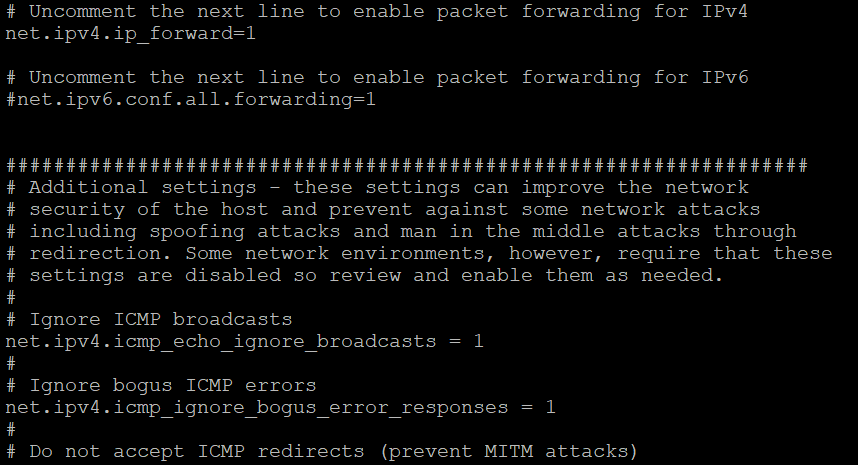
For the /etc/sysctl.conf on both BBGW


So When I connect to User Phone on BBGW(2) AP : Phantom_GS. It does not show the live stream dataCould you help with building network? I can not figure out what is the problem and where should I fix itIt seems like I have to dealing with IP forwarding and configure firewall(iptables?)Thank you
2018-01-24 17:00 GMT-06:00 Gi Soo Kim <rlarl...@tamu.edu>:
Hi!I'm glad to say that with your help, I was able to make some significant progress!That being said, I have hit a few snags I would really appreciate your consultation on.I tried to test Mesh standalone using BBGW(1) and BBGW(2)Based on attached filed name "TI Wilink 8 SDK.pdf"1. So, I modified "mesh_supplicant.conf" for BBGW1 and BBGW2

*ssid = "Phantom_GS"2. Changed the IP address for BBGW1 and BBGW2BBGW1 : 192.168.1.3BBGW2 : 192.168.1.43. Ping and Iperf test result

If seems like one of the devices has to be the server and the other has to be the client4. Mesh + STA modeI am trying use to Mesh + STA modeAccording to Section 5.3.2.1, I have to use the wpa_supplicant configuration file (I assume I have to change the wpa_supplicant, similar to what I did on mesh_supplicant)Here is what I got:

5. Display of Hidden SSID when mesh0 is up


After I tried Mesh + STA. I can view the Wi-Fi networks using iw dev wlan0 scan but, It shows no SSID defined but it has MESH ID as Phantom_GS which I defined in the mesh_supplicant configuration file.6. Mesh + API followed 5.4 and I got this output:

I assume I have to install some apt and upgrade the kernel? I do not want to install apt and upgrade kernel before verifying the changes with you.And run mesh_start.sh

+Robert
To unsubscribe from this group and stop receiving emails from it, send an email to beagle-alpha...@googlegroups.com.
For more options, visit https://groups.google.com/d/optout.
--
For more options, visit http://beagleboard.org/discuss
---
You received this message because you are subscribed to the Google Groups "BeagleBoard" group.
To unsubscribe from this group and stop receiving emails from it, send an email to beagleboard...@googlegroups.com.
To view this discussion on the web visit https://groups.google.com/d/msgid/beagleboard/CAKK8YRH0kScAE-aFqgb2%2BAqpqiGT_m939j%3DKRZaJoPxgkDFoiA%40mail.gmail.com.
For more options, visit https://groups.google.com/d/optout.