
SPI - Reading back data from PT6958
197 views
Skip to first unread message

Geert Lorang
Sep 27, 2014, 9:54:27 AM9/27/14
to bcm...@googlegroups.com
Hello,
I've got a frontpanel from some old set-top box which has a PT6958 on board. It's a SPI LED driver IC with key scanning support (4 x 7 segment display, led control & 24 keys).
I've got the 4x7 segment display and the leds 100% working but I just can't get any data out of the key scanning and I'm out of ideas where to look.
The PCB has a 10 pins header of which 3 are connected to the PT6958 chip : STB / CLK / DIN+DOUT. The manufacturer put DOUT and DIN on the same pin on the header, So I've tied MOSI and MISO together and connected it to this pin. It seems to work ok.
E.g.
char data = bcm2835_spi_transfer(0x40);
printf("%02x\n", data);
will actually print out 0x40. With MOSI disconnected I will read out 0xFF, with MISO disconnected I read out 0x00. So guess the tying is ok?!
Also when I tie MISO directly to the DOUT of the IC (bypassing the pin header on the PCB) I get the same result.
According to the datasheet you just need to write 0x42 after which it will send back the key scanning data but all i'm getting back are 0x00's.
E.g.:
while(1) {
char read[] = { 0x42, 0x00, 0x00 };
bcm2835_spi_transfern(read, sizeof(read));
for(i=0;i<sizeof(read);i++) { printf("%02x ", read[i]); } printf("\n");
bcm2835_delay(1000);
}
Prints out:
42 00 00
42 00 00
42 00 00
42 00 00
Data sheet can be found here : http://www.princeton.com.tw/en-us/products/leddriveric/leddisplaydriveric.aspx
If anyone successfully managed to read out keyscan data from PT69*, please let me know.
Thanks!
Geert

Mike McCauley
Sep 28, 2014, 5:52:13 PM9/28/14
to bcm...@googlegroups.com
Hello,
On Saturday, September 27, 2014 06:54:27 AM Geert Lorang wrote:
> Hello,
>
> I've got a frontpanel from some old set-top box which has a PT6958 on
> board. It's a SPI LED driver IC with key scanning support (4 x 7 segment
> display, led control & 24 keys).
>
> I've got the 4x7 segment display and the leds 100% working but I just can't
> get any data out of the key scanning and I'm out of ideas where to look.
>
> The PCB has a 10 pins header of which 3 are connected to the PT6958 chip :
> STB / CLK / DIN+DOUT. The manufacturer put DOUT and DIN on the same pin on
> the header, So I've tied MOSI and MISO together and connected it to this
> pin. It seems to work ok.
But only for output to the PT6958?
If you are unable to read anything back other then whats going out on MOSI,
its because the MISO and MOSI pins are tied together.
You may need a resistor network so the input from the device to MISO will
override MOSI.
Looks like you are using the library correctly though.
Cheers.
>
> E.g.
> char data = bcm2835_spi_transfer(0x40);
> printf("%02x\n", data);
>
> will actually print out 0x40. With MOSI disconnected I will read out 0xFF,
> with MISO disconnected I read out 0x00. So guess the tying is ok?!
> Also when I tie MISO directly to the DOUT of the IC (bypassing the pin
> header on the PCB) I get the same result.
>
> According to the datasheet you just need to write 0x42 after which it will
> send back the key scanning data but all i'm getting back are 0x00's.
> E.g.:
> while(1) {
> char read[] = { 0x42, 0x00, 0x00 };
> bcm2835_spi_transfern(read, sizeof(read));
> for(i=0;i<sizeof(read);i++) { printf("%02x ", read[i]); }
> printf("\n");
> bcm2835_delay(1000);
> }
>
> Prints out:
> 42 00 00
> 42 00 00
> 42 00 00
> 42 00 00
>
>
> Data sheet can be found here
>
> : http://www.princeton.com.tw/en-us/products/leddriveric/leddisplaydriveric.
> : aspx
Mike McCauley VK4AMM mi...@airspayce.com
Airspayce Pty Ltd 9 Bulbul Place Currumbin Waters QLD 4223 Australia
http://www.airspayce.com
Phone +61 7 5598-7474
On Saturday, September 27, 2014 06:54:27 AM Geert Lorang wrote:
> Hello,
>
> I've got a frontpanel from some old set-top box which has a PT6958 on
> board. It's a SPI LED driver IC with key scanning support (4 x 7 segment
> display, led control & 24 keys).
>
> I've got the 4x7 segment display and the leds 100% working but I just can't
> get any data out of the key scanning and I'm out of ideas where to look.
>
> The PCB has a 10 pins header of which 3 are connected to the PT6958 chip :
> STB / CLK / DIN+DOUT. The manufacturer put DOUT and DIN on the same pin on
> the header, So I've tied MOSI and MISO together and connected it to this
> pin. It seems to work ok.
If you are unable to read anything back other then whats going out on MOSI,
its because the MISO and MOSI pins are tied together.
You may need a resistor network so the input from the device to MISO will
override MOSI.
Looks like you are using the library correctly though.
Cheers.
>
> E.g.
> char data = bcm2835_spi_transfer(0x40);
> printf("%02x\n", data);
>
> will actually print out 0x40. With MOSI disconnected I will read out 0xFF,
> with MISO disconnected I read out 0x00. So guess the tying is ok?!
> Also when I tie MISO directly to the DOUT of the IC (bypassing the pin
> header on the PCB) I get the same result.
>
> According to the datasheet you just need to write 0x42 after which it will
> send back the key scanning data but all i'm getting back are 0x00's.
> E.g.:
> while(1) {
> char read[] = { 0x42, 0x00, 0x00 };
> bcm2835_spi_transfern(read, sizeof(read));
> for(i=0;i<sizeof(read);i++) { printf("%02x ", read[i]); }
> printf("\n");
> bcm2835_delay(1000);
> }
>
> Prints out:
> 42 00 00
> 42 00 00
> 42 00 00
> 42 00 00
>
>
> Data sheet can be found here
>
> : http://www.princeton.com.tw/en-us/products/leddriveric/leddisplaydriveric.
> If anyone successfully managed to read out keyscan data from PT69*, please
> let me know.
>
> Thanks!
> Geert
--
> let me know.
>
> Thanks!
> Geert
Mike McCauley VK4AMM mi...@airspayce.com
Airspayce Pty Ltd 9 Bulbul Place Currumbin Waters QLD 4223 Australia
http://www.airspayce.com
Phone +61 7 5598-7474

Damiano Benedetti
Sep 30, 2014, 1:18:27 PM9/30/14
to bcm...@googlegroups.com
Hi Geert
The PCB has a 10 pins header of which 3 are connected to the PT6958 chip : STB / CLK / DIN+DOUT. The manufacturer put DOUT and DIN on the same pin on the header, So I've tied MOSI and MISO together and connected it to this pin. It seems to work ok.
sounds to me quite strange... If you connect miso and mosi toghether you'll of course read back what your raspi is sending out! Maybe the manufacturer wanted to just write data without reading back key or the PCB is wrong! If I were in your situation, I'd try to temporary disconnect DOUT or DIN pin of the I.C. and connected separately as should be in SPI and how is reported on the manual you linked and check if your code is ok.
Regards
Geert Lorang
Oct 2, 2014, 2:25:23 PM10/2/14
to bcm...@googlegroups.com
Thanks for your help guys! Got it all working! It was actually a fault in the code. Instead of sending { 0x42, 0x00, 0x00 } I had to transfer { 0x42, 0xFF, 0xFF, 0xFF }.
0x42 is the command for this chip for receiving data and the 0xFF would then get pulled down to the correct value (key scanning data uses 3 bytes)
MOSI and MISO are still tied together by the way. This "frontpanel" actually works on 5V VCC so my current setup is something like:
´----> voltage divider --> MISO
Frontpanel DOUT/DIN pin -| | GND
`----< voltage divider <-- MOSI
| GND
Frontpanel GND ----------|-------------/\-------------------------- RPI GND
I'm a bit confused myself how this can work because now MOSI (pi side) is connected to a voltage divider. I'll connect my scope tomorrow and have a look what's happening.
Geert Lorang
Oct 3, 2014, 9:34:45 AM10/3/14
to bcm...@googlegroups.com
Ok not sure what happened yesterday but double checked with scope today and as expected the voltage divider is definitely not necessary on the MOSI.
Probe at MISO ( the 0x42 is not relevant in this screenshot, since we wrote this on MOSI but since they are tied etc):
(blue is data, red clock, green cs)

Probe at "frontpanel" (only the 0x42 is relevant for same reason as in previous screenshot)
(blue is data, red clock, green cs)
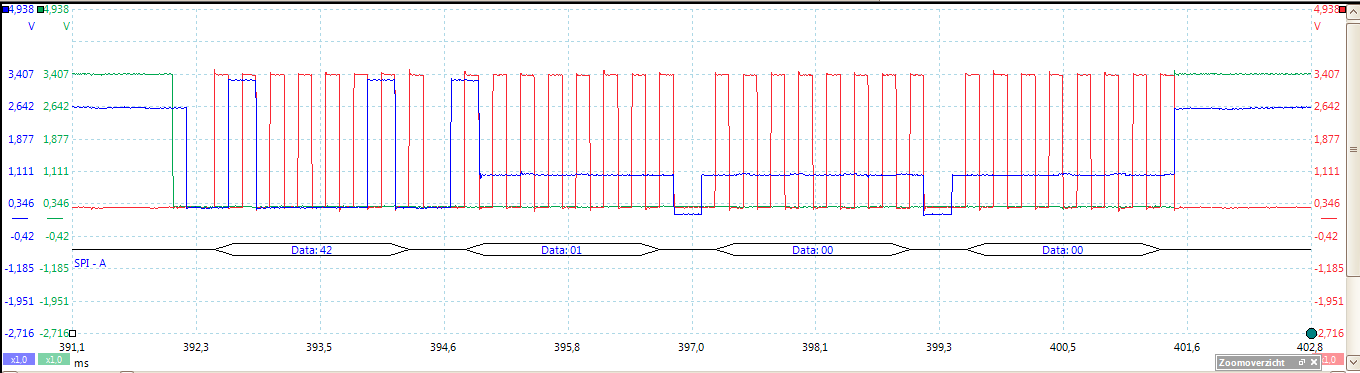
Only 'issue' is that the Pi is only feeding ~3.3 for VIH to the PT6958 while it should be at least 3.75 according to the datasheet, but hey, it all works so guess I'll leave it like this for now.
Thanks again for your help guys.
Reply all
Reply to author
Forward
0 new messages