
Using SIX maps as a WMS

ia...@jcis.net.au
In contrast it prints ok in ArcGIS where the layer is accessed via a layer file.
Has anyone experienced this issue? Assuming it is an operator error what have I done wrong??
Cheers

Bill Williamson
--
You received this message because you are subscribed to the Google Groups "QGIS Australia User Group" group.
To unsubscribe from this group and stop receiving emails from it, send an email to australian-qgis-use...@googlegroups.com.
To view this discussion on the web, visit https://groups.google.com/d/msgid/australian-qgis-user-group/dc8ddae5-323d-4153-8933-a886bdec6c27n%40googlegroups.com.

Andrew Jeffrey
To view this discussion on the web, visit https://groups.google.com/d/msgid/australian-qgis-user-group/CADaVm0KxY%3Dqy3iabdp12EnybZdVs5To1nmMsXf3Umzt2hyg95w%40mail.gmail.com.
Ia...@jcis.net.au
Andrew,
How and where would you change the DPI??
Dr Iain Stuart
JCIS Consultants
P.O. Box 2397
Burwood North
NSW, 2134
(02) 9701 0191
(0413) 380116 (m)
To view this discussion on the web, visit https://groups.google.com/d/msgid/australian-qgis-user-group/CADTxF6ZcFeYOA8a%2BXs%2BnKa49k26RPoNaV5FBihHj7nKh31qrYw%40mail.gmail.com.

Phil Wyatt
Hi Iain,
It will be on the Item Properties Tab of the layout, then look for export settings.

Cheers - Phil
To view this discussion on the web, visit https://groups.google.com/d/msgid/australian-qgis-user-group/000201d75db3%240d79e360%24286daa20%24%40jcis.net.au.
Andrew Jeffrey


To view this discussion on the web, visit https://groups.google.com/d/msgid/australian-qgis-user-group/000201d75db3%240d79e360%24286daa20%24%40jcis.net.au.
Andrew Jeffrey
Ia...@jcis.net.au
Thanks Andrew and Phil,
I got it to 200 dpi and decided not to press my luck!
Cheers
Dr Iain Stuart
JCIS Consultants
P.O. Box 2397
Burwood North
NSW, 2134
(02) 9701 0191
(0413) 380116 (m)
From: australian-qg...@googlegroups.com <australian-qg...@googlegroups.com> On Behalf Of Andrew Jeffrey
Sent: Thursday, 10 June 2021 3:09 PM
To: Australian and New Zealand QGIS User Group <australian-qg...@googlegroups.com>
Subject: Re: [Aus-NZ-QGIS-group] Using SIX maps as a WMS
Ha!
Hey Phil - sorry didn't mean to post the same thing over the top. Didn't see the response until I hit send :)
On Thu, Jun 10, 2021 at 3:06 PM Andrew Jeffrey <aljef...@gmail.com> wrote:
Hi Iain,
Assuming it is related to the DPI, see the following.
From memory in my ArcMap 9.0 days the default DPI for map export was 96dpi, in QGIS the default is set to 300dpi. Crudely the higher DPI is requesting a larger image from the WMS provider, along with your chosen page size. QGIS will warn you about this by printing a map with a WMS layer - unless you have hidden the warning previously.
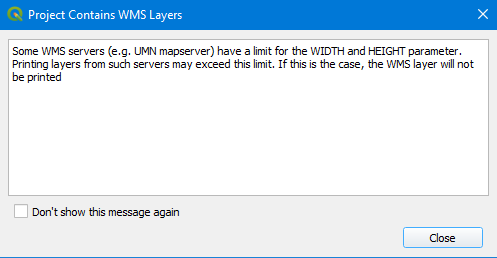
There are actually two places in the print layout where you can affect the output DPI.
The First one is in the "Export Settings" shown below - If you don't see the layout tab go to the "View" > "Panels" > 'Layout" menu item.

The second place you can change the DPI is in the Export Settings when you have chosen to save the file - see screenshot below. This will probably also help explain what an increase to the DPI is doing because when you change the values you see the page width and height change.

To view this discussion on the web, visit https://groups.google.com/d/msgid/australian-qgis-user-group/CADTxF6bGOjzb1Dxv-N9XoLraFX_UpQ9o%2BZsdsC%3DLFRxJi_ABUQ%40mail.gmail.com.