
QGIS Issue installing via osgeo4w-setup-x86.exe

Marco Giana
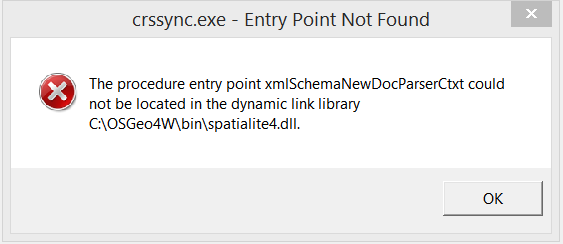
2015/01/09 09:44:49 error: Environment variable 'PATH' length exceeds 1024; running with %WINDIR%\system32;%WINDIR%;%WINDIR%
which I think is related.
I am on windows 8.i pro.
Any one else experienced this issue and solved the problem?
Cheers
Marco
Install log file content
2015/01/09 09:44:39 Starting OSGeo4W install, version 2.579
2015/01/09 09:44:39 using locales .1252
2015/01/09 09:44:39 Current Directory: C:\Software\OSGeo4w
2015/01/09 09:44:39 Root Directory: C:\OSGeo4W
2015/01/09 09:44:39 Could not open service McShield for query, start and stop. McAfee may not be installed, or we don't have access.
2015/01/09 09:44:44 source: network install
2015/01/09 09:44:44 root: C:\OSGeo4W
2015/01/09 09:44:45 Selected local directory: C:\Software\OSGeo4w
2015/01/09 09:44:45 Menu name: OSGeo4W
2015/01/09 09:44:46 net: Direct
Loaded cached mirror list
2015/01/09 09:44:47 site: http://download.osgeo.org/osgeo4w/
get_url_to_membuf http://download.osgeo.org/osgeo4w/x86/setup.ini.bz2
getUrlToStream http://download.osgeo.org/osgeo4w/x86/setup.ini.bz2
The package <freeglut-2.8.1-1> has a non-free license it was successfully added
The package <gdal-ecw-1.11.1-4> has a non-free license it was successfully added
The package <gdal-mrsid-1.11.1-4> has a non-free license it was successfully added
The package <glext-20140221-1> has a non-free license it was successfully added
The package <oci-11.2.0.1-1> has a non-free license it was successfully added
The package <szip-2.1-1> has a non-free license it was successfully added
2015/01/09 09:44:49 error: Environment variable 'PATH' length exceeds 1024; running with %WINDIR%\system32;%WINDIR%;%WINDIR%\wbem
Visited: 116 nodes out of 260 while creating dependency order.
Dependency order of packages: msvcrt setup shell libmysql php apache avce00 openssl curl expat fcgi fftw fftw-devel libjpeg libpng zlib fltk freetype-mingw iconv freexl libjpeg12 libtiff libgeotiff proj-hpgn proj-datumgrid proj geos sqlite3 netcdf libintl libpq xerces-c-vc9 hdf4 szip hdf5 ogdi openjpeg libxml2 spatialite xerces-c gdal15dll gdal18dll spatialite3dll gdal19dll gdal110dll gdal gdal-ecw gdal-filegdb gdal-mrsid oci gdal-oracle python-core python-help python-tcltk python-testsuite python-tools python python-numpy gdal-python gdal-sosi gpsbabel msys pdcurses python-win32 wxpython python-pil pyopengl gs libcairo msys-grass tcltk grass gsl-libs java libspatialindex six python-dateutil pyparsing matplotlib mod_fcgid networkx opencv qt4-libs osg-libs osgearth-libs ossim otb-bin psycopg2 pygments pyodbc pyqt4 sip qwt5-libs-qt4 pyqwt5-qt4 pyspatialite python-markupsafe python-jinja2 qscintilla python-qscintilla python-scipy python-scikit_learn python-shapely python-simplejson python-xlrd python-xlwt pytz qgis-common qgis qgis-dev qgis-grass-plugin qgis-oracle-provider qgis-globe-plugin qt4-devel saga qgis-full qgis-server
2015/01/09 09:44:49 running: cmd.exe /c "C:\OSGeo4W\\etc\postinstall\qgis-common.bat"
C:\OSGeo4W>call "C:\OSGeo4W\bin\o4w_env.bat"
C:\OSGeo4W>REM Make parent of this script location our current directory,
C:\OSGeo4W>REM converting UNC path to drive letter if needed
C:\OSGeo4W>pushd C:\OSGeo4W\bin\
C:\OSGeo4W\bin>cd ..
C:\OSGeo4W>REM set OSGEO4W_ROOT to short path version
C:\OSGeo4W>for %i in ("C:\OSGeo4W") do set OSGEO4W_ROOT=%~fsi
C:\OSGeo4W>set OSGEO4W_ROOT=C:\OSGeo4W
C:\OSGeo4W>REM start with clean path
C:\OSGeo4W>set path=C:\OSGeo4W\bin;C:\Windows\system32;C:\Windows;C:\Windows\WBem
C:\OSGeo4W>for %f in ("C:\OSGeo4W\etc\ini\*.bat") do call "%f"
C:\OSGeo4W>call "C:\OSGeo4W\etc\ini\gdal.bat"
C:\OSGeo4W>SET GDAL_DATA=C:\OSGeo4W\share\gdal
C:\OSGeo4W>SET GDAL_DRIVER_PATH=C:\OSGeo4W\bin\gdalplugins
C:\OSGeo4W>call "C:\OSGeo4W\etc\ini\libgeotiff.bat"
C:\OSGeo4W>SET GEOTIFF_CSV=C:\OSGeo4W\share\epsg_csv
C:\OSGeo4W>call "C:\OSGeo4W\etc\ini\msvcrt.bat"
C:\OSGeo4W>rem This is just a dummy to make sure the for loop in ..\..\osgeo4w.bat
C:\OSGeo4W>rem always has some files to process.
C:\OSGeo4W>call "C:\OSGeo4W\etc\ini\msys.bat"
C:\OSGeo4W>PATH C:\OSGeo4W\bin;C:\Windows\system32;C:\Windows;C:\Windows\WBem;C:\OSGeo4W\apps\msys\bin
C:\OSGeo4W>if not defined HOME set HOME=C:\Users\marco.giana
C:\OSGeo4W>call "C:\OSGeo4W\etc\ini\orfeotoolbox-apps.bat"
C:\OSGeo4W>SET ITK_AUTOLOAD_PATH=C:\OSGeo4W\apps\orfeotoolbox\applications;
C:\OSGeo4W>call "C:\OSGeo4W\etc\ini\proj.bat"
C:\OSGeo4W>SET PROJ_LIB=C:\OSGeo4W\share\proj
C:\OSGeo4W>call "C:\OSGeo4W\etc\ini\python.bat"
C:\OSGeo4W>SET PYTHONHOME=C:\OSGeo4W\apps\Python27
C:\OSGeo4W>SET PATH=C:\OSGeo4W\bin;C:\Windows\system32;C:\Windows;C:\Windows\WBem;C:\OSGeo4W\apps\msys\bin;C:\OSGeo4W\apps\Python27\Scripts
C:\OSGeo4W>call "C:\OSGeo4W\etc\ini\qt4.bat"
C:\OSGeo4W>set QT_PLUGIN_PATH=C:\OSGeo4W\apps\Qt4\plugins
C:\OSGeo4W>set QT_RASTER_CLIP_LIMIT=4096
C:\OSGeo4W>popd
C:\OSGeo4W>path C:\OSGeo4W\bin;C:\Windows\system32;C:\Windows;C:\Windows\WBem;C:\OSGeo4W\apps\msys\bin;C:\OSGeo4W\apps\Python27\Scripts;C:\OSGeo4W\apps\qgis\bin
C:\OSGeo4W>set QGIS_PREFIX_PATH=C:/OSGeo4W/apps/qgis
C:\OSGeo4W>"C:\OSGeo4W\apps\qgis\crssync"
2015/01/09 09:45:12 abnormal exit: exit code=-1073741511
2015/01/09 09:45:12 running: cmd.exe /c "C:\OSGeo4W\\etc\postinstall\qgis-dev.bat"
C:\OSGeo4W>textreplace -std -t bin\qgis-dev.bat
C:\OSGeo4W>textreplace -std -t bin\qgis-dev-browser.bat
C:\OSGeo4W>textreplace -std -t bin\designer-qgis-dev.bat
C:\OSGeo4W>if not 1 == 0 mkdir "C:\ProgramData\Microsoft\Windows\Start Menu\Programs/OSGeo4W"
A subdirectory or file C:\ProgramData\Microsoft\Windows\Start Menu\Programs/OSGeo4W already exists.
C:\OSGeo4W>if not 1 == 0 nircmd shortcut "C:\OSGeo4W\bin\nircmd.exe" "C:\ProgramData\Microsoft\Windows\Start Menu\Programs/OSGeo4W" "QGIS Desktop 2.7.0" "exec hide """C:\OSGeo4W\bin\qgis-dev.bat"" "C:\OSGeo4W\apps\qgis-dev\icons\QGIS.ico"
C:\OSGeo4W>if not 1 == 0 nircmd shortcut "C:\OSGeo4W\bin\nircmd.exe" "C:\ProgramData\Microsoft\Windows\Start Menu\Programs/OSGeo4W" "QGIS Browser 2.7.0" "exec hide """C:\OSGeo4W\bin\qgis-dev-browser.bat"" "C:\OSGeo4W\apps\qgis-dev\icons\QGIS.ico"
C:\OSGeo4W>if not 1 == 0 nircmd shortcut "C:\OSGeo4W\bin\nircmd.exe" "C:\ProgramData\Microsoft\Windows\Start Menu\Programs/OSGeo4W" "Qt Designer with QGIS 2.7.0 custom widgets" "exec hide """C:\OSGeo4W\bin\designer-qgis-dev.bat"" "C:\OSGeo4W\apps\qgis-dev\icons\QGIS.ico"
C:\OSGeo4W>if not 0 == 0 nircmd shortcut "C:\OSGeo4W\bin\nircmd.exe" "~$folder.desktop$" "QGIS Desktop 2.7.0" "exec hide """C:\OSGeo4W\bin\qgis-dev.bat"" "C:\OSGeo4W\apps\qgis-dev\icons\QGIS.ico"
C:\OSGeo4W>if not 0 == 0 nircmd shortcut "C:\OSGeo4W\bin\nircmd.exe" "~$folder.desktop$" "QGIS Browser 2.7.0" "exec hide """C:\OSGeo4W\bin\qgis-dev-browser.bat"" "C:\OSGeo4W\apps\qgis-dev\icons\QGIS.ico"
C:\OSGeo4W>if not 0 == 0 nircmd shortcut "C:\OSGeo4W\bin\nircmd.exe" "~$folder.desktop$" "Qt Designer with QGIS 2.7.0 custom widgets" "exec hide """C:\OSGeo4W\bin\designer-qgis-dev.bat"" "C:\OSGeo4W\apps\qgis-dev\icons\QGIS.ico"
C:\OSGeo4W>set O4W_ROOT=C:\OSGeo4W
C:\OSGeo4W>set OSGEO4W_ROOT=C:\\OSGeo4W
C:\OSGeo4W>textreplace -std -t "C:\OSGeo4W\apps\qgis-dev\bin\qgis.reg"
C:\OSGeo4W>set OSGEO4W_ROOT=C:\OSGeo4W
C:\OSGeo4W>REM Do not register extensions if release is installed
C:\OSGeo4W>if not exist "C:\OSGeo4W\apps\qgis\bin\qgis.reg" nircmd elevate "C:\Windows\regedit" /s "C:\OSGeo4W\apps\qgis-dev\bin\qgis.reg"
C:\OSGeo4W>call "C:\OSGeo4W\bin\o4w_env.bat"
C:\OSGeo4W>REM Make parent of this script location our current directory,
C:\OSGeo4W>REM converting UNC path to drive letter if needed
C:\OSGeo4W>pushd C:\OSGeo4W\bin\
C:\OSGeo4W\bin>cd ..
C:\OSGeo4W>REM set OSGEO4W_ROOT to short path version
C:\OSGeo4W>for %i in ("C:\OSGeo4W") do set OSGEO4W_ROOT=%~fsi
C:\OSGeo4W>set OSGEO4W_ROOT=C:\OSGeo4W
C:\OSGeo4W>REM start with clean path
C:\OSGeo4W>set path=C:\OSGeo4W\bin;C:\Windows\system32;C:\Windows;C:\Windows\WBem
C:\OSGeo4W>for %f in ("C:\OSGeo4W\etc\ini\*.bat") do call "%f"
C:\OSGeo4W>call "C:\OSGeo4W\etc\ini\gdal.bat"
C:\OSGeo4W>SET GDAL_DATA=C:\OSGeo4W\share\gdal
C:\OSGeo4W>SET GDAL_DRIVER_PATH=C:\OSGeo4W\bin\gdalplugins
C:\OSGeo4W>call "C:\OSGeo4W\etc\ini\libgeotiff.bat"
C:\OSGeo4W>SET GEOTIFF_CSV=C:\OSGeo4W\share\epsg_csv
C:\OSGeo4W>call "C:\OSGeo4W\etc\ini\msvcrt.bat"
C:\OSGeo4W>rem This is just a dummy to make sure the for loop in ..\..\osgeo4w.bat
C:\OSGeo4W>rem always has some files to process.
C:\OSGeo4W>call "C:\OSGeo4W\etc\ini\msys.bat"
C:\OSGeo4W>PATH C:\OSGeo4W\bin;C:\Windows\system32;C:\Windows;C:\Windows\WBem;C:\OSGeo4W\apps\msys\bin
C:\OSGeo4W>if not defined HOME set HOME=C:\Users\marco.giana
C:\OSGeo4W>call "C:\OSGeo4W\etc\ini\orfeotoolbox-apps.bat"
C:\OSGeo4W>SET ITK_AUTOLOAD_PATH=C:\OSGeo4W\apps\orfeotoolbox\applications;
C:\OSGeo4W>call "C:\OSGeo4W\etc\ini\proj.bat"
C:\OSGeo4W>SET PROJ_LIB=C:\OSGeo4W\share\proj
C:\OSGeo4W>call "C:\OSGeo4W\etc\ini\python.bat"
C:\OSGeo4W>SET PYTHONHOME=C:\OSGeo4W\apps\Python27
C:\OSGeo4W>SET PATH=C:\OSGeo4W\bin;C:\Windows\system32;C:\Windows;C:\Windows\WBem;C:\OSGeo4W\apps\msys\bin;C:\OSGeo4W\apps\Python27\Scripts
C:\OSGeo4W>call "C:\OSGeo4W\etc\ini\qt4.bat"
C:\OSGeo4W>set QT_PLUGIN_PATH=C:\OSGeo4W\apps\Qt4\plugins
C:\OSGeo4W>set QT_RASTER_CLIP_LIMIT=4096
C:\OSGeo4W>popd
C:\OSGeo4W>path C:\OSGeo4W\bin;C:\Windows\system32;C:\Windows;C:\Windows\WBem;C:\OSGeo4W\apps\msys\bin;C:\OSGeo4W\apps\Python27\Scripts;C:\OSGeo4W\apps\qgis-dev\bin
C:\OSGeo4W>set QGIS_PREFIX_PATH=C:/OSGeo4W/apps/qgis-dev
C:\OSGeo4W>"C:\OSGeo4W\apps\qgis-dev\crssync"
2015/01/09 09:45:16 abnormal exit: exit code=-1073741511
2015/01/09 09:45:43 note: Nothing needed to be installed
2015/01/09 09:45:43 Ending OSGeo4W install

Carl
- I noticed McAfee at the start of the install log, I didn't use any optional tools when installing.
- My Windows PATH env. variable doesn't contain anything specific to QGIS and is 329 characters long.
- The qgis.bat file seems to call o4w_env.bat which contains this line:
REM start with clean path
set path=%OSGEO4W_ROOT%\bin;%WINDIR%\system32;%WINDIR%;%WINDIR%\WBem
So I think QGIS makes it's own temporary path variable loaded with what it limited entries, nothing near 1024 characters.