
Creating parametric EQ and plot magnitude response of filter
725 views
Skip to first unread message

Ales Tsurko
Jun 4, 2015, 5:28:00 PM6/4/15
to audi...@googlegroups.com
Hi all! I try to create parametric EQ with AudioKit. With 5 bands: low-shelf, 3 peak and high-shelf. In GUI I have planned something really simple - just frequency response curve with 5 circles which indicates bands. Dragging will change frequency and gain, and zoom gesture will change q or bandwidth. I've never done this before. At first I thought it will be easy: just bezier, may be not accurately demonstrating magnitude response. But I was wrong... I found that I need to plot magnitude response of the EQ to view its curve. In my app EQ will be not on master, but on each of 4 tracks separately. I tried to understand how to do this with AKAudioOutputFFTPlot, but I can't understand how to plot specific channel. I'm even not sure that this is done by FFT. I'm totally confused. In addition, I've not found low-shelf and hi-shelf filters in AudioKit.
Can someone please point me out where to start to view EQ curve and explain basic steps of making it with AudioKit?

Aurelius Prochazka Ph.D.
Jun 4, 2015, 5:36:06 PM6/4/15
to audi...@googlegroups.com, ales....@gmail.com
Hi,
I can add low-shelf and hi-shelf filters for you later today. As for plotting FFT, the included AKAudioFFTPlot stuff only works on microphone input or audio output.
Aure
Aurelius Prochazka Ph.D.
Jun 5, 2015, 4:23:23 AM6/5/15
to audi...@googlegroups.com, aur...@gmail.com, ales....@gmail.com
I just added peaking, low-shelf, and high shelf parametric equalizer filters into the develop branch.
Aure
Ales Tsurko
Jun 5, 2015, 1:33:45 PM6/5/15
to audi...@googlegroups.com, ales....@gmail.com
Wow, so fast! Thanks!!!
And how about curve plotting?.. Are there any ideas? Or at least getting filter's magnitude response values.
пятница, 5 июня 2015 г., 11:23:23 UTC+3 пользователь Aurelius Prochazka Ph.D. написал:
пятница, 5 июня 2015 г., 11:23:23 UTC+3 пользователь Aurelius Prochazka Ph.D. написал:
Aurelius Prochazka Ph.D.
Jun 5, 2015, 4:41:53 PM6/5/15
to audi...@googlegroups.com, ales....@gmail.com
I am not sure what you're trying to plot to be honest. You can plot instrument properties if you have an instrument property tied to the magnitude of something. Would that be enough? Look at how the AudioKitDemo project plots instrument properties to see if that would be of any help.
Aure
Ales Tsurko
Jun 6, 2015, 1:03:15 PM6/6/15
to audi...@googlegroups.com, ales....@gmail.com
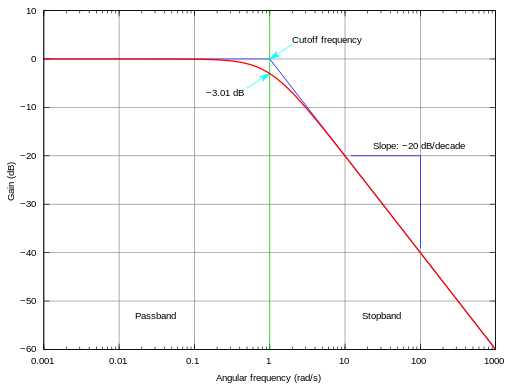
I'm trying to get filter's frequency response. For example for LP filter it will look like this:
And in the end I want to get something similar to this:
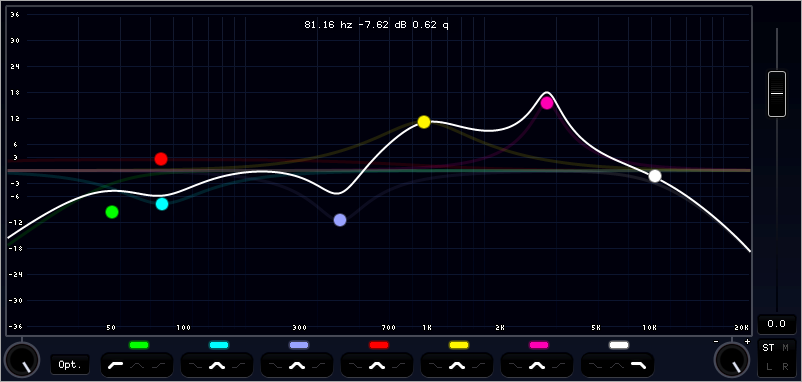
I thought it will be possible via assigning the filter to a property, but as a result I get just changed filter's input, not the filter's frequency response itself.
I found two open source projects with parametric EQ features which I'm trying to implement: MasterEQ from wislib for SuperCollider and ParQ (https://github.com/julianvogels/ParQ) But both use special methods for filters to get their magnitude response, I'm looking for a way to do this with AudioKit.
пятница, 5 июня 2015 г., 23:41:53 UTC+3 пользователь Aurelius Prochazka Ph.D. написал:
Aurelius Prochazka Ph.D.
Jun 6, 2015, 5:29:51 PM6/6/15
to audi...@googlegroups.com, ales....@gmail.com
Forgive me if I'm mistaken, but I think these are representative curves for a clean perhaps sine wave input. They aren't calculated, but kind of like estimates of what effect the filter has in general. You can create things that look like this in the UI and not calculate it based on audio streams. For plotting help, you might have to look elsewhere because the plots in AudioKit are meant to help people get things up and running, but if you want a really professional plotting system you might have to work with CorePlot or Shinobi.
Aure
Ales Tsurko
Jun 8, 2015, 11:12:56 AM6/8/15
to Aurelius Prochazka Ph.D., audi...@googlegroups.com
--
You received this message because you are subscribed to a topic in the Google Groups "AudioKit Users Group" group.
To unsubscribe from this topic, visit https://groups.google.com/d/topic/audiokit/tLlFKpP5Ntw/unsubscribe.
To unsubscribe from this group and all its topics, send an email to audiokit+u...@googlegroups.com.
To post to this group, send email to audi...@googlegroups.com.
To view this discussion on the web visit https://groups.google.com/d/msgid/audiokit/c8605a0c-fcd3-4ddd-8617-1409613cc43b%40googlegroups.com.
For more options, visit https://groups.google.com/d/optout.
Reply all
Reply to author
Forward
0 new messages