
Overlay file too large for MS Access
107 views
Skip to first unread message

AP
Jan 26, 2021, 8:22:07 AM1/26/21
to ArcSWAT
Hi all,
AP
Just wondering if anyone has a work around on this issue during the overylay step of landuse/soil/slope processing
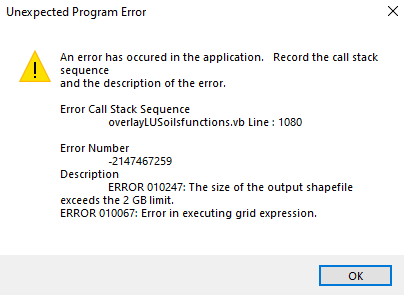
My Database isn't anywhere close to 2GB currently.
My Database isn't anywhere close to 2GB currently.
I am wondering if there is a way to increase this limit or subvert it?
I am using a 50cm x 50cm DEM and I am wondering if there is a work around for this as it's taken quite a while to process the data to this point.
Thanks,
AP

Natalja C.
Jan 26, 2021, 10:22:52 AM1/26/21
to ArcSWAT
Hello,
There is a Access size extension option somewhere in the settings/options, try to find those. I remember someone pointed out it in previous posts, search the group for that.
I also suggest to try out the QSWAT addon, as I remember it was more stable with large DEMs.
Also, please explore the possibility to resize your dem pixel size, as 0.5m is really small for SWAT. I'm not sure that you will be able to create an adequate model using the GIS interfaces. Although I did not try with pixel sizes smaller than 5m :)
Best,
Natalja
Natalja
AP
Feb 26, 2021, 3:43:58 PM2/26/21
to ArcSWAT
Hi Natalja,
I just had a quick question regarding the DEM size I was using. Is there any literature you can point me to that indicates adequate sizing of rasters? I cannot find anything in the SWAT literature about DEM sizing. My reasoning behind using such a small pixel size is I assumed it would provide a higher quality spatial resolution to the results?
Thanks,
Alex

Jim Almendinger
Feb 26, 2021, 6:00:23 PM2/26/21
to AP, ArcSWAT
Alex --
Just a few comments:
-- I presume your DEM is from LiDAR, to be that high resolution. You're correct that the finer resolution will give greater detail. But a big problem is that you will need to hydro-correct the DEM to allow for conveyance features that are hidden from LiDAR. Typically these are places like bridges over streams and culverts under roads, where the water passes under but is hidden from LiDAR's view. These features will appear as false dams that block flow. Perhaps you already have a hydro-corrected LiDAR DEM; otherwise it is a chore to do the corrections.
-- I think people often re-sample high-res DEMs back to about a 3-m resolution to speed up processing, but I have no documentation on that. Even then the same issue as listed above is a concern.
-- In my case the state water resource agency has created GIS layers of high-density drainage networks where they have already identified the culverts and the details of where water flows. I use this network to burn in my streams in ArcSWAT, and consequently the resolution of the DEM is much less of an issue.
Good luck!
-- Jim
--
You received this message because you are subscribed to the Google Groups "ArcSWAT" group.
To unsubscribe from this group and stop receiving emails from it, send an email to arcswat+u...@googlegroups.com.
To view this discussion on the web visit https://groups.google.com/d/msgid/arcswat/f49a9e90-be66-4ae2-929c-15983144e9adn%40googlegroups.com.
AP
Mar 1, 2021, 4:36:37 PM3/1/21
to ArcSWAT
Hi Jim,
Thanks for the input. Yes my data is LiDAR, however we have painstakingly gone through and hydraulically flatten it manually after I found that SWAT wasn't doing a good enough job. I have NEVER had such a headache trying to calibrate a model like I am right now. I am working in SW Ontario where the soil and overburden is highly variable and glaciofluvial. I have high res Soil and LU data (about 3mx3m) as well which I can only assume is making things even harder. I am getting NSE post calibration results of around .1-.2 and cannot wrap my head around as to why and was wondering if maybe the cell size was too tight for SWAT.
Thanks again,
AP
Jim Almendinger
Mar 1, 2021, 4:47:16 PM3/1/21
to AP, ArcSWAT
Alex --
I presume the resolution of your DEM, land use, and soils is only an issue in SWAT during the process of overlaying these layers and creating HRUs. Once HRUs are created, the resolutions of the input grids are no longer relevant. Of course, you may have an inordinate number of HRUs given such high-res input grids. That depends on the thresholds you selected during HRU creation. So is that really the issue -- that you just have so many HRUs that it slows down the SWAT run time? I think SWAT run time is directly related to the number of HRUs (linearly, I think, since HRUs are processed mostly independently).
Cheers,
-- Jim
To view this discussion on the web visit https://groups.google.com/d/msgid/arcswat/3c713e98-b53c-4f16-b3ce-e200d8983839n%40googlegroups.com.
Natalja C.
Mar 2, 2021, 2:54:49 AM3/2/21
to ArcSWAT
Hi,
I just updated my DEM resolution topic :) Indeed there are multiple and mixed results there.
I.e (just from google search): https://onlinelibrary.wiley.com/doi/pdf/10.1002/esp.4321
You are describing a situation which I faced before. No worries, here is what I learned :)
I have experience with high-res DEMs, and my conclusion was, that without a very good catchment area pre-processing (like Jim describes) and a solid understanding of processes and parameters, it is nearly impossible to calibrate a large area high res model. In fact, all my auto-calibration trials failed, compared to manual calibration. I think that the "standard" considerations for auto-calibration setup produces too much variability, due to the complex nature of high-res models. Simply put it, the algorithm needs exponentially more time to find a solution and most-probably just gets stuck around the non-optimal solution (phenomena described well in the SWAT-CUP manual). Coupled with long run-times for a single model simulation and you get an unsolvable task for your machine (or for your lifetime :D).
My suggestion is: either do a manual calibration or simplify the model (by HRU aggregation, DEM/LULC/SOIL map resampling, or splitting your model into smaller models).
All the best in your journey!
Natalja
Reply all
Reply to author
Forward
0 new messages