
Copy and Paste ArcSWAT Projects?
99 views
Skip to first unread message

Jiajia Liu
Feb 8, 2016, 10:51:53 PM2/8/16
to ArcSWAT
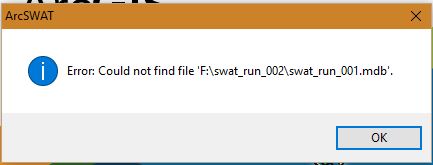
I have just set up a SWAT project and I intend to copy and paste the project to another folder so I can adjust SWAT2012 database without changing the default settings in the first set up.
I copy and save the current project "swat_001" into a second folder and changed the SwatGDB path under MasterProgress to the second folder.
How can I change the project name in the second folder from "swat_run_001" to say "swat_run_002"?
I tried to changed the file names but it keeps giving me errors as shown above.
Thanks in advance!

Evan
Feb 9, 2016, 9:46:17 AM2/9/16
to ArcSWAT
I'm no expert, but these are some solutions that have helped me in the past with similar issues: Try checking your permissions for the new folder. If you don't have proper access rights, it can give this error, I think. You can also try making another new folder (give it full read/write permissions first), then copy/pasting groups of files or folders to see which give you errors.
-Evan
Jiajia Liu
Feb 11, 2016, 4:15:59 PM2/11/16
to ArcSWAT
Thank you for the response. Both of my folders are in an external hard drive, when I try to check my permission, I can't really find the "security tab" I wonder whether it has something to do with the latest windows 10 update.
Reply all
Reply to author
Forward
0 new messages