
WebRTC Streaming In Unity on Oculus Quest
2,903 views
Skip to first unread message

Adam Roszyk
Mar 25, 2021, 5:39:45 PM3/25/21
to Ant Media Server
Hi there,
following article: https://antmedia.io/webrtc-streaming-in-unity/
I managed to successfully play the WebRTC video stream from AWS in the Unity3d.
It works just fine in the editor.
However after trying to run it on the Oculus Quest 1 - application freezes after invoking SoaraSample.OnClickStart method.
Here's the Logcat output from the device:
Sora is Created: signalingUrl=wss://*hiden for privacy*:5443/WebRTCAppEE/websocket, channelId=webrtc
GetStats: []
OnAddTrack: trackId=2
And after that application freezes without any other messages.
Have anyone encountered this issue before?
Any recommendations on how to debug it further?
Have anyone successfully used the SDK on any mobile VR platform?
Thanks a lot!

Selim Emre
Mar 25, 2021, 6:30:36 PM3/25/21
to Ant Media Server
Hi,
Thank you for reporting to us! We need to check Ant Media Server logs. Could you please add also Ant Media Server logs? You can find ant-media-server.log file on /usr/local/antmedia/log folder.
Best Regards,
Selim

gtk2k
Mar 25, 2021, 6:34:44 PM3/25/21
to Ant Media Server
I've seen reports that setting the codec to VP8 works, so why not use the codec as VP8?
2021年3月26日金曜日 6:39:45 UTC+9 funkylog...@gmail.com:

Enes Kuluk
Mar 26, 2021, 4:47:10 PM3/26/21
to Ant Media Server
It automatically use which codec is available for both sides, receiver and sender. If you set Ant Media Server to vp8, SDK will try to send as vp8.
On the other hand, SDK currently only works with Vulkan renderer. You need to net vulkan enabled in the VR devices you use. Also, you might need to use Oculus xr plugin to make rendering more compatible.
Best Regards,
Enes.
Adam Roszyk
Mar 27, 2021, 8:23:47 AM3/27/21
to Ant Media Server
Hi, thank you all for answers!
0.0.0.0_access.2021-03-27.log : https://pastebin.pl/view/6b2e85d4
antmedia-error.log: https://pastebin.pl/view/dd47b097
ant-media-server.log: https://pastebin.pl/view/261dd693
antmedia-error.log: https://pastebin.pl/view/dd47b097
ant-media-server.log: https://pastebin.pl/view/261dd693
I've seen reports that setting the codec to VP8 works, so why not use the codec as VP8?
I have changed and saved the WebRTC Codec Support in the WebRTCApp Settings to VP8 but the result is still the same.
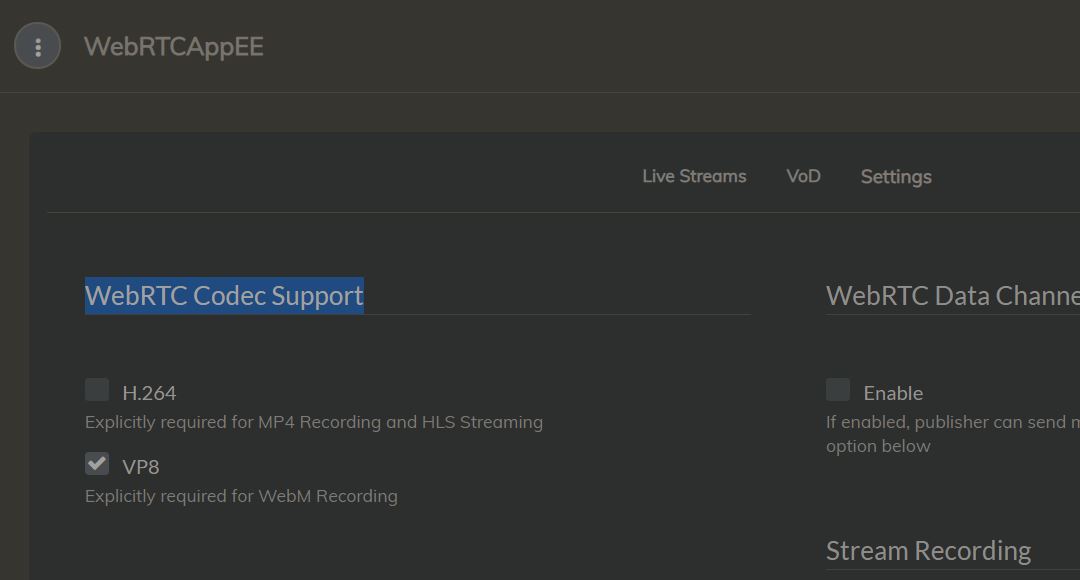
Do I need to change the OBS Settings as well, or is x264 encoder(that I am using now) compatible with VP8 server settings and that should be fine?

On the other hand, SDK currently only works with Vulkan renderer. You need to net vulkan enabled in the VR devices you use. Also, you might need to use Oculus xr plugin to make rendering more compatible.
Yes so I've followed this tutorial on enabling Vulkan support on the Quest( https://developer.oculus.com/blog/vulkan-support-for-oculus-quest-in-unity-experimental/) and I think the setup is fine. Vulkan is selected as graphic API and I am using XR Plugin Managment with Oculus as a service provider.
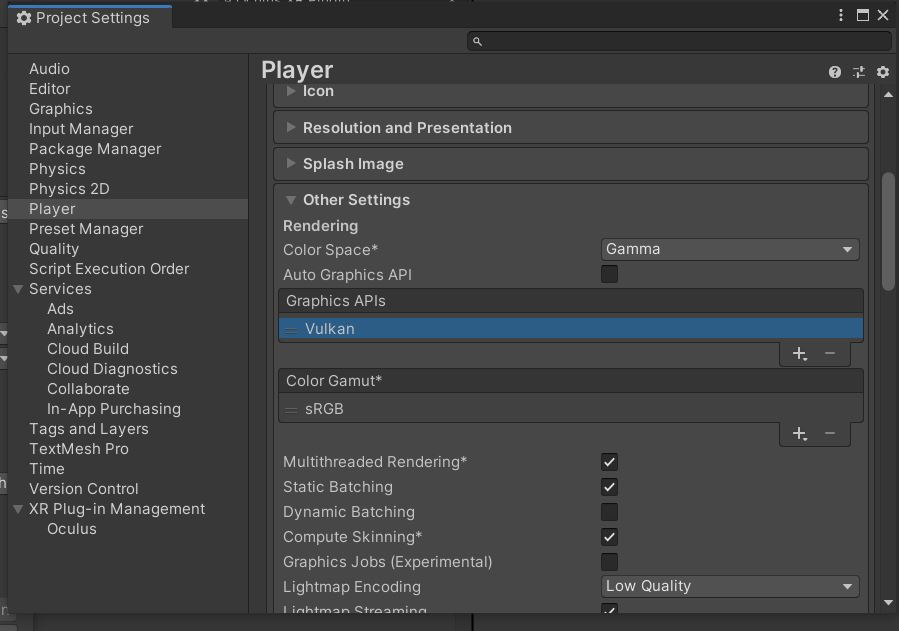

Looking forward to hearing more about the logs( maybe they show something obvious what I am missing), or any other suggestions on how to make the setup work.
Thanks again.
Selim Emre
Mar 28, 2021, 4:58:28 PM3/28/21
to Ant Media Server
Hi,
Could you please change below settings:
1- If you want to use VP8, you need to enable at least one adaptive option.
2- You need to change OBS settings according to our OBS guide.
Especially profile and tune settings are important for optimum stream quality.
Profile: Baseline
Tune: Zerolatency
Looking forward to hearing from you soon.
Best Regards,
Selim
Adam Roszyk
Mar 29, 2021, 1:35:03 AM3/29/21
to Ant Media Server
Ok,
I've added one adaptive option and updated the OBS settings, but unfortunately, the results are still the same: stream plays correctly in the player, but the Oculus Quest application freezes right after the SoaraSample.OnClickStart method is invoked.
Pasting logs from the latest session below:

Enes Kuluk
Mar 29, 2021, 10:47:51 AM3/29/21
to Ant Media Server
Is there any crash report that we can check from oculus side? When it crashes in my phone, i can see its crash report, is it possible in your end?
On the other hand, sadly I don't own oculus quest, so it will be impossible to me to try it. Best i can do is follow why it crashed.
Best Regards,
Enes.
Enes Kuluk
Mar 29, 2021, 10:51:02 AM3/29/21
to Ant Media Server
Also could you check this: https://developer.oculus.com/documentation/unity/unity-conf-settings/#enable-vr-support
Enes.
Adam Roszyk
Mar 29, 2021, 2:39:41 PM3/29/21
to Ant Media Server
Enes thanks for the answers,
I am sure that the general VR app setup is correct- as the application works fine until the OnClickStart method is called.
I added some additional logs to Sora.cs and SoraSample.cs and discovered a few additional things:
1. Application is actually not really crashing - it freezes the rendered image, but the Updated methods are still executing.
2. Whole-body of OnClickStart() executes correctly.
3. sora.DispatchEvents(); also executes correctly - when debugged, pointer p value = 542159593472 and it's being called every frame even after application renderer freezes.
4. RenderTrackToTexture is where I suspect the issue is - this method is being executed correctly(/fully) as well(as log added to line 147 in Sora.cs shows up every frame) but it seems like the native method embedded here is not returning the proper result
4. RenderTrackToTexture is where I suspect the issue is - this method is being executed correctly(/fully) as well(as log added to line 147 in Sora.cs shows up every frame) but it seems like the native method embedded here is not returning the proper result
Is there anything else I can do to help you remotely debug the application on the Quest?
Enes Kuluk
Mar 30, 2021, 10:17:13 AM3/30/21
to Ant Media Server
Thanks for the valuable informations, I'll work on the informations you gave.
Best Regards,
Enes.
Enes Kuluk
Mar 31, 2021, 8:43:02 AM3/31/21
to Ant Media Server
It's might be a good sign that you application doesn't crash, are you able to hear the audio although video image is frozen?
Also what do you mean by frozen image? If there is no camera available, its automatically sends a static default scene to the Ant Media Server, I hope you mean this one.
Best Regards,
If that is not the one could you send a screenshot of it please? and could you try to change the rendering components with the one compatible with the ones in the oculus xr plugin to make it compatible with it?
Best Regards,
Enes.
Message has been deleted
Adam Roszyk
Mar 31, 2021, 9:01:43 AM3/31/21
to Ant Media Server
I think there's no audio- but I'll double check that and confirm in few a hours.
By Frozen image- I mean the image rendered by the unity camera and displayed on the headset is still even though the user is moving his/her head.
and could you try to change the rendering components with the one compatible with the ones in the oculus xr plugin to make it compatible with it?
By Frozen image- I mean the image rendered by the unity camera and displayed on the headset is still even though the user is moving his/her head.
To give you more context:
In the sample receiver only scene - I've changed the Canvas display( where video stream should be displayed) to the world space(so that it's detached from the Unity camera) and I used a standard VR so that user can walk freely around the Canvas where to stream should be rendered.
And until the Start method is invoked- the user can control the Unity camera( through the headset movements) and everything works like in a regular VR app.
But after the start method is triggered camera stops to respond to the user movement- meaning rotation and position are not being updated and the last frame from before invoking the method is being rendered on the VR headset in perpetuity(and no headset movements updates it anymore).
I'll record and share the session in few hours- if needed?
and could you try to change the rendering components with the one compatible with the ones in the oculus xr plugin to make it compatible with it?
I am not sure which Render Components do you mean - could you elaborate on that?(or share the screenshot)
Just to clarify - I am not trying to render images from the unity to the server.
I am interested in receiving images only.
I want to stream the image from OBS to the Ant Media Server on AWS and then to the Oculus Quest.
I want to stream the image from OBS to the Ant Media Server on AWS and then to the Oculus Quest.
Adam Roszyk
Mar 31, 2021, 3:17:52 PM3/31/21
to Ant Media Server
Ok, good news to my surprise audio is actually working!
I could hear everything that was streamed from obs in the headset, even though the frame was still frozen.
And here's the video I promised- captured on the quest showing how the application behaves.
It's set so that after 5 seconds the Start method will get invoked, and after that, you can see the whole application freezes- and that would last forever.
Video: https://youtu.be/WEL8A3FUcbE
gtk2k
Apr 4, 2021, 11:43:14 AM4/4/21
to Ant Media Server
In my case, I have no audio because I don't need an audio, but I was able to play video at quest.
In the beginning, I flew in a few seconds in a few seconds, but once I uninstalled the app and set it as shown in the image.
(I'm using Unity Official WebRTC Package instead of Ant Media Server Unity SDK)

2021年4月1日木曜日 4:17:52 UTC+9 funkylog...@gmail.com:
Adam Roszyk
Apr 5, 2021, 6:08:34 AM4/5/21
to Ant Media Server
Hi, can I ask which Unity version, and which version of webrtc package are you using?
Thanks!
Thanks!
gtk2k
Apr 5, 2021, 6:36:38 AM4/5/21
to Ant Media Server
Unity: 2020.3.0f1
WebRTC Package: M89 (https://github.com/Unity-Technologies/com.unity.webrtc/releases/tag/M89)
2021年4月5日月曜日 19:08:34 UTC+9 funkylog...@gmail.com:
Adam Roszyk
Apr 6, 2021, 4:56:13 AM4/6/21
to Ant Media Server
Thanks 🙏
I'll try it out and give an update on my progress with the Unity plugin.
I'll try it out and give an update on my progress with the Unity plugin.
Enes Kuluk
Apr 8, 2021, 8:25:55 AM4/8/21
to Ant Media Server
How did your testing go? As far as i know, there is no audio support in official unity plugin right?
Best Regards,
Enes.
Reply all
Reply to author
Forward
0 new messages