
Ansible can't access my network devices. Getting : FAILED! => {"changed": false, "msg": "Connection type ssh is not valid for this module"}
5,870 views
Skip to first unread message

Palmer
Nov 13, 2019, 11:35:32 PM11/13/19
to Ansible Project
Hi,
I'm new to Ansible and trying to write my first playbook.
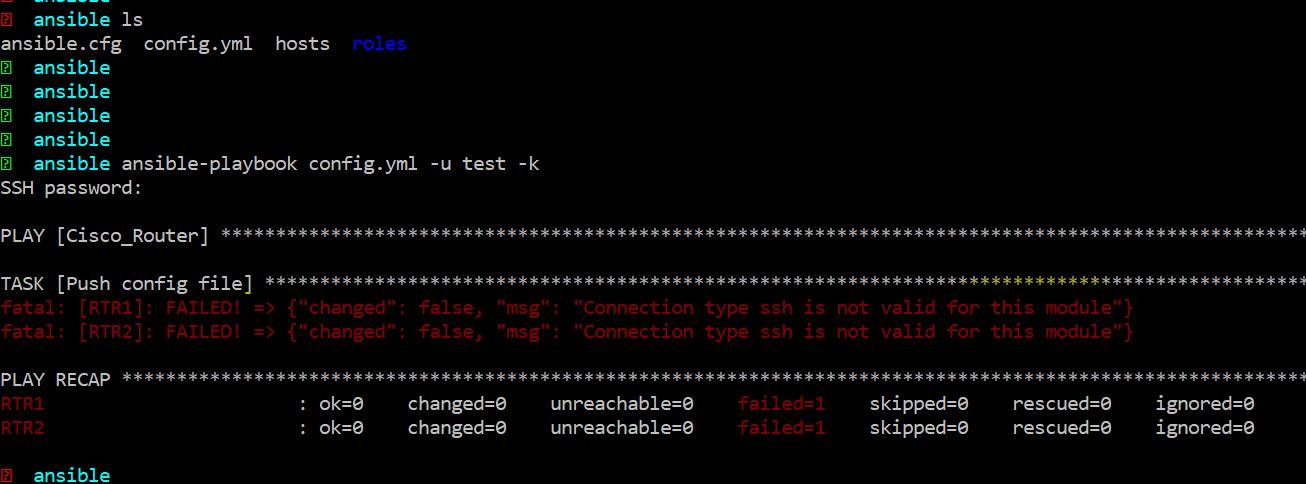
But i keep getting an error: fatal: [RTR1]: FAILED! => {"changed": false, "msg": "Connection type ssh is not valid for this module"}
I'm suspecting Ansible is complaining about my Cisco devices ssh settings (running diffie-hellman-group1-sha1) but I'm not sure if that's correct. Will appreciate your assistance

Nilashish Chakraborty
Nov 14, 2019, 12:11:11 AM11/14/19
to ansible...@googlegroups.com
Hello,
You need to use ansible_connection=network_cli. This connection plugin provides a connection to remote devices over the SSH and implements a CLI shell. It is typically used by network devices for sending CLI commands to network devices and also receiving information from them. If your devices are running Cisco IOS, please have a look at the platform guide.
You need to use ansible_connection=network_cli. This connection plugin provides a connection to remote devices over the SSH and implements a CLI shell. It is typically used by network devices for sending CLI commands to network devices and also receiving information from them. If your devices are running Cisco IOS, please have a look at the platform guide.
You can also refer to https://docs.ansible.com/ansible/latest/network/index.html for more information on getting started with Ansible Network Automation.
Thank you!
--
You received this message because you are subscribed to the Google Groups "Ansible Project" group.
To unsubscribe from this group and stop receiving emails from it, send an email to ansible-proje...@googlegroups.com.
To view this discussion on the web visit https://groups.google.com/d/msgid/ansible-project/84c3c987-ed6a-4740-8b8b-a619b9a55812%40googlegroups.com.
Nilashish Chakraborty
Software Engineer, Ansible
 |

Sam Doran
Nov 14, 2019, 10:19:33 AM11/14/19
to ansible...@googlegroups.com
Palmer,
When connecting to network devices, you need to specify an appropriate connection plugin, such as network_cli, and specify the network OS in inventory.
---
Sam
Palmer
Nov 14, 2019, 10:58:23 PM11/14/19
to Ansible Project
Thanks for the input. I did try what you suggested but I'm here the same issue. Please take a look at the screenshot and let me know if you see something


Scott Fella
Nov 15, 2019, 12:36:59 AM11/15/19
to Ansible Project
I’m pretty new to and ran into the same issue. Is your hosts file defined like this:
[ios]
RTR1
RTR2
Did you define something in your config.yml?
[ios]
RTR1
RTR2
Did you define something in your config.yml?
Palmer
Nov 15, 2019, 8:20:26 AM11/15/19
to Ansible Project
Here is what i have defined/configured in hosts and config.yml files:

On Wednesday, November 13, 2019 at 11:35:32 PM UTC-5, Palmer wrote:
Nilashish Chakraborty
Nov 15, 2019, 9:13:02 AM11/15/19
to ansible...@googlegroups.com
I see that the group name in inventory is "Cisco_Router", however, the group_vars file is named as "ios.yaml". Those two should be identical in this approach.
Please have a look at https://docs.ansible.com/ansible/latest/user_guide/intro_inventory.html#organizing-host-and-group-variables.
Thanks!
Please have a look at https://docs.ansible.com/ansible/latest/user_guide/intro_inventory.html#organizing-host-and-group-variables.
Thanks!
--
You received this message because you are subscribed to the Google Groups "Ansible Project" group.
To unsubscribe from this group and stop receiving emails from it, send an email to ansible-proje...@googlegroups.com.
To view this discussion on the web visit https://groups.google.com/d/msgid/ansible-project/28c8649d-1717-4e70-bad1-a692fbc0489e%40googlegroups.com.
Scott Fella
Nov 15, 2019, 9:14:20 AM11/15/19
to Ansible Project
Your group_vars yml file should be named identical to the group-name you put your device(s). This is why the variables are not being called. If you define these in your playbook it would work and that can help later isolate where things are not working.
Palmer
Nov 15, 2019, 5:22:06 PM11/15/19
to Ansible Project
Thank you everyone for your help on this. This issue has been resolved. As you previously mentioned, I made sure the group_vars yml file was named identical with the group-name i have my devices
On Wednesday, November 13, 2019 at 11:35:32 PM UTC-5, Palmer wrote:

Franz Ford Decrito
May 11, 2020, 4:53:31 PM5/11/20
to Ansible Project
Try adding the "connection:local" under your hosts
- hosts: "myhost"
connection: localReply all
Reply to author
Forward
0 new messages