
Trouble with Dynamic Inventory (gce.py), please help
617 views
Skip to first unread message

Ned Studious
Apr 20, 2017, 9:12:31 PM4/20/17
to Ansible Project
Greetings All,
I'm hoping the community can help with the issue I'm experiencing. I'm attempting to setup a dynamic inventory using this doc:
So far I'm not having any success as it seems that each error leads to another down the rabbit hole I go....
Error:
~/ansible/inventory$ ./gce.py --list
Traceback (most recent call last):
File "./gce.py", line 484, in <module>
GceInventory()
File "./gce.py", line 161, in __init__
self.driver = self.get_gce_driver()
File "./gce.py", line 304, in get_gce_driver
gce = get_driver(Provider.GCE)(*args, **kwargs)
File "/usr/lib/python2.7/dist-packages/libcloud/compute/drivers/gce.py", line 1058, in __init__
self.zone_list = self.ex_list_zones()
File "/usr/lib/python2.7/dist-packages/libcloud/compute/drivers/gce.py", line 1790, in ex_list_zones
response = self.connection.request(request, method='GET').object
File "/usr/lib/python2.7/dist-packages/libcloud/compute/drivers/gce.py", line 120, in request
response = super(GCEConnection, self).request(*args, **kwargs)
File "/usr/lib/python2.7/dist-packages/libcloud/common/google.py", line 718, in request
*args, **kwargs)
File "/usr/lib/python2.7/dist-packages/libcloud/common/base.py", line 797, in request
response = responseCls(**kwargs)
File "/usr/lib/python2.7/dist-packages/libcloud/common/base.py", line 145, in __init__
self.object = self.parse_body()
File "/usr/lib/python2.7/dist-packages/libcloud/common/google.py", line 287, in parse_body
raise GoogleBaseError(message, self.status, code)
libcloud.common.google.GoogleBaseError: {'domain': 'global', 'message': 'Insufficient Permission', 'reason': 'insufficientPermissions'}
I don't understand why there is insufficient permissions. I've created a service account which I initialized in the instance and I can successful use the gcloud cli.
Example:
~/ansible/inventory$ gcloud auth list
Credentialed Accounts:
- b*******@REDACTED.iam.gserviceaccount.com ACTIVE
To set the active account, run:
$ gcloud config set account `ACCOUNT`
~/ansible/inventory$ gcloud compute instances list
NAME ZONE MACHINE_TYPE PREEMPTIBLE INTERNAL_IP EXTERNAL_IP STATUS
jump us-east1-b f1-micro 10.142.0.2 REDACTED RUNNING
inst1 us-east1-b f1-micro 10.142.0.3 RUNNING
inst2 us-east1-b f1-micro 10.142.0.4 RUNNING
inst3 us-east1-b f1-micro 10.142.0.5 RUNNING
~/ansible/inventory$ cat secrets.py
GCE_PARAMS = ('', '')
GCE_KEYWORD_PARAMS = {'project': 'REDACTED', 'datacenter': 'us-east1-b'}
The docs says you can leave the GCE_PARAMS blank if you are doing this from an instance within the project. I've tried both ways and I can't get past this permissions issue. I've made the service account owner and it hasn't helped.
~/ansible/inventory$ cat gce.ini
[gce]
libcloud_secrets = /home/REDACTED/ansible/inventory/secrets.py
# If you are not going to use a 'secrets.py' file, you can set the necessary
# authorization parameters here.
#gce_service_account_email_address = b*******@REDACTED.iam.gserviceaccount.com
#gce_service_account_pem_file_path = /home/REDACTED/S********************a.json
#gce_project_id = "REDACTED"
Note: The above parameters are commented out because I am using secrets.py. I've tried with just these values alone and commenting out the "libcloud_secrets" but that didn't help.
~/ansible/inventory$ echo $GCE_INI_PATH
/home/REDACTED/ansible/inventory/gce.ini <---tried both with only the path and also the filename and same result
Is there are definitive guide posted by Google on the exact steps to make this work? A dynamic inventory isn't mission critical but it would certainly make life easier down the road when I start automating instance deployment. It seems like this is taking too much effort to get right and there has to be a simple way to make this work. Between this ansible doc and the commented info in the gce.ini there is conflicting info.
For craps and giggles I used this openssl command to convert a newly created key for the same service account to *.pem. I then entered this info into the secrets.py and attempted to run the ./gce.py --list again and it still failed. Same error. Sigh....
openssl pkcs12 -in pkey.pkcs12 -passin pass:notasecret -nodes -nocerts | openssl rsa -out pkey.pem
~/ansible/inventory$ cat secrets.py
GCE_PARAMS = ('b*******@REDACTED.iam.gserviceaccount.com', '/home/REDACTED/servkey.pem')
GCE_KEYWORD_PARAMS = {'project': 'REDACTED', 'datacenter': 'us-east1-b'}
@Eric Johnson: Are you out there? :) Help! This should be much simpler. I'll draft a how to doc and send it to you for peer review if you help me get past this hump. If it is good enough, maybe it can be posted online so other don't fight with this. Maybe no one really cares enough and that is why I don't see enough answers to this problem. Is there any debugging option I can turn on to get more info on these errors?
Ned Studious
Apr 21, 2017, 10:10:20 AM4/21/17
to Ansible Project
From the gce.ini:
# The GCE inventory script has the following dependencies:
# 1. A valid Google Cloud Platform account with Google Compute Engine
# enabled. See https://cloud.google.com
# 2. An OAuth2 Service Account flow should be enabled. This will generate
# a private key file that the inventory script will use for API request
# authorization. See https://developers.google.com/accounts/docs/OAuth2
# 3. Convert the private key from PKCS12 to PEM format
# $ openssl pkcs12 -in pkey.pkcs12 -passin pass:notasecret \
# > -nodes -nocerts | openssl rsa -out pkey.pem
# 4. The libcloud (>=0.13.3) python libray. See http://libcloud.apache.org
#
# (See ansible/test/gce_tests.py comments for full install instructions)
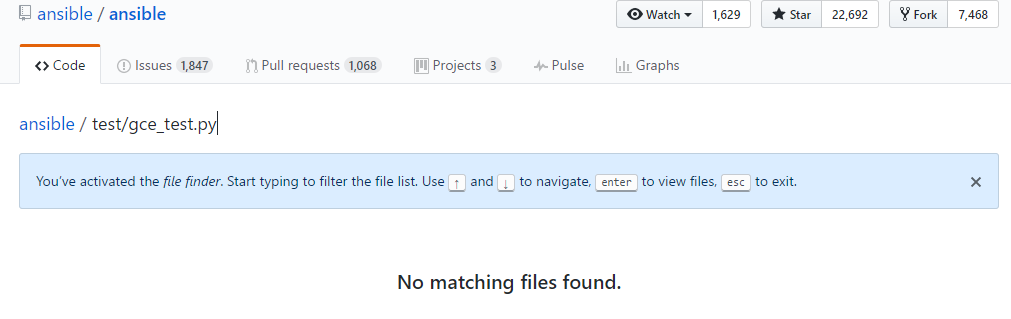
So a better question to ask is..... Where is the "ansible/test/gce_tests.py" file? I've searched but this referenced file is not found. I'm going to start from the beginning referencing the steps in the file that is supposed to have the full install instructions.

Tom Melendez
Apr 21, 2017, 12:54:24 PM4/21/17
to Ansible Project
Hi Ned,
Sorry to hear that you're having issues with the dynamic inventory. First things to confirm:
* Compute Instance API enabled?
* (If you're running on a GCE VM) the scopes of the VM/Role permissions of the service account
* Versions of ansible and libcloud (various bugs have been fixed, so the versions are important to note)
For debugging, you can do the following:
export LIBCLOUD_DEBUG=/tmp/my-logfile.log
Which will dump out the HTTP traffic, including curl commands you can run right at the command line (with tokens embedded, so they work).
Let us know how it goes.
Thanks,
Tom
Sorry to hear that you're having issues with the dynamic inventory. First things to confirm:
* Compute Instance API enabled?
* (If you're running on a GCE VM) the scopes of the VM/Role permissions of the service account
* Versions of ansible and libcloud (various bugs have been fixed, so the versions are important to note)
For debugging, you can do the following:
export LIBCLOUD_DEBUG=/tmp/my-logfile.log
Which will dump out the HTTP traffic, including curl commands you can run right at the command line (with tokens embedded, so they work).
Let us know how it goes.
Thanks,
Tom
Ned Studious
Apr 21, 2017, 3:07:44 PM4/21/17
to Ansible Project
Compute Instance API enabled?
Yes, I'm able to confirm via UI and gcloud commands work on this instance.
(If you're running on a GCE VM) the scopes of the VM/Role permissions of the service account
Originally I only had this service account setup for all compute engine roles, but I've elevated this service account to Owner status while I troubleshoot.
~/ansible/playbooks$ ansible --version
ansible 2.2.2.0
Package: python-libcloud
Priority: optional
Section: universe/python
Installed-Size: 8565
Maintainer: Ubuntu Developers
Original-Maintainer: Debian Python Modules Team
Architecture: all
Source: libcloud
Version: 0.20.0-1
I'll update this thread once I get the debugging information. I'm still not convinced I have this configured properly. I feel like the instructions that are available aren't enough to get a working dynamic inventory. Anyone have an archived copy of the file referenced in the gce.ini? ansible/test/gce_tests.py may contain the instructions needed to make this work.
Regards,
Ned

Kai Stian Olstad
Apr 21, 2017, 4:00:36 PM4/21/17
to ansible...@googlegroups.com
On 21. april 2017 21:07, Ned Studious wrote:
> Anyone have an archived copy of the file referenced in the
> gce.ini? ansible/test/gce_tests.py may contain the instructions needed to
> make this work.
Git has all the history, even deleted files, you should be able to get
> Anyone have an archived copy of the file referenced in the
> gce.ini? ansible/test/gce_tests.py may contain the instructions needed to
> make this work.
the information with the following command.
git log --all --follow -p -- test/gce_tests.py
--
Kai Stian Olstad
Ned Studious
Apr 21, 2017, 4:19:22 PM4/21/17
to Ansible Project, ansible-pr...@olstad.com
Great call out.
Tom Melendez
Apr 22, 2017, 1:29:14 PM4/22/17
to Ansible Project
Hi Ned,
For clarity and posterity, this is the compute API that needs to be (also, billing must be enabled). If you were using this previously then it's probably a non-issue. Usage of the UI and gcloud do not confirm it is enabled. Depending on your version of gcloud, you can see which APIs are enabled with:
gcloud service-management list --enabled
Your libcloud version looks fine for now, but you'll probably want to upgrade (once you get past this issue) for more features.
With the debugging info, you'll get curl command which takes Ansible out of the mix, which should help you drive to the root cause.
Specifically regarding gce.ini and dynamic inventory: This simple configuration works for me:
my gce.ini looks like this:
gce_service_account_email_address = sa-...@MYPROJECT.iam.gserviceaccount.com
gce_service_account_pem_file_path = /home/ME/keys/my-key.json
gce_project_id = MYPROJECT
No other settings are modified. My gce.ini file and gce.py are in the contrib/inventory directory for simplicity
./gce.py --list gives me a dump of my current instances.
I agree the docs are not up to date (PRs welcome!). Default application credentials (the ability to not specify a service account or key when running on GCE with appropriate scopes) was previously broken and fixed recently. And I don't believe we mention the enabling of the API, either.
One more thing: if none of this works for you still, there is a possibility you have a "corrupted" token. In your home directory, there should be a hidden file like google_libcloud_auth.your_project - try moving (not deleting) that and see if helps. I don't think it will, honestly (because you would receive an authorization error), but there a bug at one point where that token was not being rewritten correctly.
Please let us know how this works out.
Thanks,
Tom
For clarity and posterity, this is the compute API that needs to be (also, billing must be enabled). If you were using this previously then it's probably a non-issue. Usage of the UI and gcloud do not confirm it is enabled. Depending on your version of gcloud, you can see which APIs are enabled with:
gcloud service-management list --enabled
Your libcloud version looks fine for now, but you'll probably want to upgrade (once you get past this issue) for more features.
With the debugging info, you'll get curl command which takes Ansible out of the mix, which should help you drive to the root cause.
Specifically regarding gce.ini and dynamic inventory: This simple configuration works for me:
my gce.ini looks like this:
gce_service_account_email_address = sa-...@MYPROJECT.iam.gserviceaccount.com
gce_service_account_pem_file_path = /home/ME/keys/my-key.json
gce_project_id = MYPROJECT
No other settings are modified. My gce.ini file and gce.py are in the contrib/inventory directory for simplicity
./gce.py --list gives me a dump of my current instances.
I agree the docs are not up to date (PRs welcome!). Default application credentials (the ability to not specify a service account or key when running on GCE with appropriate scopes) was previously broken and fixed recently. And I don't believe we mention the enabling of the API, either.
One more thing: if none of this works for you still, there is a possibility you have a "corrupted" token. In your home directory, there should be a hidden file like google_libcloud_auth.your_project - try moving (not deleting) that and see if helps. I don't think it will, honestly (because you would receive an authorization error), but there a bug at one point where that token was not being rewritten correctly.
Please let us know how this works out.
Thanks,
Tom
Ned Studious
Apr 25, 2017, 11:09:24 AM4/25/17
to Ansible Project
Thank you Tom. I'll give this a try later today. I had to step away from this for a minute to work on an issue that pays. I'll have some cycles later today to give this a spin.
Reply all
Reply to author
Forward
0 new messages