
Unable to use the pre-built Docker container
625 views
Skip to first unread message

Jeet Biswas
May 5, 2021, 9:28:57 AM5/5/21
to Annif Users
Hi all,
I have been using Annif for some time in my Linux system and it works fine.

Now, I want to use the pre-built Docker container. I am following instructions from the wiki page.
But I am stuck at the very first step. The instruction says that it is possible to run the annif commands. However, all the Annif commands returns Illegal instruction.

What am I doing wrong? and how do I proceed further?
Best Regards,
Jeet

juho.i...@helsinki.fi
May 5, 2021, 11:57:48 AM5/5/21
to Annif Users
Hi Jeet,
In the past that kind of problems have been related to AVX support. In Annif the (prebuilt) TensorFlow library used by the NN ensemble backend needs some AVX functionality, and if AVX is not available, running any Annif command just outputs the "Illegal instruction (core dumped)" error.
AVX support might be missing from your computer's CPU, if it is an older one. But you said you have been using Annif for some time on your Linux system, so I suppose that is not the problem. Or could it be that you have been using Annif for so long that you have installed a version older than 0.43, which is the version where NN ensemble was introduced; what does the command "pip list | grep annif" show? (A bit confusingly "annif --version" does not give the version of Annif.)
You can check whether AVX support is available (https://stackoverflow.com/a/37480136) with the command
"grep avx /proc/cpuinfo"
In the case that the AVX support is missing only from within Docker containers, and if you happen to have configured some virtualization software like VirtualBox, I think the virtualization and Docker could some way interfere with each other. At least for Windows that happens, you can check the troubleshooting at https://github.com/NatLibFi/Annif-tutorial/blob/master/exercises/01_install_annif.md#11-virtualbox-based-install Is your Linux system a native installation or running on some virtual machine?
If the workaround is feasible to you, you could consider building a Docker image without TensorFlow from your own Dockerfile, where there is just one RUN statement where the uninstallation is done, see e.g. https://github.com/NatLibFi/Annif-tutorial/blob/master/Dockerfile#L15. With the prebuilt Docker image provided via quay.io the uninstallation needs to be done every time a container is started.
Best regards,
-Juho
In the past that kind of problems have been related to AVX support. In Annif the (prebuilt) TensorFlow library used by the NN ensemble backend needs some AVX functionality, and if AVX is not available, running any Annif command just outputs the "Illegal instruction (core dumped)" error.
AVX support might be missing from your computer's CPU, if it is an older one. But you said you have been using Annif for some time on your Linux system, so I suppose that is not the problem. Or could it be that you have been using Annif for so long that you have installed a version older than 0.43, which is the version where NN ensemble was introduced; what does the command "pip list | grep annif" show? (A bit confusingly "annif --version" does not give the version of Annif.)
You can check whether AVX support is available (https://stackoverflow.com/a/37480136) with the command
"grep avx /proc/cpuinfo"
In the case that the AVX support is missing only from within Docker containers, and if you happen to have configured some virtualization software like VirtualBox, I think the virtualization and Docker could some way interfere with each other. At least for Windows that happens, you can check the troubleshooting at https://github.com/NatLibFi/Annif-tutorial/blob/master/exercises/01_install_annif.md#11-virtualbox-based-install Is your Linux system a native installation or running on some virtual machine?
In any case, if the lack of the AVX support is the problem, and you don't need the NN ensemble backend, a workaround is to uninstall TensorFlow, but to do that in Docker you need be the root user, so first start a container with
"docker run -u root -it quay.io/natlibfi/annif bash"
and then do the uninstallation with
"pip uninstall tensorflow-cpu -y"-Juho
Jeet Biswas
May 6, 2021, 5:30:28 AM5/6/21
to juho.i...@helsinki.fi, Annif Users
Hi Juho,
Thanks for the reply.
Please find my response inline.
From: annif...@googlegroups.com <annif...@googlegroups.com> on behalf of juho.i...@helsinki.fi <juho.i...@helsinki.fi>
Sent: Wednesday, May 5, 2021 5:57 PM
To: Annif Users <annif...@googlegroups.com>
Subject: Re: Unable to use the pre-built Docker container
Sent: Wednesday, May 5, 2021 5:57 PM
To: Annif Users <annif...@googlegroups.com>
Subject: Re: Unable to use the pre-built Docker container
Hi Jeet,
In the past that kind of problems have been related to AVX support. In Annif the (prebuilt) TensorFlow library used by the NN ensemble backend needs some AVX functionality, and if AVX is not available, running any Annif command just outputs the "Illegal instruction (core dumped)" error.
AVX support might be missing from your computer's CPU, if it is an older one. But you said you have been using Annif for some time on your Linux system, so I suppose that is not the problem. Or could it be that you have been using Annif for so long that you have installed a version older than 0.43, which is the version where NN ensemble was introduced; what does the command "pip list | grep annif" show? (A bit confusingly "annif --version" does not give the version of Annif.)
In the past that kind of problems have been related to AVX support. In Annif the (prebuilt) TensorFlow library used by the NN ensemble backend needs some AVX functionality, and if AVX is not available, running any Annif command just outputs the "Illegal instruction (core dumped)" error.
AVX support might be missing from your computer's CPU, if it is an older one. But you said you have been using Annif for some time on your Linux system, so I suppose that is not the problem. Or could it be that you have been using Annif for so long that you have installed a version older than 0.43, which is the version where NN ensemble was introduced; what does the command "pip list | grep annif" show? (A bit confusingly "annif --version" does not give the version of Annif.)
pip list | grep annif shows version 0.50
You can check whether AVX support is available (https://stackoverflow.com/a/37480136) with the command
"grep avx /proc/cpuinfo"
It returns no result. So, it means it's not supported.
In the case that the AVX support is missing only from within Docker containers, and if you happen to have configured some virtualization software like VirtualBox, I think the virtualization and Docker could some way interfere with each other. At least for Windows that happens, you can check the troubleshooting at https://github.com/NatLibFi/Annif-tutorial/blob/master/exercises/01_install_annif.md#11-virtualbox-based-install Is your Linux system a native installation or running on some virtual machine?
Yes I'm using native linux system, No virtual machine. I tried the docker container in a different linux system and it worked. So that means the
problem is with my system.
In any case, if the lack of the AVX support is the problem, and you don't need the NN ensemble backend, a workaround is to uninstall TensorFlow, but to do that in Docker you need be the root user, so first start a container with
"docker run -u root -it quay.io/natlibfi/annif bash"
and then do the uninstallation with
"pip uninstall tensorflow-cpu -y"Thanks for the workaround. I'll try it in my system. If not, I'll have to use the friend's system or find out another way. Thanks a lot for your help. I'll trouble you again if I'm stuck. Have a nice
day.
Best Regards,
Jeet
-Juho
On Wednesday, 5 May 2021 at 16:28:57 UTC+3 j.bi...@wti-frankfurt.com wrote:
Hi all,
I have been using Annif for some time in my Linux system and it works fine.
Now, I want to use the pre-built Docker container. I am following instructions from the wiki page.
But I am stuck at the very first step. The instruction says that it is possible to run the annif commands. However, all the Annif commands returns Illegal instruction.
What am I doing wrong? and how do I proceed further?
Best Regards,Jeet
--
You received this message because you are subscribed to the Google Groups "Annif Users" group.
To unsubscribe from this group and stop receiving emails from it, send an email to annif-users...@googlegroups.com.
To view this discussion on the web visit https://groups.google.com/d/msgid/annif-users/a52b4dd0-b3f7-4759-9b4b-e9ba5d36e0e6n%40googlegroups.com.
You received this message because you are subscribed to the Google Groups "Annif Users" group.
To unsubscribe from this group and stop receiving emails from it, send an email to annif-users...@googlegroups.com.
To view this discussion on the web visit https://groups.google.com/d/msgid/annif-users/a52b4dd0-b3f7-4759-9b4b-e9ba5d36e0e6n%40googlegroups.com.
Jeet Biswas
May 12, 2021, 8:22:29 AM5/12/21
to juho.i...@helsinki.fi, Annif Users
Small update.
I decided to do it in a remote server. The installation worked. but there was error with permission
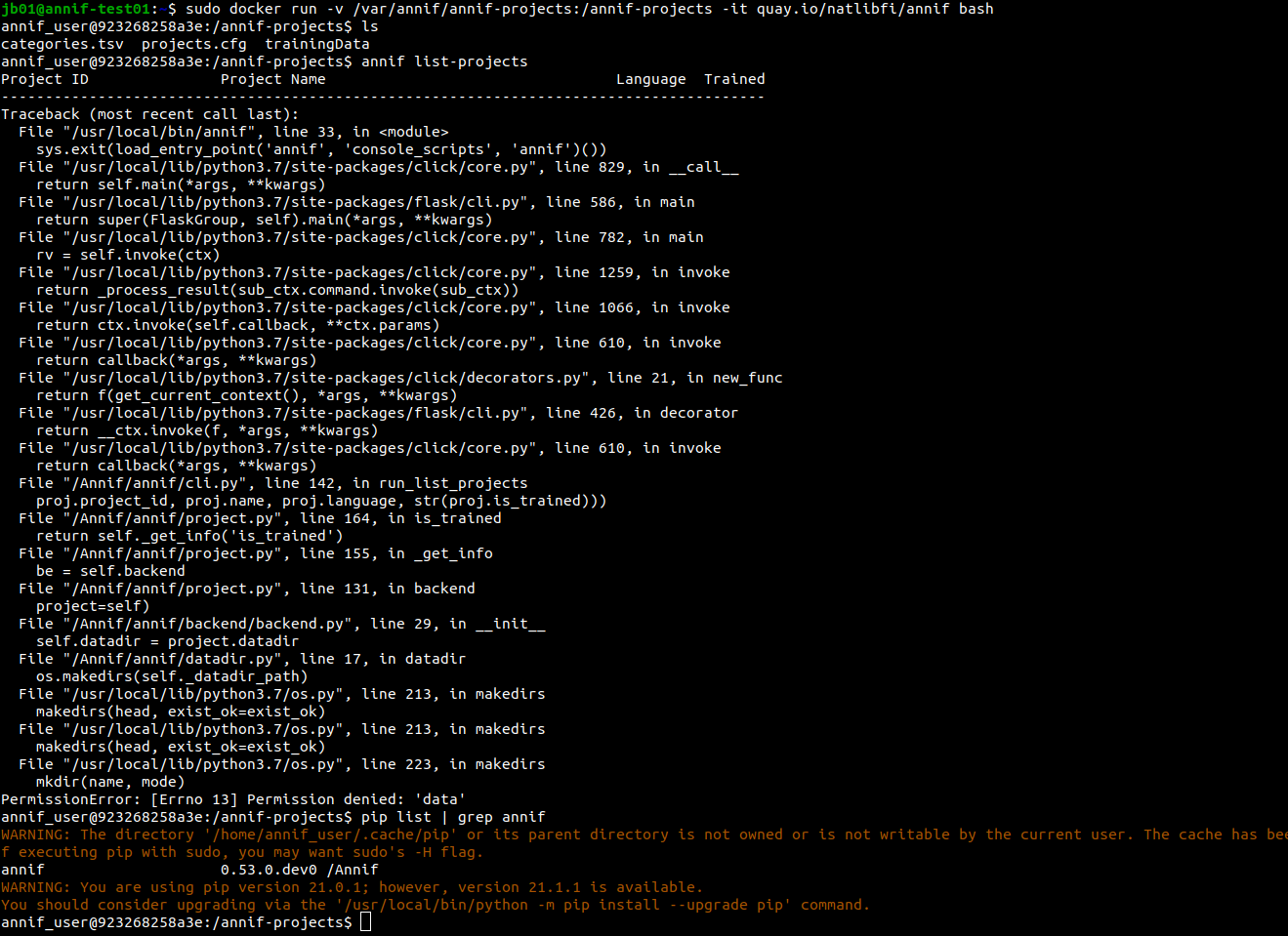
So, I tried with -u $(id -u):$(id -g)
option. but again, faced the same error. Finally, I tried with root user. and it worked.
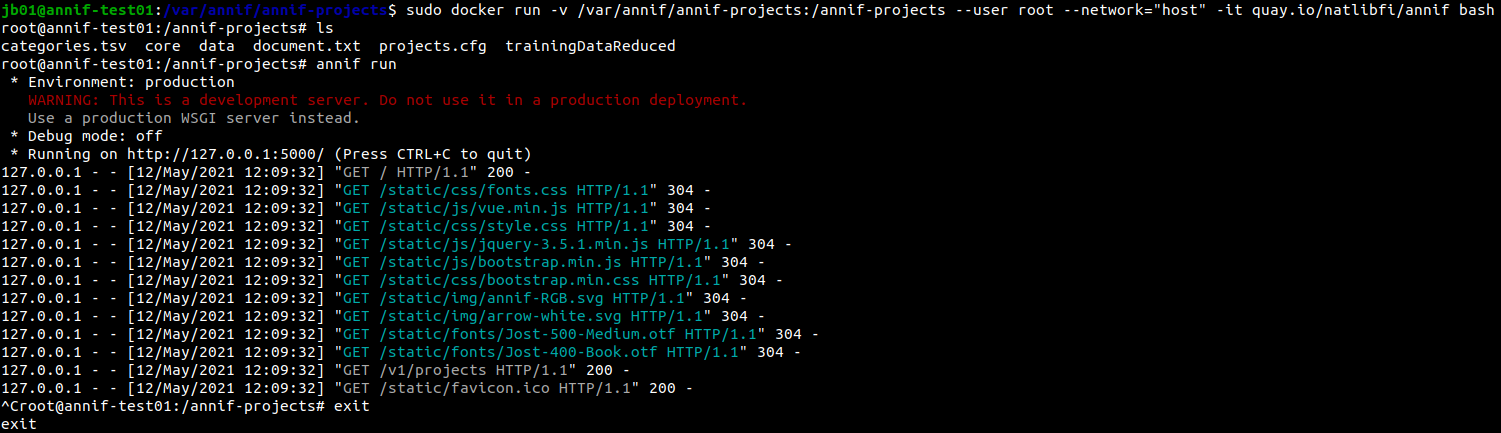
Thanks for the help Juho.
Best Regards,
Jeet
From: annif...@googlegroups.com <annif...@googlegroups.com> on behalf of Jeet Biswas <j.bi...@wti-frankfurt.com>
Sent: Thursday, May 6, 2021 11:30 AM
To: juho.i...@helsinki.fi <juho.i...@helsinki.fi>; Annif Users <annif...@googlegroups.com>
Sent: Thursday, May 6, 2021 11:30 AM
To: juho.i...@helsinki.fi <juho.i...@helsinki.fi>; Annif Users <annif...@googlegroups.com>
To view this discussion on the web visit
https://groups.google.com/d/msgid/annif-users/BE0P281MB0193E3EED23928F41708642BCE589%40BE0P281MB0193.DEUP281.PROD.OUTLOOK.COM.
Reply all
Reply to author
Forward
0 new messages