
Japanese being replaced with Chinese fonts
1,175 views
Skip to first unread message

ct.iva...@gmail.com
May 26, 2014, 11:24:58 PM5/26/14
to anki-a...@googlegroups.com
Hello, I've found this issue cited elsewhere, but I have not found a solution that I could follow.
I have both Chinese and Japanese decks on my Android devices, and when I try to study Japanese I've noticed that Japanese characters are replaced with Chinese ones, which is sometimes not an issue beyond a slight font difference, but which too often leads to the presentation of a completely or marginally different character. This renders my Japanese kanji study problematic on my droid devices. How can I fix this, and please, in terms that I can follow? I am not a programmer, and I don't even know how to find a font for Japanese that I can comfortably use on an android device :(
I have both Chinese and Japanese decks on my Android devices, and when I try to study Japanese I've noticed that Japanese characters are replaced with Chinese ones, which is sometimes not an issue beyond a slight font difference, but which too often leads to the presentation of a completely or marginally different character. This renders my Japanese kanji study problematic on my droid devices. How can I fix this, and please, in terms that I can follow? I am not a programmer, and I don't even know how to find a font for Japanese that I can comfortably use on an android device :(

Charles J. Daniels
May 26, 2014, 11:47:02 PM5/26/14
to anki-a...@googlegroups.com
these directions require use of the desktop client Anki: http://ankisrs.net/docs/manual.html#installing-fonts
also, people often run into fonts that do not work, so you may have to try several fonts until you find one that works -- I would suggest sticking to only .ttf files.
On Mon, May 26, 2014 at 8:24 PM, <ct.iva...@gmail.com> wrote:
Hello, I've found this issue cited elsewhere, but I have not found a solution that I could follow.
I have both Chinese and Japanese decks on my Android devices, and when I try to study Japanese I've noticed that Japanese characters are replaced with Chinese ones, which is sometimes not an issue beyond a slight font difference, but which too often leads to the presentation of a completely or marginally different character. This renders my Japanese kanji study problematic on my droid devices. How can I fix this, and please, in terms that I can follow? I am not a programmer, and I don't even know how to find a font for Japanese that I can comfortably use on an android device :(
--
You received this message because you are subscribed to the Google Groups "AnkiDroid" group.
To unsubscribe from this group and stop receiving emails from it, send an email to anki-android...@googlegroups.com.
To post to this group, send email to anki-a...@googlegroups.com.
To view this discussion on the web visit https://groups.google.com/d/msgid/anki-android/e551737a-100a-4125-9af9-de3792458665%40googlegroups.com.
For more options, visit https://groups.google.com/d/optout.

Tim
May 27, 2014, 12:15:01 AM5/27/14
to anki-a...@googlegroups.com
If you have Windows, you can try MS PGothic or MS PMincho from your Windows\Fonts folder. You'll need to convert them to TTC first; see the FAQ for more info:
On Tuesday, May 27, 2014 12:47:02 PM UTC+9, chajadan wrote:
these directions require use of the desktop client Anki: http://ankisrs.net/docs/manual.html#installing-fontsalso, people often run into fonts that do not work, so you may have to try several fonts until you find one that works -- I would suggest sticking to only .ttf files.
On Mon, May 26, 2014 at 8:24 PM, <ct.iva...@gmail.com> wrote:
Hello, I've found this issue cited elsewhere, but I have not found a solution that I could follow.
I have both Chinese and Japanese decks on my Android devices, and when I try to study Japanese I've noticed that Japanese characters are replaced with Chinese ones, which is sometimes not an issue beyond a slight font difference, but which too often leads to the presentation of a completely or marginally different character. This renders my Japanese kanji study problematic on my droid devices. How can I fix this, and please, in terms that I can follow? I am not a programmer, and I don't even know how to find a font for Japanese that I can comfortably use on an android device :(
--
You received this message because you are subscribed to the Google Groups "AnkiDroid" group.
To unsubscribe from this group and stop receiving emails from it, send an email to anki-android+unsubscribe@googlegroups.com.
Charles J. Daniels
May 27, 2014, 1:50:38 AM5/27/14
to anki-a...@googlegroups.com
I think Tim may have meant convert them ~from~ TTC, to .ttf (true type font) .ttc seems to have been better supported in the past, and I haven't heard of any recent successes though they may be out there
You can easily find fonts in just about any form for free by googling.
To unsubscribe from this group and stop receiving emails from it, send an email to anki-android...@googlegroups.com.
To view this discussion on the web visit https://groups.google.com/d/msgid/anki-android/7eb344f4-2104-4e90-a88f-5d3220157404%40googlegroups.com.
Tim
May 27, 2014, 3:00:01 AM5/27/14
to anki-a...@googlegroups.com
Ah yes, thanks for the clarification... You can find the Mincho and Gothic fonts as .ttc files in Windows, but you have to convert them to ttf.
On Tuesday, May 27, 2014 2:50:38 PM UTC+9, chajadan wrote:
I think Tim may have meant convert them ~from~ TTC, to .ttf (true type font) .ttc seems to have been better supported in the past, and I haven't heard of any recent successes though they may be out thereYou can easily find fonts in just about any form for free by googling.
On Mon, May 26, 2014 at 9:15 PM, Tim <perceptu...@gmail.com> wrote:
If you have Windows, you can try MS PGothic or MS PMincho from your Windows\Fonts folder. You'll need to convert them to TTC first; see the FAQ for more info:https://code.google.com/p/ankidroid/wiki/FAQ#How_can_I_use_custom_fonts?
On Tuesday, May 27, 2014 12:47:02 PM UTC+9, chajadan wrote:these directions require use of the desktop client Anki: http://ankisrs.net/docs/manual.html#installing-fonts
also, people often run into fonts that do not work, so you may have to try several fonts until you find one that works -- I would suggest sticking to only .ttf files.On Mon, May 26, 2014 at 8:24 PM, <ct.iva...@gmail.com> wrote:
Hello, I've found this issue cited elsewhere, but I have not found a solution that I could follow.--
I have both Chinese and Japanese decks on my Android devices, and when I try to study Japanese I've noticed that Japanese characters are replaced with Chinese ones, which is sometimes not an issue beyond a slight font difference, but which too often leads to the presentation of a completely or marginally different character. This renders my Japanese kanji study problematic on my droid devices. How can I fix this, and please, in terms that I can follow? I am not a programmer, and I don't even know how to find a font for Japanese that I can comfortably use on an android device :(
You received this message because you are subscribed to the Google Groups "AnkiDroid" group.
To unsubscribe from this group and stop receiving emails from it, send an email to anki-android+unsubscribe@googlegroups.com.
To post to this group, send email to anki-a...@googlegroups.com.
To view this discussion on the web visit https://groups.google.com/d/msgid/anki-android/e551737a-100a-4125-9af9-de3792458665%40googlegroups.com.
For more options, visit https://groups.google.com/d/optout.
--
You received this message because you are subscribed to the Google Groups "AnkiDroid" group.
To unsubscribe from this group and stop receiving emails from it, send an email to anki-android+unsubscribe@googlegroups.com.
To post to this group, send email to anki-a...@googlegroups.com.

Xiao Sun
May 27, 2014, 4:41:41 AM5/27/14
to anki-a...@googlegroups.com
Good luck converting them, it's going to be a bloody pain.
Bring back TTC and font in a folder support!
On Tuesday, May 27, 2014 5:00:01 PM UTC+10, Tim wrote:
Ah yes, thanks for the clarification... You can find the Mincho and Gothic fonts as .ttc files in Windows, but you have to convert them to ttf.
On Tuesday, May 27, 2014 2:50:38 PM UTC+9, chajadan wrote:
I think Tim may have meant convert them ~from~ TTC, to .ttf (true type font) .ttc seems to have been better supported in the past, and I haven't heard of any recent successes though they may be out thereYou can easily find fonts in just about any form for free by googling.
On Mon, May 26, 2014 at 9:15 PM, Tim <perceptu...@gmail.com> wrote:
If you have Windows, you can try MS PGothic or MS PMincho from your Windows\Fonts folder. You'll need to convert them to TTC first; see the FAQ for more info:
On Tuesday, May 27, 2014 12:47:02 PM UTC+9, chajadan wrote:
these directions require use of the desktop client Anki: http://ankisrs.net/docs/manual.html#installing-fonts
also, people often run into fonts that do not work, so you may have to try several fonts until you find one that works -- I would suggest sticking to only .ttf files.
On Mon, May 26, 2014 at 8:24 PM, <ct.iva...@gmail.com> wrote:
Hello, I've found this issue cited elsewhere, but I have not found a solution that I could follow.
I have both Chinese and Japanese decks on my Android devices, and when I try to study Japanese I've noticed that Japanese characters are replaced with Chinese ones, which is sometimes not an issue beyond a slight font difference, but which too often leads to the presentation of a completely or marginally different character. This renders my Japanese kanji study problematic on my droid devices. How can I fix this, and please, in terms that I can follow? I am not a programmer, and I don't even know how to find a font for Japanese that I can comfortably use on an android device :(
--
You received this message because you are subscribed to the Google Groups "AnkiDroid" group.
To unsubscribe from this group and stop receiving emails from it, send an email to anki-android...@googlegroups.com.
To post to this group, send email to anki-a...@googlegroups.com.
To view this discussion on the web visit https://groups.google.com/d/msgid/anki-android/e551737a-100a-4125-9af9-de3792458665%40googlegroups.com.
For more options, visit https://groups.google.com/d/optout.
--
You received this message because you are subscribed to the Google Groups "AnkiDroid" group.
To unsubscribe from this group and stop receiving emails from it, send an email to anki-android...@googlegroups.com.
Charles J. Daniels
May 27, 2014, 2:52:53 PM5/27/14
to anki-a...@googlegroups.com
Really, font in a folder support is still there as far as I know. All the fonts in the fonts folder have font declaration put on the card, so you should be able to reference them as well. It's just not the same method as used on Anki, so it's less portable. But if your Anki system uses a font that's not on android, it could be grabbed from the fonts folder. The name you reference it by has to match the font file name, minus any attributes like "bold" or "italic" in the file name.
To view this discussion on the web visit https://groups.google.com/d/msgid/anki-android/075dda04-faf9-4c71-b105-9d1ac023f434%40googlegroups.com.

ospalh
May 27, 2014, 3:22:40 PM5/27/14
to anki-a...@googlegroups.com
Am Dienstag, 27. Mai 2014 20:52:53 UTC+2 schrieb chajadan:
Really, font in a folder support is still there
Yes, still works. Btw, otf fonts work as well. Also, ttc fonts are tried, it is just undocumented. I have none of those lying around so i can't really experiment (and CBA) and don't know if AnkiDroid trying to load them is of any use.
There is also a bit of a problem with the names, i did rename a few of the fonts i am using, also you have to use exactly the right file name and font name in the CSS. But that should be possible with FontForge. Just save as OTF there...
There is also a bit of a problem with the names, i did rename a few of the fonts i am using, also you have to use exactly the right file name and font name in the CSS. But that should be possible with FontForge. Just save as OTF there...
Tim
May 27, 2014, 9:16:33 PM5/27/14
to anki-a...@googlegroups.com
I tried converting the Microsoft Gothic and Mincho TTC font files into TTF using FontForge and the online converters, but none of them actually worked. The only thing that I could get to work was the paid software Font Creator.
You can try using these extracted TTF fonts:
Tim
May 28, 2014, 2:59:04 AM5/28/14
to anki-a...@googlegroups.com
Or here is an alternative open source version of Mincho and Gothic called Kochi Substitute. After extracting (e.g. with 7zip) you will find the ttf files enclosed:
ospalh
May 28, 2014, 11:03:19 AM5/28/14
to anki-a...@googlegroups.com
Am Dienstag, 27. Mai 2014 21:22:40 UTC+2 schrieb ospalh:
Also, ttc fonts are tried, it is just undocumented. I have none of those lying around so i can't really experiment (and CBA)

Turns out i could BA after all. TTC fonts work. The image shows bits of a flashcard, seen on AnkiDroid latest-alpha. The bits outside the m-dashes are in an OTF-font, in the AnkiDroid/fonts folder, the bit inside the dashes in a TTC-font, also in AnkiDroid/fonts.

Dominic Lerbs
May 28, 2014, 4:44:35 PM5/28/14
to anki-a...@googlegroups.com
How do you reference the ttc files? Do you use the @font-face rule in the card template or some other way?
ospalh
May 28, 2014, 5:23:53 PM5/28/14
to anki-a...@googlegroups.com
Am Mittwoch, 28. Mai 2014 22:44:35 UTC+2 schrieb Dominic Lerbs:
How do you reference the ttc files? Do you use the @font-face rule in the card template or some other way?
- Drop the font file into <SD card>/AnkiDroid/fonts
- Make sure that the file name is the same as the font name
- and that the file name ends in "otf", "ttc" or "ttf"
- And use selector_nn {font-family: "fontName";}
Charles J. Daniels
May 28, 2014, 7:17:12 PM5/28/14
to anki-a...@googlegroups.com
also, fonts from the fonts folder do something I'm not a fan of: they strip font attributes from the name, like italic, bold, etc. So if your font name is MyFontBold.ttf you need to reference it as "MyFont" for the font-family.
--
You received this message because you are subscribed to the Google Groups "AnkiDroid" group.
To unsubscribe from this group and stop receiving emails from it, send an email to anki-android...@googlegroups.com.
To post to this group, send email to anki-a...@googlegroups.com.
To view this discussion on the web visit https://groups.google.com/d/msgid/anki-android/dbfc81d5-2563-443d-b611-9ff87919c627%40googlegroups.com.
Tim
May 28, 2014, 8:36:10 PM5/28/14
to anki-a...@googlegroups.com
There is some old documentation on using custom fonts in AnkiDroid 1.x, which goes into a bit more detail about the (officially unsupported) method suggested by Ospalh above:
On Thursday, May 29, 2014 8:17:12 AM UTC+9, chajadan wrote:
also, fonts from the fonts folder do something I'm not a fan of: they strip font attributes from the name, like italic, bold, etc. So if your font name is MyFontBold.ttf you need to reference it as "MyFont" for the font-family.
On Wed, May 28, 2014 at 2:23 PM, ospalh <osp...@gmail.com> wrote:
Am Mittwoch, 28. Mai 2014 22:44:35 UTC+2 schrieb Dominic Lerbs:How do you reference the ttc files? Do you use the @font-face rule in the card template or some other way?Cf. attachment. One font may be lying around on your Windows system, the other one is free (as in speech).
- Drop the font file into <SD card>/AnkiDroid/fonts
- Make sure that the file name is the same as the font name
- and that the file name ends in "otf", "ttc" or "ttf"
- And use selector_nn {font-family: "fontName";}
--
You received this message because you are subscribed to the Google Groups "AnkiDroid" group.
To unsubscribe from this group and stop receiving emails from it, send an email to anki-android+unsubscribe@googlegroups.com.
Charles J. Daniels
May 28, 2014, 9:01:56 PM5/28/14
to anki-a...@googlegroups.com
that link makes a good point that will remain true today: the name of the font as referenced from the fonts folder will be the name as given in the list of options for default/override font -- so that's one way to make sure you're using the right font-family name.
To unsubscribe from this group and stop receiving emails from it, send an email to anki-android...@googlegroups.com.
To view this discussion on the web visit https://groups.google.com/d/msgid/anki-android/fd7efc28-511a-4977-81a3-d5d836070053%40googlegroups.com.
Tim
May 29, 2014, 1:37:33 AM5/29/14
to anki-a...@googlegroups.com, ct.iva...@gmail.com
I had a go at getting Japanese fonts working myself using the official @font-face method with the open source Kochi TTF fonts (no conversion required).
Here is an example card template which uses them:
I've updated the FAQ to give more information about using custom fonts, including a link to a list of recommended fonts for different languages. I guess most of the fonts which come as TTC are not freely distributable, so it's probably against the terms of the license to use them on your Android device anyway, but I've also included a link to the old documentation for those who don't want to use the new method.
Charles J. Daniels
May 29, 2014, 2:20:15 AM5/29/14
to anki-a...@googlegroups.com
as far as I know, .ttc is just a way to group related fonts, not inherently a proprietary thing
the only reason it'd be so common for windows fonts is because they are likely to support various styles, coming as part of a platform
--
You received this message because you are subscribed to the Google Groups "AnkiDroid" group.
To unsubscribe from this group and stop receiving emails from it, send an email to anki-android...@googlegroups.com.
To post to this group, send email to anki-a...@googlegroups.com.
To view this discussion on the web visit https://groups.google.com/d/msgid/anki-android/3cc67cc0-688e-4604-99f5-ab89c70927b3%40googlegroups.com.
Tim
May 29, 2014, 2:23:26 AM5/29/14
to anki-a...@googlegroups.com
yeah there's nothing inherently proprietary about it, but I'm yet to see an open source font given in ttc format...
On Thursday, May 29, 2014 3:20:15 PM UTC+9, chajadan wrote:
as far as I know, .ttc is just a way to group related fonts, not inherently a proprietary thingthe only reason it'd be so common for windows fonts is because they are likely to support various styles, coming as part of a platform
On Wed, May 28, 2014 at 10:37 PM, Tim <perceptu...@gmail.com> wrote:
I had a go at getting Japanese fonts working myself using the official @font-face method with the open source Kochi TTF fonts (no conversion required).Here is an example card template which uses them:I've updated the FAQ to give more information about using custom fonts, including a link to a list of recommended fonts for different languages. I guess most of the fonts which come as TTC are not freely distributable, so it's probably against the terms of the license to use them on your Android device anyway, but I've also included a link to the old documentation for those who don't want to use the new method.On Tuesday, May 27, 2014 12:24:58 PM UTC+9, ct.iva...@gmail.com wrote:Hello, I've found this issue cited elsewhere, but I have not found a solution that I could follow.
I have both Chinese and Japanese decks on my Android devices, and when I try to study Japanese I've noticed that Japanese characters are replaced with Chinese ones, which is sometimes not an issue beyond a slight font difference, but which too often leads to the presentation of a completely or marginally different character. This renders my Japanese kanji study problematic on my droid devices. How can I fix this, and please, in terms that I can follow? I am not a programmer, and I don't even know how to find a font for Japanese that I can comfortably use on an android device :(
--
You received this message because you are subscribed to the Google Groups "AnkiDroid" group.
To unsubscribe from this group and stop receiving emails from it, send an email to anki-android+unsubscribe@googlegroups.com.
Xiao Sun
May 29, 2014, 7:38:02 AM5/29/14
to anki-a...@googlegroups.com, ct.iva...@gmail.com
You going to justify AD inability to use TTC by play the copyright card?
ospalh
May 29, 2014, 7:51:38 AM5/29/14
to anki-a...@googlegroups.com, ct.iva...@gmail.com
Am Donnerstag, 29. Mai 2014 13:38:02 UTC+2 schrieb Xiao Sun:
You going to justify AD inability to use TTC by play the copyright card?
??? No. Nobody mentioned copyright, and as i demonstrated AnkiDroid can use ttc fonts.
Tim
May 29, 2014, 9:17:30 AM5/29/14
to anki-a...@googlegroups.com, ct.iva...@gmail.com
I just tried to use the standard "msmincho.ttc" font from Windows in one of my Japanese decks, using the standard @font-face method in the Anki manual, and it works fine on AnkiDroid alpha 79 with Android 4.1.2 on Galaxy S2.
So I think it's clear that the "old method" and the "new method" are completely equivalent in which types of files they can handle. The problem should be simply that some Android versions or Devices may not be able to use some fonts, and TTF is the only format which we expect should work on most devices. So Xiao, I think you're gonna have to STFU about this ;)
Xiao Sun
May 29, 2014, 10:19:27 AM5/29/14
to anki-a...@googlegroups.com, ct.iva...@gmail.com
Can you get bold font to work on PC using @font-face method?
Tim
May 29, 2014, 10:42:07 AM5/29/14
to anki-a...@googlegroups.com
No not with the Mincho fonts unfortunately... did it ever work on Anki Desktop?
Xiao Sun
May 29, 2014, 10:50:15 AM5/29/14
to anki-a...@googlegroups.com
I tried MSmincho and Meiryo, both ttc, both can NOT display bold font using @font-face method on Anki desktop.
Msmincho can not be displayed using normal method, but Meiryo can display bold using normal method. WHich is why I'm so against @font-face because it can not display bold font.
Tim
May 29, 2014, 11:00:37 AM5/29/14
to anki-a...@googlegroups.com
If I understand correctly, you're saying you can't display bold on Anki Desktop even with Meiryo, but you can on AD using the old method?
Exactly which files do you copy to get bold working? Both meiryo.ttc and meiryob.ttc?
Xiao Sun
May 29, 2014, 12:23:03 PM5/29/14
to anki-a...@googlegroups.com
Can you get bold TTC working on PC or not?
What setup do you use on Anki desktop (assuming you're using Windows) and AD anyway?
I'm really confused as to why this isn't such a big issue to you guys. I must be doing something wrong.
Charles J. Daniels
May 29, 2014, 5:59:10 PM5/29/14
to anki-a...@googlegroups.com
Tim, if you're looking at this, I'd recommend if you're trying to figure out why something won't show bold to output the card css. That custom font code tends to want to put characteristics in the font face declaration, so like, if the font says "bold" in the filename, it will try to make it so that it's only called on bolded areas, so maybe font's are being put in "regular" and then not showing bold. I'll say it again, I'm not a fan of how font files are name mangled or css attributed.
Of course, always possible that a font simply has no bold support.
--
You received this message because you are subscribed to the Google Groups "AnkiDroid" group.
To unsubscribe from this group and stop receiving emails from it, send an email to anki-android...@googlegroups.com.
To view this discussion on the web visit https://groups.google.com/d/msgid/anki-android/f1abf219-06b3-44f0-ad99-0d5cd74ac319%40googlegroups.com.
Xiao Sun
Apr 28, 2015, 12:44:41 PM4/28/15
to anki-a...@googlegroups.com
Has this issue been fixed yet?
Tim
Apr 28, 2015, 8:31:15 PM4/28/15
to anki-a...@googlegroups.com
Has what been fixed? I already told you how to use bold fonts using CSS
Xiao Sun
Apr 29, 2015, 2:21:13 AM4/29/15
to anki-a...@googlegroups.com
Not looking for band aid solution. AnkiDroid should make a carbon copy of what's displayed on Anki.
Tim
Apr 29, 2015, 11:36:50 AM4/29/15
to anki-a...@googlegroups.com
Sorry I have no idea what you're talking about...
If you have an inconsistency between Anki Desktop and AnkiDroid using a font which is supported by Android such as Google Noto then post an example deck here.

mr.no...@gmail.com
May 21, 2015, 1:13:27 AM5/21/15
to anki-a...@googlegroups.com
> If you have an inconsistency between Anki Desktop and AnkiDroid using a font which is supported by Android such as Google Noto then post an example deck here.
Sorry to hijack the post, but I have exactly that kind of inconsistency (using Google Noto).
Here's what it looks like on desktop (correctly renders with noto):

Here's what it looks like on AnkiDroid (still using system font):

I've tried both the "new" method and "old" method of specifying the font. I've been able to successfully get the font in the browser/editor to change using the "old" method, but haven't been able to get the actual card font to change using either method.
Here's the styling:
.card {
font-family: "Noto Sans CJK JP", sans;
font-size: 20px;
text-align: center;
color: black;
background-color: white;
}
@font-face { font-family: "Noto Sans"; src: url('_NotoSans-Regular.ttf'); }
@font-face { font-family: "Noto Sans CJK JP"; src: url('_NotoSansCJKjp-Regular.ttf'); }
I've tried renaming it from OTF to TTF. I've also tried variations on the file name and font name, with and without spaces, things like that. No dice.
I've attached the deck this card is from here. I'm using AnkiDroid 2.4.3. I'm on a 2015 Moto X, Android 5.0.
Please let me know if you need any additional info. Thanks!
mr.no...@gmail.com
May 21, 2015, 2:12:02 AM5/21/15
to anki-a...@googlegroups.com, mr.no...@gmail.com
Oh, and by the way: I have verified that the files have synced correctly and are in the media folder. (In my phone and desktop.)
Thanks again for any help!
Thanks again for any help!
Tim
May 21, 2015, 2:17:00 AM5/21/15
to anki-a...@googlegroups.com, mr.no...@gmail.com, mr.no...@gmail.com
Have you tried uninstalling and re-installing AnkiDroid?
mr.no...@gmail.com
May 21, 2015, 2:23:05 AM5/21/15
to anki-a...@googlegroups.com, mr.no...@gmail.com
I just tried uninstalling and re-installing -- still no luck.
mr.no...@gmail.com
May 21, 2015, 2:41:48 AM5/21/15
to anki-a...@googlegroups.com, mr.no...@gmail.com
Just another couple notes:
* I tried restarting the phone
* I checked the permissions on the font files, making sure they're readable
* There is a slight delay as a card is displayed, which I assume is due to AnkiDroid loading the (rather hefty) font... so it's at least trying to use the right font, it seems...
* I tried restarting the phone
* I checked the permissions on the font files, making sure they're readable
* There is a slight delay as a card is displayed, which I assume is due to AnkiDroid loading the (rather hefty) font... so it's at least trying to use the right font, it seems...
Tim
May 21, 2015, 2:50:55 AM5/21/15
to anki-a...@googlegroups.com, mr.no...@gmail.com, mr.no...@gmail.com
The font isn't attached in your apkg file... Can you export again from AnkiDroid with media included?
Also, does it make any difference if you change font-family: "Noto Sans CJK JP", sans; to font-family: "Noto Sans CJK JP";?
mr.no...@gmail.com
May 21, 2015, 12:01:03 PM5/21/15
to anki-a...@googlegroups.com, mr.no...@gmail.com
Not sure if my previous post went through, since it said the attachment was too large. In any case, here's a dropbox link for the deck:
https://www.dropbox.com/s/oa12xelh3c3hp7t/jp_sentences_busted_font_w_media.apkg?dl=0
https://www.dropbox.com/s/oa12xelh3c3hp7t/jp_sentences_busted_font_w_media.apkg?dl=0
> Also, does it make any difference if you change font-family: "Noto Sans CJK JP", sans; to font-family: "Noto Sans CJK JP";?
It does not. I changed that and removed some other styling cruft in this latest attached version of the deck just to be sure. Still works on desktop but not AnkiDroid.
mr.no...@gmail.com
May 21, 2015, 11:45:19 AM5/21/15
to anki-a...@googlegroups.com, mr.no...@gmail.com
> The font isn't attached in your apkg file... Can you export again from AnkiDroid with media included?
Definitely. I thought it might be too big with the 16MB font in there too, but happy to oblige. (EDIT: Actually, sorry, I guess not. It apparently exceeds the size limit for attachments for this group. I'll post in a few minutes with a Dropbox link or something.)
> Also, does it make any difference if you change font-family: "Noto Sans CJK JP", sans; to font-family: "Noto Sans CJK JP";?
It does not. I changed that and removed some other styling cruft in this latest attached version of the deck just to be sure. Still works on desktop but not AnkiDroid.
On Wednesday, May 20, 2015 at 11:50:55 PM UTC-7, Tim wrote:
On Wednesday, May 20, 2015 at 11:50:55 PM UTC-7, Tim wrote:
Tim
May 22, 2015, 5:20:55 AM5/22/15
to anki-a...@googlegroups.com, mr.no...@gmail.com, mr.no...@gmail.com
I just tried importing your apkg into a fresh collection on my Android 4.4.4 Xperia ZR and it displays the font correctly, so it's most likely an issue with your device.
Are you using any kind of custom ROM? If it's rooted could you attach a logcat?
ospalh
May 22, 2015, 5:24:32 AM5/22/15
to anki-a...@googlegroups.com, mr.no...@gmail.com
Am Freitag, 22. Mai 2015 11:20:55 UTC+2 schrieb Tim:
I just tried importing your apkg (…) and it displays the font correctly(…)
Me too.
Am Donnerstag, 21. Mai 2015 18:01:03 UTC+2 schrieb mr.no...@gmail.com:

Works for me. (And in that sentence, there are bigger Chinese↔Japanese differences in the 「冷」 then in the 「今」, with the last to strokes more squarish in Japanese.)
That was AnkiDroid 2.4 with Android 4.1.1. Works with newer {Androids,AnkiDroids} as well.
What Android are you using? From the manual:
That was AnkiDroid 2.4 with Android 4.1.1. Works with newer {Androids,AnkiDroids} as well.
What Android are you using? From the manual:
Note 3: Custom fonts generally don’t work on Android
2.1 (Eclair). This is a limitation of the Android framework and not a
problem with AnkiDroid.
Tim
May 22, 2015, 5:28:10 AM5/22/15
to anki-a...@googlegroups.com, osp...@gmail.com, mr.no...@gmail.com
From OP:
I've attached the deck this card is from here. I'm using AnkiDroid 2.4.3. I'm on a 2015 Moto X, Android 5.0.
ospalh
May 22, 2015, 5:34:46 AM5/22/15
to anki-a...@googlegroups.com, mr.no...@gmail.com
Yes, Android 5, my “newer” meant Android 4.4.4 and AnkiDroid 2.5beta.
I don’t think it is something similar to this “old, broken font” issue. Google publishing a font that new Google OSs can’t read‽ Sounds improbable.
So, ???
So, ???
mr.no...@gmail.com
May 22, 2015, 12:12:41 PM5/22/15
to anki-a...@googlegroups.com, mr.no...@gmail.com
I just tried deleting all Anki data from the device, uninstalling, re-installing, and re-syncing from the server. Still no luck.
I also just tried renaming the font file to force a re-synce to the server, then re-syncing on the device again. Also tried copying the fonts over manually via USB.
My device is not rooted, no custom rom or anything. In fact, the Moto X is probably as close to stock Android as you can get without a Nexus.
Very, very strange. And especially sucks since one of the main things I use Anki for is learning to write kanji...
I also just tried renaming the font file to force a re-synce to the server, then re-syncing on the device again. Also tried copying the fonts over manually via USB.
My device is not rooted, no custom rom or anything. In fact, the Moto X is probably as close to stock Android as you can get without a Nexus.
Very, very strange. And especially sucks since one of the main things I use Anki for is learning to write kanji...
mr.no...@gmail.com
May 22, 2015, 8:44:10 PM5/22/15
to anki-a...@googlegroups.com, mr.no...@gmail.com
I just gave it a shot on a borrowed Nexus 7 (running stock Android 5.1) and had the same issue -- not rendering the correct font. Maybe it's a problem with newer Android versions or something? Did someone above say they've successfully tested on Android 5.x?
mr.no...@gmail.com
May 22, 2015, 9:27:48 PM5/22/15
to anki-a...@googlegroups.com, mr.no...@gmail.com
Aha! So I also just tested using Droid Sans Japanese, and it worked fine! So perhaps some combination of Noto CJK and Android >= 5.0? Though that seems crazy, as ospalh mentions above.
Maybe has to do with the fact that Noto CJK is huge (at ~16MB) compared to the relatively small (~1MB) Droid Sans JP? But it's not like I'm testing with underpowered devices here.
I should note once again that when using the "old" method (i.e. copying the font into a "fonts" folder and selecting them via the font override option in AnkiDroid), the correct font was rendering in the browser and editor. Just not the cards themselves. So the phone can load the font, and can render it. I'm not sure why it has issues in the cards in particular.
I should note once again that when using the "old" method (i.e. copying the font into a "fonts" folder and selecting them via the font override option in AnkiDroid), the correct font was rendering in the browser and editor. Just not the cards themselves. So the phone can load the font, and can render it. I'm not sure why it has issues in the cards in particular.
Tim
May 22, 2015, 9:43:01 PM5/22/15
to anki-a...@googlegroups.com, mr.no...@gmail.com, mr.no...@gmail.com
How about using one of the individual NotoSansJP fonts?

Houssam Salem
May 23, 2015, 6:41:01 AM5/23/15
to anki-a...@googlegroups.com, mr.no...@gmail.com
If you set your device's language to Japanese, does it render the Japanese version?
Does anyone know if it's even possible for a single font file to have multiple variants of a glyph which it can choose from?
mr.no...@gmail.com
May 23, 2015, 2:14:46 PM5/23/15
to anki-a...@googlegroups.com, mr.no...@gmail.com
> How about using one of the individual NotoSansJP fonts?
Using NotoSansJP-Regular.otf (which weighs in at ~4.5MB) works as well! I had visited that page before but thought the "individual" ones they were referring to were just, e.g., NotoSansCJKjp-Regular.otf. I didn't notice that they had the only-JP single-style ones below that. So maybe the issue is a combo of size + newer Android, somehow?
In any case, Noto is a much nicer-looking font than Droid Sans JP, so I appreciate you suggesting this :D
In any case, Noto is a much nicer-looking font than Droid Sans JP, so I appreciate you suggesting this :D
> If you set your device's language to Japanese, does it render the Japanese version?
I've heard this is the case but haven't actually tried it yet. Apparently if you set your device to Japanese it allows Droid Sans JP as one of the default fonts, and uses it correctly for Japanese text.
> Does anyone know if it's even possible for a single font file to have multiple variants of a glyph which it can choose from?
I think this is exactly the idea behind Han unification, though it depends on the correct language being specified by the consumer. And it seems to default to Chinese in most cases (esp. in Google products like Android and Chrome), which is pretty annoying for the Japanese learner...
mr.no...@gmail.com
May 23, 2015, 9:43:06 PM5/23/15
to anki-a...@googlegroups.com, mr.no...@gmail.com
One other random note that might be helpful to others running into issues with the Noto fonts. On this page:
https://www.google.com/get/noto/guideline.html
...they say:
> Put
>
However, this does not appear to work as expected in Anki (or AnkiDroid). If "Noto Sans" comes before the JP version in the CSS, it will override all characters, not just the latin ones, and the JP font will not be used. I'm not sure if this is an issue with the fonts themselves or with Anki/AnkiDroid.
Not a big deal either way -- latin characters look fine with the Noto JP font. Just thought I'd mention it 'cause it was another roadblock for me.
Thanks again for the help, all!
https://www.google.com/get/noto/guideline.html
...they say:
> Put
"Noto Sans" before "Noto Sans CJK". Currently, the Latin
characters in the CJK fonts are from Adobe’s Source Sans Pro>
font-family: "Noto Sans", "Noto Sans CJK JP", sans-serif;However, this does not appear to work as expected in Anki (or AnkiDroid). If "Noto Sans" comes before the JP version in the CSS, it will override all characters, not just the latin ones, and the JP font will not be used. I'm not sure if this is an issue with the fonts themselves or with Anki/AnkiDroid.
Not a big deal either way -- latin characters look fine with the Noto JP font. Just thought I'd mention it 'cause it was another roadblock for me.
Thanks again for the help, all!
Xiao Sun
Jun 8, 2015, 4:22:38 AM6/8/15
to anki-a...@googlegroups.com, mr.no...@gmail.com
Sorry, maybe if you can help me with understanding of the Noto font concept, when I down Noto font from Google, it comes in a zip file and all the variation of the font comes as separate files like this
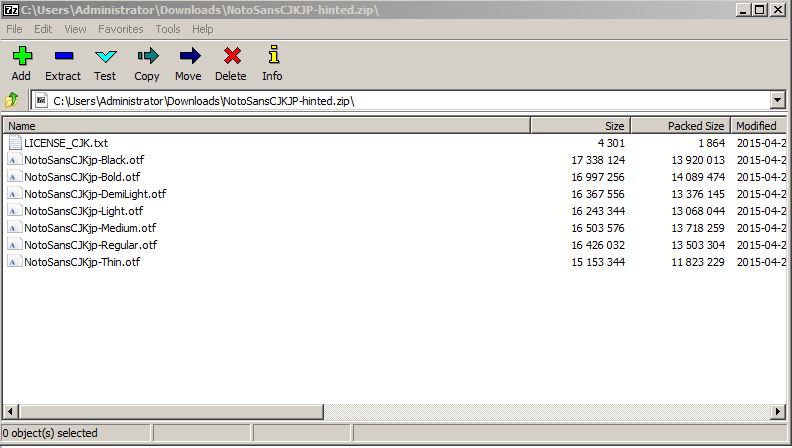
How do I install it into the computer so that it becomes one collection like the .ttc file?
Reply all
Reply to author
Forward
0 new messages