
How to add div elements on every button click in angular2
7,883 views
Skip to first unread message

Alekhya Pulavarthi
Jun 13, 2018, 1:20:34 PM6/13/18
to Angular and AngularJS discussion
I have a tier div which contains number of elements like drop-down textbox . when I click on add tier this div needs to create again and again on every button click as well as the name should be changed to tier1 tier2 tier3
Please let me know in angular2
Please let me know in angular2

khushbu poddar
Jun 15, 2018, 2:39:54 AM6/15/18
to ang...@googlegroups.com
Hello,
You can create array of tier where each element of array represents one tier and stores values of drop-down and other elements of that particular tier. So when you click on button to add one more tier to existing, you can add new element of tier and add it in list.
For Example,
In html code,
<button (click)="addTier()">Add Tier</button>
<button (click)="addTier()">Add Tier</button>
<div *ngFor="let tier of tiers">
<input [(ngModel)]="tier.title" name="title">
<!-- your elements-->
</div>
In ts code,
tiers: TierProto[] = [];
addTier(){
<input [(ngModel)]="tier.title" name="title">
<!-- your elements-->
</div>
In ts code,
tiers: TierProto[] = [];
addTier(){
this.tiers.push(new TierProto());
}
Model of TierProto,
class TierProto{
Model of TierProto,
class TierProto{
title: string;
}
On Wed, Jun 13, 2018 at 10:50 PM Alekhya Pulavarthi <lakshmia...@gmail.com> wrote:
I have a tier div which contains number of elements like drop-down textbox . when I click on add tier this div needs to create again and again on every button click as well as the name should be changed to tier1 tier2 tier3
Please let me know in angular2
--
You received this message because you are subscribed to the Google Groups "Angular and AngularJS discussion" group.
To unsubscribe from this group and stop receiving emails from it, send an email to angular+u...@googlegroups.com.
To post to this group, send email to ang...@googlegroups.com.
Visit this group at https://groups.google.com/group/angular.
For more options, visit https://groups.google.com/d/optout.
Alekhya Pulavarthi
Jun 17, 2018, 4:35:20 AM6/17/18
to ang...@googlegroups.com
Thank you so much for your response.
I am able to get the div for every button click but how can the model name will be created dynamically using this.
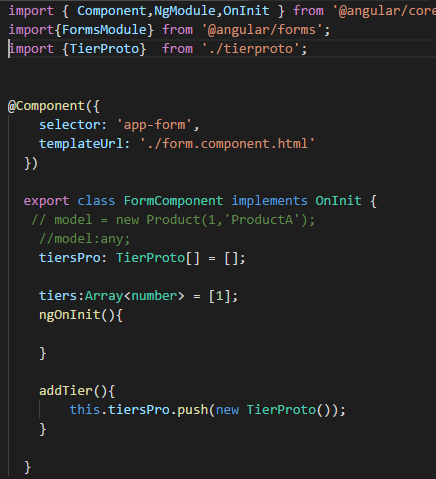


On Fri, Jun 15, 2018, 12:09 PM khushbu poddar <poddark...@gmail.com> wrote:
Hello,You can create array of tier where each element of array represents one tier and stores values of drop-down and other elements of that particular tier. So when you click on button to add one more tier to existing, you can add new element of tier and add it in list.For Example,In html code,
<button (click)="addTier()">Add Tier</button><div *ngFor="let tier of tiers">
<input [(ngModel)]="tier.title" name="title">
<!-- your elements-->
</div>
In ts code,
tiers: TierProto[] = [];
addTier(){this.tiers.push(new TierProto());}
Model of TierProto,
class TierProto{title: string;}
On Wed, Jun 13, 2018 at 10:50 PM Alekhya Pulavarthi <lakshmia...@gmail.com> wrote:
I have a tier div which contains number of elements like drop-down textbox . when I click on add tier this div needs to create again and again on every button click as well as the name should be changed to tier1 tier2 tier3
Please let me know in angular2
--
You received this message because you are subscribed to the Google Groups "Angular and AngularJS discussion" group.
To unsubscribe from this group and stop receiving emails from it, send an email to angular+unsubscribe@googlegroups.com.
To post to this group, send email to ang...@googlegroups.com.
Visit this group at https://groups.google.com/group/angular.
For more options, visit https://groups.google.com/d/optout.
--
You received this message because you are subscribed to the Google Groups "Angular and AngularJS discussion" group.
To unsubscribe from this group and stop receiving emails from it, send an email to angular+unsubscribe@googlegroups.com.
khushbu poddar
Jun 19, 2018, 2:45:57 AM6/19/18
to ang...@googlegroups.com
Hello,
For two way bindings on input control, you have to use tier variable from your ngFor. You need to replace model by tier so that whenever you input any value in that input it will be directly stored in your array as it two way binding is done there
You can do something like this,
<div *ngFor="let tier of tiers; let index=index">
<input [(ngModel)]="tier.title" name="name{{index}}" id="productId{{index}}">
<!-- your elements-->
</div>
And if you want to set product name by default on adding new tier then you can do something like this,
addTier(){
You can do something like this,
<div *ngFor="let tier of tiers; let index=index">
<input [(ngModel)]="tier.title" name="name{{index}}" id="productId{{index}}">
<!-- your elements-->
</div>
And if you want to set product name by default on adding new tier then you can do something like this,
addTier(){
let temp = new TierProto();
temp.productname = 'Product'+(tiersProto.length+1);
tiersProto.push(temp);
}


To unsubscribe from this group and stop receiving emails from it, send an email to angular+u...@googlegroups.com.
To post to this group, send email to ang...@googlegroups.com.
Visit this group at https://groups.google.com/group/angular.
For more options, visit https://groups.google.com/d/optout.
--
You received this message because you are subscribed to the Google Groups "Angular and AngularJS discussion" group.
To unsubscribe from this group and stop receiving emails from it, send an email to angular+u...@googlegroups.com.
To post to this group, send email to ang...@googlegroups.com.
Visit this group at https://groups.google.com/group/angular.
For more options, visit https://groups.google.com/d/optout.
--
You received this message because you are subscribed to the Google Groups "Angular and AngularJS discussion" group.
To unsubscribe from this group and stop receiving emails from it, send an email to angular+u...@googlegroups.com.
Alekhya Pulavarthi
Jul 1, 2018, 5:27:47 AM7/1/18
to ang...@googlegroups.com
Thank you
For every product I'd I have delete button
How can i remove that particular product I'd div
Alekhya
khushbu poddar
Jul 2, 2018, 1:57:23 AM7/2/18
to ang...@googlegroups.com
Alekhya Pulavarthi
Jul 3, 2018, 10:18:39 PM7/3/18
to Angular and AngularJS discussion
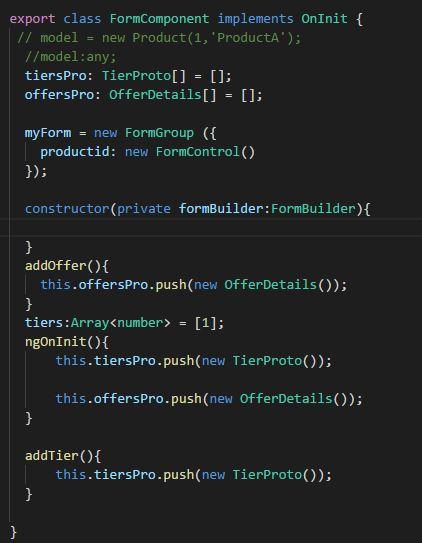
I have two add functionalities one is addoffer and addtier whenever i click on addtier productid,name and offerDetails input and button should be displayed every time
if i click on addtier 2 times two times productid,name,offerdetails and add offer button is getting displayed.But when i click on addoffer() offerDetails input boxx is reflecting in
both 1st and 2nd place i need to get the offerdetails button where i have click the addoffer button rest should not be changed

khushbu poddar
Jul 4, 2018, 2:52:17 AM7/4/18
to ang...@googlegroups.com
Hello,
I am not getting what exactly you wan to do. Can you explain again?
Alekhya Pulavarthi
Jul 4, 2018, 1:22:28 PM7/4/18
to ang...@googlegroups.com
Offer div
Offer details text box
Offer summary text box
And add tier button
When I click on add tier tier div will append to offer div
Tier value txt box
Tier drop-down
At the end add offer button
I click on
Add offer
offer div with tier button will come every time. my issue is when I click on add tier for second offer div ,tier div is appending for second offer div as well as first offer div
Alekhya
Reply all
Reply to author
Forward
0 new messages