
Android-x86 4.4-RC2 released

Chih-Wei Huang
http://www.android-x86.org/releases/releasenote-4-4-rc2
I encourage all users of previous version
upgrade to this version.
--
Chih-Wei
Android-x86 project
http://www.android-x86.org

Vaidotas

Sai Zhou
Thanks

riko andi
Tested on Lenovo ideapad z400 touch
- touchscreen not work

mike r
https://groups.google.com/forum/m/#!topic/android-x86/e79dAuB2ra4
Mike
Sai Zhou

Markus K
System specs: MSI Windpad 110W-232G, AMD Brazos Z01, crutial m4 120GB SSD, 8GB of RAM
Great project by the way!
mike r

Manuel
mike r
MIKE
mike r
Mike

scu...@gmail.com
mike r
Great Job!
Mike

monstercameron

Richard Savijn
Op dinsdag 20 mei 2014 17:45:59 UTC+2 schreef Chih-Wei Huang:

Mr le V
I downloaded the sources and built this version (I did not use the prebuilt .iso). No issue with block_imgsize (as expected)
The hybrid .iso file worked as expected, I could install 4.4 RC2 on a previously formatted ext4 partition on some USB HDD I had (40GB).
I used GRUB2 as the bootloader, works OK.
It seems that the "sdcard" partition is not available as a FAT32 partition on the USB storage (which I like in order to be able to transfer files simply this way), I may change that tomorrow (I did it with the previous version).
I wanted a "pure x86 experience", so I disabled libhoudini (renaming the files, including enable_houdini) and made changes to the build.prop files in order to be "x86" only. There maybe a cleaner way to do it but it worked.
I installed gapps "manually". I could then download a bunch of apps (x86 only, that was my goal), including Facebook (which x86 version is still the old one, compared to the ARM version). I could make sure and verify that most of the "essentials" apps work: email apps (K9 mail in my case), hangout, Facebook, Google+, KingSoft office, avast antivirus, YouTube (with a not-so-good video rendering), maps etc. Games are not my primary concerns, but I tried Angry Birds, Angry Birds Space. Candy Crush Saga is not available as an x86 app (yet).
I'll make further test tomorrow (so far I just tested on an HP elite 8000 SFF, all Intel based).
Chih-Wei Huang
> Great achievement
>
> I downloaded the sources and built this version (I did not use the prebuilt .iso). No issue with block_imgsize (as expected)
>
> The hybrid .iso file worked as expected, I could install 4.4 RC2 on a previously formatted ext4 partition on some USB HDD I had (40GB).
> I used GRUB2 as the bootloader, works OK.
>
> It seems that the "sdcard" partition is not available as a FAT32 partition on the USB storage (which I like in order to be able to transfer files simply this way), I may change that tomorrow (I did it with the previous version).
Sdcard/usb should be mounted to /storage/usbX.
> I wanted a "pure x86 experience", so I disabled libhoudini (renaming the files, including enable_houdini) and made changes to the build.prop files in order to be "x86" only. There maybe a cleaner way to do it but it worked.
>

Tom Koeppel

Bnjmn
Vivi
2014-05-22 8:32 GMT+08:00 Mr le V <m...@vivigatt.com>:Great achievement I downloaded the sources and built this version (I did not use the prebuilt .iso). No issue with block_imgsize (as expected) The hybrid .iso file worked as expected, I could install 4.4 RC2 on a previously formatted ext4 partition on some USB HDD I had (40GB). I used GRUB2 as the bootloader, works OK. It seems that the "sdcard" partition is not available as a FAT32 partition on the USB storage (which I like in order to be able to transfer files simply this way), I may change that tomorrow (I did it with the previous version).Not sure what you meant. Sdcard/usb should be mounted to /storage/usbX.
What I want is a separate "SDCARD" FAT32 partition on the USB device that would get mounted as /sdcard (actually /mnt/emulated/shell). I'll modify some init script to do so, and, if I have the time, I'll propose a modification to the init script that would scan available partitions on the system HDD and if a partition is FAT32 AND labelled AX86_SDCARD (or whatever is OK) it would use it as its /sdcard...
BTW, I was never able (with 4.4 RC1 or 4.4 RC2) to create a directory in /mnt, it is a "read-only file system" and I can't remount it "rw". Is there a trick to solve that?
I wanted a "pure x86 experience", so I disabled libhoudini (renaming the files, including enable_houdini) and made changes to the build.prop files in order to be "x86" only. There maybe a cleaner way to do it but it worked.Just remove (rename) vendor/intel/houdini/houdini.mk.
I'll do it for my next build.

Francesco Diaz

Somebody
Somebody
- The installer can't format ext3 filesystem.
On Tuesday, May 20, 2014 11:45:59 AM UTC-4, Chih-Wei Huang wrote:
scu...@gmail.com
On Tuesday, May 20, 2014 11:45:59 PM UTC+8, Chih-Wei Huang wrote:
scu...@gmail.com
Bnjmn
mike r
Mike
Mike Ross
Mike
Sent with AquaMail for Android
http://www.aqua-mail.com
On May 22, 2014 2:18:10 PM Bnjmn <bnj...@gmail.com> wrote:
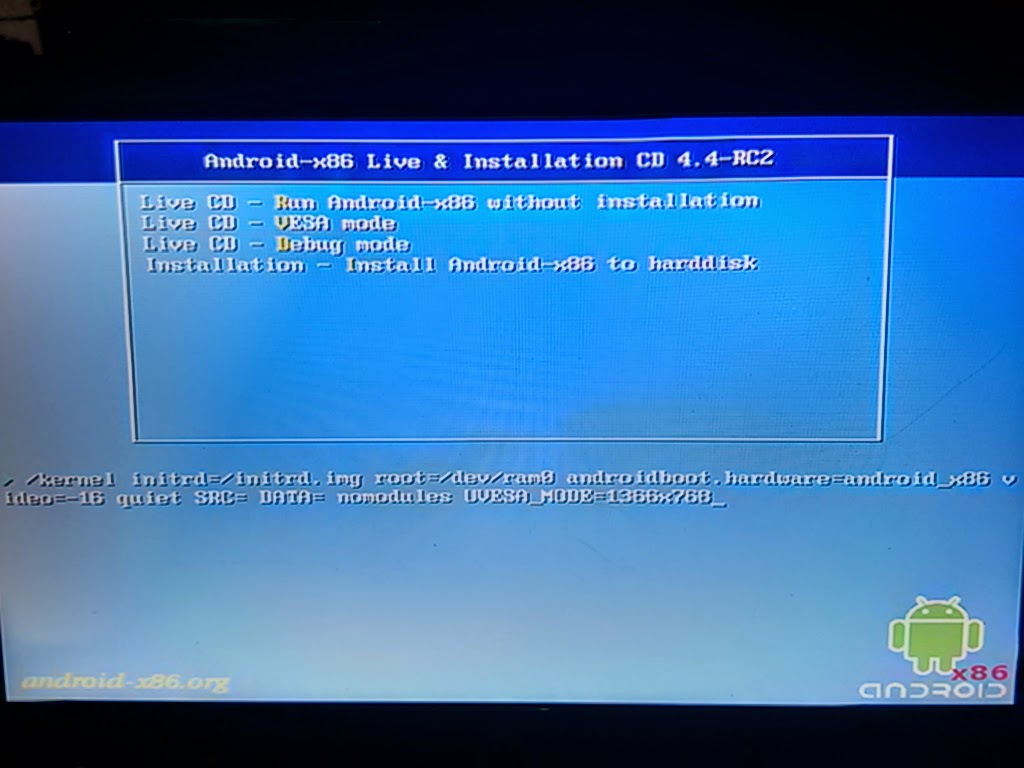
> Intel GM45 graphics prevents installation. Workround is UVESA_MODE=
> You received this message because you are subscribed to the Google Groups
> "Android-x86" group.
> To unsubscribe from this group and stop receiving emails from it, send an
> email to android-x86...@googlegroups.com.
> To post to this group, send email to andro...@googlegroups.com.
> Visit this group at http://groups.google.com/group/android-x86.
> For more options, visit https://groups.google.com/d/optout.
Chih-Wei Huang
> BTW, I was never able (with 4.4 RC1 or 4.4 RC2) to create a directory in
> /mnt, it is a "read-only file system" and I can't remount it "rw". Is there
> a trick to solve that?
Chih-Wei Huang
> A lot of the AMD hardware is helped significantly by bumping mesa version
> from 9.2 to 10.1. RC2 has 9.2, unfortunately.
I won't introduce such a significant change
in the current stable stage.
It will be addressed in next development cycle.
(including new kernel & mesa)

Hideaki Tominaga
- [OK]: Display
- [OK]: Memory 1.5GB (HIGHMEM)
- [OK]: Keyboard / Touch Pad
- [OK]: Wifi / LAN
- [OK]: USB (USB Mouse / USB Flash Drive)
- [OK]: Sound / Microphone
- [OK]: SD Card reader / Multimedia Card reader
- [OK]: Bluetooth dongle (PLANEX BT-MicroEDR2X)
- [NG]: Built-in camera does not work.
- [NG]: Doesn't take a screenshot. ("Couldn't save screenshoot. Storage may be in use.")

job
Somebody
Bnjmn

Massimo Belgrano
Il giorno martedì 20 maggio 2014 17:45:59 UTC+2, Chih-Wei Huang ha scritto:
The 4.4-RC2 is released.
http://www.android-x86.org/releases/releasenote-4-4-rc2
I encourage all users of previous version
upgrade to this version.

sulton maulana fathuddin

Christopher attwood-thomas
Hi is there any way of this being altered to include the touch support from intel for android for my dell xps12 ?

Robert Kavaler

Andy S
Overall performance is great, main issue is no cpu frequency scaling, so cpu cores stuck on 1000000 (higer frequencies are listed as available but cannot change config)
Likely related to another issue preventing install of some apps (unknown -24 issue, Google suggests removing the relevant /data/data/appname/ folder, but not poss to even tho mounted rw...
Also get storage/system partition ID num mismatch warning at start, also likely related.
Installed on Ext3 partition on hard drive previously formatted.
Think I feel a re-format and fresh install coming on!
mike r
Mike
Andy S
Lack of CPU frequency scaling issue remains, various kernel tune/tweak apps report the available frequencies but reversed on the adjustment scale.
Looking in /sys/devices/system/cpu/cpu0/cpufreq/bios_limit it is set to 1000000, but other files in these directories repot the true limit of 1660000, so not sure why the system isn't using the available frequency scales..
Bnjmn
Apart from install not running until adding nomodules UVESA_MODE=1280x800 to kernel command, the Gallery, wallpaper, save screenshot all crash. Google Maps shows nothing (black/blank)
log report
Bnjmn
Robert Kavaler
Hideaki Tominaga
- [NG]: Built-in camera does not work.
- [OK]: Built-in camera (Taking snapshot doesn't work well)
Chih-Wei Huang
> Then it will never be stable, because android simply does not work on 9.2.
'Stable' doesn't mean it has no bug.
It just means the code should be frozen
to avoid introducing additional bugs.
Only bugfixes are acceptable.
If you want newer mesa, just work on it and make it stable.
Make sure it doesn't have any regression to the current
supported devices.
Then send me the pull request of your branch.
I'm happy to merge it in the next development cycle.
Manuel
Somebody

Daniel Barrett
1) can someone tell me what keylayout and keychars file are used in RC 2... im trying to add some buttons to the config to turn on and off the onscreen keyboard and rotate the screen by a button
2) Im looking for a list of all the flags that i can use to assign functions to buttons
thanks for your help in advance

fuzzy7k
On Tuesday, May 27, 2014 3:55:52 PM UTC-4, Daniel Barrett wrote:
hi i have 2 questions:
1) can someone tell me what keylayout and keychars file are used in RC 2... im trying to add some buttons to the config to turn on and off the onscreen keyboard and rotate the screen by a button
Unless it's changed, the file name is specified in logcat. Search for eventhub or keylayout (i.e. logcat -d | grep -i keylayout). The location of the files is /system/usr/keylayout/. However, there is no function key to rotate the screen. So far, this has been something that is designed only for a sensor to control. This may change if tabletPC's start shipping without those sensors. Although they're somewhat necessary on a phone that doesn't have buttons, it's been my experience that they just cause aggravation, but that's just me ranting.
To get around this, CW created a fake sensor that polls the keyboard and scans for a rotate key. You can use the build.prop to configure it, but documentation is hard to find. It might have been explained in a couple posts a while back. Look for hal.sensors & hal.sensors.kbd.type & hal.sensors.kbd.keys.
2) Im looking for a list of all the flags that i can use to assign functions to buttons
Is this what you are looking for?
From the source tree: frameworks/base/core/java/android/view/KeyEvent.java

john garrett
On Tuesday, May 20, 2014 10:45:59 AM UTC-5, Chih-Wei Huang wrote:
The 4.4-RC2 is released.
http://www.android-x86.org/releases/releasenote-4-4-rc2
I encourage all users of previous version
upgrade to this version.

evaristo gonzález balbuena
Daniel Barrett

Tetsuya Hinomura
Issues I have:
- Display/Apps/Launcher often goes black and restart(Any running(or background) apps closed without notice) == Never encountered this in 4.4 RC1
- Some apps from previous version crashed for the first time run(after upgrading) = Run well after the crash (not much annoying)
- Some apps is unresponsive - showing blackscreen/not clickable/Crashed; ex. Chaos Drive shows blackscreen, some apps like Kaizin Rumble/Epic Cards Battle/Devil Maker Tokyo(both not clickable and crashed after loading)... are not clickable(using assistive zoom gave out touch respond), Million Arthur SEA crashed after loading to black screen(they said Million Arthur checking baseband and valid license for Android device - any non-Android device can not run) - meanwhile Million Arthur from Japan runs pretty well, Valkyrie Crusade crashed frequently when internet connection is laggy/slow or interrupted. (*)
- If anyone notices, using ethernet(connecting cable to computer) will disable WiFi after a while(wireless card not showing after using netcfg) (*)
- The clock on Android x86 always keeps up-to-date to local clock(matched timezone), but after shutting down and rebooting into windows 8.1, the clock in Windows 8.1 is mismatched the local clock(still matched timezone) - (minus)7hours different,sometimes is the hours of the time Windows shutdown...Have to manual sync clock to server...clock again goes wrong after booting into Android x86. (*)
- Connecting HDMI - No sound on display(have to using command line to enable sound on display) - Only have native resolution and some basic resolutions of built-in display when using vga=ask (not showing external display resolutions) (*)
Those issues with (*) is encountered in previous versions.
---
I hope in the next release you could cloaking Android x86 a valid license and ID of an Android device(using ARM) so it could bypass the checking phase of apps(like Million Arthur SEA)
---
I will find and report more issues and bugs to you.
Thanks for your great work.
evaristo gonzález balbuena
Thank you very much and thanks for the great work.

Riccardo Pisanu
evaristo gonzález balbuena
mike r
I think I might have found the root cause of the problem with the Intel Corporation WiFi Link 5100, On a Dell Laptop 1750, I'm going to present this in the order i did it...
Googling around in Android X86 4.4.2 RC2, I found This Command (This Was for linux, but worked)
Wi-Fi State was on at the time:
root@x86:/ # dmesg | grep -e ipw -e wlan0
<6>[ 48.494513] IPv6: ADDRCONF(NETDEV_UP): wlan0: link is not ready
<6>[ 51.958692] wlan0: authenticate with 98:0c:82:44:46:c2
<6>[ 51.962519] wlan0: send auth to 98:0c:82:44:46:c2 (try 1/3)
<6>[ 51.965346] wlan0: authenticated
<6>[ 51.970051] wlan0: associate with 98:0c:82:44:46:c2 (try 1/3)
<6>[ 51.973497] wlan0: RX AssocResp from 98:0c:82:44:46:c2 (capab=0x411 status=0 aid=1)
<6>[ 51.976309] wlan0: associated
<6>[ 51.976341] IPv6: ADDRCONF(NETDEV_CHANGE): wlan0: link becomes ready
So at this point I got to wondering about the FN-F2 Toggle for the Wi-Fi so I Did the key Combo and the Wi-Fi SHUT-OFF!!!! This Surprised me, Went to do it again, and it wouldn't turn back on!!!!\
So I Did The Above Command Again While Wi-Fi Was Off:
127|root@x86:/ # dmesg | grep -e ipw -e wlan0
<6>[ 48.494513] IPv6: ADDRCONF(NETDEV_UP): wlan0: link is not ready
<6>[ 51.958692] wlan0: authenticate with 98:0c:82:44:46:c2
<6>[ 51.962519] wlan0: send auth to 98:0c:82:44:46:c2 (try 1/3)
<6>[ 51.965346] wlan0: authenticated
<6>[ 51.970051] wlan0: associate with 98:0c:82:44:46:c2 (try 1/3)
<6>[ 51.973497] wlan0: RX AssocResp from 98:0c:82:44:46:c2 (capab=0x411 status=0 aid=1)
<6>[ 51.976309] wlan0: associated
<6>[ 51.976341] IPv6: ADDRCONF(NETDEV_CHANGE): wlan0: link becomes ready
<6>[ 1197.351419] wlan0: deauthenticating from 98:0c:82:44:46:c2 by local choice (reason=3)
<6>[ 1197.351472] wlan0: HW problem - can not stop rx aggregation for 98:0c:82:44:46:c2 tid 0
<3>[ 1197.351554] wlan0: failed to remove key (0, 98:0c:82:44:46:c2) from hardware (-5)
<3>[ 1197.351674] wlan0: failed to remove key (1, ff:ff:ff:ff:ff:ff) from hardware (-5)
<3>[ 1197.351692] wlan0: failed to remove key (2, ff:ff:ff:ff:ff:ff) from hardware (-5)
Now this got me thinking, Could it Simply be That The "ON" Switch is not correctly configured???
If looked into RFKILL, And am Totally lost, RFKILL returns Not Found, I've Come across a bunch of scripts, and have even hacked into initrd.img and ramdisk.img but really don't knbow nothing about Inserting these things in,,,,
Here is what I've found and maybe you can direct me on how to implement this:
This I Believe was from a Git
rfkill - RF switch subsystem support
====================================
1 Implementation details
2 Driver support
3 Userspace support
===============================================================================
1: Implementation details
The rfkill switch subsystem offers support for keys often found on laptops
to enable wireless devices like WiFi and Bluetooth.
This is done by providing the user 3 possibilities:
1 - The rfkill system handles all events; userspace is not aware of events.
2 - The rfkill system handles all events; userspace is informed about the events.
3 - The rfkill system does not handle events; userspace handles all events.
The buttons to enable and disable the wireless radios are important in
situations where the user is for example using his laptop on a location where
wireless radios _must_ be disabled (e.g. airplanes).
Because of this requirement, userspace support for the keys should not be
made mandatory. Because userspace might want to perform some additional smarter
tasks when the key is pressed, rfkill still provides userspace the possibility
to take over the task to handle the key events.
The system inside the kernel has been split into 2 separate sections:
1 - RFKILL
2 - RFKILL_INPUT
The first option enables rfkill support and will make sure userspace will
be notified of any events through the input device. It also creates several
sysfs entries which can be used by userspace. See section "Userspace support".
The second option provides an rfkill input handler. This handler will
listen to all rfkill key events and will toggle the radio accordingly.
With this option enabled userspace could either do nothing or simply
perform monitoring tasks.
====================================
2: Driver support
To build a driver with rfkill subsystem support, the driver should
depend on the Kconfig symbol RFKILL; it should _not_ depend on
RKFILL_INPUT.
Unless key events trigger an interrupt to which the driver listens, polling
will be required to determine the key state changes. For this the input
layer providers the input-polldev handler.
A driver should implement a few steps to correctly make use of the
rfkill subsystem. First for non-polling drivers:
- rfkill_allocate()
- input_allocate_device()
- rfkill_register()
- input_register_device()
For polling drivers:
- rfkill_allocate()
- input_allocate_polled_device()
- rfkill_register()
- input_register_polled_device()
When a key event has been detected, the correct event should be
sent over the input device which has been registered by the driver.
====================================
3: Userspace support
For each key an input device will be created which will send out the correct
key event when the rfkill key has been pressed.
The following sysfs entries will be created:
name: Name assigned by driver to this key (interface or driver name).
type: Name of the key type ("wlan", "bluetooth", etc).
state: Current state of the key. 1: On, 0: Off.
claim: 1: Userspace handles events, 0: Kernel handles events
Both the "state" and "claim" entries are also writable. For the "state" entry
this means that when 1 or 0 is written all radios, not yet in the requested
state, will be will be toggled accordingly.
For the "claim" entry writing 1 to it means that the kernel no longer handles
key events even though RFKILL_INPUT input was enabled. When "claim" has been
set to 0, userspace should make sure that it listens for the input events or
check the sysfs "state" entry regularly to correctly perform the required
tasks when the rkfill key is pressed.
This From a Linux Board:
Thanks for your answer! acpid is not installed on my system and to be honest, I don't want to install another service just for this single hotkey. But I will take that method into consideration, if I can't find anything else.
Using...
echo 1 > /sys/devices/platform/thinkpad_acpi/bluetooth_enable
...I'm still missing the sufficient permissions.
There MUST be a way to toggle bluetooth without root permissions and _without_ using acpid, since bluetooth-applet can do this without root permissions and without acpid?!
This is, how bluetooth-applet manages the Bluetooth-Killswitch: http://pastebin.com/3U4VKLtY
This inspired me to install "rfkill". And now
I finally found a solution!
#!/bin/bash
BT_RFKILL=$(rfkill list | grep tpacpi_bluetooth_sw | sed 's/\([0-9]\+\):.*/\1/')
BT_STATE=$(/sbin/rfkill list $BT_RFKILL | grep "Soft blocked: yes")
if [ "x" == "x$BT_STATE" ]; then
/sbin/rfkill block $BT_RFKILL
else
/sbin/rfkill unblock $BT_RFKILL
fi
exit 0
--------------------------------------------------------------------------------
David Batson31st December 2011, 03:48 PM
Using your rfkill script, I was able to toggle bluetooth as well.
As root, I created the file /etc/acpi/actions/bluetooth.sh with the contents of your rfkill script. I then made the file executable from Nautilus as root by changing permissions.
Next I ran acpi_listen in terminal to see what Fn+F9 showed. I was getting button/f24 F24 00000080 00000000. I then created the file /etc/acpi/events/bluetoothconf as root with the following contents:
event=button/f24.*
action=/etc/acpi/actions/bluetooth.sh
Finally I ran #acpid restart. Now my hotkey combo toggles the bluetooth radio on and off. :)
An alternative for some might be to create a custom keyboard shortcut in System Settings > Keyboard > Shortcuts > Custom Shortcuts, however this was not working for me with the Fn+F9 shortcut.
EDIT: After reboot I got some SELinux alerts. Had to run audit2allow 3 times (IIRC) to get SELinux to allow the rfkill script to run.
--------------------------------------------------------------------------------
vBulletin® v3.8.7, Copyright ©2000-2014, vBulletin Solutions, Inc.
And this Is the File I dob't Know what do do with, but i think needs to be in intitrc:
/* vi: set sw=4 ts=4: */
/*
* rfkill implementation for busybox
*
* Copyright (C) 2010 Malek Degachi <malek-...@laposte.net>
*
* Licensed under GPLv2 or later, see file LICENSE in this source tree.
*/
//config:config RFKILL
//config: bool "rfkill"
//config: default n # doesn't build on Ubuntu 9.04
//config: select PLATFORM_LINUX
//config: help
//config: Enable/disable wireless devices.
//config:
//config: rfkill list : list all wireless devices
//config: rfkill list bluetooth : list all bluetooth devices
//config: rfkill list 1 : list device corresponding to the given index
//config: rfkill block|unblock wlan : block/unblock all wlan(wifi) devices
//config:
//applet:IF_RFKILL(APPLET(rfkill, BB_DIR_USR_SBIN, BB_SUID_DROP))
//kbuild:lib-$(CONFIG_RFKILL) += rfkill.o
//usage:#define rfkill_trivial_usage
//usage: "COMMAND [INDEX|TYPE]"
//usage:#define rfkill_full_usage "\n\n"
//usage: "Enable/disable wireless devices\n"
//usage: "\nCommands:"
//usage: "\n list [INDEX|TYPE] List current state"
//usage: "\n block INDEX|TYPE Disable device"
//usage: "\n unblock INDEX|TYPE Enable device"
//usage: "\n"
//usage: "\n TYPE: all, wlan(wifi), bluetooth, uwb(ultrawideband),"
//usage: "\n wimax, wwan, gps, fm"
#include "libbb.h"
#include <linux/rfkill.h>
enum {
OPT_b = (1 << 0), /* must be = 1 */
OPT_u = (1 << 1),
OPT_l = (1 << 2),
};
int rfkill_main(int argc, char **argv) MAIN_EXTERNALLY_VISIBLE;
int rfkill_main(int argc UNUSED_PARAM, char **argv)
{
struct rfkill_event event;
const char *rf_name;
int rf_fd;
int mode;
int rf_type;
int rf_idx;
unsigned rf_opt = 0;
argv++;
/* Must have one or two params */
if (!argv[0] || (argv[1] && argv[2]))
bb_show_usage();
mode = O_RDWR | O_NONBLOCK;
rf_name = argv[1];
if (strcmp(argv[0], "list") == 0) {
rf_opt |= OPT_l;
mode = O_RDONLY | O_NONBLOCK;
} else if (strcmp(argv[0], "block") == 0 && rf_name) {
rf_opt |= OPT_b;
} else if (strcmp(argv[0], "unblock") == 0 && rf_name) {
rf_opt |= OPT_u;
} else
bb_show_usage();
rf_type = RFKILL_TYPE_ALL;
rf_idx = -1;
if (rf_name) {
static const char rfkill_types[] ALIGN1 = "all\0wlan\0bluetooth\0uwb\0wimax\0wwan\0gps\0fm\0";
if (strcmp(rf_name, "wifi") == 0)
rf_name = "wlan";
if (strcmp(rf_name, "ultrawideband") == 0)
rf_name = "uwb";
rf_type = index_in_strings(rfkill_types, rf_name);
if (rf_type < 0) {
rf_idx = xatoi_positive(rf_name);
}
}
rf_fd = device_open("/dev/rfkill", mode);
if (rf_fd < 0)
bb_perror_msg_and_die("/dev/rfkill");
if (rf_opt & OPT_l) {
while (full_read(rf_fd, &event, sizeof(event)) == RFKILL_EVENT_SIZE_V1) {
parser_t *parser;
char *tokens[2];
char rf_sysfs[sizeof("/sys/class/rfkill/rfkill%u/uevent") + sizeof(int)*3];
char *name, *type;
if (rf_type && rf_type != event.type && rf_idx < 0) {
continue;
}
if (rf_idx >= 0 && event.idx != rf_idx) {
continue;
}
name = NULL;
type = NULL;
sprintf(rf_sysfs, "/sys/class/rfkill/rfkill%u/uevent", event.idx);
parser = config_open2(rf_sysfs, fopen_for_read);
while (config_read(parser, tokens, 2, 2, "\n=", PARSE_NORMAL)) {
if (strcmp(tokens[0], "RFKILL_NAME") == 0) {
name = xstrdup(tokens[1]);
continue;
}
if (strcmp(tokens[0], "RFKILL_TYPE") == 0) {
type = xstrdup(tokens[1]);
continue;
}
}
config_close(parser);
printf("%u: %s: %s\n", event.idx, name, type);
printf("\tSoft blocked: %s\n", event.soft ? "yes" : "no");
printf("\tHard blocked: %s\n", event.hard ? "yes" : "no");
free(name);
free(type);
}
} else {
memset(&event, 0, sizeof(event));
if (rf_type >= 0) {
event.type = rf_type;
event.op = RFKILL_OP_CHANGE_ALL;
}
if (rf_idx >= 0) {
event.idx = rf_idx;
event.op = RFKILL_OP_CHANGE;
}
/* Note: OPT_b == 1 */
event.soft = (rf_opt & OPT_b);
xwrite(rf_fd, &event, sizeof(event));
}
return EXIT_SUCCESS;
}
Sorry to post this and not ATTACH it but it says it's not allowed....
Any Ideas?? I've OBVIOUSLY Done alot of research to get this far................
Mike
On Tuesday, May 20, 2014 10:45:59 AM UTC-5, Chih-Wei Huang wrote:
mike r
SO Question is How do I flash a the zip on X86? I tried:
root@x86:/storage/emulated/legacy # adb sideload bup.zip
error: closed
ADB Ideas?
Mike
Bnjmn
Massimo Belgrano
installation is ok
then remain halted on "android" logo
using a prev 4.4 version published here i am able to run

Ícaro Albuquerque

steve c

Ralf ranfyy
Am Montag, 9. Juni 2014 07:25:17 UTC+2 schrieb steve c:
Just tried 4.4-RC2 but the disc won't boot. I get a message saying "No Default or Configuration Directive Found" and it won't go any farther. I have no idea what that means but the older ver. 4.3 runs OK. Anyone know what's wrong with the new version?
steve c
Bnjmn
mike r
Mike
Ralf ranfyy

rizq auliansyah

Wurt Lain
steve c
RC2 again and found the download site hadn't sent the complete file.
Re-downloaded it to get the entire file and it installed OK. BTW,
wifi works fine on my Dell D630 using Intel wifi adapter card so if
your wifi isn't working then try a different one.
On Mon, Jun 16, 2014 at 12:28 PM, Wurt Lain <wu...@tlen.pl> wrote:
> Tested on Lenovo ThinkPad T400 - work's fine 1 problem with graphic card but
> resolved (working in full resolution)
>
> You received this message because you are subscribed to a topic in the
> Google Groups "Android-x86" group.
> To unsubscribe from this topic, visit
> https://groups.google.com/d/topic/android-x86/x-HLcuFNTXA/unsubscribe.
> To unsubscribe from this group and all its topics, send an email to
> android-x86...@googlegroups.com.
> To post to this group, send email to andro...@googlegroups.com.
> Visit this group at http://groups.google.com/group/android-x86.
> For more options, visit https://groups.google.com/d/optout.

Julian Alvarez
I have a Surface pro 2 & androidx86 works very fast and fluency but I have 2 "big" problems:
- Orientation not work on Surface pro 2, but with the version 4.2.2 Android-ia from rerede works perfect.
- WiFi dongle Realtek Cus 8188 not work but it have driver for Android. I atach the link.
In next release It would be posible to add the orientation driver from Android-ia to androidx86?
Thnks a lot

Insane Destiny
On Saturday, May 31, 2014 11:59:13 PM UTC-5, Tetsuya Hinomura wrote:
Upgraded to 4.4 RC2 from 4.4RC1 on Acer Aspire E1-571 (no touchscreen - using mouse)
Issues I have:
- The clock on Android x86 always keeps up-to-date to local clock(matched timezone), but after shutting down and rebooting into windows 8.1, the clock in Windows 8.1 is mismatched the local clock(still matched timezone) - (minus)7hours different,sometimes is the hours of the time Windows shutdown...Have to manual sync clock to server...clock again goes wrong after booting into Android x86. (*)
Vivi
Windows assumes the internal clock is local time when most other OSes assume that the local clock is UTC.
If one OS sets the clock automatically, the other one gets a "wrong" internal clock (unless you live in the UK and daylight savings are not in place).
One solution is to make sure that both OSes synchronize with some NTP client when they boot up.
Windows has some ntp client (embedded in its "Internet time" feature) and you can use ClockSync on Android x86.
Use this ntp server:
pool.ntp.org
It should work reliably
--
You received this message because you are subscribed to the Google Groups "Android-x86" group.
To unsubscribe from this group and stop receiving emails from it, send an email to android-x86...@googlegroups.com.
mike r
Mike

Mario Ray Mahardhika
Bnjmn
Look at my earlier post here for a possible fix
Bnjmn
> Your display driver is an issue.
nomodules UVESA_MODE=1280x800 to kernel command
Bnjmn
Mario Ray Mahardhika
Here's what I get next:

Bnjmn
> Like that?
>
>
>
> Here's what I get next:
>
Mario Ray Mahardhika
Bnjmn
Mario Ray Mahardhika
> On Sunday, 22 June 2014 16:39:37 UTC+1, Mario Ray Mahardhika wrote:
> > That's the problem: it has no use if it's ignored. On the next page, I'll
> > have a wifi setup which I can skip, and after that google account handler
> > that crashes like those bunch of services in the 2nd screenshot, and it
> > ends. Blank screen with non functional back button.>
> > On Sunday, June 22, 2014 10:32:14 PM UTC+7, Bnjmn wrote:On Sunday, 22 June
2014 16:26:24 UTC+1, Mario Ray Mahardhika wrote:
> > > Like that?
> > >
> > >
> > >
> > >
> > >
> > >
> > >
> > >
> > >
> > > Here's what I get next:
> > >
> > >
> > >
> > > In other words: no difference
> > >
> > > On Sunday, June 22, 2014 9:58:35 PM UTC+7, Bnjmn wrote:On Sunday, 22
June 2014 15:45:12 UTC+1, Mario Ray Mahardhika wrote:
> > > > Trying it again on my optimus laptop, still the same with RC1. Many
> > > > services crashes on first boot and I end up with empty screen with
> > > > non functional back button. But now, I get the logcat to help you
> > > > analyze the
> > > > problem: https://dl.dropboxusercontent.com/u/22124591/Docs/android-x8
> > > > 6.kitkatrc2.logcat
> > > >
> > > >
> > > >
> > > >
> > > >
> > > >
> > > >
> > > > On Tuesday, May 20, 2014 10:45:59 PM UTC+7, Chih-Wei Huang wrote:The
> > > > 4.4-RC2 is released.
> > > >
> > > >
> > > >
> > > >
> > > >
> > > >
> > > >
> > > >
> > > >
> > > >
> > > >
> > > >
> > > >
> > > >
> > > >
> > > > http://www.android-x86.org/releases/releasenote-4-4-rc2
> > > >
> > > >
> > > >
> > > >
> > > >
> > > >
> > > >
> > > >
> > > >
> > > >
> > > >
> > > >
> > > >
> > > >
> > > >
> > > > I encourage all users of previous version
> > > >
> > > >
> > > >
> > > >
> > > >
> > > >
> > > >
> > > > upgrade to this version.
> > > >
> > > >
> > > >
> > > >
> > > >
> > > >
> > > >
> > > >
> > > >
> > > >
> > > >
> > > >
> > > >
> > > >
> > > >
> > > >
> > > >
> > > >
> > > >
> > > >
> > > >
> > > >
> > > >
> > > >
> > > >
> > > >
> > > >
> > > >
> > > >
> > > > Android-x86 project
> > > >
> > > >
> > > >
> > > >
> > > >
> > > >
> > > >
> > > > http://www.android-x86.org
> > >
> > > nomodules UVESA_MODE='whatever your display res' is?' to kernel command
> >
> > Looks Okay apart from that! can that be ignored?
>
> Oh! sorry for my misunderstanding....was the partition formatted?
through the live cd.
Bnjmn
Looks like you'll have to comit!!

rbg
mike r
Mike

Barry Drake
description: Motherboard
product: FM2A55M-VG3
vendor: ASRock
*-cpu
description: CPU
product: AMD A8-5600K APU with Radeon(tm) HD Graphics
*-display
description: VGA compatible controller
product: Trinity [Radeon HD 7560D]
vendor: Advanced Micro Devices, Inc. [AMD/ATI]
Ram
4 Gib
When I boot from the new installation, it boots OK, but gives the error 'Setup wizard has stopped'. If I click 'OK' I get nothing but the back button which does nothing. I can get to a terminal, but have no idea what I might try. I have tried all the boot options with no success. I can easily read and/or edit any of the startup sctipts if that will help. I can also retrieve any of the logs and post, but I don't know my way around Android sufficiently well to know what I am looking at. Any suggestions?
Thanks for all your work. Regards,
Barry Drake
description: Motherboard
product: FM2A55M-VG3
vendor: ASRock
product: Trinity [Radeon HD 7560D]
vendor: Advanced Micro Devices, Inc. [AMD/ATI]
product: AMD A8-5600K APU with Radeon(tm) HD Graphics
description: RAM 4GiB
When I boot, it gets into 'X' Ok with a cursor etc. But it fails with the message 'The setup wizard has closed'. If I click the 'OK' button, I am left with nothing but a 'back' button and have to get out by going into a terminal.
I know Linux well, but the Android setup is so different that I have no idea what files I might tweak or what logs might be helpful to post here. Any thoughts please? I'm happy to do some work on this.
Thanks for all your excellent work. Regards, Barry.
Barry Drake
I have installed to an 88 GiB hard drive on my desktop alongside two other drives dual booting Ubuntu 14.04 and 14.10. It is installed to /dev/sdc1 which is formatted ext3. The hardware is as follows:
description: Motherboard
product: FM2A55M-VG3
vendor: ASRock
description: VGA compatible controller
product: Trinity [Radeon HD 7560D]
vendor: Advanced Micro Devices, Inc. [AMD/ATI]
description: CPU
product: AMD A8-5600K APU with Radeon(tm) HD Graphics
vendor: Advanced Micro Devices [AMD]
description: RAM 4GiB
When I boot, it gets into 'X' Ok with a cursor etc. But it fails with the message 'The setup wizard has closed'. If I click the 'OK' button, I am left with nothing but a 'back' button and have to get out by going into a terminal.
Thanks for all your excellent work. Regards, Barry.