[SCRIPT] Auto Root x86 4.3 - Simple method:

10,145 views
Skip to first unread message

Quinny899

unread,
Aug 3, 2013, 6:48:18 AM8/3/13
to andro...@googlegroups.com
More detailed thread over on xda, with download and screenshots:

This is a script to root Android x86 4.3 after installation to the hard disk. It installs all the files needed, botched together from the latest SuperSU version. It needs you to have access to a Linux OS on the same device as Android is installed to, but a live CD/USB of that will work too

Try it and see if it works for you, it does for me

Chih-Wei Huang

unread,
Aug 3, 2013, 11:10:30 AM8/3/13
to Android-x86
Thank you for the script.
But could you provide a simpler solution?
I expect a patch to the source tree
so we can add it in the next release.
Thanks!

Regards,

2013/8/3 Quinny899 <quin...@gmail.com>:
> --
> You received this message because you are subscribed to the Google Groups
> "Android-x86" group.
> To unsubscribe from this group and stop receiving emails from it, send an
> email to android-x86...@googlegroups.com.
> To post to this group, send email to andro...@googlegroups.com.
> Visit this group at http://groups.google.com/group/android-x86.
> For more options, visit https://groups.google.com/groups/opt_out.
>
>


--
Chih-Wei
Android-x86 project
http://www.android-x86.org

Quinny899

unread,
Aug 3, 2013, 11:31:50 AM8/3/13
to andro...@googlegroups.com
I don't do stuff like that usually, but the bulk of the script is the user input for where they installed it to. Just copying the files to your tree and setting the permissions from what the script does should work, it's just the x86 su file many times and a patched init.sh file to add one line before "return 0":
daemonsu --daemon &

That's all it does. I'm also making a script now that runs in the Android x86 alt+f1 command line to install it, should be easier to understand too

Ron M

unread,
Aug 3, 2013, 11:32:01 AM8/3/13
to Android-x86

אחא

Quinny899

unread,
Aug 3, 2013, 12:26:17 PM8/3/13
to andro...@googlegroups.com
Here's version 2:
v2:Included version for Android x86 boot, through the Alt+F1 terminal
Made it a bit simpler

Note: If you want to see how it works, your best place to look is the "install-device.sh" script in the script/ folder

coax

unread,
Aug 3, 2013, 12:52:02 PM8/3/13
to andro...@googlegroups.com
Is there source code for daemonsu?

Quinny899

unread,
Aug 3, 2013, 4:32:27 PM8/3/13
to andro...@googlegroups.com
It's just the same as su but renamed, no idea why, but it works

Greg McGee

unread,
Aug 3, 2013, 11:57:08 PM8/3/13
to andro...@googlegroups.com
...and rootcheck sayeth: ROOTED.

Works peachy on the latest 4.3 iso I have from DCIM.
(Not the tablets-x86 build, the std one)

Greg McGee

unread,
Aug 4, 2013, 1:02:16 AM8/4/13
to andro...@googlegroups.com

So... Before I go and mess it up, we should probably install SuperSU or Superuser so we have some actual protection? (since a root passwd is not happening and it's wide open ATM)

That won't bork it?

--
You received this message because you are subscribed to a topic in the Google Groups "Android-x86" group.
To unsubscribe from this topic, visit https://groups.google.com/d/topic/android-x86/C7Qy0CoIeig/unsubscribe.
To unsubscribe from this group and all its topics, send an email to android-x86...@googlegroups.com.

Greg McGee

unread,
Aug 4, 2013, 1:22:29 AM8/4/13
to andro...@googlegroups.com

Supersu works to allow or deny, but the prompt mode doesn't seem to work.
SuperUser doesn't work at all
(using apks from Play store)

Quinny899

unread,
Aug 4, 2013, 4:23:20 AM8/4/13
to andro...@googlegroups.com
SuperSU is installed by the script and works fine, prompting and everything. No further installations are needed

Joris De Matos Nobre

unread,
Aug 4, 2013, 10:07:42 AM8/4/13
to andro...@googlegroups.com
I have tried to run the script and it does not work. The problem is that the script does not seem to be granted with su permissions.
the first "mount" displayed "permission not allowed".
Of course I tried to run the script from Androidx86 (Alt+F1).

Greg McGee

unread,
Aug 4, 2013, 3:12:16 PM8/4/13
to andro...@googlegroups.com

The installed su has no admin GUI and appears to allow everything by default.
Installing SuperSU from Play after rooting allows me to set it to deny or allow by default, but the prompt mode doesn't seem to work AFAICT.

Am I missing something?

Perhaps I need to start over...

Greg McGee

unread,
Aug 5, 2013, 1:12:43 AM8/5/13
to andro...@googlegroups.com

Did several clean install//root cycles, it works but there is NO gui unless one installs SuperSU, and even then you can only set it grant or off, SuperSU prompts are inop with the 4.3-test release ATM, and simply running the root procedure defaults to "grant". you can de- and re- activate SuperSU via the gui as well. (tried it without SuperSU fom play, tried installing it FIRST, and after rooting, same issues w/prompt)

Message has been deleted

Quinny899

unread,
Aug 5, 2013, 4:40:42 PM8/5/13
to andro...@googlegroups.com
It definitely installs SuperSU to the system:
cp system/app/Superuser.apk /system/app/
That's SuperSU, which is available on reboot

Greg McGee

unread,
Aug 5, 2013, 7:41:12 PM8/5/13
to andro...@googlegroups.com
Odd it didn't show up as an available app on 4.3-test after rooting... But it DID root my system from VT1. (Alt+ F1) using the first android-x86-4.3-test iso. (not the tablets-x86 build)

I can set it to grant or deny by default as well as disable/re-enable su, but only after installing the app from Play, no app shows up to bring up the management GUI.
Message has been deleted

Greg McGee

unread,
Aug 6, 2013, 3:07:11 PM8/6/13
to andro...@googlegroups.com
The root hack installs SuperSU as a system app.

Is this why the GUI/popup notifications are not available to the user?


On Mon, Aug 5, 2013 at 11:02 PM, tabletsx86 <rbg.tab...@gmail.com> wrote:
have installed all this in my build...doesn't work.....?????

does it only work from and installed to disk installation....??? if so how come??/

tried chainfires release in my build also doesn't work????

--
You received this message because you are subscribed to a topic in the Google Groups "Android-x86" group.
To unsubscribe from this topic, visit https://groups.google.com/d/topic/android-x86/C7Qy0CoIeig/unsubscribe.

P-O

unread,
Aug 6, 2013, 5:44:21 PM8/6/13
to andro...@googlegroups.com
Tried to install the script. Failed. Sorry for not being capable to take a screen shot
Is there a problem if the android 4.3 is installed on and booted from a sd-card (sdb1) and not the main hard disk sda?

Fujitsu lifebook T730

P-O

Greg McGee

unread,
Aug 6, 2013, 6:52:51 PM8/6/13
to andro...@googlegroups.com
It must be RW, at least.

You can't trivially do it from the installer as everything is still mounted ro.

You might be able to manually remount things as needed, but it works on RW installed setups, booted from that installed setup, at least with DCIMs 4.3-test iso from last week.

Some folks have reported the tablets-x86 iso would not root, it kept randomly restarting zygote on me.

The other iso works well for me, even sleep mostly works as intended on both my old Thinkpads.
Video playback on youtube is iffy, and the X200Ts sound will not work with headphones.
Most everything seems to work well on the slightly older X300.


Quinny899

unread,
Aug 7, 2013, 12:03:08 PM8/7/13
to andro...@googlegroups.com
A system app is just a user app with more access, nothing more, nothing that SuperSU uses either. It not prompting is not something I've seen before

Also, to reply to all the issues of the root from Android part of the script, it will be hit and miss, I can't do anything about that, it depends on hardware. However, using the root from another OS part should work fine regardless, as mounting a partition in Linux will make it R/W and it will write to it

vicki...@gmail.com

unread,
Aug 17, 2013, 9:02:26 AM8/17/13
to andro...@googlegroups.com
Hi, All I'm installing A4.3 on a PC, (Android x84 4.3 downloaded as on 13-8-2013, CHECKSUM matched SUCCESFULLY)
The installation doesn't *ask to install /system as read-write as it was in A4.2, even trying many times + in VBox too.(is it me only with such exception, or it is actually not in A4.3?)
I tried to root through Live Ubuntu(USB) too, but it failed.

I need to root A4.3 badly, so is there any other way to root, or I'm doing something wrong.

Please Help!

Technical Details:
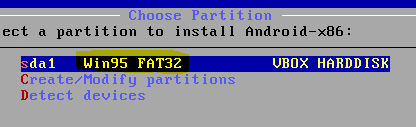
XP installed on sda1(NTFS)
Android x86 4.3 installed on sda1(without read-write), through USB Fash Drive

*Check out the screenshot
Android 4.2 asks for the read-write /system, but not Android 4.3 does not asks

vicki...@gmail.com

unread,
Aug 17, 2013, 9:51:44 AM8/17/13
to andro...@googlegroups.com
In response to my previous post, i.e I am not able to Root Android x86 4.3
Here is a image of what happens when I run the install.sh script in Alt-F1 screen


Chih-Wei Huang

unread,
Aug 17, 2013, 7:46:44 PM8/17/13
to Android-x86

4.3 can't run in NTFS with read-write mode. If you are interesting, try to fix it.

--
You received this message because you are subscribed to the Google Groups "Android-x86" group.
To unsubscribe from this group and stop receiving emails from it, send an email to android-x86...@googlegroups.com.

Steve Jones

unread,
Aug 17, 2013, 9:32:21 PM8/17/13
to andro...@googlegroups.com

Hi folks If this hasn't been solved yet I'd say the correct implementation the take inspiration from is Cyanogenmod, as they do have Superuser embedded into setting directly what ever was required to reach that will have been covered. 
From what I've l;anced at there an extra sudaemon sat in the middle to feal with SELinux and it's labelled filesystem

On Sunday, 18 August 2013 00:46:44 UTC+1, Chih-Wei Huang wrote:

4.3 can't run in NTFS with read-write mode. If you are interesting, try to fix it.

2013/8/18 上午6:36 於 <vicki...@gmail.com> 寫道:
Hi, All I'm installing A4.3 on a PC, (Android x84 4.3 downloaded as on 13-8-2013, CHECKSUMh matched SUCCESFULLY)
The installation doesn't *ask to install /system as read-write as it was in A4.2, even trying many times + in VBox too.(is it me only with such exception, or it is actually not in A4.3?)
I tried to root through Live Ubuntu(USB) too, but it failed.

I need to root A4.3 badly, so is there any other way to root, or I'm doing something wrong.

Please Help!

Technical Details:
XP installed on sda1(NTFS)
Android x86 4.3 installed on sda1(without read-write), through USB Fash Drive

*Check out the screenshot
Android 4.2 asks for the read-write /system, but not Android 4.3 does not asks

vicki...@gmail.com
unread,
Aug 18, 2013, 11:45:37 AM8/18/13
to andro...@googlegroups.com

I tried on FAT32 disk/drive too + in VBox too, but it does't ask for read-write /system

After your Reply,
I landed on this page, and I learned that, its difficult to Rooting Android 4.3, even for the experinced duos.

I will try my best to contribute towards development of Android-x85 project.

vicki...@gmail.com

unread,
Aug 18, 2013, 11:48:25 AM8/18/13
to andro...@googlegroups.com

On Sunday, August 18, 2013 9:15:37 PM UTC+5:30, vicki...@gmail.com wrote:
I landed on this page, and I learned that, its difficult to Rooting Android 4.3, even for the experinced duos.

Chih-Wei Huang

unread,
Aug 18, 2013, 12:02:36 PM8/18/13
to Android-x86
2013/8/18 Steve Jones <trev...@gmail.com>
> Hi folks If this hasn't been solved yet I'd say the correct implementation the take inspiration from is Cyanogenmod, as they do have Superuser embedded into setting directly what ever was required to reach that will have been covered.
> From what I've l;anced at there an extra sudaemon sat in the middle to feal with SELinux and it's labelled filesystem

Yes, indeed I've worked it out.
There are still some issues that
I'm working with the Superuser author.

Steve Jones

unread,
Aug 18, 2013, 2:06:27 PM8/18/13
to andro...@googlegroups.com
Hi Chih-Wei Huang  

You're probably already aware of this in 3.7 and above kernels

Processor type and features - Supervisor Mode Access Prevention
CONFIG_X86_SMAP:                                                                                                                                                                                                                      
                                                                                                                                                                                                                                        
  Supervisor Mode Access Prevention (SMAP) is a security                                                                                                                                                                                
  feature in newer Intel processors.  There is a small                                                                                                                                                                                  
  performance cost if this enabled and turned on; there is                                                                                                                                                                              
  also a small increase in the kernel size if this is enabled.  

Maybe a "gotcha" to look for when everything else is ok.

Thanks 

============
A Couple of off-topics question : Are you accepting patches or pull from github et al?
Is there a less formal way to address you than Chih-Wei Huang? It maybe a programmer thing but I think using the correct name convention is important?

Chih-Wei Huang

unread,
Aug 18, 2013, 10:10:34 PM8/18/13
to Android-x86
2013/8/19 Steve Jones <trev...@gmail.com>:
> Hi Chih-Wei Huang
>
> You're probably already aware of this in 3.7 and above kernels
>
> Processor type and features - Supervisor Mode Access Prevention
> CONFIG_X86_SMAP: > Supervisor Mode Access Prevention (SMAP) is a security > feature in newer Intel processors. There is a small > performance cost if this enabled and turned on; there is > also a small increase in the kernel size if this is enabled.
>
> Maybe a "gotcha" to look for when everything else is ok.

Thank you. I'm not aware of that.
Do you suggest to disable it?


> A Couple of off-topics question : Are you accepting patches or pull from
> github et al?

Sure. Patches are always welcome.
You can send them in either way.

> Is there a less formal way to address you than Chih-Wei Huang? It maybe a
> programmer thing but I think using the correct name convention is important?


fgdn17

unread,
Aug 18, 2013, 10:59:14 PM8/18/13
to andro...@googlegroups.com
isn't that only for x86_64 kernels????

Greg McGee

unread,
Aug 19, 2013, 12:05:20 AM8/19/13
to andro...@googlegroups.com
x86_64 kernel with 32bit (Android) userland is viable//works on 4.3 with no additional work other than running menuconfig to set up the 64 bit kernel.

Just make sure IA32_EMULATION=1 is also set. 


--
You received this message because you are subscribed to a topic in the Google Groups "Android-x86" group.
To unsubscribe from this topic, visit https://groups.google.com/d/topic/android-x86/C7Qy0CoIeig/unsubscribe.
To unsubscribe from this group and all its topics, send an email to android-x86...@googlegroups.com.

dscm

unread,
Aug 28, 2013, 3:25:00 AM8/28/13
to andro...@googlegroups.com
untested build of android-x86 4.3 from latest updated git sources 

available from tabletsx86 on GoogleDrive here:


Superuser added and needs testing........

    to enable go to Superuser in settings, select SU settings in upper right corner, enable your choices


TO INSTALL GAPPS on YOUR Android-x86 installation
-------------------------------------------------

1) backup your existing apps from your installation

2) find the gapps package you want to install here:

        http://goo.im/gapps  (suggested for 4.3 is gapps-jb-20130813-signed.zip)

3) unzip the gapps packages you selected to a folder

4) adb push (system folder from the unzipped package) ./system

5) adb reboot your system

there is also a method to install the gapps zip file after pushing it to the sdcard which is not documented here..locate it by google search


On Saturday, August 3, 2013 11:10:30 AM UTC-4, Chih-Wei Huang wrote:
Thank you for the script.
But could you provide a simpler solution?
I expect a patch to the source tree
so we can add it in the next release.
Thanks!

Regards,

2013/8/3 Quinny899 <quin...@gmail.com>:
> More detailed thread over on xda, with download and screenshots:
> http://forum.xda-developers.com/showthread.php?p=44239140
>
> This is a script to root Android x86 4.3 after installation to the hard
> disk. It installs all the files needed, botched together from the latest
> SuperSU version. It needs you to have access to a Linux OS on the same
> device as Android is installed to, but a live CD/USB of that will work too
>
> Try it and see if it works for you, it does for me
>
> --
> You received this message because you are subscribed to the Google Groups
> "Android-x86" group.
> To unsubscribe from this group and stop receiving emails from it, send an
> email to android-x86...@googlegroups.com.
> To post to this group, send email to andro...@googlegroups.com.
> Visit this group at http://groups.google.com/group/android-x86.
> For more options, visit https://groups.google.com/groups/opt_out.
>
>


Message has been deleted

Javier Jan

unread,
Oct 6, 2013, 1:21:44 PM10/6/13
to andro...@googlegroups.com
EN ESTE VIDEO SE VE COMO LO HACE   http://www.youtube.com/watch?v=dujo_mAa0h8
Reply all
Reply to author
Forward
0 new messages