
How to change/force display resolution

Luca

NovHak
luca.a...@gmail.com
thank you very much for you reply. I tried your suggestion and
indeed I made a little step forward,
but still no-go.
it seems you're modifying the GRUB boot configuration file at install time,
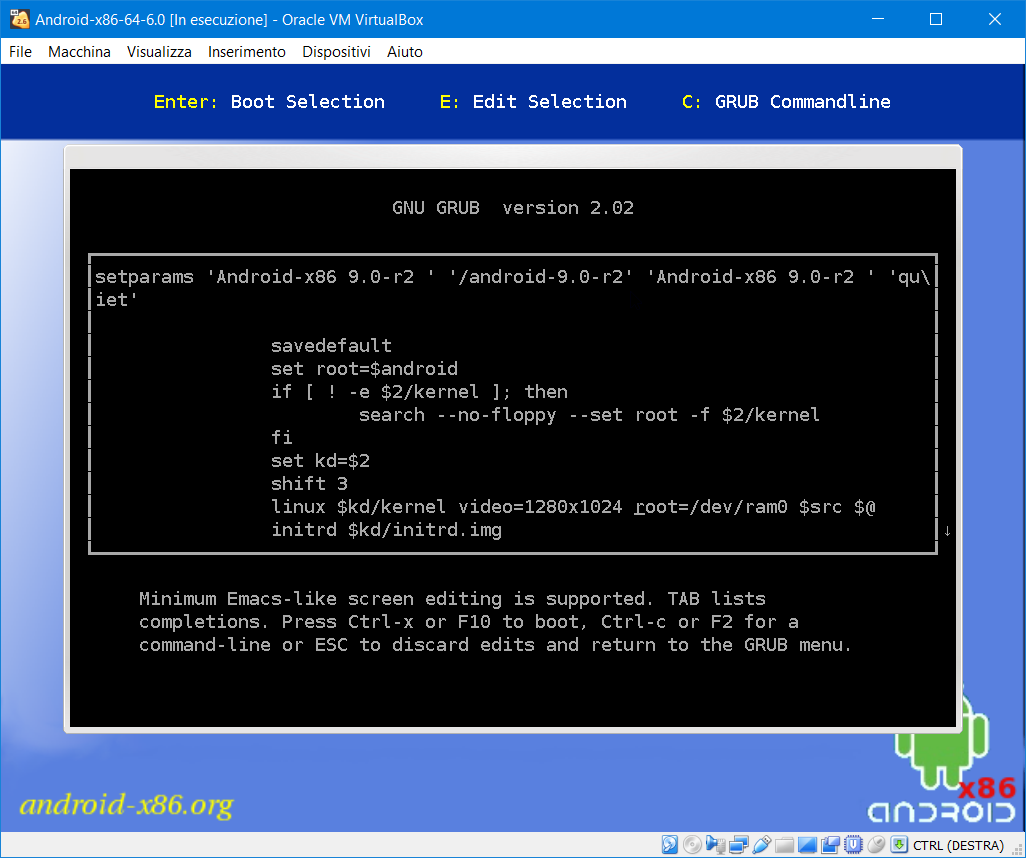
Not really. The screenshot I posted refers to the normal boot of the installed Android-x86 9.0-r2; I went on the (E)dit option to modify boot options. I'm using EFI boot.
which is a good thing to do if you want your changes to persist.
Well this is different from my experience. Changes made this way
aren't persisted across boots. Indeed a subsequent question would
be: how to persist them.
I suppose you're not showing the whole configuration file,
Actually that's all.
so the place where you're putting the kernel parameter may be concerning a nondefault menu option. That's why I would advise that you put your kernel parameter on the setparam line, let's say just before the 'quiet' parameter, so that in the end it looks like this :
setparams 'Android-x86 9.0-r2' '/android-9.0-r2' 'Android-x86 9.0-r2' 'video=1280x1024' 'quiet'
My progress are: with 'video=1280x1024' on the setparam line, as you suggested, the screen goes initially to that resolution (when in console mode) but as soon as the system attempt to switch to graphic mode, it freezes.
I also tried to put on the first line the option gfxmode=1280x1024 instead but this produces no effect. The same with gfxpayload.
Thanks again!
Luca
luca.a...@gmail.com
thank you very much for you reply. I tried your suggestion and
indeed I made a little step forward,
but still no-go.
it seems you're modifying the GRUB boot configuration file at install time,
Not really. The screenshot I posted refers to the normal boot of the installed Android-x86 9.0-r2; I went on the (E)dit option to modify boot options. I'm using EFI boot.
which is a good thing to do if you want your changes to persist.
Well this is different from my experience. Changes made this way
aren't persisted across boots. Indeed a subsequent question would
be: how to persist them.
I suppose you're not showing the whole configuration file,
Actually that's all.
so the place where you're putting the kernel parameter may be concerning a nondefault menu option. That's why I would advise that you put your kernel parameter on the setparam line, let's say just before the 'quiet' parameter, so that in the end it looks like this :
setparams 'Android-x86 9.0-r2' '/android-9.0-r2' 'Android-x86 9.0-r2' 'video=1280x1024' 'quiet'
NovHak

Chih-Wei Huang
> Hi NovHak!
>
> thank you very much for you reply. I tried your suggestion and indeed I made a little step forward, but still no-go.
>
> Il 06/04/2020 15:01, NovHak ha scritto:
>
> it seems you're modifying the GRUB boot configuration file at install time,
>
> Not really. The screenshot I posted refers to the normal boot of the installed Android-x86 9.0-r2; I went on the (E)dit option to modify boot options. I'm using EFI boot.
>
>
> which is a good thing to do if you want your changes to persist.
>
> Well this is different from my experience. Changes made this way aren't persisted across boots. Indeed a subsequent question would be: how to persist them.
> I suppose you're not showing the whole configuration file,
>
> Actually that's all.
>
> so the place where you're putting the kernel parameter may be concerning a nondefault menu option. That's why I would advise that you put your kernel parameter on the setparam line, let's say just before the 'quiet' parameter, so that in the end it looks like this :
>
> setparams 'Android-x86 9.0-r2' '/android-9.0-r2' 'Android-x86 9.0-r2' 'video=1280x1024' 'quiet'
>
> My progress are: with 'video=1280x1024' on the setparam line, as you suggested, the screen goes initially to that resolution (when in console mode) but as soon as the system attempt to switch to graphic mode, it freezes.
I can just guess you're using a invalid resolution for your graphic card.
Please try more standard resolution like 1024x768 or 1920x1080.
BTW, what's your GPU?
> I also tried to put on the first line the option gfxmode=1280x1024 instead but this produces no effect. The same with gfxpayload.
Chih-Wei
Android-x86 project
http://www.android-x86.org
luca.a...@gmail.com
Yes! It worked out!
I was just using a wrong resolution!
Thank you, guys!