
Fw: The IDE cannot find the AMPL executable.
616 views
Skip to first unread message

Ahmad Abedinpour
Feb 17, 2019, 11:04:51 AM2/17/19
to am...@googlegroups.com
----- Forwarded Message -----
From: Ahmad Abedinpour <ahmad_abed...@yahoo.com>
To: AMPL Support Services <sup...@ampl.com>
Sent: Sunday, February 17, 2019, 5:54:01 PM GMT+3:30
Subject: Re: The IDE cannot find the AMPL executable.
2.I done your tips; and shows me :
ampl: model 'C:\Users\Ahmad\Desktop\code\OperFin.mod';
ampl: data 'C:\Users\Ahmad\Desktop\code\OperFebCL - Copy.dat';
ampl: solve;
Error executing "solve" command:
error processing param PN:
144 invalid subscripts discarded:
PN['TA5X6',1]
PN['TA5X5',1]
PN['TA4X5',1]
and 141 more.
Error executing "solve" command:
error processing param PC:
432 invalid subscripts discarded:
PC['TA5X6',1,'CH']
PC['TA5X5',1,'CH']
PC['TA4X5',1,'CH']
and 429 more.
Error executing "solve" command:
error processing param CI:
16 invalid subscripts discarded:
CI['W1','TA5X6']
CI['W1','TA5X5']
CI['W1','TA4X5']
and 13 more.
Error executing "solve" command:
error processing param CID:
16 invalid subscripts discarded:
CID['D1','TA5X6']
CID['D1','TA5X5']
CID['D1','TA4X5']
and 13 more.
Error executing "solve" command:
error processing param CT:
18 invalid subscripts discarded:
CT['CH','P1','TM1']
CT['CD','P1','TM1']
CT['CL','P1','TM1']
and 15 more.
Error executing "solve" command:
error processing param CTW:
18 invalid subscripts discarded:
CTW['CH','W1','TM1']
CTW['CL','W1','TM1']
CTW['CD','W1','TM1']
and 15 more.
Error executing "solve" command:
error processing param CTD:
6 invalid subscripts discarded:
CTD['CH','D1','TM1']
CTD['CD','D1','TM1']
CTD['CL','D1','TM1']
and 3 more.
Error executing "solve" command:
error processing param CTPW:
12 invalid subscripts discarded:
CTPW['W1','P1','TM1']
CTPW['W2','P1','TM1']
CTPW['W1','P2','TM1']
and 9 more.
Error executing "solve" command:
error processing param CTPD:
12 invalid subscripts discarded:
CTPD['D1','P1','TM1']
CTPD['D2','P1','TM1']
CTPD['D1','P2','TM1']
and 9 more.
Error executing "solve" command:
error processing param CTWD:
12 invalid subscripts discarded:
CTWD['D1','W1','TM1']
CTWD['D2','W1','TM1']
CTWD['D1','W2','TM1']
and 9 more.
Bailing out after 10 warnings.
On Tuesday, February 12, 2019, 8:27:18 PM GMT+3:30, AMPL Support Services <sup...@ampl.com> wrote:
1. Your file OperFebCL.run was found by the AMPL IDE in the folder C:\Users\Ahmad\Desktop\ -- that is, on your desktop. If OperFin.mod is in a different folder, then you will get the "Can't find file" message when AMPL tries to find it. To fix the problem, move OperFebCL.run to the same folder as OperFind.mod, and then try running OperFebCL.run again. -- If you continue to have trouble, post a screenshot of your AMPL IDE window.
2. Instead of
write
and similarly for other tables. Also, add (tr) after [*,*,CH] and all similar templates; and put a ; only at the very end of all the data for a param.
If you have further questions, please submit them to our online user forum by sending an email to am...@googlegroups.com or entering your question at http://groups.google.com/group/ampl. That will often get you a faster response and also will make the answer available to other users.
--
AMPL Support Services
sup...@ampl.com
{#HS:773255639-35901#}
2. Instead of
param DW (tr):
 [*,*,CD]:
write
param DW
 [*,*,CD] (tr):
and similarly for other tables. Also, add (tr) after [*,*,CH] and all similar templates; and put a ; only at the very end of all the data for a param.
If you have further questions, please submit them to our online user forum by sending an email to am...@googlegroups.com or entering your question at http://groups.google.com/group/ampl. That will often get you a faster response and also will make the answer available to other users.
--
AMPL Support Services
sup...@ampl.com

On Mon, Feb 11, 2019 at 10:07 AM UTC, Ahmad Abedinpour <ahmad_abed...@yahoo.com> wrote:
Thanks a lot, I done it, and installed.
I have problem to solve my problem,
I attached 2 zip file:
1. It has 3 file ".RUN"&".MOD"and".xlxs" that my data import in excel file and called it to ".RUN" file.
when I import these files to ampl and right-click and choose "send to AMPL", show me "
C:\Users\Ahmad\Desktop\OperFebCL.run, line 2 (offset 14):
Can't find file "OperFin.mod"
context: model >>> OperFin.mod <<< ;
include stack...
-, line 55 includes
C:\Users\Ahmad\Desktop\OperFebCL.run"
and I can't solve it.
2. It has 2 file like previous zip file, but with ".MOD" and "..DAT". and done like previous way, show me several error like:
"
C:\Users\Ahmad\Desktop\code\OperFebCL - Copy.dat, line 67 (offset 1230):
expected :=
context: >>> [ <<< *,*,CD]: "
I read your guid "12-data.pdf" and example file in your website, but they didn't help to solve and clean these error.
Is it possible help me??
thanks
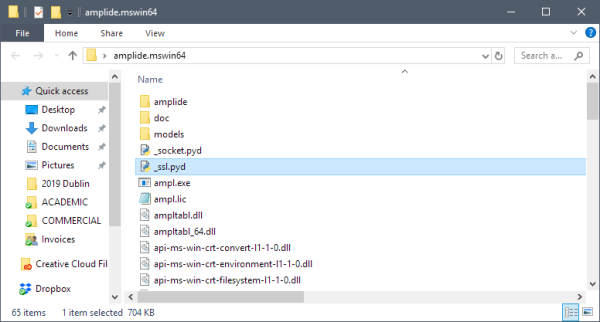
On Fri, Feb 8, 2019 at 6:03 PM UTC, AMPL Support Services <sup...@ampl.com> wrote:When you downloaded and then unzipped amplide.mswin64.zip, you created a folder named amplide.mswin64 that looked like:
You can see in this display that the folder contains ampl.exe (the AMPL program) and also the amplide folder. The error messages from the AMPL IDE indicate that you moved the amplide folder to your desktop -- but it won't work there. You need to move the amplide folder back into the amplide.mswin64 folder, and after that open the amplide folder and double-click the amplide application.
If you can't find the amplide.mswin64 folder anymore, then download a new copy. It will contain an amplide folder, with the amplide application inside it; just don't move the amplide folder before starting the amplide application.
--
AMPL Support Services
sup...@ampl.com
On Fri, Feb 8, 2019 at 4:49 AM UTC, Ahmad Abedinpour <ahmad_abed...@yahoo.com> wrote:and number 3 for error:
The IDE cannot find the AMPL executable.
For assistance, copy this entire message and send it to lice...@ampl.com.
Search paths:
C:\Users\Ahmad\Desktop
C:\Users\Ahmad\Desktop\amplide\ampl
C:/Users/Ahmad/Desktop/amplide/jre/bin/server
C:/Users/Ahmad/Desktop/amplide/jre/bin
C:/Users/Ahmad/Desktop/amplide/jre/lib/amd64
C:\Program Files\Broadcom\Broadcom 802.11 Network Adapter\Driver
B:\IBM\ILOG\CPLEX_Studio_Preview126\opl\bin\x86_win32
B:\IBM\ILOG\CPLEX_Studio_Preview126\opl\oplide\
B:\IBM\ILOG\CPLEX_Studio_Preview126\cplex\bin\x86_win32
B:\IBM\ILOG\CPLEX_Studio_Preview126\cpoptimizer\bin\x86_win32
C:\WINDOWS\system32
C:\WINDOWS
C:\WINDOWS\System32\Wbem
C:\WINDOWS\System32\WindowsPowerShell\v1.0\
C:\WINDOWS\System32\OpenSSH\
C:\Program Files (x86)\NVIDIA Corporation\PhysX\Common
C:\WINDOWS\system32
C:\WINDOWS
C:\WINDOWS\System32\Wbem
C:\WINDOWS\System32\WindowsPowerShell\v1.0\
C:\WINDOWS\System32\OpenSSH\
C:\Users\Ahmad\AppData\Local\Microsoft\WindowsApps
C:\Users\Ahmad\Desktop\amplide
On Thu, Feb 7, 2019 at 10:59 PM UTC, AMPL Support Services <sup...@ampl.com> wrote:To get further help, send us the following information:
- A screenshot of your folder that contains the "ampl" or "ampl.exe" file.
- A description or screenshot of the web page where you download AMPL.
- The complete error message again (so that we can see if it has changed).
--
AMPL Support Services
sup...@ampl.com
On Thu, Feb 7, 2019 at 5:32 PM UTC, Ahmad Abedinpour <ahmad_abed...@yahoo.com> wrote:your guides isn't work :(
On Thu, Feb 7, 2019 at 5:18 PM UTC, AMPL Support Services <sup...@ampl.com> wrote:It appears that you downloaded the AMPL IDE folder "amplide" from http://ampl.com/products/ide/, and you have placed "amplide" on your desktop. However this download contains only the IDE, and not the AMPL executable file ampl.exe or the rest of the AMPL installation.
If you have a different folder that contains ampl.exe, then drag your "amplide" folder inside of it. Then you can go inside the "amplide" folder and double-click "amplide.exe" to start the AMPL IDE application.
If you do not have a folder that contains ampl.exe and you are using AMPL in a course, then follow your professor's instructions for downloading a course version of the software and setting up your course AMPL folder. The course AMPL folder might already have amplide inside it, but if not, you can add on the AMPL IDE by dragging the amplide folder into your course AMPL folder.
Otherwise, delete the "amplide" folder from your desktop, and instead follow the Windows instructions at http://ampl.com/try-ampl/download-a-free-demo/ to download a package that contains both the AMPL IDE and the AMPL and solver products.
--
AMPL Support Services
sup...@ampl.com
On Thu, Feb 7, 2019 at 5:01 PM UTC, Ahmad Abedinpour <ahmad_abed...@yahoo.com> wrote:The IDE cannot find the AMPL executable.For assistance, copy this entire message and send it to lice...@ampl.com.Search paths:C:\Users\Ahmad\DesktopC:\Users\Ahmad\Desktop\amplide\amplC:/Users/Ahmad/Desktop/amplide/jre/bin/serverC:/Users/Ahmad/Desktop/amplide/jre/binC:/Users/Ahmad/Desktop/amplide/jre/lib/amd64C:\Program Files\Broadcom\Broadcom 802.11 Network Adapter\DriverB:\IBM\ILOG\CPLEX_Studio_Preview126\opl\bin\x86_win32B:\IBM\ILOG\CPLEX_Studio_Preview126\opl\oplide\B:\IBM\ILOG\CPLEX_Studio_Preview126\cplex\bin\x86_win32B:\IBM\ILOG\CPLEX_Studio_Preview126\cpoptimizer\bin\x86_win32C:\WINDOWS\system32C:\WINDOWSC:\WINDOWS\System32\WbemC:\WINDOWS\System32\WindowsPowerShell\v1.0\C:\WINDOWS\System32\OpenSSH\C:\Program Files (x86)\NVIDIA Corporation\PhysX\CommonC:\WINDOWS\system32C:\WINDOWSC:\WINDOWS\System32\WbemC:\WINDOWS\System32\WindowsPowerShell\v1.0\C:\WINDOWS\System32\OpenSSH\C:\Users\Ahmad\AppData\Local\Microsoft\WindowsAppsC:\Users\Ahmad\Desktop\amplide

AMPL Google Group
Feb 18, 2019, 8:13:06 AM2/18/19
to Ampl Modeling Language
It appears that there is an error in your data file, which is causing the subscripts to be given in the wrong order. Most likely you need to add "(tr)" to the data tables to transpose them, or else you have specified "(tr)" where it should not be used. However it is not possible to provide a more specific reply given the information in your message; if you need more help, reply to this message with the complete mod and dat files attached.
--
Robert Fourer
am...@googlegroups.com
{#HS:781207307-36548#}
--
Robert Fourer
am...@googlegroups.com

On Sun, Feb 17, 2019 at 4:04 PM UTC, Ampl Modeling Language <am...@googlegroups.com> wrote:
Ahmad Abedinpour
Feb 19, 2019, 5:43:48 PM2/19/19
to AMPL Support Services, am...@googlegroups.com
ampl: model 'C:\Users\Ahmad\Desktop\ODBC\OperFin.mod';
ampl: include 'C:\Users\Ahmad\Desktop\ODBC\OperFebCL.run';
Error at _cmdno 2 executing "read_table" command
(file C:\Users\Ahmad\Desktop\ODBC\OperFebCL.run, line 37, offset 1940):
Error reading table DW with table handler odbc:
ODBC is not available.
On Monday, February 18, 2019, 4:38:34 PM GMT+3:30, AMPL Support Services <sup...@ampl.com> wrote:
Just above the folder listing on the left side of your IDE screen, the IDE's current directory is indicated as "C:\". Thus when your run file executes "model OperFin.mod", the IDE looks for it in "C:\" and does not find it -- resulting in the "Can't find file . . ." message.
To fix this, in the left-hand file listing, double-click on Users, then Ahmad, then Desktop, then ODBC. Then the current directory will be C:\Users\Ahmad\Desktop\ODBC and the model file will be found.
Since your run file includes "model OperFind.mod", do not also execute a "model" command at the "ampl:" prompt.
Your other question will be answered in our user forum at groups.google.com/group/ampl. If you have further questions, please post them to the user forum by sending them to am...@googlegroups.com.
To fix this, in the left-hand file listing, double-click on Users, then Ahmad, then Desktop, then ODBC. Then the current directory will be C:\Users\Ahmad\Desktop\ODBC and the model file will be found.
Since your run file includes "model OperFind.mod", do not also execute a "model" command at the "ampl:" prompt.
Your other question will be answered in our user forum at groups.google.com/group/ampl. If you have further questions, please post them to the user forum by sending them to am...@googlegroups.com.
{#HS:773255639-35901#}

On Sun, Feb 17, 2019 at 3:09 PM UTC, Ahmad Abedinpour <ahmad_abed...@yahoo.com> wrote:
1. I done your tip, but not responding.
AMPL Google Group
Feb 20, 2019, 10:07:36 AM2/20/19
to Ampl Modeling Language, sup...@ampl.com
Could you please run odbcad32.exe and and send us screenshots of the tabs DNS and Drivers so that we can see all the drivers you have installed? ACEODBC.DLL drivers are 64-bit drivers and ODBCJT32.DLL are 32-bit drivers that often do not work properly and should be avoided.
In case you do not have ACEODBC.DLL drivers installed, you can install Microsoft Access Database Engine 2016 (https://www.microsoft.com/en-us/download/details.aspx?id=54920&751be11f-ede8-5a0c-058c-2ee190a24fa6=True) in order to install recent 64-bit drivers.
In case you have both 32 and 64 bit drivers installed and AMPL is not using the correct one, you can specify the driver name in the table declaration as follows:
table Foods "odbc" "Driver=Microsoft Excel Driver (*.xls, *.xlsx,
*.xlsm, *.xlsb);ReadOnly=0;DBQ=diet.xls" "verbose": ...
The option "verbose" in the table declaration is useful to generate additional feedback about the error.
--
Filipe Brandão
am...@googlegroups.com
{#HS:783167310-36739#}
In case you do not have ACEODBC.DLL drivers installed, you can install Microsoft Access Database Engine 2016 (https://www.microsoft.com/en-us/download/details.aspx?id=54920&751be11f-ede8-5a0c-058c-2ee190a24fa6=True) in order to install recent 64-bit drivers.
In case you have both 32 and 64 bit drivers installed and AMPL is not using the correct one, you can specify the driver name in the table declaration as follows:
table Foods "odbc" "Driver=Microsoft Excel Driver (*.xls, *.xlsx,
*.xlsm, *.xlsb);ReadOnly=0;DBQ=diet.xls" "verbose": ...
The option "verbose" in the table declaration is useful to generate additional feedback about the error.
--
Filipe Brandão
am...@googlegroups.com


AMPL Google Group
Feb 21, 2019, 3:19:48 PM2/21/19
to Ampl Modeling Language
When you have a param indexed over two sets, like
param PN {DAYD,PROD} >=0;
then AMPL expects your table in the .dat file to be arranged as follows:
--
Robert Fourer
am...@googlegroups.com
{#HS:781207307-36548#}
param PN {DAYD,PROD} >=0;
then AMPL expects your table in the .dat file to be arranged as follows:
- Members of the first set on the left, and members of the second set on the top; or
- if (tr) is specified, then members of the second set on the left, and members of the first set on the top.
--
Robert Fourer
am...@googlegroups.com

ahmad.abed...@gmail.com
Feb 22, 2019, 11:15:39 AM2/22/19
to AMPL Modeling Language
I solved this error, and I have a new error,that send in previous question.
Ahmad Abedinpour
Feb 22, 2019, 11:15:39 AM2/22/19
to am...@googlegroups.com
----- Forwarded Message -----
From: Ahmad Abedinpour <ahmad_abed...@yahoo.com>
Sent: Thursday, February 21, 2019, 5:33:45 PM GMT+3:30
Subject: The IDE cannot find the AMPL executable.
my problem didn't solve yet
I have 2 problem:
1. I attached these file to one ODBC.rar file
it shows me :
"
I have 2 problem:
1. I attached these file to one ODBC.rar file
it shows me :
"
ampl: model 'C:\Users\Ahmad\Desktop\ODBC\OperFin.mod';
ampl: include 'C:\Users\Ahmad\Desktop\ODBC\OperFebCL.run';
Error at _cmdno 2 executing "read_table" command
(file C:\Users\Ahmad\Desktop\ODBC\OperFebCL.run, line 37, offset 1940):
Error reading table DW with table handler odbc:
ODBC is not available."
and
and
2. the same file with ".dat" file for data instead of excel file in previous file (code.rar).
and it shows me :
and it shows me :
"
I send sevral email to am...@googlegroups.com but not responding, I have a tight time, and I'm worried about it, please help me this way.
If my problem solve , I share my experience to http://groups.google.com/group/ampl.
thank you
If my problem solve , I share my experience to http://groups.google.com/group/ampl.
thank you
AMPL Google Group
Feb 22, 2019, 6:54:05 PM2/22/19
to Ampl Modeling Language
I am not sure which error you still have at this point. To be sure that you get help with the proper error, please resend the error report to am...@googlegroups.com, with a new subject that describes the error that you currently have.
--
Robert Fourer
am...@googlegroups.com
{#HS:781207307-36548#}
--
Robert Fourer
am...@googlegroups.com

On Fri, Feb 22, 2019 at 4:15 PM UTC, Ampl Modeling Language <am...@googlegroups.com> wrote:
I solved this error, and I have a new error,that send in previous question.
On Thu, Feb 21, 2019 at 8:19 PM UTC, AMPL Google Group <am...@googlegroups.com> wrote:
When you have a param indexed over two sets, like
param PN {DAYD,PROD} >=0;
then AMPL expects your table in the .dat file to be arranged as follows:So you are getting error messages because you have specified "param PN (tr):" in the dat file, but members of DAYD (the first set) are on the left, and members of PROD (the second set) are on the top. To fix this, remove (tr) from the specification of param PN in your .dat file. Your other errors are for similar reasons; in particular it appears that you have used (tr) in many places where it is not needed.
- Members of the first set on the left, and members of the second set on the top; or
- if (tr) is specified, then members of the second set on the left, and members of the first set on the top.
--
Robert Fourer
am...@googlegroups.com
Reply all
Reply to author
Forward
0 new messages