
Increase number of threads for parallel tasks at root LP
155 views
Skip to first unread message

nhh1...@gmail.com
Jul 14, 2021, 2:09:40 AM7/14/21
to AMPL Modeling Language
Hi! In a problem I run with AMPL and CPLEX 12.10.0.0, I encounter a message saying that there are quite a low number of threads being run at root LP:
This is much lower than the number of threads being used after the root LP, a setting I changed with the "threads" setting.
To utilize my resources better and hopefully speed up the root LP problem, is it a way I can increase the number of threads from (in my situation) 4 to a higher number?

AMPL Google Group
Jul 14, 2021, 10:21:54 AM7/14/21
to AMPL Modeling Language
In general, there are only very limited possibilities for parallel processing at the root node. Thus as a result, CPLEX may be able to use only a limited number of threads for root LP processing.
Can you post the entire output from your CPLEX run? (You can copy it into your email, or copy it to a file and attach the file.) Then some more detailed comments may be possible.
Can you post the entire output from your CPLEX run? (You can copy it into your email, or copy it to a file and attach the file.) Then some more detailed comments may be possible.
--
Robert Fourer
am...@googlegroups.com

nhh1...@gmail.com
Jul 14, 2021, 3:46:12 PM7/14/21
to AMPL Modeling Language
Thank you for the quick reply!

- I have a 72-virtual core CPU (threads=100 has been set just because I've learned that I utilize the cores better than if I leave the default setting or specify—for example—threads=72).
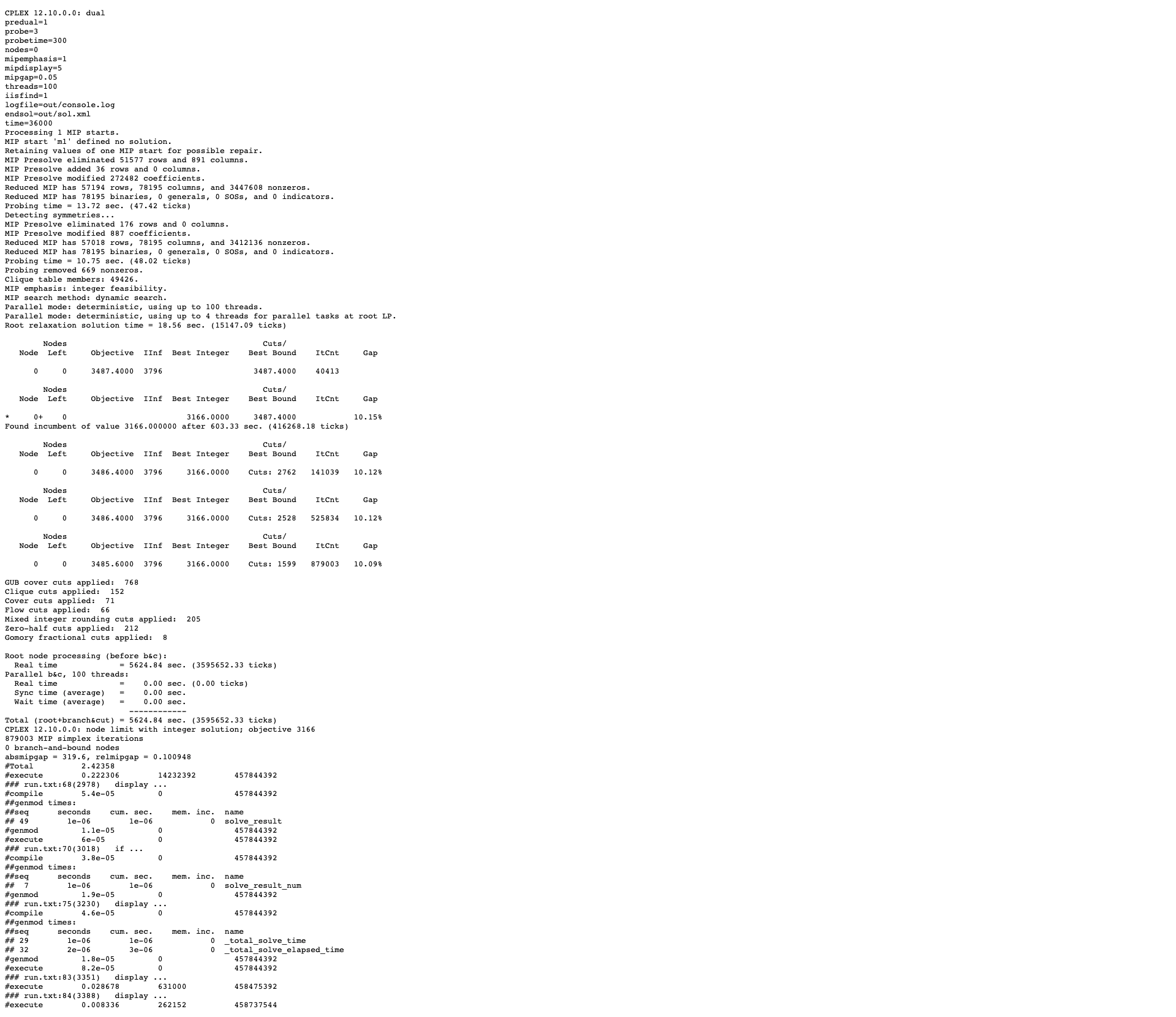
- As you can see in the output, CPLEX remains in node 0 for the 1.5 hours CPLEX runs until hitting the node limit (which I'm not sure where comes from)
- When checking the processor usage, I see that mostly all the time about 300 % CPU is used at node 0, while 7200 % is the max capacity for this 72-virtual core CPU. 7200 % is approximately what is achieved after node 0.
- So the problem I'm faced with, is that CPLEX is running a process that is utilizing my computational resources poorly. Hence, the solving time is somewhat low.
- You can see the CPLEX settings on top of the image. I've been experimenting with a few different settings today to try to achieve some speedups at node 0, but to no avail. I have tried to follow the recommendations listed here: https://www.ibm.com/docs/en/icos/12.7.1.0?topic=problems-too-much-time-node . However, this link is somewhat ambiguous.
- One one hand, this link says "The standard screen display will print a line saying "Root relaxation solution time = " after this root solve is complete, and a large solution time would be an indicator of an opportunity for tuning."
- I don't have a large time here, the root relaxation solution time is only 18.56 seconds.
- On the other hand, this link says: "For some problems, CPLEX will spend a significant amount of time performing computation at node 0 ... Time spent at node 0 can be reduced by two parameters.". This is my problem: time spent at node 0 is large. But I've tried the parameters being suggested without any success.
Moreover:
- I observe that a solution is found at node 0 after about 600 seconds.
- It works at node 0 for a total of about 1.5 hours, trying to improve this solution.
- What could have been interesting, if it is possible, is to "leave" node 0 once the first feasible solution is found and start progressing through nodes to improve the solution further. That would "unlock" more computational resources because all threads can now be used.
I hope this made sense. Essentially, my problem is that CPLEX is spending too much time in node 0.
One last point:
- I tried providing an initial solution, which seems to have been discarded because of a few infeasibilities. I don't think that affects the issue I'm facing here, but I'm bringing it up just in case.
Have a good afternoon!
Best,
Christian
AMPL Google Group
Jul 15, 2021, 3:15:42 PM7/15/21
to AMPL Modeling Language
As you observe, the continuous relaxation is quickly solved to give an upper bound of 3487.4. Other initial root-node processing (starting solution, presolve, probing, symmetry detection) also appears to be not very time-consuming. After about 10 minutes, CPLEX's heuristics find an integer-feasible solution with objective value 3166, giving an optimality gap of 10.15%.
CPLEX then turns to cut generation. It reports generating 6889 additional cut candidates, but after another 80+ minutes of work, these only decrease the gap marginally to 10.09%. At that point, since you specified the CPLEX option nodes=0, the run is terminated.
Since cut generation does not seem to be helping much, I would next try adding cutpass=-1 to turn off cuts entirely, while dropping nodes=0 so that CPLEX continues with the branching phase after root-node processing is finished. Hopefully the time to find an integer-feasible solution will remain at about 10 minutes, but if not then you can allow limited cut generation with cutpass=1, 2, etc. After this, you may want to compare performance using different mipemphasis values. (See CPLEX Options for AMPL for details.)
After the branching phase has been running for more time than the root-node processing, you should start to see some substantial parallelism. Branching search is not easy to parallelize, however; there is a nontrivial amount of communication overhead, which increases with the number of threads. As a result, you can expect that there will some maximal number of useful threads, above which additional threads fail to reduce total run time. (In fact, if IBM's comments on the threads parameter are correct, CPLEX should never use more than 32 threads.) The actual maximum useful threads is problem-dependent, however, and so can only be determined (approximately) by experimenting with different values of the threads option.
CPLEX then turns to cut generation. It reports generating 6889 additional cut candidates, but after another 80+ minutes of work, these only decrease the gap marginally to 10.09%. At that point, since you specified the CPLEX option nodes=0, the run is terminated.
Since cut generation does not seem to be helping much, I would next try adding cutpass=-1 to turn off cuts entirely, while dropping nodes=0 so that CPLEX continues with the branching phase after root-node processing is finished. Hopefully the time to find an integer-feasible solution will remain at about 10 minutes, but if not then you can allow limited cut generation with cutpass=1, 2, etc. After this, you may want to compare performance using different mipemphasis values. (See CPLEX Options for AMPL for details.)
After the branching phase has been running for more time than the root-node processing, you should start to see some substantial parallelism. Branching search is not easy to parallelize, however; there is a nontrivial amount of communication overhead, which increases with the number of threads. As a result, you can expect that there will some maximal number of useful threads, above which additional threads fail to reduce total run time. (In fact, if IBM's comments on the threads parameter are correct, CPLEX should never use more than 32 threads.) The actual maximum useful threads is problem-dependent, however, and so can only be determined (approximately) by experimenting with different values of the threads option.
--
Robert Fourer
am...@googlegroups.com

On Wed, Jul 14, 2021 at 7:46 PM UTC, AMPL Modeling Language <am...@googlegroups.com> wrote:
Thank you for the quick reply!
- I have a 72-virtual core CPU (threads=100 has been set just because I've learned that I utilize the cores better than if I leave the default setting or specify-for example-threads=72).
- As you can see in the output, CPLEX remains in node 0 for the 1.5 hours CPLEX runs until hitting the node limit (which I'm not sure where comes from)
- When checking the processor usage, I see that mostly all the time about 300 % CPU is used at node 0, while 7200 % is the max capacity for this 72-virtual core CPU. 7200 % is approximately what is achieved after node 0.
- So the problem I'm faced with, is that CPLEX is running a process that is utilizing my computational resources poorly. Hence, the solving time is somewhat low.
- You can see the CPLEX settings on top of the image. I've been experimenting with a few different settings today to try to achieve some speedups at node 0, but to no avail. I have tried to follow the recommendations listed here: https://www.ibm.com/docs/en/icos/12.7.1.0?topic=problems-too-much-time-node . However, this link is somewhat ambiguous.
- One one hand, this link says "The standard screen display will print a line saying "Root relaxation solution time = " after this root solve is complete, and a large solution time would be an indicator of an opportunity for tuning."
- I don't have a large time here, the root relaxation solution time is only 18.56 seconds.
- On the other hand, this link says: "For some problems, CPLEX will spend a significant amount of time performing computation at node 0 ... Time spent at node 0 can be reduced by two parameters.". This is my problem: time spent at node 0 is large. But I've tried the parameters being suggested without any success.
Moreover:I hope this made sense. Essentially, my problem is that CPLEX is spending too much time in node 0. One last point:
- I observe that a solution is found at node 0 after about 600 seconds.
- It works at node 0 for a total of about 1.5 hours, trying to improve this solution.
- What could have been interesting, if it is possible, is to "leave" node 0 once the first feasible solution is found and start progressing through nodes to improve the solution further. That would "unlock" more computational resources because all threads can now be used.
Have a good afternoon! Best, Christian
- I tried providing an initial solution, which seems to have been discarded because of a few infeasibilities. I don't think that affects the issue I'm facing here, but I'm bringing it up just in case.
On Wed, Jul 14, 2021 at 2:21 PM UTC, AMPL Google Group <am...@googlegroups.com> wrote:
In general, there are only very limited possibilities for parallel processing at the root node. Thus as a result, CPLEX may be able to use only a limited number of threads for root LP processing.
Can you post the entire output from your CPLEX run? (You can copy it into your email, or copy it to a file and attach the file.) Then some more detailed comments may be possible.
--
Robert Fourer
am...@googlegroups.com
Reply all
Reply to author
Forward
0 new messages