
knitro solver problem
120 views
Skip to first unread message

Jan Müller
May 18, 2021, 8:52:28 AM5/18/21
to AMPL Modeling Language
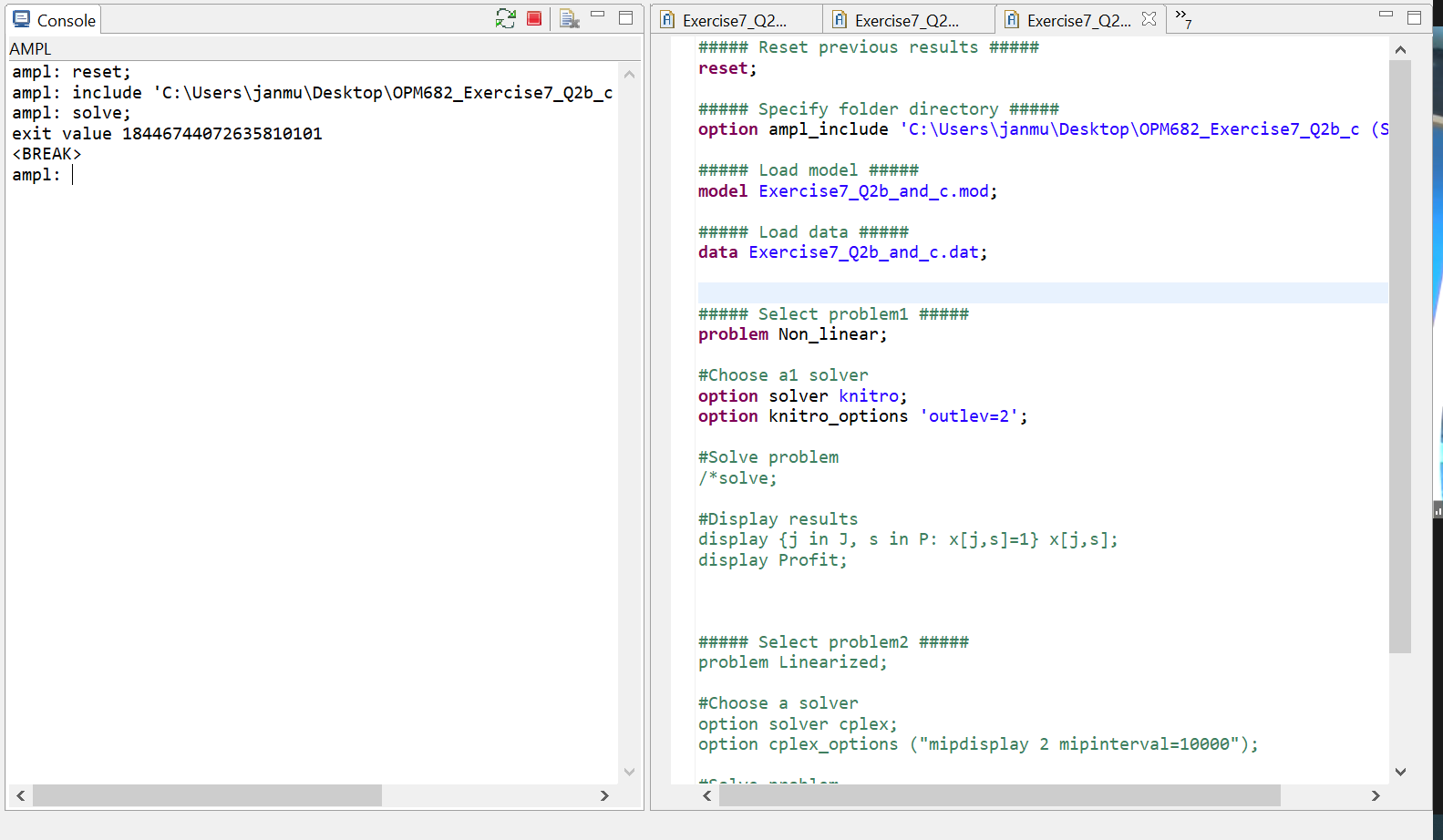
Hi, I have a problem solving this model where ampl just returns an exit value and than BREAK
When I run it with minos, it works.
So, it might be a knitro problem... Do you have any solution for this?
Thanks in advance!

AMPL Google Group
May 18, 2021, 10:13:08 AM5/18/21
to AMPL Modeling Language
This is some kind of crash in the solver. So that we can investigate the problem and get it fixed, please provide the following information:
- Copies of the files that that are needed to reproduce the error. Be sure to include any model and data files, and also the run file that you were executing when the error occurred.
- All lines of output that appear when you give this AMPL command:
shell "knitro -v";
--
Robert Fourer
am...@googlegroups.com

AMPL Google Group
May 18, 2021, 11:01:55 PM5/18/21
to AMPL Modeling Language
Using the latest Windows build of Knitro 12.3, Knitro solves your problem easily; the output is in the attached text file. Since Knitro crashed even when you only asked it for the version number (with "knitro -v"), Knitro's files may be corrupted. Thus you should try downloading the Knitro files -- knitro.exe, knitro1230.dll, and libiomp5md.dll -- again, and using them to replace the copies of these files that you currently have. (If you need help downloading new copies, just let me know how you downloaded Knitro before now.)
If you replace the files and afterwards get the same error, then send a screenshot of your Windows folder that contains the Knitro files.
If you replace the files and afterwards get the same error, then send a screenshot of your Windows folder that contains the Knitro files.
--
Robert Fourer
am...@googlegroups.com

On Tue, May 18, 2021 at 6:21 PM UTC, AMPL Modeling Language <am...@googlegroups.com> wrote:
Hi,
attached are all the files I used and the ampl output.
On Tue, May 18, 2021 at 2:12 PM UTC, AMPL Google Group <am...@googlegroups.com> wrote:
This is some kind of crash in the solver. So that we can investigate the problem and get it fixed, please provide the following information:
- Copies of the files that that are needed to reproduce the error. Be sure to include any model and data files, and also the run file that you were executing when the error occurred.
- All lines of output that appear when you give this AMPL command:
shell "knitro -v";
--
Robert Fourer
am...@googlegroups.com
Jan Müller
May 25, 2021, 3:08:05 PM5/25/21
to AMPL Modeling Language
I continue to have this problem.
attached the folder, hope this was the screenshot you were looking for
AMPL Google Group
May 26, 2021, 1:41:33 PM5/26/21
to AMPL Modeling Language
The cause is still not clear, then. Can you also answer the following questions, which will help in troubleshooting the problem?
- Double-click "sw.exe" in your AMPL folder. A terminal window will appear with an "sw:" prompt at the top. Enter "knitro -v" at the prompt. What output do you see? (It might be an error message.)
- What webpage or URL did you use to download Knitro?
- What is the ampl.lic file in your AMPL folder? (You can just attach it.)
--
Robert Fourer
am...@googlegroups.com

On Tue, May 25, 2021 at 7:08 PM UTC, AMPL Modeling Language <am...@googlegroups.com> wrote:
I continue to have this problem.
attached the folder, hope this was the screenshot you were looking for
AMPL Google Group schrieb am Mittwoch, 19. Mai 2021 um 05:01:55 UTC+2:
Using the latest Windows build of Knitro 12.3, Knitro solves your problem easily; the output is in the attached text file. Since Knitro crashed even when you only asked it for the version number (with "knitro -v"), Knitro's files may be corrupted. Thus you should try downloading the Knitro files -- knitro.exe, knitro1230.dll, and libiomp5md.dll -- again, and using them to replace the copies of these files that you currently have. (If you need help downloading new copies, just let me know how you downloaded Knitro before now.)
If you replace the files and afterwards get the same error, then send a screenshot of your Windows folder that contains the Knitro files.
--
Robert Fourer

On Wed, May 19, 2021 at 3:01 AM UTC, AMPL Google Group <am...@googlegroups.com> wrote:
Using the latest Windows build of Knitro 12.3, Knitro solves your problem easily; the output is in the attached text file. Since Knitro crashed even when you only asked it for the version number (with "knitro -v"), Knitro's files may be corrupted. Thus you should try downloading the Knitro files -- knitro.exe, knitro1230.dll, and libiomp5md.dll -- again, and using them to replace the copies of these files that you currently have. (If you need help downloading new copies, just let me know how you downloaded Knitro before now.)
If you replace the files and afterwards get the same error, then send a screenshot of your Windows folder that contains the Knitro files.
--
Robert Fourer
am...@googlegroups.com
Jan Müller
May 27, 2021, 7:53:41 AM5/27/21
to AMPL Modeling Language
Regarding question 1:
as expected I get an error stating that it can't execute the code since VCOMP140.DLL was not found and that through reinstalling the problem might be solved.
Regarding question 2:
we were provided with the ampl-folder by the university, i.e. our teacher by downloading from our learning platform.
Other students using windows don't have any problems with knitro.
Q3: file attached
AMPL Google Group
May 27, 2021, 2:07:11 PM5/27/21
to AMPL Modeling Language
The message about VCOMP140.DLL is useful, as we had not seen it before. Windows 10 systems normally have this file in C:\Windows\System32. But you may be able to fix the problem on your computer, by installing a copy of that file. Download https://ampl.com/dl/vcomp140.zip, double-click to unzip it, and copy the contained file vcomp140.dll to your AMPL folder. Then try the "knitro -v" test again, and report whether there is still any problem.
--
Robert Fourer
am...@googlegroups.com

On Thu, May 27, 2021 at 11:53 AM UTC, AMPL Modeling Language <am...@googlegroups.com> wrote:
Regarding question 1: as expected I get an error stating that it can't execute the code since VCOMP140.DLL was not found and that through reinstalling the problem might be solved.
Regarding question 2: we were provided with the ampl-folder by the university, i.e. our teacher by downloading from our learning platform. Other students using windows don't have any problems with knitro.
Q3: file attached
On Wed, May 26, 2021 at 5:41 PM UTC, AMPL Google Group <am...@googlegroups.com> wrote:
The cause is still not clear, then. Can you also answer the following questions, which will help in troubleshooting the problem?
- Double-click "sw.exe" in your AMPL folder. A terminal window will appear with an "sw:" prompt at the top. Enter "knitro -v" at the prompt. What output do you see? (It might be an error message.)
- What webpage or URL did you use to download Knitro?
- What is the ampl.lic file in your AMPL folder? (You can just attach it.)
--
Robert Fourer
am...@googlegroups.com
Jan Müller
May 28, 2021, 11:15:37 AM5/28/21
to AMPL Modeling Language
Now it works.
Thank you very much for all your help!
Reply all
Reply to author
Forward
0 new messages